https://github.com/numat/mfc
Python driver and command line tool for MKS mass flow controllers.
https://github.com/numat/mfc
Last synced: 6 months ago
JSON representation
Python driver and command line tool for MKS mass flow controllers.
- Host: GitHub
- URL: https://github.com/numat/mfc
- Owner: numat
- License: gpl-2.0
- Created: 2015-07-19T17:02:22.000Z (almost 11 years ago)
- Default Branch: master
- Last Pushed: 2023-04-10T23:15:01.000Z (about 3 years ago)
- Last Synced: 2026-01-06T05:20:13.784Z (6 months ago)
- Language: Python
- Homepage:
- Size: 40 KB
- Stars: 10
- Watchers: 10
- Forks: 1
- Open Issues: 1
-
Metadata Files:
- Readme: README.md
- License: LICENSE
Awesome Lists containing this project
README
mfc
===
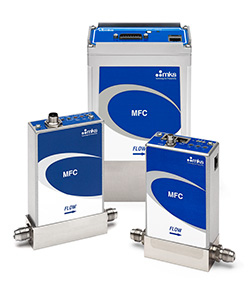
Python driver and command-line tool for [MKS mass flow controllers](http://www.mksinst.com/product/category.aspx?CategoryID=406).
Installation
============
```
pip install mfc
```
If you want the older python2/tornado driver, use `pip install mfc==0.2.11` and review [this README](https://github.com/numat/mfc/tree/1af5162b67041c6b5d934a5ef5f1aea0c8a5731e).
Usage
=====
This driver uses the ethernet port *on the side of the device* for communication.
If you use this driver, you only need to provide power to the top ports.
### Command Line
To test your connection and stream real-time data, use the command-line
interface. You can read the flow rate with:
```
$ mfc 192.168.1.200
{
"actual": 4.99,
"gas": "CO2",
"max": 37,
"setpoint": 5.00,
"temperature": 27.34
}
```
You can optionally specify a setpoint flow and/or gas with e.g.
`mfc 192.168.1.150 --set 7.5 --set-gas N2`. See `mfc --help` for more.
### Python
This uses Python ≥3.5's async/await syntax to asynchronously communicate with
the mass flow controller. For example:
```python
import asyncio
from mfc import FlowController
async def get():
async with FlowController('the-mfc-ip-address') as fc:
print(await fc.get())
asyncio.run(get())
```
The API that matters is `get`, `set`, and `set_gas`.
```python
>>> await fc.get()
{
"actual": 4.99,
"gas": "CO2",
"max": 37,
"setpoint": 5.00,
"temperature": 27.34
}
```
```python
>>> await fc.set(10)
>>> await fc.open() # set to max flow
>>> await fc.close() # set to zero flow
```
```python
>>> await fc.set_gas('N2')
```
There is also `set_display`, which will only work on devices that support it.
```python
>>> await fc.set_display('flow')
```