https://github.com/numat/tripplite
Python USB HID interface to Tripplite UPS battery backups.
https://github.com/numat/tripplite
Last synced: 6 months ago
JSON representation
Python USB HID interface to Tripplite UPS battery backups.
- Host: GitHub
- URL: https://github.com/numat/tripplite
- Owner: numat
- License: gpl-2.0
- Created: 2018-01-25T21:30:40.000Z (over 8 years ago)
- Default Branch: master
- Last Pushed: 2023-09-06T19:06:42.000Z (almost 3 years ago)
- Last Synced: 2025-11-27T16:20:37.195Z (7 months ago)
- Language: Python
- Homepage:
- Size: 44.9 KB
- Stars: 31
- Watchers: 6
- Forks: 12
- Open Issues: 3
-
Metadata Files:
- Readme: README.md
- License: LICENSE
Awesome Lists containing this project
README
# tripplite
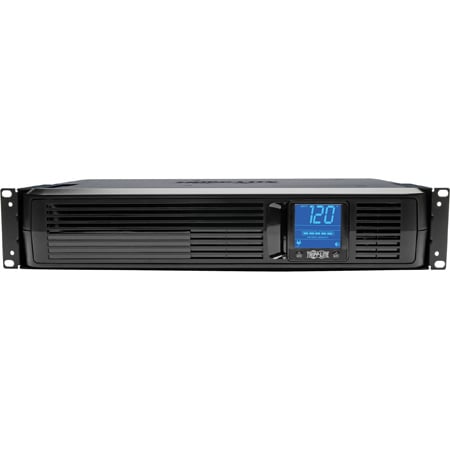
Python USB interface and command-line tool for TrippLite UPS battery backups.
## Background
TrippLite offers [UI software](https://www.tripplite.com/products/power-alert)
for monitoring its batteries. However, most of its batteries don't have
network access, and the existing TrippLite software requires a local install.
I wanted to monitor the UPS from a remote headless Linux server, so I wrote
this tool.
## Supported Hardware
This has been exclusively tested on the TrippLite SMART1500LCD UPS. It will
likely work on similar firmware but there is a known communication issue with
some other TrippLite models (see [numat/tripplite#3](https://github.com/numat/tripplite/issues/3)).
Use `lsusb` to check. `09ae:2012` should work, while `09ae:3016` may not.
## Installation
```console
apt install gcc libusb-1.0-0-dev libudev-dev
pip install tripplite
```
Connect a USB cable from the UPS to your headless server, and you should be
ready to run. If you don't want to run as root, see *Note on Permissions*
below.
# Command Line
```
$ tripplite
{
"config": {
"frequency": 60, # Hz
"power": 1500, # VA
"voltage": 120 # V
},
"health": 100, # %
"input": {
"frequency": 59.7, # Hz
"voltage": 117.2 # V
},
"output": {
"power": 324, # W
"voltage": 117.2 # V
},
"status": {
"ac present": true,
"below remaining capacity": true,
"charging": false,
"discharging": false,
"fully charged": true,
"fully discharged": false,
"needs replacement": false,
"shutdown imminent": false
},
"time to empty": 1004 # s
}
```
To use in shell scripts, parse the json output with something like
[jq](https://stedolan.github.io/jq/). For example,
`tripplite | jq '.status."ac present"'` will return whether or not the unit
detects AC power.
## Python
If you'd like to link this to more complex behavior (e.g. data logging,
text alerts), consider using a Python script.
```python
from tripplite import Battery
with Battery() as battery:
print(battery.get())
```
The `state` variable will contain an object with the same format as above. Use
`state['status']['ac present']` and `state['status']['shutdown imminent']` for
alerts, and consider logging voltage, frequency, and power.
If you are logging multiple batteries, you will need to handle each connection
separately.
```python
from tripplite import Battery, battery_paths
for path in battery_paths:
with Battery(path) as battery:
print(battery.get())
```
These paths are unfortunately non-deterministic and will change on each
iteration.
For long polling, you can improve stability by keeping connections open as long
as possible and reconnecting on error. For example:
```python
state = None
def read_batteries(check_period=5):
"""Read battery and reopen in error. Use for long polling."""
battery = Battery()
battery.open()
while True:
time.sleep(check_period)
try:
state = battery.get()
except OSError:
logging.exception(f"Could not read battery {battery}.")
battery.close()
battery.open()
```
An example for multiple batteries can be found in [numat/tripplite#6](https://github.com/numat/tripplite/pull/6#issuecomment-700152340).
## Note on Permissions
To read the TrippLite, you need access to the USB port. You have options:
* Run everything as root
* Add your user to the `dialout` group to access *all* serial ports
* Create a group restricted to accessing TrippLite USB devices through `udev`
For the last option, the rule looks like:
```console
echo 'SUBSYSTEM=="usb", ATTRS{idVendor}=="09ae", GROUP="tripplite"' > /etc/udev/rules.d/tripplite.rules
udevadm control --reload-rules
```
## Prometheus Exporter
This package offers an extra install to include a [Prometheus Exporter](https://prometheus.io/docs/instrumenting/exporters/)
which allows for data collection into a prometheus time series database. Essentially it's a small `HTTP` server that allows
Prometheus to *scrape* grabbing metrics at a configurable period.
### Install
```console
pip install tripplite[exporter]
```
* This adds the [prometheus_client](https://pypi.org/project/prometheus-client/) dependency.
You can then manually run the `triplite-exporter` cli or use the
[tripplite_exporter.service](https://github.com/numat/tripplite/blob/master/tripplite_exporter.service)
systemd unit file to have systemd run and supervise the process.
### Failure Mode
The script will try to close and reopen the USB serial connection to the device on an `OSError`. If an open fails,
the script will exit with the return code of 2.