https://github.com/nunum/where-am-i-server
Implement and test indoor position algorithms using Wi-Fi signal information
https://github.com/nunum/where-am-i-server
fingerprinting java javadoc localization-tool maven open-source swagger wifi
Last synced: over 1 year ago
JSON representation
Implement and test indoor position algorithms using Wi-Fi signal information
- Host: GitHub
- URL: https://github.com/nunum/where-am-i-server
- Owner: NunuM
- License: mit
- Created: 2019-05-12T21:55:45.000Z (about 7 years ago)
- Default Branch: master
- Last Pushed: 2023-07-07T21:55:27.000Z (about 3 years ago)
- Last Synced: 2025-03-25T10:12:33.786Z (over 1 year ago)
- Topics: fingerprinting, java, javadoc, localization-tool, maven, open-source, swagger, wifi
- Language: Java
- Homepage: https://whereami.nunum.me
- Size: 4.96 MB
- Stars: 9
- Watchers: 2
- Forks: 2
- Open Issues: 1
-
Metadata Files:
- Readme: README.md
- License: LICENSE
Awesome Lists containing this project
README
## WhereAmI
[](https://travis-ci.org/NunuM/where-am-i-server)
### Motivation
This is a free, collaborative platform with the goal of helping researchers to test and develop indoor tracking algorithms using Wi-Fi signal information. Apart of the server, we also build an [Android application](https://github.com/NunuM/where-am-i-android-app) to help users to collect raw data more easily.
Android Application already available on [market](https://play.google.com/store/apps/details?id=me.nunum.whereami&hl=pt_PT)
### Table Of Contents
* [Get Start](#get-started)
* [Data Model & Lifecycle](#data-model--lifecycle)
* [Data Flow](#data-flow)
* [Android Application](#android-application)
* [How to become a Algorithm Provider](#how-to-become-a-algorithm-provider)
* [REST API Docs](https://whereami.nunum.me/swagger/)
* [Java API Docs](https://whereami.nunum.me/javadoc/)
* [FAQ](#faq)
### Get Started
To get start you will **Java 8** and Maven in you machine. To start the server you need to type the following commands.
```
mvn compile
mvn exec:exec -Dexec.executable="java"
```
*Note:* You must take a look and change the default System Arguments in the [pom.xml](https://github.com/NunuM/where-am-i-server/blob/master/pom.xml#L158)
### Data Model & Lifecycle
This is a brief summary of the entities. Let's begin with **Localization**. This entity represents a point on the map, like your home in a satellite view. Within your home, you have various rooms, there are **Positions**. With this, we have the relationship of **one localization** can have **zero or more positions**. The localizations can be private for the device that created it. In other words, you can share with other users your localizations. The privacy is declared at its creation.
A **Training** entity is created with the desired algorithm and the respective provider. An **Algorithm** can be proposed by everyone. This is because several people like more reading than implementing and vice versa, thus **the same algorithm** can be provided by several providers and their results can be compared and competition ("I have a better random algorithm 😅") may also be resulted by this design.
An **AlgorithmProvider** can be, for now, either a user with their own server or a user that has a git repository ready to be deployed. Both must apply to be a provider. This is just e email verification and there are ready to go.
The provider with their own server will receive all fingerprints for the **Training requests** via HTTP. Remember that a Training request belongs to a localization that has multiples positions and each position have hundreds of Wi-Fi fingerprints. When you train the model, you must update the respective **Training** to inform that you are ready to predict the user localization. After that, your server will be queried. From this description, the server owner registers as to be an algorithm provider by giving two required HTTP resources, one for data ingestion, and another for the prediction phase. For the git owners, we integrate the repository with the platform.
When exists a training request for a given provider, the subsequent training request, will reactivate the sinking of the data to the HTTP provider, the cursor is preserved. In other words, your server will receive only newer data.
The visible **Localizations** and **Positions** can be reported as **Spam** by sanity. And only the localization owners can submit training requests.
To conclude this chapter, the use case that this platform offers is the integration of two actors, a user who shares Wi-Fi information and a Provider who predicts the user localization using their algorithm implementation.
### Data Flow
1 - User requests a new prediction model from **Algorithm Provider**
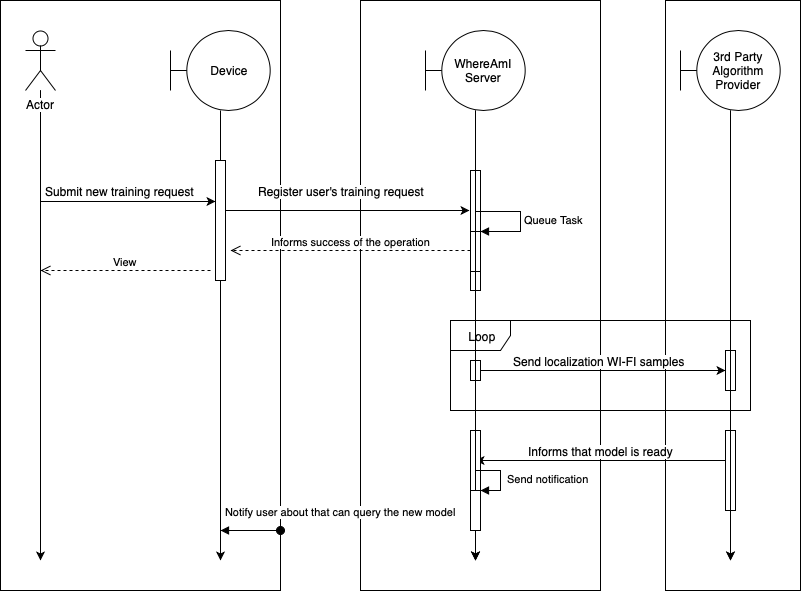
The diagram above shows how the user can have a training model for a given localization.
The user starts by making a [POST request](https://whereami.nunum.me/swagger/#/localization/submitTrainingRequest) server indicating the algorithm and the implementor.
The server queues the task and responds to the user. Meanwhile, the server gets all samples for the user's localization, and starts sending to the server implementor the samples in batch fashion.
When the algorithm provider [registers the service](https://whereami.nunum.me/swagger/#/algorithm/addAlgorithmProvider) it has to send in the request two URL's (for who has a server)
```json
{
"method": "http",
"properties": {
"url_to_receive_data": "https://provider.com/sink",
"url_to_predict": "https://provider.com/predict"
}
}
```
Or for who has a repository:
```json
{
"method":"git",
"properties":{
"repository_url":"https://rep.provider.com/sink"
}
}
```
The server start sending the samples with the following body:
```json
{
"id":0,
"isDrained":false,
"fingerprints":[
{
"id":0,
"uid":"UUID",
"bssid":"",
"ssid":"",
"levelDBM":0,
"centerFreq0":0,
"centerFreq1":0,
"channelWidth":0,
"frequency":2,
"timeStamp":"",
"localizationId":0,
"positionId":0
}
]
}
```
The **isDrained** value is set `true` when the server has no more samples to push, with this, the provider can start the model training. Once a model is trained, the provider makes a [POST request](https://whereami.nunum.me/swagger/#/task/updateTask). The id that must be sent is the id of the root object when samples are pushing to the provider. Until then, the user cannot use your model. The server is expecting a `2XX` as a response, otherwise, the error will be send via email to the provider and the sinking will be postponed.
2 - In the **prediction phase**, the server makes regular POST requests to the provider's model with the following body:
```json
{
"localizationId":0,
"samples":[
{
"bssid":"",
"ssid":"",
"levelDBM":0,
"centerFreq0":0,
"centerFreq1":0,
"channelWidth":0,
"frequency":0,
"timeStamp":""
}
]
}
```
And expects as a response the following body:
```json
{
"positionId":0,
"accuracy":100.0
}
```
If the provider responds with the **positionId** equal to zero, it means that was not able to determine user's positions and the prediction will not be seen by the user.
All request between the server and the provider, the server will send in the headers the `X-APP` and `x-request-id` headers.
The provider can [delete one of their algorithm implementations](https://whereami.nunum.me/swagger/#/algorithm/deleteAlgorithmProvider) and the affected users will be notified.
### Android Application
#### Table Of Contents
* [Features](#features)
* [Permissions](#permissions)
* [FAQ Android](#faq-android)
* [ScreenShots](#screen-shots)
##### Features
* Posts view with related material about the state of art;
* Localizations management;
* Positions management;
* Customizable privacy of localizations;
* Notification center;
* Offline localizations and posts visualization;
* Offline fingerprinting collection;
* Automatic synchronization of locally stored data;
* Highly configurable REST API;
* All lists views use endless scrolling and swipe to refresh gesture;
* No collect or sell information that is shared by the users;
* Open Source;
* No Ads;
##### Permissions
* [Internet](https://developer.android.com/reference/android/Manifest.permission.html#INTERNET) - To communicate with server;
* [Access WI-FI State](https://developer.android.com/reference/android/Manifest.permission.html#ACCESS_WIFI_STATE) - For collect WI-FI samples;
* [Change WI-FI State](https://developer.android.com/reference/android/Manifest.permission#CHANGE_WIFI_STATE) - For Turning On the Wi-Fi card;
* [Access Coarse Location](https://developer.android.com/reference/android/Manifest.permission.html#ACCESS_COARSE_LOCATION) - For localization associated data at their creation;
##### FAQ Android
###### There are a ton of localizations, can I only see mine?
Yes, you can. Click on top right button **⋮** -> **settings** -> **HTTP API** and activate the option **List only my localizations**.
###### Why the screen of my Android device is always ON when I am sending samples or requesting to predict my localization?
When the screen goes dark (by inactivity), the WI-FI card no longer scans the available networks. This was the behavior on my device, I also have tried to build the sink service as a background job, but without success. If you know a better way, let me know, or open an issue.
###### Do I need an Internet connection to see my localizations?
No, the localization will be displayed from the application cache directory. If you clean it, you will need Internet.
###### Do I need an Internet connection when am I collecting samples?
No, the application will store locally and automatically sync with server when you are back online.
###### When I delete one localization, what data is deleted?
The server will hard delete all data associated with the localization. There is no coming back;
###### You pretend to implement more indoor tracking algorithms, besides the Mean?
Yes, when the community starts to share information (currently is a cold start), I will provide more implementations.
###### Can I suggest posts and/or algorithms?
Yes, you can use the feedback form to propose new material.
###### I have more than one device, can I share my localizations to another specific device?
Kind of, currently either you mark the localization as public or private for a list and/or predict, and is for all users. However, you can go to the **settings** -> **general** and click on **Installation ID** and set on all devices the same installation, and all will see the same localizations.
##### Screen Shots


### How to become a Algorithm provider
Open the swagger API, find the resource **provider**, make a POST request by filling your email and wait for it in your mailbox (**verify the spam**). click on the link and voila. You can use the **provider** sub-resource of **algorithm** to tell what implementations you have to offer.
### FAQ
##### What is a Wi-Fi fingerprint?
[Wikipedia knows better](https://en.wikipedia.org/wiki/Wi-Fi_positioning_system#Fingerprinting_based)
##### I know that you do not have won anything besides knowledge building this project, can I pay you a beer?
Thank you for your kindness, you can via PayPal