https://github.com/nutonomy/second.pytorch
PointPillars for KITTI object detection
https://github.com/nutonomy/second.pytorch
Last synced: about 1 year ago
JSON representation
PointPillars for KITTI object detection
- Host: GitHub
- URL: https://github.com/nutonomy/second.pytorch
- Owner: nutonomy
- License: mit
- Archived: true
- Fork: true (traveller59/second.pytorch)
- Created: 2018-12-12T00:29:38.000Z (over 7 years ago)
- Default Branch: master
- Last Pushed: 2020-05-15T09:45:34.000Z (almost 6 years ago)
- Last Synced: 2024-08-01T03:45:30.405Z (over 1 year ago)
- Language: Python
- Homepage:
- Size: 7 MB
- Stars: 964
- Watchers: 59
- Forks: 238
- Open Issues: 1
-
Metadata Files:
- Readme: README.md
- License: LICENSE
Awesome Lists containing this project
README
# PointPillars
Welcome to PointPillars.
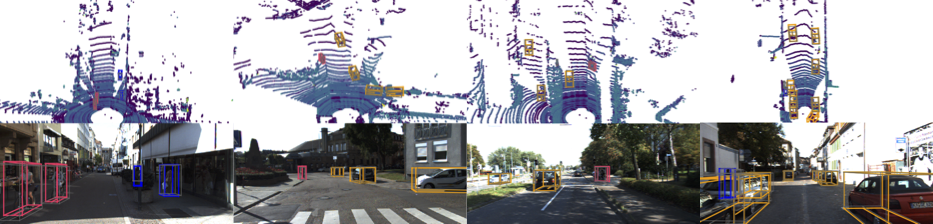
This repo demonstrates how to reproduce the results from
[_PointPillars: Fast Encoders for Object Detection from Point Clouds_](https://arxiv.org/abs/1812.05784) (to be published at CVPR 2019) on the
[KITTI dataset](http://www.cvlibs.net/datasets/kitti/) by making the minimum required changes from the preexisting
open source codebase [SECOND](https://github.com/traveller59/second.pytorch).
This is not an official nuTonomy codebase, but it can be used to match the published PointPillars results.
**WARNING: This code is not being actively maintained. This code can be used to reproduce the results in the first version of the paper, https://arxiv.org/abs/1812.05784v1. For an actively maintained repository that can also reproduce PointPillars results on nuScenes, we recommend using [SECOND](https://github.com/traveller59/second.pytorch). We are not the owners of the repository, but we have worked with the author and endorse his code.**
## Getting Started
This is a fork of [SECOND for KITTI object detection](https://github.com/traveller59/second.pytorch) and the relevant
subset of the original README is reproduced here.
### Code Support
ONLY supports python 3.6+, pytorch 0.4.1+. Code has only been tested on Ubuntu 16.04/18.04.
### Install
#### 1. Clone code
```bash
git clone https://github.com/nutonomy/second.pytorch.git
```
#### 2. Install Python packages
It is recommend to use the Anaconda package manager.
First, use Anaconda to configure as many packages as possible.
```bash
conda create -n pointpillars python=3.7 anaconda
source activate pointpillars
conda install shapely pybind11 protobuf scikit-image numba pillow
conda install pytorch torchvision -c pytorch
conda install google-sparsehash -c bioconda
```
Then use pip for the packages missing from Anaconda.
```bash
pip install --upgrade pip
pip install fire tensorboardX
```
Finally, install SparseConvNet. This is not required for PointPillars, but the general SECOND code base expects this
to be correctly configured.
```bash
git clone git@github.com:facebookresearch/SparseConvNet.git
cd SparseConvNet/
bash build.sh
# NOTE: if bash build.sh fails, try bash develop.sh instead
```
Additionally, you may need to install Boost geometry:
```bash
sudo apt-get install libboost-all-dev
```
#### 3. Setup cuda for numba
You need to add following environment variables for numba to ~/.bashrc:
```bash
export NUMBAPRO_CUDA_DRIVER=/usr/lib/x86_64-linux-gnu/libcuda.so
export NUMBAPRO_NVVM=/usr/local/cuda/nvvm/lib64/libnvvm.so
export NUMBAPRO_LIBDEVICE=/usr/local/cuda/nvvm/libdevice
```
#### 4. PYTHONPATH
Add second.pytorch/ to your PYTHONPATH.
### Prepare dataset
#### 1. Dataset preparation
Download KITTI dataset and create some directories first:
```plain
└── KITTI_DATASET_ROOT
├── training <-- 7481 train data
| ├── image_2 <-- for visualization
| ├── calib
| ├── label_2
| ├── velodyne
| └── velodyne_reduced <-- empty directory
└── testing <-- 7580 test data
├── image_2 <-- for visualization
├── calib
├── velodyne
└── velodyne_reduced <-- empty directory
```
Note: PointPillar's protos use ```KITTI_DATASET_ROOT=/data/sets/kitti_second/```.
#### 2. Create kitti infos:
```bash
python create_data.py create_kitti_info_file --data_path=KITTI_DATASET_ROOT
```
#### 3. Create reduced point cloud:
```bash
python create_data.py create_reduced_point_cloud --data_path=KITTI_DATASET_ROOT
```
#### 4. Create groundtruth-database infos:
```bash
python create_data.py create_groundtruth_database --data_path=KITTI_DATASET_ROOT
```
#### 5. Modify config file
The config file needs to be edited to point to the above datasets:
```bash
train_input_reader: {
...
database_sampler {
database_info_path: "/path/to/kitti_dbinfos_train.pkl"
...
}
kitti_info_path: "/path/to/kitti_infos_train.pkl"
kitti_root_path: "KITTI_DATASET_ROOT"
}
...
eval_input_reader: {
...
kitti_info_path: "/path/to/kitti_infos_val.pkl"
kitti_root_path: "KITTI_DATASET_ROOT"
}
```
### Train
```bash
cd ~/second.pytorch/second
python ./pytorch/train.py train --config_path=./configs/pointpillars/car/xyres_16.proto --model_dir=/path/to/model_dir
```
* If you want to train a new model, make sure "/path/to/model_dir" doesn't exist.
* If "/path/to/model_dir" does exist, training will be resumed from the last checkpoint.
* Training only supports a single GPU.
* Training uses a batchsize=2 which should fit in memory on most standard GPUs.
* On a single 1080Ti, training xyres_16 requires approximately 20 hours for 160 epochs.
### Evaluate
```bash
cd ~/second.pytorch/second/
python pytorch/train.py evaluate --config_path= configs/pointpillars/car/xyres_16.proto --model_dir=/path/to/model_dir
```
* Detection result will saved in model_dir/eval_results/step_xxx.
* By default, results are stored as a result.pkl file. To save as official KITTI label format use --pickle_result=False.