https://github.com/nuvious/scanpi
A simple self-hosted scanner that is designed to allow scanning using document scanners to automatically scan, save and ocr documents.
https://github.com/nuvious/scanpi
Last synced: 8 months ago
JSON representation
A simple self-hosted scanner that is designed to allow scanning using document scanners to automatically scan, save and ocr documents.
- Host: GitHub
- URL: https://github.com/nuvious/scanpi
- Owner: nuvious
- License: gpl-2.0
- Created: 2024-12-20T15:54:06.000Z (over 1 year ago)
- Default Branch: main
- Last Pushed: 2024-12-27T19:22:13.000Z (over 1 year ago)
- Last Synced: 2025-02-14T16:12:33.691Z (over 1 year ago)
- Language: Python
- Size: 25.4 KB
- Stars: 18
- Watchers: 2
- Forks: 3
- Open Issues: 8
-
Metadata Files:
- Readme: README.md
- License: LICENSE
Awesome Lists containing this project
README
# ScanPi
A simple self-hosted scanner that is designed to allow scanning using document
scanners to automatically scan, save and ocr documents. While called ScanPi it
could be deployed to any system. Designed to give USB scanners or any scanner
that is supported by [scanadf](https://linux.die.net/man/1/scanadf) a second
life.
Current implementation does not have authentication. Issue #1 is earmarked for
implementation of authentication, ideally without requiring any registration.
## Demo
[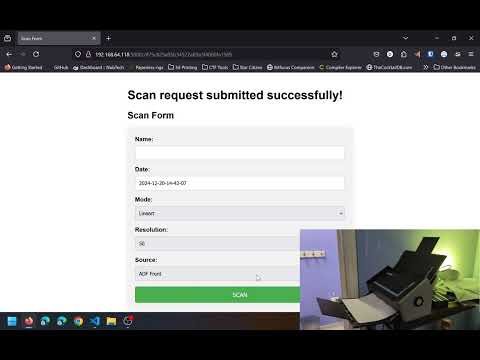](http://www.youtube.com/watch?v=9Ftn02hEa44 "ScanPi Video Demo")
## Quickstart
First install flask, scanadf and ocrmypdf. The application needs to run as root
for `scanadf` so install as the root user.
```bash
sudo pip3 install Flask
sudo apt update
sudo apt install scanadf ocrmypdf -y
```
Next launch the app.
```bash
sudo python3 app.py
```
The scan tool defaults to `http://localhost:5000`. Current implementation has
no authentication, but will be added in the future.
## Environment Variables
Settings are modified through environment variables listed below:
|Name|Desc|Default|
|-|-|-|
|DEBUG|Launches flask in debug and raises all exceptions.|False|
|ROOT_PATH|Root path for scan form endpoint.|'/'|
|SOURCES|Scanner specific sources as a comma separated string.|"ADF Front,ADF Back,ADF Duplex"|
|MODES|Scanner specific modes as a comma separated string.|"Lineart,Halftone,Gray,Color"|
|RESOLUTIONS|Scanner specific resolutions as a comma separated string.|"50,100,150,200,250,300,350,400,450,500,550,600"|
|DATE_FORMAT|A date format string prepended to file names|"%Y-%m-%d-%H-%M-%S"|
|SCAN_DIRECTORY|A default directory to put scanned files. Default assumes using some form of network share.|/mnt/scan|
|PROCESSING_LOCKFILE|Location of the lockfile used to avoid collisions during scan processing.|/var/lock/.scanlock|
|SCAN_JOB_DELAY|Seconds to wait between scan jobs to allow loading the next job.|15s|
NOTE: It is possible to queue multiple jobs, but order is not guaranteed. If
queueing multiple jobs use a generic name like 'scan1', 'scan2', etc and rename
after the fact.
## Systemd Service Template
Below is an example of a systemd configuration that moves the scan directory
to `/mnt/smbscandir` and makes the root path `/scan` instead of `/` with the
project cloned to my home directory.
```ini
[Unit]
Description=ScanPi Python Application
After=network.target
[Service]
WorkingDirectory=/home/nuvious/scanpi
ExecStart=/usr/bin/python3 /home/nuvious/scanpi/app.py
Environment="SCAN_DIRECTORY=/mnt/smbscandir"
Environment="ROOT_PATH=/scan"
Restart=always
RestartSec=30
User=root
Group=root
[Install]
WantedBy=multi-user.target
```
Below is a copy-paste-ready command one could run that generates a default
configuration with scanpi cloned to /opt/scanpi and scans are saved to
`/mnt/scan` and the root path is `/`. Below should be run as root.
```bash
set -e # Stop on any error
mkdir -p /mnt/scan
git clone https://github.com/nuvious/scanpi.git /opt/scanpi
touch /lib/systemd/system/scanpi.service
cat > /lib/systemd/system/scanpi.service << EOF
[Unit]
Description=ScanPi Python Application
After=network.target
[Service]
WorkingDirectory=/opt/scanpi
ExecStart=/usr/bin/python3 /opt/scanpi/app.py
Restart=always
RestartSec=30
User=root
Group=root
[Install]
WantedBy=multi-user.target
EOF
# Edit accordingly if desired to add environment variables.
systemctl enable scanpi --now
```
## Tested Hardware
[Fujitsu/RICOH SnapScan S1500](https://www.pfu.ricoh.com/global/scanners/scansnap/discontinued/s1500/s1500.html)