https://github.com/nuwber/rabbitevents
Nuwber's RabbitEvents provides a simple observer implementation, allowing you to publishing and handling for various events that occur in your applications. For example, if you need to react to some event occurred in another API.
https://github.com/nuwber/rabbitevents
event-driven laravel microservices php publish-subscribe rabbitmq
Last synced: 3 months ago
JSON representation
Nuwber's RabbitEvents provides a simple observer implementation, allowing you to publishing and handling for various events that occur in your applications. For example, if you need to react to some event occurred in another API.
- Host: GitHub
- URL: https://github.com/nuwber/rabbitevents
- Owner: nuwber
- License: mit
- Created: 2017-10-24T09:21:11.000Z (over 8 years ago)
- Default Branch: 9.x
- Last Pushed: 2026-01-30T18:38:48.000Z (6 months ago)
- Last Synced: 2026-01-31T11:23:43.939Z (6 months ago)
- Topics: event-driven, laravel, microservices, php, publish-subscribe, rabbitmq
- Language: PHP
- Homepage: https://nuwber.github.io/rabbitevents/
- Size: 18.2 MB
- Stars: 121
- Watchers: 9
- Forks: 34
- Open Issues: 1
-
Metadata Files:
- Readme: README.md
- Funding: .github/FUNDING.yml
- License: LICENSE
- Code of conduct: .github/CODE_OF_CONDUCT.md
Awesome Lists containing this project
README
# RabbitEvents
[](https://github.com/nuwber/rabbitevents/actions?query=branch%3Amaster+workflow%3A%22Unit+tests%22)
[](https://codecov.io/gh/nuwber/rabbitevents)
[](https://packagist.org/packages/nuwber/rabbitevents)
[](https://packagist.org/packages/nuwber/rabbitevents)
[](https://packagist.org/packages/nuwber/rabbitevents)
Let's imagine a use case: a User made a payment. You need to handle this payment, register the user, send him emails, send analytics data to your analysis system, and so on. The modern infrastructure requires you to create microservices that do their specific job and only it: one handles payments, one is for user management, one is the mailing system, one is for analysis. How to let all of them know that a payment succeeded and handle this message? The answer is "To use RabbitEvents".
Once again, the RabbitEvents library helps you publish an event and handle it in another app. It doesn't make sense to use it in the same app because Laravel's Events work better for that.
## Demo
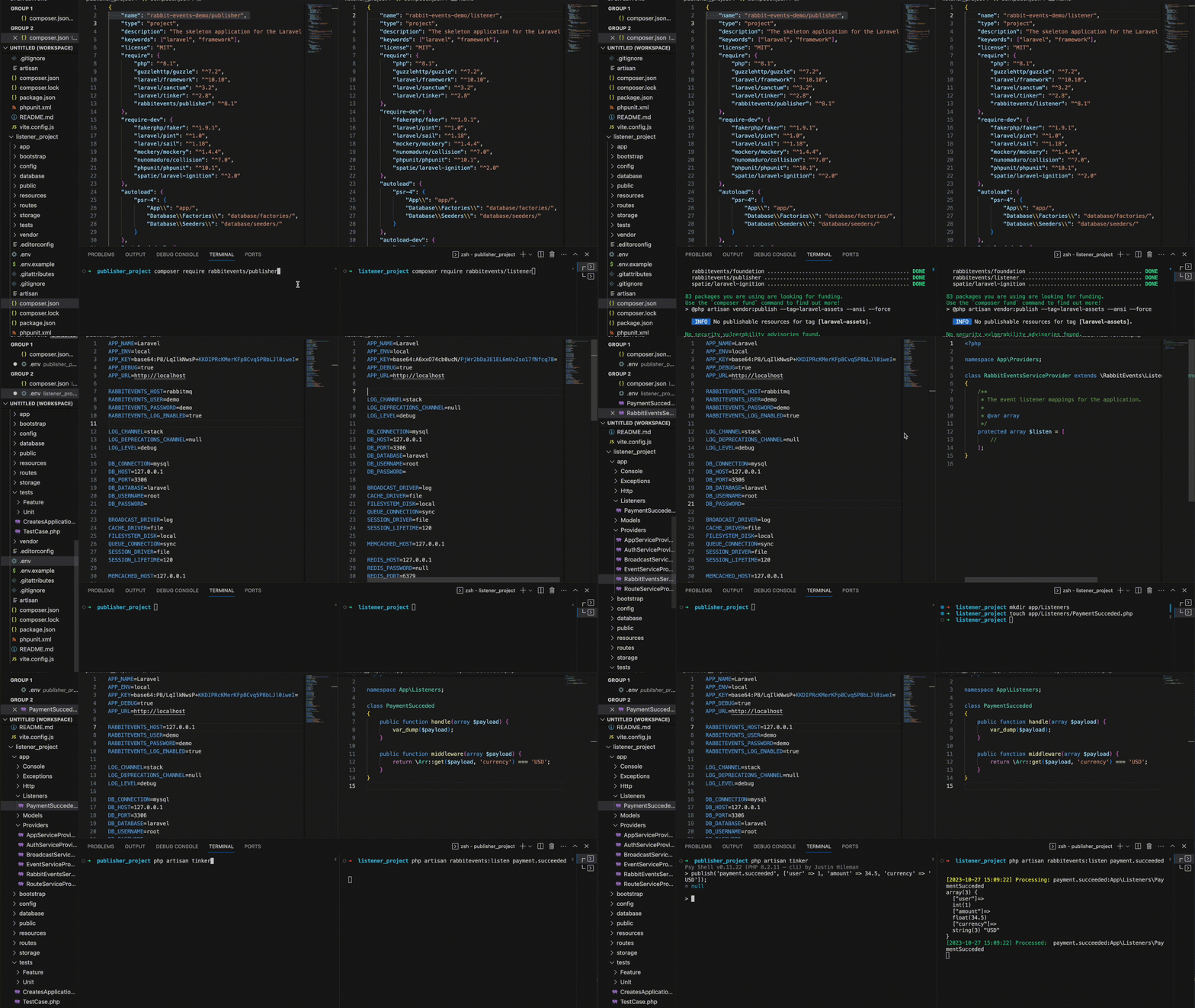
## Table of Contents
1. [Installation via Composer](#installation)
* [Configuration](#configuration)
1. [Upgrade from 8.x to 9.x](#upgrade_8.x-9.x)
1. [Publisher component](#publisher)
1. [Listener component](#listener)
1. [Listeners & Payloads](#listeners-payloads)
1. [Custom Serializers](#custom-serializers)
1. [Extensions](#extensions)
1. [Examples](./examples)
1. [Speeding up RabbitEvents](#speeding-up-rabbitevents)
1. [Testing](#testing)
1. [Non-standard use](#non-standard-use)
1. [License](#license)
## Installation via Composer
You can use Composer to install RabbitEvents into your Laravel project:
```bash
composer require nuwber/rabbitevents
```
### Configuration
After installing RabbitEvents, publish its config and a service provider using the `rabbitevents:install` Artisan command:
```bash
php artisan rabbitevents:install
```
This command installs the config file at `config/rabbitevents.php` and the Service Provider file at `app/providers/RabbitEventsServiceProvider.php`.
The config file is very similar to the queue connection, but with the separate config, you'll never be confused if you have another connection to RabbitMQ.
```php
env('RABBITEVENTS_CONNECTION', 'rabbitmq'),
/*
|--------------------------------------------------------------------------
| Default Serializer
|--------------------------------------------------------------------------
|
| The default serializer to use when publishing messages.
| Supported: "json", "protobuf" or any class implementing Serializer interface.
|
*/
'default_serializer' => \RabbitEvents\Foundation\Serialization\JsonSerializer::class,
'connections' => [
'rabbitmq' => [
'driver' => 'rabbitmq',
'exchange' => env('RABBITEVENTS_EXCHANGE', 'events'),
'durable' => env('RABBITEVENTS_QUEUE_DURABLE', true),
'host' => env('RABBITEVENTS_HOST', 'localhost'),
'port' => env('RABBITEVENTS_PORT', 5672),
'user' => env('RABBITEVENTS_USER', 'guest'),
'pass' => env('RABBITEVENTS_PASSWORD', 'guest'),
'vhost' => env('RABBITEVENTS_VHOST', 'events'),
'delay_strategy' => env('RABBITEVENTS_DELAY_STRATEGY', RabbitMqDlxDelayStrategy::class),
'ssl' => [
'is_enabled' => env('RABBITEVENTS_SSL_ENABLED', false),
'verify_peer' => env('RABBITEVENTS_SSL_VERIFY_PEER', true),
'cafile' => env('RABBITEVENTS_SSL_CAFILE'),
'local_cert' => env('RABBITEVENTS_SSL_LOCAL_CERT'),
'local_key' => env('RABBITEVENTS_SSL_LOCAL_KEY'),
'passphrase' => env('RABBITEVENTS_SSL_PASSPHRASE', ''),
],
'read_timeout' => env('RABBITEVENTS_READ_TIMEOUT', 3.),
'write_timeout' => env('RABBITEVENTS_WRITE_TIMEOUT', 3.),
'connection_timeout' => env('RABBITEVENTS_CONNECTION_TIMEOUT', 3.),
'heartbeat' => env('RABBITEVENTS_HEARTBEAT', 0),
'persisted' => env('RABBITEVENTS_PERSISTED', false),
'lazy' => env('RABBITEVENTS_LAZY', true),
'qos' => [
'global' => env('RABBITEVENTS_QOS_GLOBAL', false),
'prefetch_size' => env('RABBITEVENTS_QOS_PREFETCH_SIZE', 0),
'prefetch_count' => env('RABBITEVENTS_QOS_PREFETCH_COUNT', 1),
]
],
],
'logging' => [
'enabled' => env('RABBITEVENTS_LOG_ENABLED', false),
'level' => env('RABBITEVENTS_LOG_LEVEL', 'info'),
'channel' => env('RABBITEVENTS_LOG_CHANNEL'),
],
];
```
## Upgrade from 8.x to 9.x
### PHP 8.2 required
RabbitEvents now requires PHP 8.2 or greater. It uses `readonly` classes and Enums.
### Payload System Refactor
The internal payload handling has been refactored. `Message::payload()` now returns a `RabbitEvents\Foundation\Contracts\Payload` object.
To get the raw value, use `$message->payload->value()`.
### Protobuf Support
RabbitEvents supports [Google Protobuf](https://github.com/protocolbuffers/protobuf) messages via the `rabbitevents/protobuf` extension package.
Once installed, simply publish a Protobuf Message object, and it will be automatically serialized and hydrated on the listener side.
The system uses the `type` AMQP header to resolve the correct class.
**Example:**
```php
use Google\Protobuf\StringValue;
+$message = new StringValue();
+$message->setValue('Hello World');
+
+publish('my.event', $message);
```
### Dynamic Serializers
The correct serializer is now automatically selected based on the `content_type` header of the message.
- `application/json` -> JSON Serializer
- `application/x-protobuf` -> Protobuf Serializer
### Supported Laravel versions
RabbitEvents now supports Laravel 10.0 or greater.
### Architecture Decoupling
Version 9.0 introduces a more abstract and extensible architecture.
- **Decoupled Serialization**: Serializers now use an abstract `TransportMessage` contract instead of `Interop\Amqp\AmqpMessage`. This creates a cleaner separation between domain logic and the transport layer.
- **Abstract Message Factory**: The `MessageFactory` has been moved to the Foundation layer and is now pluggable. You can implement your own `TransportMessageFactory` to create messages from different sources (e.g., tailored for testing or other transports).
- **Transport Agnostic**: The core `Message` and `Sender` classes rely on internal contracts (`RabbitEvents\Foundation\Contracts\*`), avoiding strict dependencies on `queue-interop`. Adapters are provided for AMQP.
- **Connection Class Moved**: `RabbitEvents\Foundation\Connection` has been moved to `RabbitEvents\Foundation\Amqp\Connection`. Update your type hints if you were using it directly.
### Namespace Changes
We have reorganized the namespace structure for better clarity and standard compliance:
- **Commands**: All console commands have been moved to `Console` namespaces.
- `RabbitEvents\Foundation\Commands` -> `RabbitEvents\Foundation\Console`
- `RabbitEvents\Listener\Commands` -> `RabbitEvents\Listener\Console`
- `RabbitEvents\Publisher\Commands` -> `RabbitEvents\Publisher\Console`
- **Releaser**: `RabbitEvents\Foundation\Support\Releaser` has been moved to `RabbitEvents\Listener\Support\Releaser` as it is a listener-specific component.
### Removed `--connection` option from the `rabbitevents:listen` command
The default connection is always used instead.
The RabbitEvents Publisher component provides an API to publish events across the application structure. More information about how it works can be found on the RabbitEvents [Publisher page](https://github.com/rabbitevents/publisher).
The RabbitEvents Listener component provides an API to handle events that were published across the application structure. More information about how it works can be found on the RabbitEvents [Listener page](https://github.com/rabbitevents/listener).
It supports:
- **Manual Registration:** using the `$listen` array.
- **Attributes:** using `#[Listener]` on classes or methods.
- **Auto-Discovery:** automatically finding `#[Listener]` attributes in your listeners directory.
How the payload is passed to your listener depends on the serialization format:
**JSON (Default):**
The payload is decoded as an **associative array**.
```php
public function handle(array $payload) {
// $payload['key']
}
```
**Protobuf:**
The payload is passed as the **Message Object** itself.
```php
public function handle(\Google\Protobuf\Internal\Message $message) {
// $message->getSomething()
}
```
You can implement your own serializer by implementing `RabbitEvents\Foundation\Contracts\Serializer` and `RabbitEvents\Foundation\Contracts\ContentType`.
```php
use RabbitEvents\Foundation\Contracts\Serializer;
use RabbitEvents\Foundation\Contracts\ContentType;
use RabbitEvents\Foundation\Contracts\Payload;
class MySerializer implements Serializer
{
public function serialize($data): Payload { ... }
public function deserialize($message): Payload { ... }
public function contentType(): ContentType { return new MyContentType(); }
public function canSerialize($payload): bool { ... }
}
```
Register your serializer in a ServiceProvider:
```php
$registry = $this->app->make(\RabbitEvents\Foundation\Serialization\SerializerRegistry::class);
$registry->register(new MySerializer());
```
New serializers are prepended to the registry, so they can override default behavior if they claim the payload.
- [Protobuf Support](https://github.com/rabbitevents/protobuf) - Provides official Google Protobuf serialization support. Required for using Protobuf messages.
## Speeding up RabbitEvents
To enhance the performance of RabbitEvents, consider installing the `php-amqp` extension along with the `enqueue/amqp-ext` package.
By doing so, RabbitEvents will utilize the `enqueue/amqp-ext` package instead of the default `enqueue/amqp-lib` package.
This substitution is advantageous because the C-written `php-amqp` package significantly outperforms the PHP-written `enqueue/amqp-lib` package.
You can install the `php-amqp` extension using the following command:
```bash
pecl install amqp
```
or use the way you prefer. More about it can be found [here](https://pecl.php.net/package/amqp).
Next, install the `enqueue/amqp-ext` package with the following command:
```bash
composer require enqueue/amqp-ext
```
No additional configuration is required.
We always write tests. Tests in our applications contain many mocks and fakes to test how events are published.
There is the `PublishableEventTesting` trait that provides assertion methods in an Event class that you want to test.
**Event.php**
```php
payload;
}
}
```
**Test.php**
```php
'value1',
'key2' => 'value2',
];
Event::publish($payload);
Event::assertPublished('something.happened', $payload);
AnotherEvent::assertNotPublished();
```
If the assertion does not pass, `Mockery\Exception\InvalidCountException` will be thrown.\
Don't forget to call `\Mockery::close()` in `tearDown` or similar methods of your tests.
If you're using only one part of RabbitEvents, you should know a few things:
1. You remember, we're using RabbitMQ as the transport layer. In the [RabbitMQ Documentation](https://www.rabbitmq.com/tutorials/tutorial-five-python.html), you can find examples of how to publish your messages using a routing key. This routing key is the event name, like `something.happened` from the examples above.
1. RabbitEvents expects that a message body is a JSON-encoded array. Every element of an array will be passed to a Listener as a separate variable. For example:
```json
[
{
"key": "value"
},
"string",
123
]
```
There are 3 elements in this array, so 3 variables will be passed to a Listener (an array, a string, and an integer).
If an associative array is being passed, the Dispatcher wraps this array by itself.
RabbitEvents is open-sourced software licensed under the [MIT license](https://opensource.org/licenses/MIT).