https://github.com/nvk/agentnoise
Chat with local coding agents through White Noise. agentnoise is a native desktop helper for using a phone running White Noise as the control surface for local Codex and Claude sessions. It is intentionally Rust-first and keeps Node/npm/bun out of the trusted bridge path.
https://github.com/nvk/agentnoise
agent brew chat im mls nostr whitenoise
Last synced: about 1 month ago
JSON representation
Chat with local coding agents through White Noise. agentnoise is a native desktop helper for using a phone running White Noise as the control surface for local Codex and Claude sessions. It is intentionally Rust-first and keeps Node/npm/bun out of the trusted bridge path.
- Host: GitHub
- URL: https://github.com/nvk/agentnoise
- Owner: nvk
- License: mit
- Created: 2026-05-14T04:33:42.000Z (about 2 months ago)
- Default Branch: main
- Last Pushed: 2026-06-03T01:08:32.000Z (about 1 month ago)
- Last Synced: 2026-06-03T02:13:26.442Z (about 1 month ago)
- Topics: agent, brew, chat, im, mls, nostr, whitenoise
- Language: Rust
- Homepage: https://agentnoise.org/
- Size: 500 KB
- Stars: 17
- Watchers: 0
- Forks: 3
- Open Issues: 3
-
Metadata Files:
- Readme: README.md
- License: LICENSE
- Agents: AGENTS.md
Awesome Lists containing this project
- awesome-marmot - agentnoise - first, no Node/npm/bun in the trusted bridge path. (Applications)
README
# agentnoise
```text
░█▀█░█▀▀░█▀▀░█▀█░▀█▀░█▀█░█▀█░▀█▀░█▀▀░█▀▀
░█▀█░█░█░█▀▀░█░█░░█░░█░█░█░█░░█░░▀▀█░█▀▀
░▀░▀░▀▀▀░▀▀▀░▀░▀░░▀░░▀░▀░▀▀▀░▀▀▀░▀▀▀░▀▀▀
```
Chat with local coding agents through White Noise.
`agentnoise` is a native desktop helper for using a phone running White Noise as the control surface for local Codex, Claude, and optional Hermes sessions. It is intentionally Rust-first and keeps Node/npm/bun out of the trusted bridge path.
agentnoise exists because the available agent-chat bridges were too heavy,
too slow-moving, or too awkward for the simple workflow this project needs: a
native desktop helper, a phone chat UI, strong first-pairing, and local coding
agents launched through a [local policy boundary](https://agentbondage.org/).
The less polite design brief: I had to build it because everything else sucks
and Jeff moves too slow.
such alpha, much wow.
## Changelog
Detailed per-version notes live in [docs/release-notes.md](docs/release-notes.md).
The README keeps the recent history grouped by product milestone.
**v0.1.31-v0.1.35** - **Mobile chat UX stabilization.** agentnoise now
defaults to phone-safe progress: raw command/tool progress and routine agent
self-narration stay in `/tail`, job acks/finals use compact chat labels, long
answers point to `/tail `, and agent prompts include the White Noise
mobile-chat delivery contract. This release window also fixed the active-job
self-echo loop, clamped quiet-mode "still working" pings to a five-minute
minimum, kept failed Codex/Claude jobs from dumping raw JSON stream
fragments into phone chat, and restored newer Claude Code compatibility by
adding the required stream-json verbose launch flag.
**v0.1.29-v0.1.30** - **White Noise media ingest and fake-phone TUI.**
Phone-sent media is saved into the active workspace and attached to agent
prompts, including `/wiki` runs that use LLM Wiki ingest framing. Supported
chat media now covers JPEG/PNG/GIF/WebP, MP4/WebM/MOV, MP3/OGG/M4A/WAV, and
PDF, and agent replies can upload referenced supported media files from the
workspace back to chat. The default-built `agentnoise fake-phone tui` adds live
replies, `:attach [caption]`, chat switching, and automatic handoff
following.
**v0.1.28** - **Transport/worker split.** Homebrew, launchd, systemd, and
rc services now run `agentnoise transport run`, which keeps White Noise
subscriptions and pairing alive and writes jobs to a local SQLite queue. Local
agent execution moves to `agentnoise worker start` from a login shell, with
optional `--tmux` when tmux is installed. `agentnoise up` remains the all-in-one
foreground path.
**v0.1.27** - **Pending proposal recovery and clearer diagnostics.** Reply
sends now refresh pending White Noise group proposals immediately when White
Noise reports `pending proposal exists`, giving the normal retry loop a real
chance to recover. Service startup logs the active listener pid while waiting
on an existing lock, and fake-phone tests now print the early `wnd` stderr
excerpt instead of hiding daemon startup failures behind a missing socket
timeout.
**v0.1.26** - **Named instances and subscription recovery.** Added
`agentnoise --instance ` for safer multi-tenant hosts with separate
config, data, logs, keychain service names, White Noise profile names, and
native service names. The listener now also records subscription health,
reconciles recent White Noise group history, recovers missed inbound messages,
and restarts stale `wn messages subscribe` children so phone commands do not
get accepted and then disappear.
**v0.1.25** - **Work chat replies without slashes.** The inbox stays command
oriented, but work/session chats now remember the agent mode that created or
last explicitly ran in them. After `/codex`, `/claude`, `/hermes`, or `/wiki`
starts a work chat, plain text in that chat continues with the same
agent/profile/wiki mode and workspace.
**v0.1.24** - **Mobile chat cleanup and opt-in local session watch.** White
Noise replies are shorter and more phone-readable: compact startup hellos,
queue/final job replies, progress pings, status, help, session lists, and local
agent session metadata. Job ids and local session ids can be referenced by
short unique prefixes for `/tail`, `/cancel`, and `*-resume` commands. Added
the opt-in local session watcher so `agentnoise config local-sessions-watch on`
can notify the primary paired chat when same-account Codex/Claude metadata
appears, while staying off by default for privacy.
**v0.1.23** - **Inbox sessions and stale group cleanup.** The primary paired
chat now acts as an inbox: new `/codex`, `/claude`, `/hermes`, and `/wiki`
jobs from that chat open a fresh White Noise work session named from the
hostname and a short prompt summary, then progress and final output continue
there. The fake-phone harness follows those handoff links, session open links
are shown with shorter refs, and startup reconciles saved control chats against
active White Noise groups so removed chats stop looking live.
**v0.1.22** - **Service-mode and White Noise delivery fix.** Codex jobs now
fail fast with a clear explanation when launched from macOS launchd/brew
service contexts that make Codex hang before producing output. Direct Codex
launches use a stable agentnoise data dir while still passing the selected
workspace through `codex -C`, startup has a no-output watchdog/retry, removed
White Noise groups are ignored, pending paired control chats are accepted, and
reply send failures no longer kill the listener.
**v0.1.21** - **Quiet-job chat pings.** Running jobs now send a visible
`still running` message when Codex, Claude, Hermes, or the launcher stays alive
but produces no new output. The ping includes `/tail ` and `/cancel `
so a phone user can inspect or stop the job instead of staring at an accepted
command with no follow-up.
**v0.1.20** - **Fake-phone E2E and Codex launch fix.** The fake-phone harness
now waits for real command replies and final job output instead of passing on
startup hellos or unrelated auth replies. Codex jobs also pass
`--skip-git-repo-check`, which fixes phone-launched jobs in configured
workspaces that are plain directories.
**v0.1.16** - **Startup hello.** Once the listener is up, already-paired
control chats get a timestamped `agentnoise is up` message with profile and
workspace context. First-pairing mode stays quiet until the PIN succeeds.
**v0.1.15** - **Homebrew service keychain prompt fix.** Service startup now
waits longer for `wnd` to become ready and avoids a redundant second daemon
startup check after setup. This prevents launchd keep-alive loops from
repeatedly touching the macOS Keychain when White Noise startup is slow.
**v0.1.14** - **Optional direct launcher and reliability polish.**
`bondage` remains the default and recommended local policy boundary, but
first-run commands can now opt into `runner.launcher = "direct"` with
`--direct-agents`. Direct mode runs raw `codex`, `claude`, or optional
`hermes` CLIs with structured argv and skips the `bondage` binary/config
checks in `agentnoise doctor`. Session replies now spell out current chat,
target chat, workspace, and next command more clearly for phone use.
Live fake-phone tests and service diagnostics were tightened, and `status` /
`doctor` avoid slow implicit keychain probes. A local White Noise send can still
arrive on the phone late; the docs now call out how to separate local send
success from phone sync/display lag.
**v0.1.13** - **White Noise login detection fix.** `wn whoami` reports logged
in accounts as hex pubkeys while agentnoise config stores the desktop account
as `npub`. The startup check now normalizes both forms, so agentnoise only
skips Keychain repair when the actual White Noise signing account is present.
**v0.1.12** - **Service keychain startup fix.** `agentnoise up` now reuses the
cached desktop `npub` from config for QR/profile setup instead of loading the
desktop `nsec` on every service restart. Homebrew services should only touch
the OS keychain when creating the identity or repairing a missing White Noise
login. Keychain repair errors now explain the Terminal authorization step.
**v0.1.11** - **Pairing identity fix.** Normalized Nostr sender identity
checks across hex pubkeys and `npub` values. This stops agentnoise from
treating its own White Noise replies as unpaired inbound messages when the
desktop identity is stored as `npub` but White Noise reports authors as hex.
Allowed phone senders also match across both forms.
**v0.1.10** - **Reliability and identity polish.** Bare text, unknown
commands, unauthorized senders, and startup catch-up events now get explicit
phone replies instead of silent drops. Added reply send retries,
`agentnoise identity status`, `agentnoise identity rename `, and support
for the common typo `agentnoise -- help`. Added configured White Noise message
relays and `agentnoise whitenoise relays`/`ensure-relays` so message delivery
can use a broader account relay set instead of only the QR discovery hints.
**v0.1.9** - **Remote pairing polish.** Added SSH pairing mode with
terminal-only PIN display, `--name` for per-machine White Noise/Nostr profile
labels, and a remote SSH guide that passes the phone `npub` without moving any
`nsec` over SSH.
**v0.1.8** - **Parity hardening pass.** Added a fake phone harness for
isolated White Noise testing, durable runtime event journaling, `agentnoise
status`, progress messages from Codex/Claude JSON streams, approval replay for
risky local profiles, attachment metadata capture, a direct `wnd` socket probe,
`/agents`, opt-in git worktree sessions, and local release smoke checks.
**v0.1.7** - **Optional Hermes backend.** Added `/hermes` and
`/hermes-resume` as disabled-by-default commands that route Hermes through the
same `bondage` local policy boundary used for Codex and Claude. Command
parsing, config compatibility, command construction, doctor output, and
packaging are tested; live Hermes CLI/runtime execution is still alpha and
untested.
**v0.1.6** - **Service console and dev burner identity.** `agentnoise up` can
attach to an already-running Homebrew service as a local console instead of
starting a second listener, and disposable development identities can use
`--dev-burner-nsec` without repeated OS keychain prompts.
## What It Does
agentnoise listens to one or more White Noise chats and accepts a small command set from allowlisted senders. It launches local coding agents through the configured launcher: direct raw Codex/Claude CLIs for the simplest setup, or [`bondage`](https://agentbondage.org/) profiles when you want a hardened local policy boundary. It stores job state and logs locally, and posts results back through White Noise. The primary paired chat acts like an inbox: starting a new job there creates a new White Noise work session named `hostname - short prompt summary`, then progress and final output continue in that session. Each White Noise group id gets its own workspace state, so the same phone user can keep multiple independent agentnoise sessions open in separate chat windows.
The most tested target is macOS. Linux and FreeBSD service templates are
included and should be treated as newer paths.
## Requirements
- Rust toolchain for building from source
- Codex CLI and/or Claude Code CLI installed and logged in locally
- no `agentbondage` required for the simple path: use `agentnoise init --direct-agents`
- recommended hardened path: `bondage` with `codex-agentnoise` and `claude-agentnoise` profiles
- optional: Hermes Agent CLI plus a dedicated `bondage` profile, or direct Hermes mode
- `wn` and `wnd` from `marmot-protocol/whitenoise-rs`, either packaged beside `agentnoise` or installed with `agentnoise whitenoise install`
- OS keychain access if using automatic White Noise login repair with a real identity
- a dedicated White Noise group for agent control
For a normal public install without `agentbondage`, use direct mode:
```sh
agentnoise init --direct-agents
```
Or set it during first setup:
```sh
agentnoise up --direct-agents --no-listen
```
That writes:
```toml
[runner]
launcher = "direct"
```
Direct mode does not require `bondage` at runtime. It still uses structured argv
and the same White Noise pairing/allowlist, but local filesystem, network,
secret, and approval behavior is whatever the raw agent CLI enforces. Use
`agentnoise doctor` or `agentnoise agents` to confirm the active launcher.
For the hardened local-agent-stack setup, use dedicated `bondage` profiles:
`codex-agentnoise`, `claude-agentnoise`, and optional `hermes-agentnoise`. If an
older config still says `profile = "codex"` or `profile = "claude"`,
agentnoise uses the matching `*-agentnoise` profile for remote chat runs unless
`runner.allow_generic_agent_profiles = true` is set. This keeps phone-triggered
jobs separate from human terminal profiles and gives the launcher a place to
pin sandbox, secrets, and non-interactive behavior.
Existing installs can switch explicitly:
```sh
agentnoise config launcher direct
agentnoise config launcher bondage
```
See [Configuration](docs/configuration.md) for copy/paste examples covering
raw Codex/Claude mode, `bondage` profiles, repo aliases, and extra commands
like `/codex-fix`.
## Security Stack
agentnoise is the phone and White Noise control plane. It does not try to make
remote chat messages safe by itself; it keeps command parsing small, requires a
first-pairing PIN before trusting a sender, and hands local execution to the
agent security stack.
The intended stack is:
- [White Noise](https://www.whitenoise.chat/) carries the phone chat and desktop identity discovery.
- The OS keychain stores the dedicated desktop helper `nsec` for normal use; `config.toml` stores only public identity and runtime configuration.
- [`bondage`](https://agentbondage.org/) is the local launcher/policy boundary for Codex, Claude, and other agent profiles. It keeps launch decisions explicit: pinned target, expected hash, configured args, and selected sandbox profile.
- [`envchain-xtra`](https://envchain-xtra.org/) can be used under bondage when an agent profile needs explicit secret release instead of ambient shell environment.
- [`nono`](https://nono.sh/) can provide the OS sandbox layer used by bondage profiles.
- [Learn to Prompt](https://learntoprompt.org/guides/agent-stack.html) is the living operator guide for the larger local agent stack, sandbox profiles, prompt/workflow conventions, and vendor-independent setup notes.
In short: the phone can ask for work, agentnoise authenticates and routes the
request, and the local stack decides what the agent process is actually allowed
to touch. In direct mode that local stack is just the raw agent CLI and its own
permissions model.
## First Run
Install from Homebrew:
```sh
brew install nvk/tap/agentnoise
```
The simplest setup does not need `agentbondage`:
```sh
# raw Codex/Claude mode
agentnoise init --direct-agents
```
Use the hardened policy-boundary setup only if you already have `bondage`
profiles such as `codex-agentnoise` and `claude-agentnoise`:
```sh
agentnoise init
```
For an existing config:
```sh
agentnoise config launcher direct
# or, for bondage profiles
agentnoise config launcher bondage
```
Then start it. Homebrew services are the simple setup and boot path:
```sh
agentnoise up --direct-agents --no-listen
brew services start nvk/tap/agentnoise
agentnoise worker start
# or, if tmux is installed:
agentnoise worker start --tmux
```
The first command creates the desktop identity, writes config, stores the
desktop `nsec` in the OS keychain, and prints the desktop QR/setup hints. The
Homebrew service then shows the pairing PIN when needed and keeps the White
Noise transport alive after reboot. The worker
runs Codex/Claude/Hermes jobs from your login shell so those CLIs see the same
profile, TTY/session, and local permissions you use manually.
For a single foreground process while developing or debugging, skip the service
and worker split:
```sh
brew services stop nvk/tap/agentnoise
agentnoise up --direct-agents
```
Over SSH, keep the worker alive with tmux:
```sh
brew install tmux
agentnoise worker start --tmux
```
`agentnoise up` is still safe to run while the Homebrew service is enabled. If
the service already owns the transport, `up` attaches as the terminal UI and
follows logs instead of starting a second listener.
On first run, agentnoise starts White Noise, publishes the profile/key package,
and opens the pairing window.
After the desktop `npub` is written to config, service restarts use that public
identity for QR/profile setup and avoid reading the `nsec` unless White Noise
login repair is needed. The listener still requires a logged-in White Noise
signing account before it can send replies. If macOS blocks background Keychain
access during repair, authorize it from Terminal once:
```sh
agentnoise keychain status
```
Pair the phone:
1. Look for the macOS `agentnoise pairing` window.
2. Scan the QR from White Noise on the phone.
3. Create a White Noise chat/group with the agentnoise desktop identity.
4. Type the 6-digit PIN shown on the desktop as the first phone message.
5. Send `/status`, then `/help`.
If the pairing window is hidden or blocked, the same QR/PIN is in the service
logs:
```sh
tail -f "$(brew --prefix)/var/log/agentnoise.log"
tail -f "$(brew --prefix)/var/log/agentnoise.err.log"
```
Useful local diagnostics:
```sh
agentnoise status
agentnoise transport status
agentnoise worker status
agentnoise doctor
agentnoise agents
agentnoise config path
agentnoise identity status
agentnoise identity rename agentnoise-mbp
agentnoise fake-phone plan
```
Remote SSH pairing:
```sh
brew services stop nvk/tap/agentnoise
agentnoise up --ssh --phone npub1... --name agentnoise-mbp
```
In `--ssh` mode, agentnoise prints the pairing PIN in the SSH session and does
not open a desktop GUI alert. Pass the phone `npub`, not an `nsec`; the remote
machine creates and stores its own desktop identity locally. Use a distinct
`--name` per machine so White Noise can show `agentnoise-mbp`,
`agentnoise-linuxbox`, or whatever label makes sense.
After setup, check or change the published machine label without passing any
phone identity:
```sh
agentnoise identity status
agentnoise identity rename agentnoise-linuxbox
```
The service is expected to start even before the White Noise chat exists. It
waits, keeps showing a rotating PIN while pairing is required, and discovers
the phone-created chat automatically. During first pairing it also reads a small
initial message window, so a PIN sent right after chat creation can still be
accepted.
Build from source:
```sh
cargo build --release
target/release/agentnoise up
```
The QR scans as the desktop `npub`. The terminal also prints the `nprofile`
with relay hints. Neither value exposes the desktop `nsec`.
Pairing relay hints are for discovery. Message delivery uses the White Noise
account relay list. agentnoise now keeps a broader message relay list in config
and reconciles it through `wn relays add` after login:
```toml
[whitenoise]
message_relays = [
"wss://index.hzrd149.com",
"wss://relay.primal.net",
"wss://relay.ditto.pub",
"wss://nos.lol",
"wss://nostr.mom",
]
```
Inspect or apply those relays manually:
```sh
agentnoise whitenoise relays
agentnoise whitenoise ensure-relays
```
If the phone does not show a reply, first check whether the desktop created one:
```sh
agentnoise status
tail -f "$HOME/Library/Application Support/agentnoise/runtime-events.jsonl"
```
`reply-sent` means agentnoise handed the message to White Noise and stored it
locally. The phone can still render it late if the White Noise relay or mobile
sync path is delayed. Reopening the chat or restarting the local `agentnoise up`
/ `wnd` pair can flush old replies, but treat that as a transport diagnostic,
not proof that the agent ignored the command.
### Development Burner Identity
For local development and throwaway relay testing, skip OS keychain prompts:
```sh
agentnoise up --dev-burner-nsec
```
That creates a burner `nsec` at
`~/Library/Application Support/agentnoise/dev-burner.nsec`, sets
`whitenoise.dev_burner_nsec = true`, and makes future `agentnoise up` or
Homebrew service runs use that file instead of the OS keychain. This is
plaintext by design. Do not use it for a real phone identity or a production
desktop helper.
This flag bypasses the agentnoise keychain store. White Noise still owns its
own daemon account store after `wn login`; on platforms where that store is
unavailable, `agentnoise doctor` or startup will show the upstream White Noise
login error explicitly.
If you already have the phone identity `npub`, agentnoise can create the White
Noise control chat too:
```sh
target/release/agentnoise up --phone npub... --name agentnoise-mbp
```
Otherwise scan the QR, create a White Noise chat/group with the desktop
identity, and leave the listener running. If you used `--no-listen` or stopped
the process, start or attach again:
```sh
target/release/agentnoise up
```
To open another independent session, create another White Noise chat with the
same agentnoise desktop identity. The running listener discovers visible chats
periodically; each chat has separate `/use`, `/cd`, and prompt context.
### Multiple People on One Machine
Use named instances when two people share one host but need separate phone
pairing, desktop identities, keychain entries, services, logs, and sandboxes.
Do not put both phone npubs in the same `allowed_senders` list unless they are
intentionally sharing the same repos and launcher policy.
Example with Alice and Bob:
```sh
agentnoise --instance alice up --ssh --name frontier-alice
agentnoise --instance bob up --ssh --name frontier-bob
```
Each instance gets its own default config:
```text
~/Library/Application Support/agentnoise/instances/alice/config.toml
~/Library/Application Support/agentnoise/instances/bob/config.toml
```
Each generated config uses a separate keychain service, data directory, log
directory, worktree directory, White Noise profile name, and default sandbox:
```text
agentnoise-alice -> ~/Library/Application Support/agentnoise/instances/alice/sandbox
agentnoise-bob -> ~/Library/Application Support/agentnoise/instances/bob/sandbox
```
Install separate services after each instance is paired:
```sh
agentnoise --instance alice service install --target launchd --force --load
agentnoise --instance bob service install --target launchd --force --load
```
On Linux the user units are named `agentnoise-alice.service` and
`agentnoise-bob.service`; on macOS the LaunchAgent labels are
`com.agentnoise.agentnoise.alice` and `com.agentnoise.agentnoise.bob`.
If `wn`/`wnd` are not already packaged beside `agentnoise`, install them under agentnoise's managed data directory:
```sh
target/release/agentnoise whitenoise install
```
Install as a user LaunchAgent:
```sh
target/release/agentnoise service install --target launchd --force --load
```
If first pairing is still required, macOS shows a pairing window with the
desktop identity QR, current PIN, and live countdown. The same PIN is also
printed to the terminal or service log.
## Linux Quick Start
Build or install `agentnoise`, then put it on the user `PATH`:
```sh
cargo build --release
install -Dm755 target/release/agentnoise ~/.local/bin/agentnoise
```
Install the bundled White Noise CLI tools if `wn` and `wnd` are not already on
the service user's `PATH`:
```sh
agentnoise whitenoise install
```
Run the first pairing in the foreground. On Linux the QR and rotating PIN are
printed to the terminal/logs:
```sh
agentnoise up --no-listen
```
After the phone is paired, install a user systemd transport service and start
a login-shell worker:
```sh
agentnoise service install --target systemd-user --force --load
agentnoise worker start
systemctl --user status agentnoise.service
journalctl --user -u agentnoise.service -f
```
For boot without an active login session, enable lingering:
```sh
loginctl enable-linger "$USER"
```
Secret storage on Linux uses keyutils plus Secret Service persistence. Headless
servers need the same user service context to reach an unlocked Secret Service
collection; test that before relying on unattended restart:
```sh
agentnoise keychain status
```
## FreeBSD Quick Start
Build or install `agentnoise`, then install the binary somewhere in the service
`PATH`:
```sh
cargo build --release
sudo install -m 0755 target/release/agentnoise /usr/local/bin/agentnoise
```
Create the config and do first pairing as the user that should own the helper:
```sh
agentnoise whitenoise install
agentnoise up --no-listen
```
Then install the rc.d transport service using that user's config path and keep
a worker alive in tmux or another user supervisor:
```sh
CONFIG="$(agentnoise config path)"
sudo agentnoise --config "$CONFIG" service install --target freebsd-rc --force
sudo sysrc agentnoise_enable=YES
sudo sysrc agentnoise_user="$USER"
sudo sysrc agentnoise_config="$CONFIG"
sudo service agentnoise start
agentnoise worker start
sudo service agentnoise status
```
For service logs, use the normal rc/daemon logs for the host, commonly:
```sh
tail -f /var/log/messages
```
FreeBSD uses DBus Secret Service for real `nsec` storage. Confirm the service
account can read the stored secret before depending on restart repair:
```sh
agentnoise keychain status
```
For disposable relay testing only, `agentnoise up --dev-burner-nsec` uses a
plaintext burner identity and avoids Secret Service setup.
## Chat Commands
- `/status`
- `/agents`
- `/agent-sessions [limit]`
- `/new [name]`
- `/rename [name]`
- `/list`
- `/jump `
- `/resume `
- `/close`
- `/repos`
- `/use `
- `/pwd`
- `/ls [path]`
- `/cd `
- `/codex `
- `/codex `
- `/codex-resume `
- `/claude `
- `/claude `
- `/claude-resume `
- `/hermes `
- `/hermes `
- `/hermes-resume `
- `/wiki `
- `/codex-wiki `
- `/claude-wiki `
- `/jobs`
- `/tail `
- `/cancel `
- `/approvals`
- `/approve `
- `/deny `
- `/attachments`
- `/attach `
- `/download [file-number]`
- `/worktrees`
- `/worktree new `
- `/worktree use `
- `/worktree remove confirm`
- `/help`
Each White Noise chat is one agentnoise session. The first paired chat is the
inbox. Send `/codex ...`, `/claude ...`, `/hermes ...`, or `/wiki ...` there to
open a fresh work chat; agentnoise names it from the machine hostname and a
2-4 word prompt summary, sends an open link back to the inbox, and posts
quiet status plus final output in the new chat. Follow-up plain text sent inside
that work chat continues with the same agent/profile/wiki mode after the prior
queued job has finished, while slash
commands remain available when you want to change workspace, inspect jobs, or
force a different agent.
`/new bugfix-ui` still creates a manual parallel White Noise chat with the
paired phone identity and clones the current workspace into it. `/rename main`
names the current chat, `/list` shows known sessions with short chat refs and
`whitenoise://chat/...` open links, `/jump 2` or `/resume 2` resumes a session
from that list, and `/close` marks the current session closed locally.
`/sessions` remains accepted as a readable alias for `/list`.
Repos are aliases from the config, not arbitrary paths. `/use` selects a repo
for the session, `/cd ..` moves within that selected repo, and plain `/codex` or
`/claude` uses the selected workspace. `/hermes` does the same when Hermes is
enabled. `/wiki` follows the local Codex `codex-wiki` convention by prefixing
`@wiki`; `/claude-wiki` sends a `wiki ...` prompt for Claude installations with
the LLM Wiki instructions/plugin available.
Plain text in the inbox, and plain text in chats without a remembered agent
mode, is not executed. The reply points the user at `/help` and `/codex
` so a mistyped phone message does not look like a dead daemon.
Codex and Claude JSON streams are parsed for progress while a job runs, but the
default `runner.progress_mode = "quiet"` keeps raw command/tool progress and
agent self-narration out of the phone chat. Use `progress_mode = "verbose"` only
when debugging transport. If a running job goes quiet, agentnoise sends a
"still working" ping after `runner.silence_ping_seconds = 60`, but quiet mode
enforces a five-minute minimum so phone chats are not pinged every minute. Set
`silence_ping_seconds = 0` to disable those pings. Pings include `/tail `
and `/cancel ` hints. If a new launch emits no output at all for
`runner.startup_silence_timeout_seconds = 90`, agentnoise terminates that
attempt and retries once by default. Final job output still arrives as one
normal reply, compacted for phone when needed, with `/tail ` for logs.
If a configured agent profile looks intentionally elevated, for example a
profile or permission mode containing `unsafe`, agentnoise creates an approval
object instead of launching immediately. Approvals are bound to the same White
Noise chat that requested them and expire after
`runner.approval_ttl_seconds`.
For Homebrew service use, keep configured repos outside iCloud Drive/CloudDocs.
Codex can hang under launchd before writing output when `-C` points at those
GUI-backed sync folders. `agentnoise doctor` warns about this; run
`agentnoise up` from an interactive terminal if you must use an iCloud
workspace.
White Noise media sent by the phone is accepted automatically. agentnoise saves
the attachment metadata, calls `wn media download` when White Noise exposes a
media file hash, copies downloaded supported media into
`.agentnoise/attachments//` under the chat's selected
repo/worktree, and adds those local file paths to the agent prompt when the
media arrives with a caption or work-chat follow-up. The supported chat-media
set mirrors White Noise: JPEG/PNG/GIF/WebP images, MP4/WebM/MOV video,
MP3/OGG/M4A/WAV audio, and PDF. That workspace-local default is readable by the
default `bondage`/nono agent profiles because it sits inside the same workdir
passed to the agent. `/wiki` media prompts are framed for the LLM Wiki
file-ingestion workflow so the wiki can create raw metadata stubs before
continuing the requested wiki task. `/attachments` and `/attach ` show saved
metadata and local paths; `/download ` remains available for manual
retrieval. When a completed agent job references a supported media file it
created in the selected repo/worktree, agentnoise sends that file back through
White Noise media upload automatically.
Git worktrees are opt-in per chat. `/worktree new fix-ui` creates a git
worktree under the configured `runner.worktree_dir`, switches only that chat to
the new path, and keeps other White Noise sessions on their existing
workspaces. Removal requires the explicit `confirm` word.
## Fake Phone Testing
`agentnoise fake-phone` starts from a separate White Noise daemon data
directory, keeps a throwaway phone `nsec` in the fake-phone test root, creates
a chat with the desktop agentnoise identity, and sends test messages without
touching the real phone identity or the normal agentnoise keychain.
```sh
agentnoise fake-phone plan
agentnoise fake-phone tui --pin 123456
agentnoise fake-phone roundtrip --pin 123456 /status
agentnoise fake-phone roundtrip /help
agentnoise fake-phone roundtrip \
--timeout-seconds 180 \
--min-replies 2 \
--require-job-final \
--expect agentnoise-e2e-ok \
/codex "Reply with exactly: agentnoise-e2e-ok"
```
`fake-phone tui` is compiled into the default `agentnoise` binary, including
Homebrew installs. It opens a human-driven terminal fake phone with the same
burner identity/root as `roundtrip`: type `/status`, `/help`, `/wiki ...`, or
plain text to send to the active chat. Local TUI commands start with `:` so
they do not collide with agentnoise slash commands: `:attach [caption]`
sends a supported media file through White Noise media, `:chats` lists followed chats,
`:use ` switches chats, and `:quit` exits. The TUI
auto-follows `whitenoise://chat/` job handoff links unless
`--no-follow-handoffs` is set.
For first-pairing tests, pass the current desktop PIN. After pairing, omit
`--pin`. The harness resends the test message for the timeout window because a
running agentnoise service may need one discovery cycle before subscribing to
the newly-created chat. With `--expect`, unrelated replies such as startup
hellos or auth errors do not stop resends. Use `--require-job-final` for
`/codex`, `/claude`, or `/hermes` tests; otherwise the first ack would be
enough to pass.
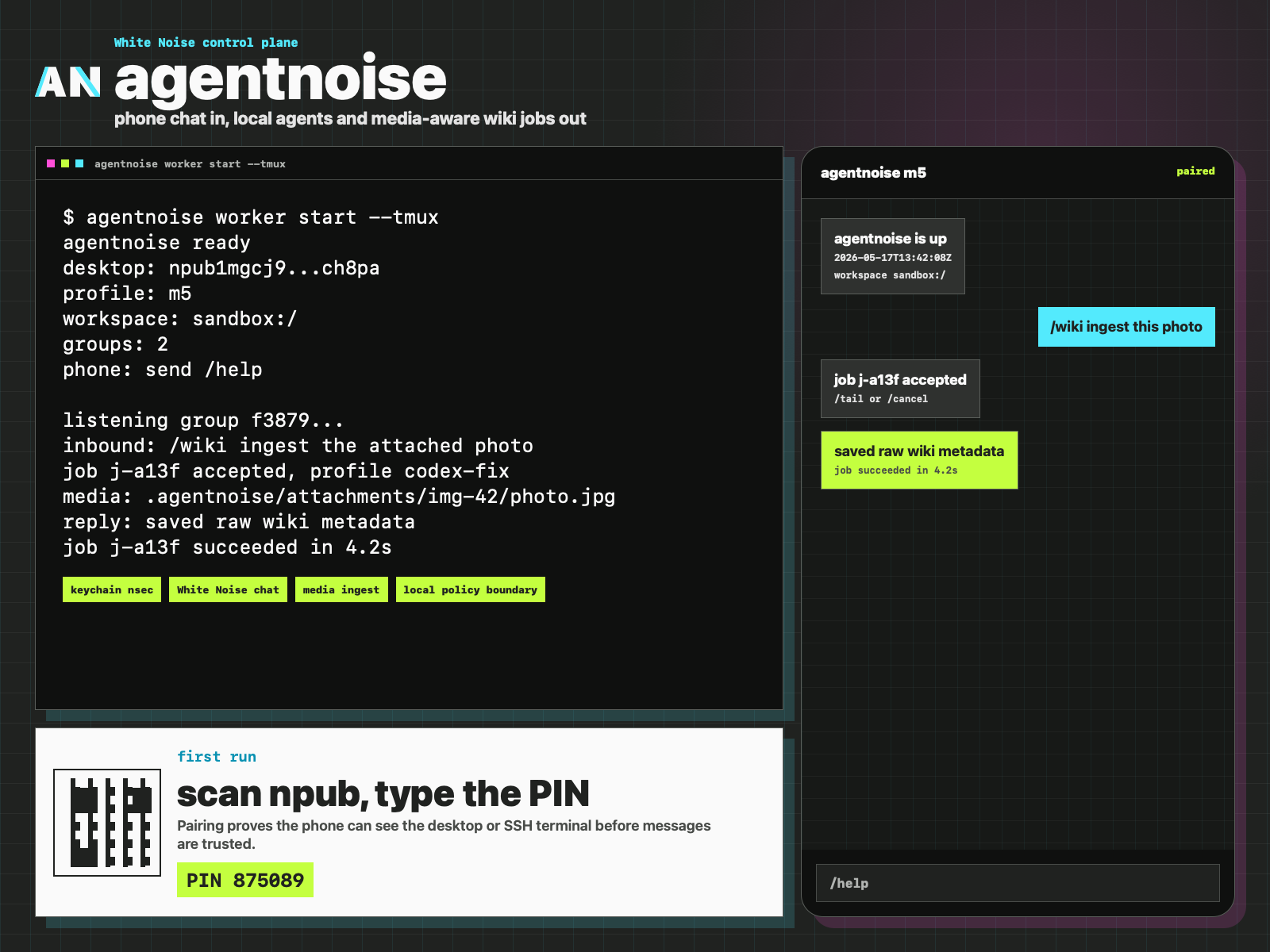
## Screenshots
Product screenshots and Open Graph assets are generated from a dedicated
`agentnoise.org/shots.html` staging page, not from the marketing site. See
[Screenshots](docs/screenshots.md) for the exact commands and privacy checklist
before using a real phone or terminal capture.
## Transport Notes
The default White Noise transport remains the tested `wn` CLI path. Setting
`whitenoise.socket` points `wn` at a specific `wnd` daemon socket. The
experimental direct socket adapter is exposed as a probe only:
```sh
agentnoise whitenoise socket-probe --method ping
```
This keeps production message send/subscribe behavior on the stable upstream
CLI while giving us a tested JSON-line Unix socket client for future direct
`wnd` work.
### Local Agent Session Visibility
`/agent-sessions` shows recent local Codex and Claude session metadata from the
same user account, including sessions started outside agentnoise. It returns
session ids, update times, cwd when available, and the explicit resume command
to use next:
```text
/agent-sessions
/codex-resume continue
/claude-resume continue
```
This is intentionally conservative: it does not return transcript content,
inspect process environments, or silently attach unrelated local work to a
White Noise chat. The phone user must explicitly resume a listed session.
Automatic local session notifications are disabled by default. Enable them only
on machines where it is okay to send same-account Codex/Claude session metadata
to the primary paired White Noise chat:
```sh
agentnoise config local-sessions-watch on
brew services restart nvk/tap/agentnoise
```
The watcher baselines existing sessions at startup, then reports newly seen
local session ids, update times, and cwd metadata. It does not send transcript
content or attach automatically. To turn it off:
```sh
agentnoise config local-sessions-watch off
brew services restart nvk/tap/agentnoise
```
## Optional Hermes Support
Hermes support is disabled by default. agentnoise does not run the Hermes Agent
gateway and does not expose a second remote API. It launches the Hermes CLI as a
local backend through `bondage`, the same way it launches Codex and Claude.
Enable it in `~/.config/agentnoise/config.toml` after installing Hermes and
creating a dedicated `bondage` profile:
```toml
[agents.hermes]
enabled = true
profile = "hermes-agentnoise"
bin = "hermes"
```
Then restart the listener:
```sh
brew services restart nvk/tap/agentnoise
```
From White Noise:
```text
/hermes summarize this repo
/hermes-resume continue
```
The command shape is intentionally narrow:
```sh
bondage exec hermes-agentnoise ~/.config/bondage/bondage.conf -- hermes chat --quiet --source agentnoise --toolsets skills -q ""
```
Use the `bondage` profile to set a dedicated `HERMES_HOME`, model endpoint
environment, filesystem policy, and any local secrets release rules. Start with
restricted toolsets and widen policy only after the local profile is behaving.
## First Pairing
The agentnoise `npub` is public on relays, so first-run command authorization is
separate from discovery. When `allowed_senders` is empty, `agentnoise up` enters
pairing mode:
1. Desktop shows a QR for the agentnoise desktop `npub`.
2. On macOS, agentnoise opens a pairing window with the QR, the desktop `npub`,
a live countdown, and the current 6-digit PIN.
3. The phone sends the PIN as the first message, either `123456` or `/pair 123456`.
4. agentnoise stores that sender in `allowed_senders`.
5. All other messages are ignored until this succeeds.
The PIN also prints to stdout/stderr logs for headless and non-macOS setups.
While the listener is running, `agentnoise pair` prints the same live PIN in the
terminal alongside the QR. It rotates on `whitenoise.pairing_pin_seconds`, which
defaults to 30 seconds.
## Security Defaults
- Use a dedicated White Noise bot identity for the desktop helper.
- Put only trusted devices/users in agentnoise control chats.
- Keep first pairing local: the sender must prove they can see the desktop PIN.
- Keep repos as configured aliases.
- For the simple setup, use direct raw Codex/Claude mode and rely on those
CLIs' own permission model.
- For the hardened setup, keep agent execution behind
[`bondage`](https://agentbondage.org/).
- Store the bot `nsec` in the OS keychain for normal use, not in `config.toml`.
- Keep automatic local-session notifications off unless that machine is meant
to expose same-account Codex/Claude metadata to the paired chat.
- Use `--dev-burner-nsec` only for throwaway development identities.
## More
- [White Noise setup](docs/whitenoise.md)
- [Local bring-up](docs/local-bringup.md)
- [Remote SSH pairing](docs/remote-ssh.md)
- [Fake phone testing](docs/fake-phone-testing.md)
- [Testing](docs/testing.md)
- [Terminal client plan](docs/terminal-client-plan.md)
- [Screenshots](docs/screenshots.md)
- [Supervisor services](docs/services.md)
- [Launchd service](docs/launchd.md)
- [Homebrew packaging](docs/homebrew.md)
- [Release notes](docs/release-notes.md)
- [Learn to Prompt agent stack](https://learntoprompt.org/guides/agent-stack.html)
- [Bondage local launcher](https://agentbondage.org/)
## License
MIT License. Copyright (c) 2026 nvk.
This software is provided as-is, without warranty of any kind.