https://github.com/nxroot/electron-multiple-windows
Example of electron app with multiple windows.
https://github.com/nxroot/electron-multiple-windows
Last synced: about 1 year ago
JSON representation
Example of electron app with multiple windows.
- Host: GitHub
- URL: https://github.com/nxroot/electron-multiple-windows
- Owner: NxRoot
- Created: 2022-12-09T21:32:31.000Z (over 3 years ago)
- Default Branch: master
- Last Pushed: 2022-12-10T01:26:13.000Z (over 3 years ago)
- Last Synced: 2025-02-06T21:46:23.124Z (over 1 year ago)
- Language: TypeScript
- Size: 264 KB
- Stars: 1
- Watchers: 1
- Forks: 0
- Open Issues: 0
-
Metadata Files:
- Readme: README.md
Awesome Lists containing this project
README
# Electron Multiple Windows
Example of electron app with multiple windows.
## Description
* This example was inspired by [this issue](https://github.com/electron-react-boilerplate/electron-react-boilerplate/issues/623), and an [old approach](https://medium.com/@ZoeDreams/multiple-electron-windows-using-a-view-manager-and-react-js-6d8b1e209faf) from 2017.
* Bundles are now handled individually, instead of duplicating the entire bundle.
* Redirection is done with [@electron-forge/plugin-webpack](https://www.electronforge.io/config/plugins/webpack) entrypoints, instead of react-router.
* We also use [electron-forge](https://www.electronforge.io/) to package our application.
## How does it work
### The real magic happens in the webpack entrypoints:
```js
"plugins": [
[
"@electron-forge/plugin-webpack",
{
"mainConfig": "./webpack.main.config.js",
"renderer": {
"config": "./webpack.renderer.config.js",
"entryPoints": [
{
"html": "./src/windows/index.html",
"js": "./src/windows/home/index.tsx", // Window 1
"name": "main_window"
},
{
"html": "./src/windows/index.html",
"js": "./src/windows/other/index.tsx", // Window 2
"name": "other"
}
]
}
}
]
]
```
As you can see the `html` index is always the same, but the `js` bundles are poiting to different locations.
### Main Process
Each entry point has two globals defined based on the name assigned to your entry point:
* The renderer's entry point will be suffixed with _WEBPACK_ENTRY.
* The renderer's preload script will be suffixed with _PRELOAD_WEBPACK_ENTRY
```ts
// Window 1
declare const MAIN_WINDOW_WEBPACK_ENTRY: string;
declare const MAIN_WINDOW_PRELOAD_WEBPACK_ENTRY: string;
// Window 2
declare const OTHER_WEBPACK_ENTRY: string;
declare const OTHER_PRELOAD_WEBPACK_ENTRY: string;
```
## How to manage shared imports
You probably want to share **styles** or **providers** across all your windows:
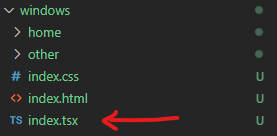
> The default `index.tsx` is always the top level of your application where you can wrap providers.
**Component imports are managed **automatically** by webpack configuration.** (Each bundle requires used imports only)
# Available Scripts
In the project directory, you can run:
### Starting
### `npm start`
Runs the app in the development mode.
### Building
### `npm run make`
So you've got an amazing application there, and you want to package it all up and share it with the world. If you run the make script, Electron Forge will generate you platform specific distributables for you to share with everyone.
### Publishing
### `npm run publish`
Now you have distributables that you can share with your users. If you run the publish script, Electron Forge will then publish the platform-specific distributables for you, using the publishing method of your choice.
## Learn More
You can learn more in the [Electron-Forge documentation](https://www.electronforge.io/).
To learn React, check out the [React documentation](https://reactjs.org/).