https://github.com/obcat/vim-sclow
:space_invader: Text-based scrollbar for Vim
https://github.com/obcat/vim-sclow
scrollbar vim
Last synced: 9 months ago
JSON representation
:space_invader: Text-based scrollbar for Vim
- Host: GitHub
- URL: https://github.com/obcat/vim-sclow
- Owner: obcat
- License: mit
- Created: 2020-12-01T20:29:03.000Z (over 5 years ago)
- Default Branch: main
- Last Pushed: 2025-06-27T12:08:54.000Z (12 months ago)
- Last Synced: 2025-06-27T13:24:16.790Z (12 months ago)
- Topics: scrollbar, vim
- Language: Vim Script
- Homepage: https://zenn.dev/obcat/articles/2020-12-vim-sclow
- Size: 38.1 KB
- Stars: 39
- Watchers: 4
- Forks: 5
- Open Issues: 3
-
Metadata Files:
- Readme: README.md
- License: LICENSE.txt
Awesome Lists containing this project
README
# vim-sclow
Text-based scrollbar for Vim.
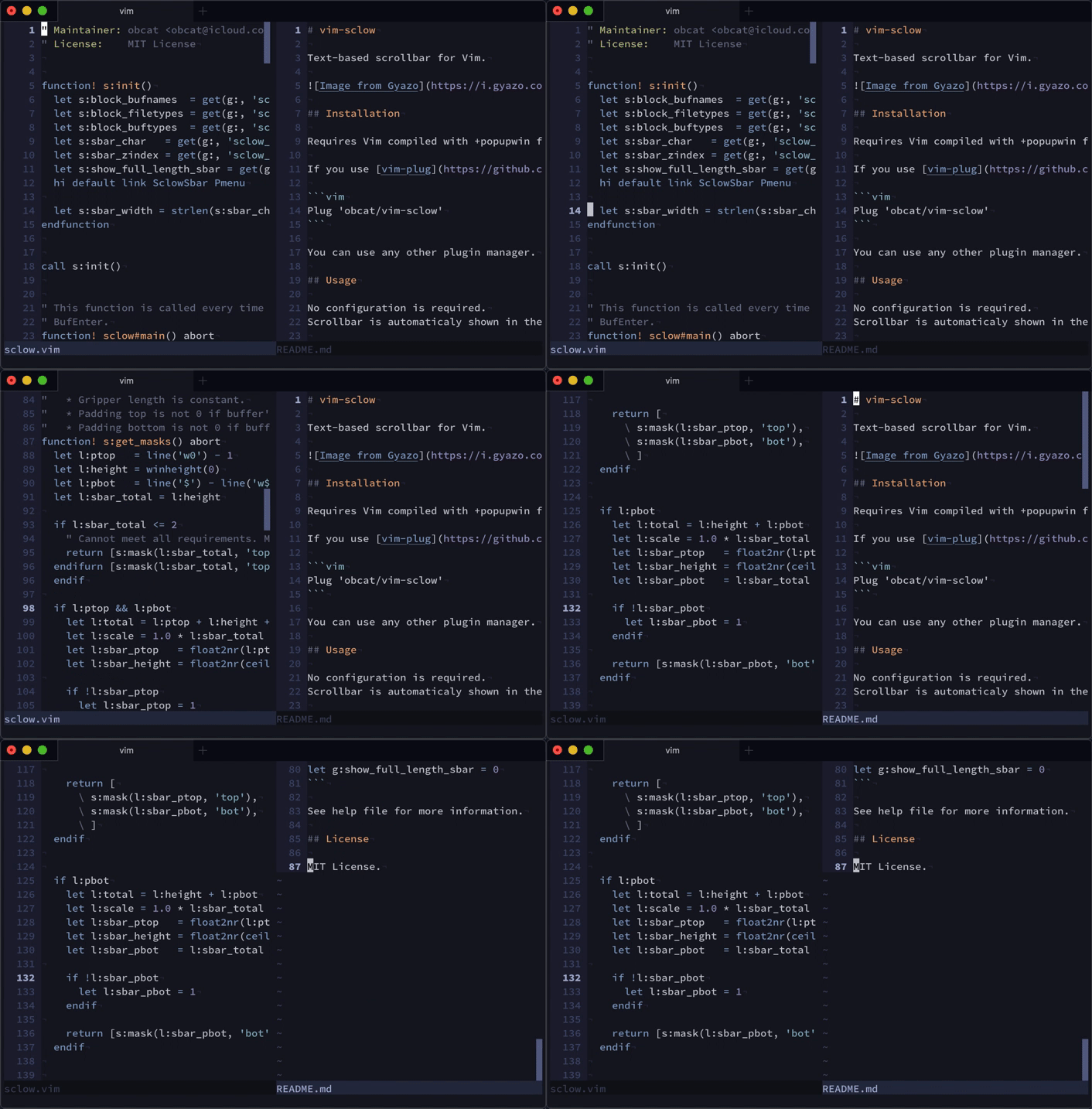
## Installation
Requires Vim compiled with `+popupwin` feature (Neovim is not supported).
If you use [vim-plug](https://github.com/junegunn/vim-plug), add the following
line to your vimrc:
```vim
Plug 'obcat/vim-sclow'
```
You can use any other plugin manager.
## Usage
No settings are required. A scrollbar will automatically appear on the right
edge of the current window.
### Tip
As you **move the cursor** and scroll, the scrollbar's position will be updated
immediately.
On the other hand, if you scroll **without moving the cursor** (you can do this
with `` or `` etc.), the scrollbar's position will be updated after
the time specified with the `updatetime` option.
The default value of `updatetime` is `4000`, i.e. 4 seconds. If you want to
update the scrollbar's position as soon as possible, reduce the value of this
option. I suggest around 100ms:
```vim
set updatetime=100
```
Note that `updatetime` also controls the delay before Vim writes its swap file
(see `:h updatetime`).
## Customization
You can customize some features.
### Appearance
To customize scrollbar's appearance, you can use:
* `g:sclow_sbar_text` (default: `"\"`)
* `SclowSbar` highlight group (default: links to `Pmenu`)
Examples:

```vim
let g:sclow_sbar_text = '*'
highlight link SclowSbar PmenuSel
```

```vim
let g:sclow_sbar_text = '👾👾'
highlight SclowSbar ctermbg=NONE guibg=NONE
```
📝 I use [iceberg.vim](https://github.com/cocopon/iceberg.vim) for color scheme.
You can also customize the offset of the scrollbar from the right border of the
window with `g:sclow_sbar_right_offset` (default: `0`). Setting this to `-1`
helps to prevent the scrollbar from hiding the rightmost characters of the
window.
### Blocking
To disable scrollbar in a specific buffer, you can use:
* `g:sclow_block_filetypes` (default: `[]`)
* `g:sclow_block_buftypes` (default: `[]`)
Example:
```vim
let g:sclow_block_filetypes = ['netrw', 'nerdtree']
let g:sclow_block_buftypes = ['terminal', 'prompt']
```
### Hiding
By default, when both the first and last line of the buffer are in the window,
a full-length scrollbar will be shown.

If you want to hide this, use the following:
```vim
let g:sclow_hide_full_length = 1
```
See help file for more information.
### Autohiding
By default the scrollbar will be shown on the screen permanently. If this behavior
is undesirable, it is possible to automatically hide the scrollbar after a predefined
period of inactivity.
To make scrollbar disappear after 2000ms set:
```vim
let g:sclow_auto_hide = 2000
```
## License
MIT License.