https://github.com/obegron/mkdocs-pipeline-visualizer
Generates MD documentation from tekton pipelines and tasks
https://github.com/obegron/mkdocs-pipeline-visualizer
mkdocs-plugin tekton tekton-pipelines
Last synced: 6 months ago
JSON representation
Generates MD documentation from tekton pipelines and tasks
- Host: GitHub
- URL: https://github.com/obegron/mkdocs-pipeline-visualizer
- Owner: obegron
- License: bsd-2-clause
- Created: 2024-08-07T10:03:40.000Z (almost 2 years ago)
- Default Branch: main
- Last Pushed: 2025-09-17T18:04:58.000Z (10 months ago)
- Last Synced: 2026-01-05T02:00:58.961Z (6 months ago)
- Topics: mkdocs-plugin, tekton, tekton-pipelines
- Language: Python
- Homepage:
- Size: 117 KB
- Stars: 2
- Watchers: 1
- Forks: 0
- Open Issues: 0
-
Metadata Files:
- Readme: README.md
- License: LICENSE
Awesome Lists containing this project
README
# mkdocs-pipeline-visualizer
## Introduction
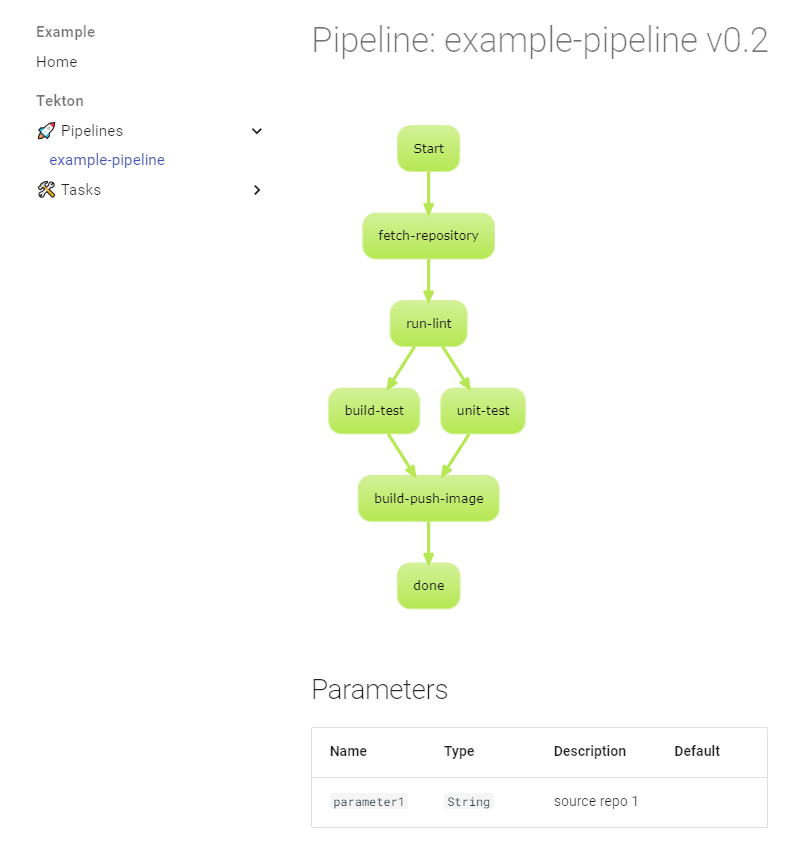
> The mkdocs-pipeline-visualizer plugin automates the creation of up-to-date documentation for your Tekton pipelines and tasks.
## Installation
To install the mkdocs-pipeline-visualizer plugin, run the following command:
```console
$ pip install mkdocs-pipeline-visualizer
```
### Example Configuration
Below is an example of how to configure mkdocs.yaml:
```yaml
site_name: Tekton
docs_dir: ./tekton
nav:
- Home: index.md
plugins:
- pipeline-visualizer
markdown_extensions:
plantuml_markdown:
server: http://www.plantuml.com/plantuml
theme:
name: material
features:
- navigation.sections
```
## Configuration
By default, the plugin creates two sections at the root level: Pipelines and Tasks. The docs_dir should point to the location of pipelines and tasks manifests.
| Config parameter | Type | Description | Default | Since |
| ---------------- | ---- | ----------- | ------- | -------------- |
| `plantuml_graphs`| **[bool]** | Controls if pipeline graph should be visible | `True` | 0.1.5 |
| `plantuml_graph_direction` | **[string]** | TB(top to bottom) or LR(left to right) | `TB` | 0.1.3 |
| `plantuml_theme` | **[string]** | Any theme listed on https://plantuml.com/theme to style e.g hacker, spacelab | `_none_` | 0.1.3 |
| `nav_generation` | **[bool]** | Automatically generate navigation tree | `True` | 0.2.0 |
| `nav_hide_empty_sections` | **[bool]** | Hide empty navigation sections | `False` | 0.4.0 |
| `nav_group_tasks_by_category` | **[bool]** | Group tasks in navigation by `tekton.dev/categories` annotation | `False` | 0.3.0 |
| `nav_section_pipelines` | **[string]** | Section name used for pipelines | `Pipelines` | 0.2.0 |
| `nav_section_tasks` | **[string]** | Section name used for tasks | `Tasks` | 0.2.0 |
| `nav_section_stepactions` | **[string]** | Section name used for stepactions | `StepActions` | 0.4.0 |
| `nav_pipeline_grouping_offset` | **[string]** | Controls how pipeline file paths are represented in the navigation structure. The format is "start:end", where: "start" is the index of the first directory to include "end" is the index of the last directory to include (use negative numbers to count from the end) | `None` | 0.2.0 |
| `nav_task_grouping_offset` | **[string]** | Same as `nav_pipeline_grouping_offset` but for tasks | `None` | 0.2.0 |
| `nav_stepaction_grouping_offset` | **[string]** | Same as `nav_pipeline_grouping_offset` but for stepactions | `None` | 0.4.0 |
| `log_level` | **[string]** | `DEBUG INFO WARNING ERROR CRITICAL` | `INFO` | 0.2.0 |
| `nav_category_mapping` | **[dict]** | Custom category name mappings | `{}` | 0.3.0 |
### Example for `nav_pipeline_grouping_offset`
Let's say you have a pipeline file located at:
```
./pipelines/project-a/deployment/my-pipeline.yaml
```
Here's how different `nav_pipeline_grouping_offset` values would affect the navigation structure:
- `"0:-1"`: Includes all directories except the last one (which is the file name).
- Result: `Pipelines > pipelines > project-a > deployment > my-pipeline`
- `"1:-1"`: Skips the first directory and includes all others except the last one.
- Result: `Pipelines > project-a > deployment > my-pipeline`
- `"1:-2"`: Skips the first directory and excludes the last two (the last directory and the file name).
- Result: `Pipelines > project-a > my-pipeline`
- `None` (default): All pipelines are placed directly under the `nav_section_pipelines` section.
- Result: `Pipelines > my-pipeline`
## How To
### Customizing Documentation Locations
You can change the location of the documentation sections by placing an empty section in any location of the navigation (nav) and setting it to the value of `nav_section_pipelines` or `nav_section_tasks`:
```yaml
site_name: Tekton
docs_dir: ./tekton
nav:
- Home: index.md
- Tekton:
- "Tasks": []
- "Pipelines": []
- "StepActions": []
plugins:
- pipeline-visualizer
```
### Customizing Menu Section Names and Graph Themes
To change the names of the menu sections and apply a custom graph theme, use the following configuration:
```yaml
site_name: Tekton
docs_dir: ./tekton
nav:
- Home: index.md
- Tekton:
- "🛠️ Tasks": []
- "🚀 Pipelines": []
- "⚙️ StepActions": []
plugins:
- pipeline-visualizer:
plantuml_theme: hacker
nav_section_tasks: "🛠️ Tasks"
nav_section_pipelines: "🚀 Pipelines"
nav_section_stepactions: "⚙️ StepActions"
```
### Category Name Mapping
You can customize how task categories appear in the navigation by providing mappings in the `nav_category_mapping` configuration:
```yaml
plugins:
- pipeline-visualizer:
nav_category_mapping:
"Code Quality": "Quality Tools"
"Build": "Build Tools"
"Deploy": "Deployment"
```
## Changelog
### 0.4.2
#### Fixed
* Fix rendering of StepAction
### 0.4.1
#### Fixed
* Corrected markdown code block rendering for scripts.
### 0.4.0
#### Added
* Support for Tekton StepActions.
* `nav_section_stepactions` and `nav_stepaction_grouping_offset` configuration options.
* Updated navigation generation to include StepActions.
* Updated example configuration and documentation.
#### Fixed
* Resolved infinite loop issue with `mkdocs serve` by preventing unnecessary file writes when content is unchanged.
### 0.3.0
#### Added
* Optional support for categorization of tasks in navigation using `tekton.dev/categories` annotation.
### 0.2.1
#### Added
* Example in `example/`.
* Visualization for step templates in tasks.
#### Fixed
* Corrected typo in `plantuml_graphs` attribute name (from `plantum_graphs`).
* Corrected typo in `nav_task_grouping_offset` attribute name (from `nav_tasks_grouping_offset`).
### 0.2.0
#### Added
* Navigation generation feature with customizable sections for pipelines and tasks.
* Support for grouping pipelines and tasks in the navigation.
* Improved logging with configurable log levels.
* Version-based sorting for resources in navigation.
#### Changed
* Improved visualization of tasks, parameters, and workspaces.
* Better handling of different script types in task steps.
#### Fixed
* Various bug fixes and code structure improvements.
### 0.1.8
#### Removed
* Version of tasks from the documentation until a better presentation is available.
### 0.1.7
#### Fixed
* Issue with backslashes (`\`) in usage examples.
* Example in the README.
### 0.1.6
#### Added
* Version of pipeline/task when available.
#### Fixed
* Hide workspaces for tasks when none are used.
### 0.1.5
#### Added
* Sample on how to use a task in a pipeline.
* `plantuml_graphs` option to make PlantUML graphs optional.
#### Fixed
* Removed extra `---` after tasks.
* Processing of only pipelines or tasks.
### 0.1.4
#### Added
* Display of all tasks in the `finally` block.
### 0.1.3
#### Added
* Configuration for graph direction (`plantuml_graph_direction`).
* Configuration for PlantUML theme (`plantuml_theme`).
* Display of references to `configMaps`.
### 0.1.2
#### Changed
* Presentation of default and empty values.
#### Removed
* Unused code.
### 0.1.1
#### Fixed
* Issue with multidoc YAML.