https://github.com/obeone/sys-stats
The Sys-Stats Dashboard is a real-time system monitoring tool that provides comprehensive insights into CPU, RAM, GPU usage, and more through interactive web-based and command-line interfaces. Deployed using Docker, it supports cross-platform use and integrates with the Ollama API for additional metrics.
https://github.com/obeone/sys-stats
dashboard monitoring sys-admin
Last synced: 5 months ago
JSON representation
The Sys-Stats Dashboard is a real-time system monitoring tool that provides comprehensive insights into CPU, RAM, GPU usage, and more through interactive web-based and command-line interfaces. Deployed using Docker, it supports cross-platform use and integrates with the Ollama API for additional metrics.
- Host: GitHub
- URL: https://github.com/obeone/sys-stats
- Owner: obeone
- Created: 2025-01-20T18:27:16.000Z (over 1 year ago)
- Default Branch: main
- Last Pushed: 2025-05-20T21:14:27.000Z (about 1 year ago)
- Last Synced: 2025-05-20T22:41:30.215Z (about 1 year ago)
- Topics: dashboard, monitoring, sys-admin
- Language: Python
- Homepage:
- Size: 1.62 MB
- Stars: 0
- Watchers: 1
- Forks: 0
- Open Issues: 0
-
Metadata Files:
- Readme: README.md
Awesome Lists containing this project
README
# 📊 Sys-Stats Dashboard ✨
Welcome to the **Sys-Stats Dashboard**! This project is designed to monitor and visualize system performance in real-time through a sleek and interactive dashboard. Whether you're interested in CPU, RAM, or GPU usage, this tool provides comprehensive insights at your fingertips.
## 🎢 Features
- **Real-time Monitoring**: Get instant updates on system metrics such as CPU load, memory usage, GPU stats, and essential processes.
- **Interactive Dashboards**: Use the web-based or command-line interface for intuitive dashboards, allowing detailed insights into system behavior.
- **Cross-Platform Support**: Deployed using Docker, ensuring consistency and easy setup across different operating environments.
- **Customizable Refresh Rates**: Adapt the monitoring frequency to suit your needs, enabling faster updates or conserving resources when needed.
- **Ollama API Integration**: Out-of-the-box compatibility with the Ollama API for additional system-specific metrics and insights.
## 🎆 Screenshots
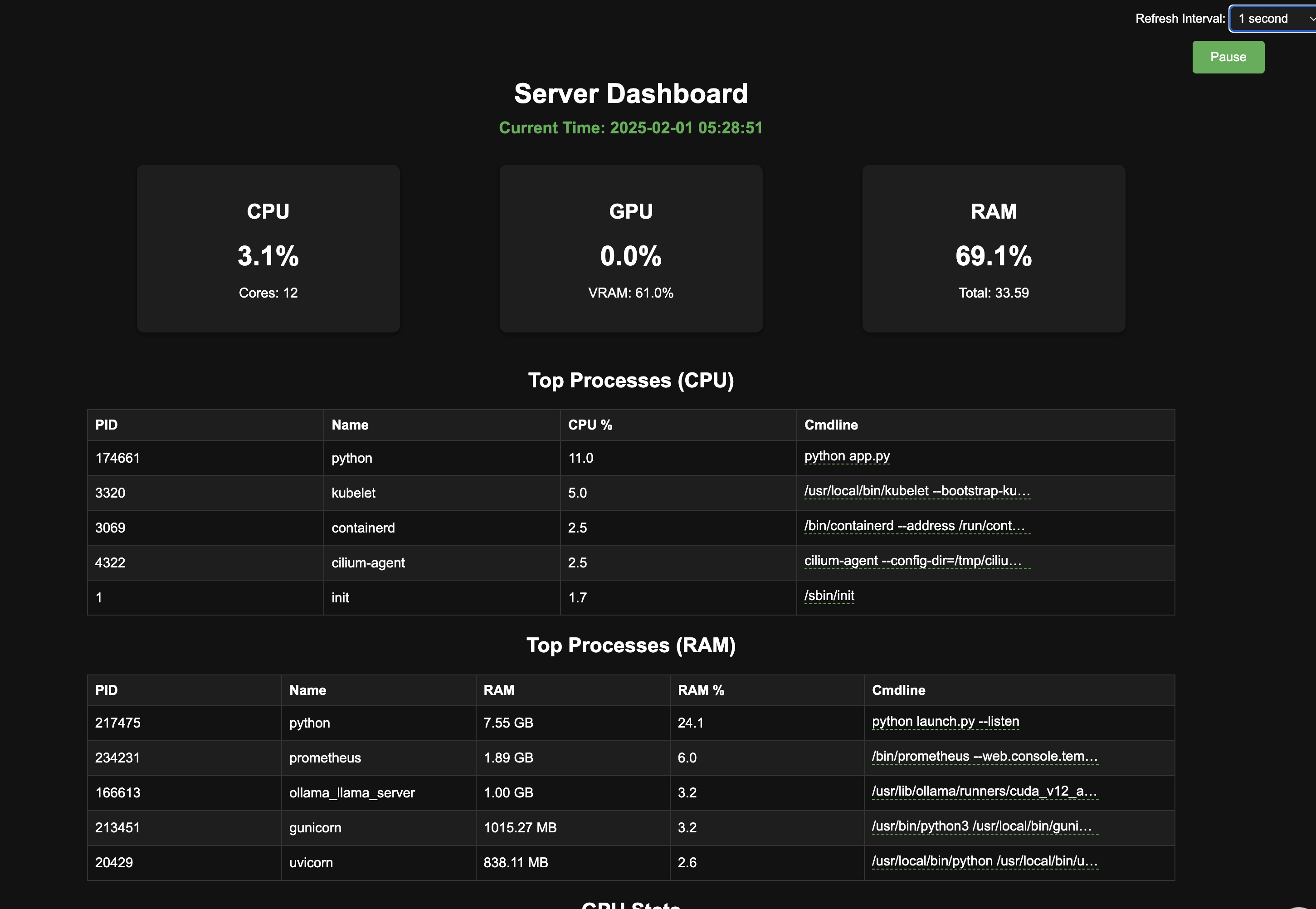
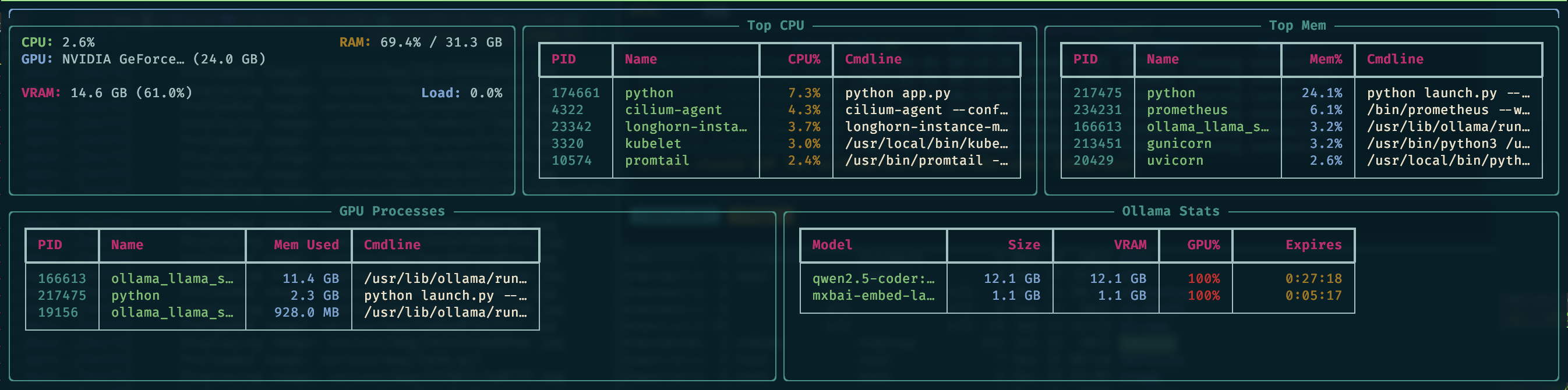
## 🚀 Getting Started
Ready to get your Sys-Stats Dashboard up and running? Follow these steps:
### 🐳 Running with Docker
#### Requirements
Ensure you have the following installed on your system:
- Docker 🐳
- NVIDIA drivers (if you want GPU monitoring) 🎮
#### Installation
1. **Clone the Repository:**
```bash
git clone https://github.com/obeone/sys-stats.git
cd sys-stats
`````
1. **Running the System:**
- **With nvidia GPU Support:**
```bash
docker compose -f compose.yaml -f compose.gpu.yaml up -d
```
- **Without nvidia GPU Support:**
```bash
docker compose up -d
```
The service will be running at `http://localhost:5000`.
### ⚙️ Running Without Docker
If you prefer to run the Sys-Stats Dashboard directly on your machine without using Docker, follow these steps for a seamless setup:
#### Prerequisites
Before setting up the project, make sure you have the following prerequisites installed:
- **Python 3.12+**: You'll need Python to run the application natively.
- **pip**: Python's package manager to install required dependencies.
- **NVIDIA drivers**: For GPU monitoring (if applicable).
#### Setup Instructions
1. **Clone the Repository:**
Begin by cloning the repository to your local machine:
```bash
git clone https://github.com/obeone/sys-stats.git
cd sys-stats
```
2. **Create a Virtual Environment:**
It's a good practice to use a virtual environment to manage dependencies:
```bash
python3 -m venv venv
source venv/bin/activate # On Windows use `venv\Scripts\activate`
```
3. **Install Dependencies:**
Install the required packages using `pip`:
```bash
pip install -r requirements.txt
```
4. **Configure Environment Variables:**
If you're using the Ollama API, ensure you set the `OLLAMA_API_URL` environment variable:
```bash
export OLLAMA_API_URL="http://localhost:11434"
```
5. **Start the Application:**
Run the Flask application:
```bash
python app.py
```
The application will start on `http://localhost:5000`.
## 📺 Using the CLI
To use the CLI for live monitoring, execute:
```bash
python cli.py [--url http://localhost:5000/stats] [--interval 5]
```
This command launches the CLI with a 5-second refresh interval.
You're all set! Now you can enjoy using the Sys-Stats Dashboard on your local setup without Docker.
## 🧑💻 Contributing
We welcome contributions from the community! Feel free to open issues, suggest features, or submit pull requests. Let's build a better Sys-Stats Dashboard together!
## 📝 Notes
This repo is clearly messy, but it was supposed to be only for my own use!