https://github.com/octobanana/fltrdr
A TUI text reader for the terminal.
https://github.com/octobanana/fltrdr
reader terminal text tui
Last synced: over 1 year ago
JSON representation
A TUI text reader for the terminal.
- Host: GitHub
- URL: https://github.com/octobanana/fltrdr
- Owner: octobanana
- License: mit
- Created: 2019-02-18T11:23:25.000Z (over 7 years ago)
- Default Branch: master
- Last Pushed: 2019-05-10T02:39:49.000Z (about 7 years ago)
- Last Synced: 2024-08-01T03:34:10.049Z (almost 2 years ago)
- Topics: reader, terminal, text, tui
- Language: C++
- Homepage: https://octobanana.com/software/fltrdr
- Size: 1.44 MB
- Stars: 483
- Watchers: 7
- Forks: 9
- Open Issues: 4
-
Metadata Files:
- Readme: README.md
- License: LICENSE
Awesome Lists containing this project
README
# Fltrdr
A TUI text reader for the terminal.
[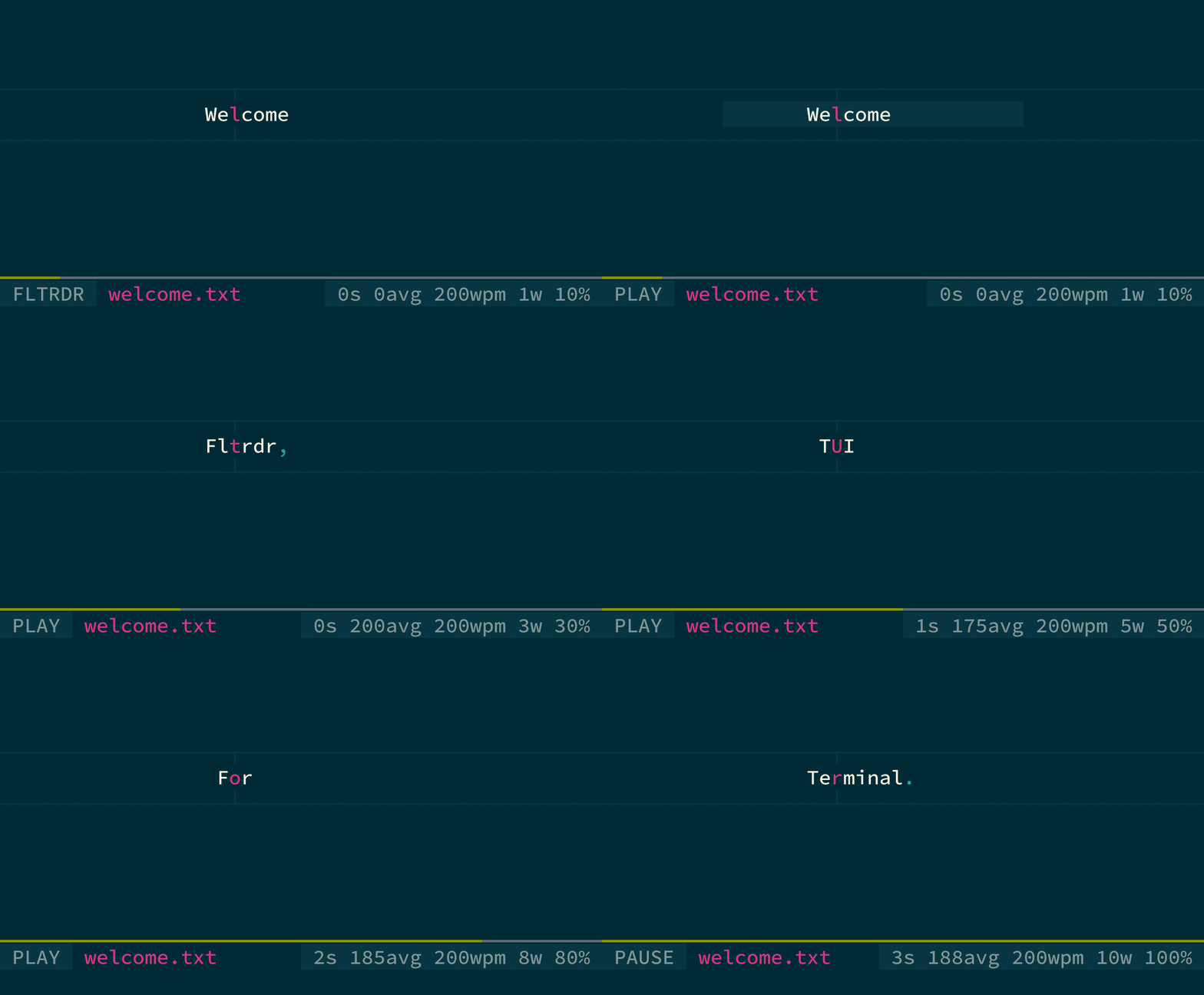](https://octobanana.com/software/fltrdr/blob/assets/fltrdr.mp4#file)
Click the above gif to view a video of __Fltrdr__ in action.
## Contents
* [About](#about)
* [Features](#features)
* [Usage](#usage)
* [Terminal Compatibility](#terminal-compatibility)
* [Pre-Build](#pre-build)
* [Dependencies](#dependencies)
* [Linked Libraries](#linked-libraries)
* [Included Libraries](#included-libraries)
* [Environment](#environment)
* [macOS](#macos)
* [Build](#build)
* [Install](#install)
* [Configuration](#configuration)
* [License](#license)
## About
__Fltrdr__, or *flat-reader*, is an interactive text reader for the terminal.
It is *flat* in the sense that the reader is word-based. It creates a
horizontal stream of words by ignoring all newline characters and removing
sequential whitespace.
Its purpose is to facilitate reading, scanning, and searching text.
The program has a play mode that moves the reader forward one word at a time,
along with a configurable words per minute (WPM) setting.
It can be used to read text from either a file or stdin.
### Features
* word-based text reader
* *vi* inspired key-bindings
* read UTF-8 encoded text from a file or stdin
* play mode with variable speed controlled through WPM
* in play mode, longer pauses occur on words that end in punctuation
* focus point to align the current word
* focus point tries to be smart about its placement,
ignoring any surrounding punctuation or plurality
* search forwards and backwards using regular expressions
* command prompt to interact with the program
* store your settings in a configuration file
* choose how many words are shown at a time
* colours can be customized
* chars/symbols can be customized
* show/hide parts of the interface
* mouse support for play/pause and scrolling text
* history file for command prompt inputs
* history file for search prompt inputs
* fuzzy search prompt input history based on current prompt input
* load and save reader state to continue where you last left off
## Usage
View the usage and help output with the `--help` or `-h` flag.
The help output contains the documentation for the key bindings
and commands for customization.
## Terminal Compatibility
This program uses raw terminal control sequences to manipulate the terminal,
such as moving the cursor, styling the output text, and clearing the screen.
Although some of the control sequences used may not work as intended on all terminals,
they should work fine on any modern terminal emulator.
## Pre-Build
This section describes what environments this program may run on,
any prior requirements or dependencies needed,
and any third party libraries used.
> #### Important
> Any shell commands using relative paths are expected to be executed in the
> root directory of this repository.
### Dependencies
* __C++17__ compiler/library
* __CMake__ >= 3.8
* __ICU__ >= 62.1
* __OpenSSL__ >= 1.1.0
### Linked Libraries
* __stdc++fs__ (libstdc++fs) included in the C++17 Standard Library
* __crypto__ (libcrypto) part of the OpenSSL Library
* __icuuc__ (libicuuc) part of the ICU library
* __icui18n__ (libicui18n) part of the ICU library
### Included Libraries
* [__parg__](https://github.com/octobanana/parg):
for parsing CLI args, included as `./src/ob/parg.hh`
### Environment
* __Linux__ (supported)
* __BSD__ (supported)
* __macOS__ (supported)
### macOS
Using a new version of __gcc__ or __llvm__ is __required__, as the default
__Apple llvm compiler__ does __not__ support C++17 Standard Library features such as `std::filesystem`.
A new compiler can be installed through a third-party package manager such as __Brew__.
Assuming you have __Brew__ already installed, the following commands should install
the latest __gcc__.
```
brew install gcc
brew link gcc
```
The following line will then need to be appended to the CMakeLists.txt file.
Replace the placeholder `` with the canonical path to the new __g++__ compiler binary.
```
set (CMAKE_CXX_COMPILER )
```
## Build
The following shell command will build the project in release mode:
```sh
./build.sh
```
To build in debug mode, run the script with the `--debug` flag.
## Install
The following shell command will install the project in release mode:
```sh
./install.sh
```
To install in debug mode, run the script with the `--debug` flag.
## Configuration
Base Config Directory (BASE): `${HOME}/.fltrdr`
State Directory: `BASE/state`
History Directory: `BASE/history`
Config File: `BASE/config`
State Files: `BASE/state/`
Search History File: `BASE/history/search`
Command History File: `BASE/history/command`
Use `--config=` to override the default config file.
Use `--config-base=` to override the default base config directory.
The base config directory and config file must be created by the user.
The config file in the base config directory must be named `config`.
It is a plain text file that can contain any of the
commands listed in the __Commands__ section of the `--help` output.
Each command must be on its own line. Lines that begin with the
`#` character are treated as comments.
If you want to permanently use a different base config directory,
such as `~/.config/fltrdr`, add the following line to your shell profile:
```sh
alias fltrdr="fltrdr --config-base ~/.config/fltrdr"
```
The following shell commands will create the base config directory
in the default location and copy over the example config file:
```sh
mkdir -pv ~/.fltrdr
cp -uv ./config/default ~/.fltrdr/config
```
Several config file examples can be found in the `./config` directory.
## License
This project is licensed under the MIT License.
Copyright (c) 2019 [Brett Robinson](https://octobanana.com/)
Permission is hereby granted, free of charge, to any person obtaining a copy
of this software and associated documentation files (the "Software"), to deal
in the Software without restriction, including without limitation the rights
to use, copy, modify, merge, publish, distribute, sublicense, and/or sell
copies of the Software, and to permit persons to whom the Software is
furnished to do so, subject to the following conditions:
The above copyright notice and this permission notice shall be included in all
copies or substantial portions of the Software.
THE SOFTWARE IS PROVIDED "AS IS", WITHOUT WARRANTY OF ANY KIND, EXPRESS OR
IMPLIED, INCLUDING BUT NOT LIMITED TO THE WARRANTIES OF MERCHANTABILITY,
FITNESS FOR A PARTICULAR PURPOSE AND NONINFRINGEMENT. IN NO EVENT SHALL THE
AUTHORS OR COPYRIGHT HOLDERS BE LIABLE FOR ANY CLAIM, DAMAGES OR OTHER
LIABILITY, WHETHER IN AN ACTION OF CONTRACT, TORT OR OTHERWISE, ARISING FROM,
OUT OF OR IN CONNECTION WITH THE SOFTWARE OR THE USE OR OTHER DEALINGS IN THE
SOFTWARE.