https://github.com/officiallyutso/easy_terminal
easy_terminal is a lightweight Dart package that allows Flutter developers to easily simulate and embed a classic terminal interface within their apps. Perfect for retro-style UIs, developer tools, or educational apps, it provides customizable input/output streams and a terminal-like experience with minimal setup.
https://github.com/officiallyutso/easy_terminal
dart package pubdev terminal-ui
Last synced: 27 days ago
JSON representation
easy_terminal is a lightweight Dart package that allows Flutter developers to easily simulate and embed a classic terminal interface within their apps. Perfect for retro-style UIs, developer tools, or educational apps, it provides customizable input/output streams and a terminal-like experience with minimal setup.
- Host: GitHub
- URL: https://github.com/officiallyutso/easy_terminal
- Owner: officiallyutso
- License: apache-2.0
- Created: 2025-06-24T23:56:38.000Z (about 1 year ago)
- Default Branch: main
- Last Pushed: 2025-06-28T18:11:40.000Z (about 1 year ago)
- Last Synced: 2025-11-01T04:06:28.674Z (9 months ago)
- Topics: dart, package, pubdev, terminal-ui
- Language: Dart
- Homepage: https://pub.dev/packages/easy_terminal
- Size: 514 KB
- Stars: 4
- Watchers: 0
- Forks: 0
- Open Issues: 0
-
Metadata Files:
- Readme: README.md
- Changelog: CHANGELOG.md
- License: LICENSE
Awesome Lists containing this project
README
# Easy Terminal Dart Package
A fully customizable terminal-style UI toolkit for Flutter that brings the power and aesthetics of command-line interfaces to your mobile and desktop applications.
[](https://pub.dev/packages/easy_terminal)
[](https://opensource.org/licenses/MIT)
[](https://flutter.dev)
## API Documentation
Complete API documentation is available at [pub.dev/documentation/easy_terminal](https://pub.dev/documentation/easy_terminal/latest/). All public APIs are fully documented with examples and usage instructions.
## Example
A complete example application demonstrating all package features is available in the `/example` directory. Run it with:
```bash
cd example
flutter run
```
The example includes:
- Basic terminal implementation
- Custom theming
- Command handling
- All widget demonstrations
- Interactive tutorials
## Usage Examples
These screenshots demonstrate the practical implementation of the package features:
- **Responsive Design**: The interface adapts well to different screen sizes
- **User Experience**: Clean, intuitive navigation and interaction patterns
- **Feature Integration**: Seamless integration of package functionality within the demo app
- **Customization**: Various configuration options available to developers
- **Commands**: Configurable commands to perform any task is available
### Feature Demonstrations
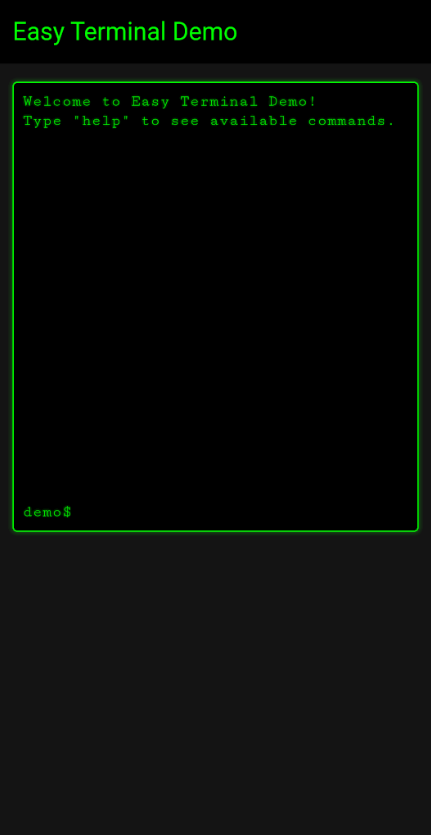
Main application interface showing the primary features and layout

Demonstration of key package functionality in action

Additional feature showcase highlighting package capabilities
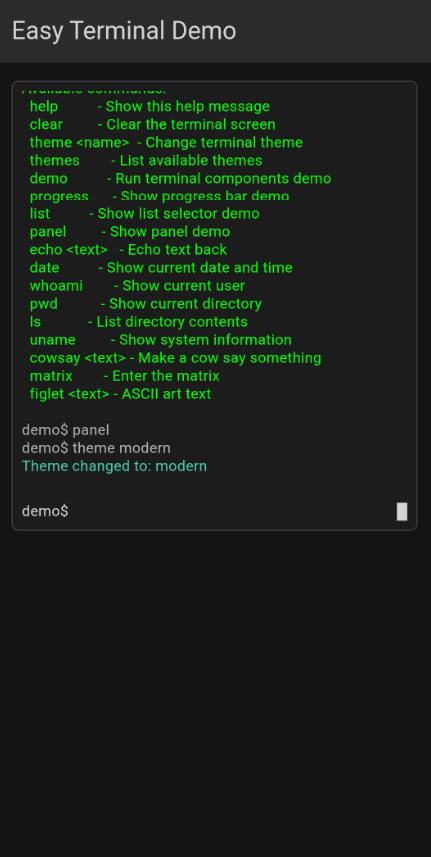
Configuration interface demonstrating package customization options
## Getting Started
To integrate similar functionality in your own project, refer to the package documentation on pub.dev and use these screenshots as reference for expected behavior and UI patterns.
## Features
- **Terminal View** - Complete terminal emulation with command input, output display, and history
- **Input Components** - Advanced terminal-style input fields with autocomplete and command history
- **List Selectors** - Interactive terminal-style selection menus with keyboard navigation
- **Progress Bars** - ASCII-style progress indicators with customizable styling
- **Panels** - Bordered containers with optional titles for organizing terminal content
- **Themes** - Comprehensive theming system with support for colors, fonts, effects, and styling
- **Command Parsing** - Built-in command parser with support for arguments and flags
- **Keyboard Handling** - Full keyboard support including history navigation, shortcuts, and special keys
- **Box Drawing** - Extensive collection of Unicode box drawing characters and utilities
- **Visual Effects** - Optional scanlines, glow effects, and retro styling
## Use Cases
This package is perfect for:
- **Developer Tools** - Build CLI-style interfaces for development tools, debuggers, and IDEs
- **System Monitoring** - Create dashboards with terminal aesthetics for server monitoring
- **Games** - Develop retro-style games, hacking simulators, or text-based adventures
- **Educational Apps** - Build interactive coding tutorials or command-line learning tools
- **Admin Panels** - Design system administration interfaces with terminal styling
- **Data Entry** - Create efficient forms with terminal-style input and navigation
- **IoT Interfaces** - Build control panels for embedded systems and IoT devices
- **Prototyping** - Quickly mock up CLI tools and terminal applications
## Installation
Add this to your package's `pubspec.yaml` file:
```yaml
dependencies:
easy_terminal: ^0.0.1
```
Then run:
```bash
flutter pub get
```
## Quick Start
### Basic Terminal View
```dart
import 'package:flutter/material.dart';
import 'package:easy_terminal/easy_terminal.dart';
class MyTerminal extends StatefulWidget {
@override
_MyTerminalState createState() => _MyTerminalState();
}
class _MyTerminalState extends State {
final GlobalKey _terminalKey = GlobalKey();
final TerminalTheme theme = TerminalTheme(
backgroundColor: Color(0xFF000000),
foregroundColor: Color(0xFF00FF00),
cursorColor: Color(0xFF00FF00),
fontFamily: 'Courier New',
fontSize: 14.0,
);
@override
Widget build(BuildContext context) {
return Scaffold(
body: TerminalView(
key: _terminalKey,
theme: theme,
prompt: 'user@system:~\$ ',
onCommand: _handleCommand,
initialText: [
'Welcome to Easy Terminal!',
'Type "help" for available commands.',
],
),
);
}
void _handleCommand(TerminalCommand command) {
switch (command.command.toLowerCase()) {
case 'help':
_terminalKey.currentState?.addOutput(
'Available commands:\n'
' help - Show this help message\n'
' clear - Clear the screen\n'
' echo - Echo text back\n'
' date - Show current date',
);
break;
case 'clear':
_terminalKey.currentState?.clearScreen();
break;
case 'echo':
_terminalKey.currentState?.addOutput(command.args.join(' '));
break;
case 'date':
_terminalKey.currentState?.addOutput(DateTime.now().toString());
break;
default:
_terminalKey.currentState?.addOutput(
'Command not found: ${command.command}',
color: theme.errorColor,
);
}
}
}
```
### Terminal Input with Autocomplete
```dart
TerminalInput(
theme: theme,
prompt: 'Enter command: ',
placeholder: 'Type a command...',
suggestions: ['help', 'clear', 'echo', 'date', 'exit'],
onSubmitted: (input) {
print('Command entered: $input');
},
enableHistory: true,
)
```
### List Selector
```dart
TerminalListSelector(
items: ['Option 1', 'Option 2', 'Option 3', 'Option 4'],
theme: theme,
title: 'Select an option:',
onSelected: (item, index) {
print('Selected: $item at index $index');
},
showNumbers: true,
selectedIndicator: '▶ ',
unselectedIndicator: ' ',
)
```
### Progress Bar
```dart
TerminalProgressBar(
progress: 0.75,
theme: theme,
label: 'Loading...',
width: 40,
showPercentage: true,
fillChar: '█',
emptyChar: '░',
)
```
### Themed Panel
```dart
TerminalPanel(
title: 'System Information',
theme: theme,
child: Column(
crossAxisAlignment: CrossAxisAlignment.start,
children: [
TerminalText(text: 'CPU: 45%', theme: theme),
TerminalText(text: 'Memory: 2.1GB / 8GB', theme: theme),
TerminalText(text: 'Disk: 156GB / 512GB', theme: theme),
],
),
)
```
## Theming
Easy Terminal provides extensive theming capabilities:
```dart
final customTheme = TerminalTheme(
backgroundColor: Color(0xFF1E1E1E),
foregroundColor: Color(0xFF00D4AA),
cursorColor: Color(0xFFFFFFFF),
selectionColor: Color(0x4000D4AA),
borderColor: Color(0xFF00D4AA),
errorColor: Color(0xFFFF5555),
successColor: Color(0xFF50FA7B),
warningColor: Color(0xFFFFB86C),
fontFamily: 'Fira Code',
fontSize: 16.0,
lineHeight: 1.4,
enableScanlines: true,
enableGlow: true,
glowRadius: 2.0,
borderRadius: 8.0,
borderWidth: 2.0,
);
```
## Components Overview
### Core Components
| Component | Description |
|-----------|-------------|
| `TerminalView` | Complete terminal interface with command input/output |
| `TerminalInput` | Advanced input field with history and autocomplete |
| `TerminalText` | Styled text rendering with theme support |
| `TerminalPanel` | Bordered container for organizing content |
| `TerminalListSelector` | Interactive selection menu with keyboard navigation |
| `TerminalProgressBar` | ASCII-style progress indicators |
### Models
| Model | Purpose |
|-------|---------|
| `TerminalTheme` | Comprehensive theming configuration |
| `TerminalBuffer` | Text buffer management with scrolling |
| `TerminalCommand` | Command parsing with arguments and flags |
| `TerminalCursor` | Cursor state and positioning |
### Utilities
| Utility | Features |
|---------|----------|
| `KeyboardHandler` | Command history, keyboard shortcuts, special keys |
| `BoxDrawing` | Unicode box drawing characters and utilities |
| `ColorUtils` | Color manipulation and effects |
## Advanced Features
### Command Parsing
```dart
final command = TerminalCommand.parse('git commit -m "Initial commit" --verbose');
print(command.command); // 'git'
print(command.args); // ['commit']
print(command.flags); // {'m': 'Initial commit', 'verbose': 'true'}
```
### Box Drawing
```dart
// Create a box
final box = BoxDrawing.createBox(20, 10, doubleLine: true);
// Progress bar
final progress = BoxDrawing.createProgressBar(0.7, 30,
fillChar: BoxDrawing.fullBlock,
emptyChar: BoxDrawing.lightShade,
);
```
### Buffer Management
```dart
final buffer = TerminalBuffer(maxLines: 1000);
buffer.addText('Hello, Terminal!');
buffer.addLine(TerminalLine(
content: 'Error occurred',
color: Colors.red,
isInput: false,
));
// Get visible lines for display
final visibleLines = buffer.getVisibleLines(25);
```
## Keyboard Shortcuts
Easy Terminal supports standard terminal keyboard shortcuts:
- `Ctrl+C` - Clear current input
- `Ctrl+L` - Clear screen
- `Ctrl+D` - EOF signal
- `↑/↓` - Navigate command history
- `Tab` - Autocomplete suggestions
- `Esc` - Close suggestions/cancel
- `Enter` - Execute command
- `Backspace` - Delete character
- `Home/End` - Navigate to line start/end
## Examples
The package includes several example implementations:
1. **Basic Terminal** - Simple command-line interface
2. **File Manager** - Terminal-style file browser
3. **System Monitor** - Resource monitoring dashboard
4. **Code Editor** - Terminal-based text editor
5. **Game Terminal** - Interactive text adventure
6. **Developer Console** - Debug console for applications
## Documentation Standards
This package follows Dart documentation standards with comprehensive dartdoc comments for all public APIs. Key documentation features include:
- **Complete API Coverage** - All public classes, methods, and properties documented
- **Usage Examples** - Practical code examples for every component
- **Parameter Descriptions** - Detailed explanations of all parameters
- **Return Value Documentation** - Clear descriptions of return values
- **Exception Documentation** - Documented exceptions and error conditions
- **Cross-References** - Linked references between related APIs
## Testing
The package includes comprehensive tests covering:
- Unit tests for all core functionality
- Widget tests for UI components
- Integration tests for complete workflows
- Performance tests for large datasets
- Platform-specific tests for all supported platforms
Run tests with:
```bash
flutter test
```
## Performance Considerations
- Text rendering is optimized for large amounts of terminal output
- Buffer management automatically handles memory limits
- Keyboard input is debounced for smooth performance
- Themes support hardware acceleration for visual effects
## Platform Support
Easy Terminal works on all Flutter platforms:
- iOS
- Android
- Web
- Windows
- macOS
- Linux
## Migration Guide
### From version 0.0.1 to latest
No breaking changes in current version. All existing code remains compatible.
## Troubleshooting
### Common Issues
**Issue**: Terminal not responding to keyboard input
**Solution**: Ensure the terminal widget has focus and is wrapped in a `Focus` widget.
**Issue**: Custom fonts not loading
**Solution**: Verify font files are included in `pubspec.yaml` and `flutter clean` has been run.
**Issue**: Performance issues with large output
**Solution**: Use `TerminalBuffer.maxLines` to limit buffer size and enable virtual scrolling.
### Debug Mode
Enable debug mode for additional logging:
```dart
TerminalView(
debugMode: true,
// ... other properties
)
```
## Contributing
Contributions are welcome! Please read our contributing guidelines and submit pull requests to our GitHub repository.
### Development Setup
1. Fork the repository
2. Create a feature branch
3. Make your changes
4. Add tests for new functionality
5. Ensure all tests pass
6. Update documentation
7. Submit a pull request
### Code Style
This project follows the official Dart style guide and uses the following linting rules:
- `flutter_lints` for Flutter-specific rules
- `public_member_api_docs` for documentation requirements
- Custom rules for terminal-specific code patterns
## License
This project is licensed under the MIT License - see the [LICENSE](LICENSE) file for details.
## Changelog
See [CHANGELOG.md](CHANGELOG.md) for a detailed history of changes.
## Support
If you find this package helpful, please consider:
- Giving it a star on GitHub
- Reporting issues and bugs
- Contributing improvements
- Sharing it with other developers
For questions and support, please open an issue on our GitHub repository.
## Acknowledgments
Special thanks to the Flutter community and contributors who helped make this package possible.
## Related Packages
- [flutter_terminal](https://pub.dev/packages/flutter_terminal) - Alternative terminal implementation
- [console](https://pub.dev/packages/console) - Console utilities for Dart
- [terminal_view](https://pub.dev/packages/terminal_view) - Basic terminal view widget
## Badges and Quality Metrics
[](https://pub.dev/packages/easy_terminal/score)
[](https://pub.dev/packages/easy_terminal/score)
[](https://pub.dev/packages/easy_terminal/score)
[](https://pub.dev/packages/easy_terminal)
[](https://opensource.org/licenses/MIT)
[](https://flutter.dev)
---
*This package is actively maintained and regularly updated. Please check the [changelog](CHANGELOG.md) for the latest updates and improvements.*