https://github.com/offline-gmbh/oc-gdpr-plugin
October CMS plugin to make websites GDPR and ePrivacy compliant
https://github.com/offline-gmbh/oc-gdpr-plugin
eprivacy gdpr octobercms octobercms-plugin
Last synced: about 1 year ago
JSON representation
October CMS plugin to make websites GDPR and ePrivacy compliant
- Host: GitHub
- URL: https://github.com/offline-gmbh/oc-gdpr-plugin
- Owner: OFFLINE-GmbH
- License: mit
- Created: 2018-06-05T06:36:31.000Z (about 8 years ago)
- Default Branch: develop
- Last Pushed: 2024-09-05T15:16:28.000Z (almost 2 years ago)
- Last Synced: 2025-06-09T01:08:46.181Z (about 1 year ago)
- Topics: eprivacy, gdpr, octobercms, octobercms-plugin
- Language: HTML
- Homepage: https://octobercms.com/plugin/offline-gdpr
- Size: 837 KB
- Stars: 36
- Watchers: 7
- Forks: 20
- Open Issues: 8
-
Metadata Files:
- Readme: README.md
- License: LICENSE
Awesome Lists containing this project
README
# oc-gdpr-plugin
October CMS plugin to make websites GDPR compliant.
This plugin is available on the October Marketplace: https://octobercms.com/plugin/offline-gdpr
## Features
* [Cookie Consent Manager](#cookie-consent-manager)
* [Data retention](#data-retention)
## Cookie Consent Manager
This plugin provides two simple components to make your October installation GDPR compliant.
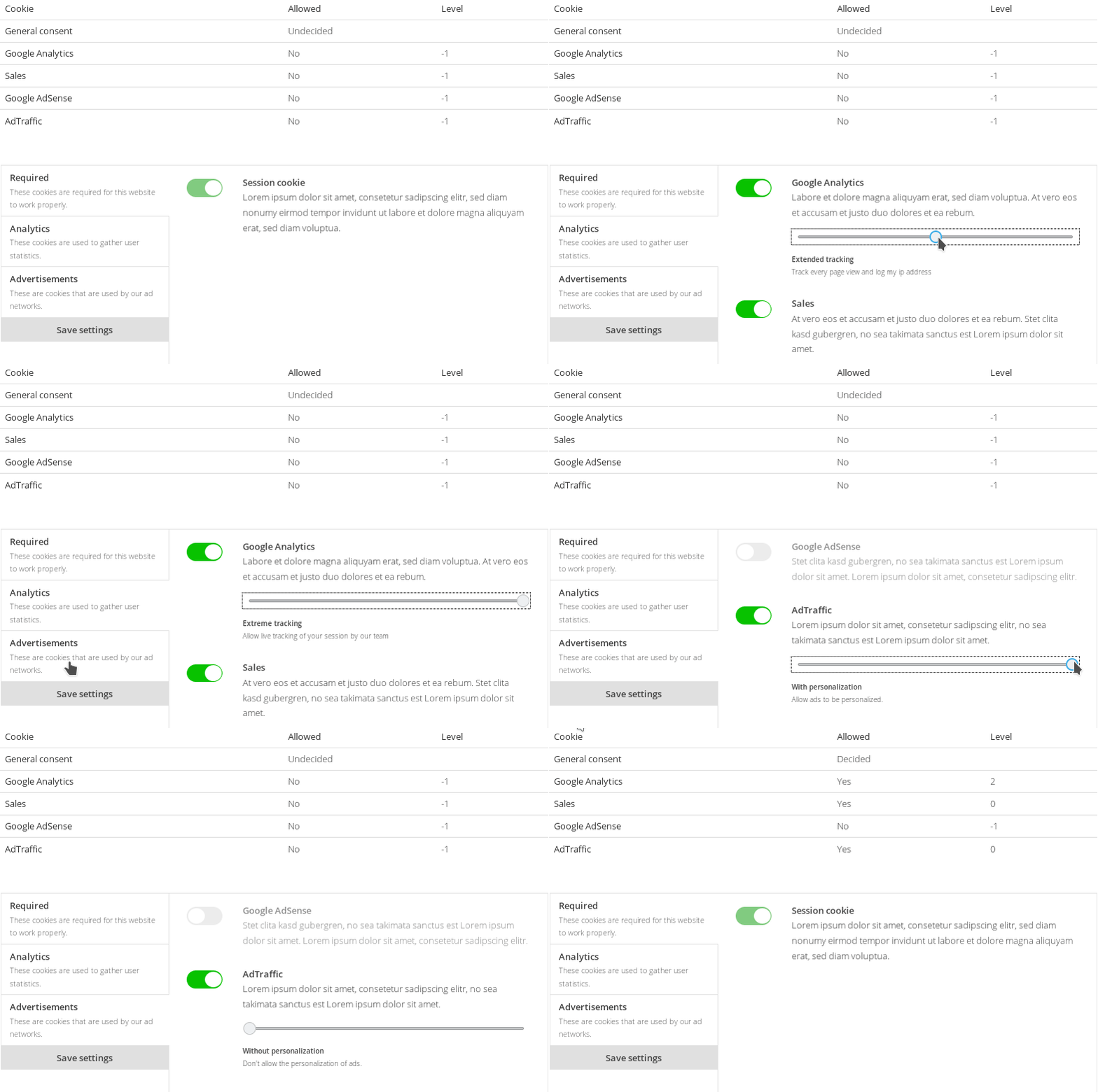
### Quick start
1. Define your cookie groups and cookies via the backend settings page.
You can also import a example preset by running `php artisan gdpr:import`
1. Place the `cookieManager` component on a `cookies.htm` page
1. Place the `cookieBanner` component on all of your layouts. Use the configuration listed below.
```ini
[cookieBanner]
include_css = 1
update_partial = "gdpr"
update_selector = "#gdpr-reload"
cookie_manager_page = "cookies"
==
{% component 'cookieBanner' %}
```
1. Create a new `gdpr.htm` partial. Include the partial in your layouts as shown below. Note the `#gdpr-reload`
wrapper.
```twig
{% partial 'gdpr' %}
```
1. Inside your `gdpr.htm` partial you can now conditionally include your dependencies by querying the cookie's `code`.
```twig
{% if gdprCookieAllowed('google-analytics') %}
{% endif %}
```
### Cookie manager
The `cookieManager` component gives a visitor more control over the cookies your site is using.
This component can simply be placed on a page and needs no further configuration.
```twig
title = "Cookies"
url = "/cookies"
layout = "default"
is_hidden = 0
[cookieManager]
==
{% component 'cookieManager' %}
```
#### Cookie presets
It is possible to define your cookie groups and cookies in a `yaml` file and import them using the `gdpr:import` console command.
This allows you to define cookies once and re-use them between installations.
```
php artisan gdpr:import --path=plugins/offline/gdpr/assets/presets/example_en.yaml --replace
```
You can find example definitions in the [`assets/presets`](./assets/presets) directory of this plugin.
You can optionally use the `--replace` flag to remove all existing cookie data and replace it with your preset.
If no path is specified, the plugin will load all presets from the configured `presets_path` and ask you which preset to import.
You can change the path where presets are loaded from by changing the `offline.gdpr::config.presets_path` config entry.
To do this, create the file `config/offline/gdpr/config.php` and return your custom path:
```php
'/path/to/your/presets',
];
```
### cookieBanner

The `cookieBanner` component displays a cookie banner on the first page view. There the user has the possibility to
enable and disable cookies that your website uses (defined via October's backend settings).
These settings are stored and made available in your partials using the `gdprCookieAllowed` helper. With this helper
you can check for the user's consent and optionally include your resources.
#### Installation
1. Define your cookie groups and cookies via the Backend settings
1. Add the `cookieBanner` component to all your **layouts**.
```
[cookieBanner]
include_css = 1
update_partial = "gdpr"
update_selector = "#gdpr-reload"
cookie_manager_page = "cookies"
==
{% component 'cookieBanner' %}
```
#### Log
You can enable a log via the backend settings so every cookie banner request gets logged. This is useful to get an idea of the number of users that do not accept a cookie request and therefore never end up in your analytics data.
The log only contains the user's session id and their decision.
#### Properties
If you don't want to include the default css use `include_css = 0` when including your component.
##### `cookieManager` page
Set the property `cookie_manager_page` to the page that contains the `cookieManager` component.
A `Advanced Settings` link will be placed on the `cookieBar` that links to this page. This enables the user to
further define what cookies are allowed.
#### Twig Helpers
##### `gdprCookieAllowed($code, $minLevel = 0)`
Check if a certain cookie is allowed to be included. You can optionally pass a cookie level to check if the user has
accepted a specific level of this cookie.
```twig
{% if gdprCookieAllowed('google-analytics') %}
{% endif %}
{% if gdprCookieAllowed('google-analytics', 3) %}
{% endif %}
```
##### `gdprAllowedCookieLevel($code)`
Get the max allowed level for a certain cookie. A return value of `-1` means the cookie is not allowed at all. A
value of `0` or higher means the cookie is allowed with the returned level value.
```twig
{% if gdprAllowedCookieLevel('google-analytics') >= 3 %}
{% endif %}
```
##### `gdprIsUndecided()`
Check if the user has made a decision about the cookies yet. This will return `true` on the second page view if the
user did not interact with the `cookieBanner` (silent opt-in).
## Data retention
The data retention functionality enables you to delete old plugin data after a specified amount of days.
You can specify the data retention policy for each plugin via October's backend settings.
> **Important**: To automatically delete old data [make sure you have set up the Task Scheduler](http://octobercms.com/docs/setup/installation#crontab-setup) correctly.
### Register your plugin
To register your plugin you have to listen for the `offline.gdpr::cleanup.register` event in your Plugin's boot method.
```php
public function boot()
{
\Event::listen('offline.gdpr::cleanup.register', function () {
return [
'id' => 'your-contact-form-plugin',
'label' => 'Custom Contact Form Plugin',
'models' => [
[
'label' => 'Contact form messages',
'comment' => 'Delete logged contact form messages',
'class' => MessageLog::class,
],
[
'id' => 'vendor-plugin-spam-messages', // The ID is required if you specify a closure. This should be unique to your plugin.
'label' => 'SPAM-Messages',
'comment' => 'Delete blocked SPAM messages',
'closure' => function (Carbon $deadline, int $keepDays) {
// Delete your old data here
},
],
],
];
});
}
```
You have to specify the following data:
| key | information |
|---|---|
| id | A unique identifier of your plugin |
| label | A human readable label for your plugin |
| models | An array of all your data collecting models |
As `models` you have to specify an array with the following data:
| key | information |
|---|---|
| id | A unique string to identify this model. Use only `_-a-z0-9`. Only required if you specify a closure. (ex. `offline-gdpr-spam-messages`) |
| label | A human readable label for the backend switch form widget |
| comment | A human readable comment for the backend switch form widget |
| closure | A closure that is called when the cleanup job is run. Make sure to also define an `id`. |
| class | A model class that defines a `gdprCleanup` method |
You have to specify either a `closure` or a `class` value. If both are specified the `closure` value will be used.
#### Cleanup method
You can either specify a `closure` or a model class that defines a `gdprCleanup` method. Both have the same
signature:
```php
public function gdprCleanup(\Carbon\Carbon $deadline, int $keepDays)
{
self::where('created_at', '<', $deadline)->each(function (self $item) {
$item->delete();
});
// or
// self::where('created_at', '<', $deadline)->delete();
}
```
This method is called whenever the cleanup job is run. `$deadline` contains a `Carbon` instance.
All data older than this date has to be deleted. `$keepDays` contains the number of days
that `$deadline` is in the past.
Make sure to use an `each/delete` loop if your model makes use of `deleting/deleted` model events.
#### Cleanup command
You can trigger the cleanup on demand via
> php artisan gdpr:cleanup