https://github.com/ogrodev/squad-management-tool
https://github.com/ogrodev/squad-management-tool
Last synced: about 2 months ago
JSON representation
- Host: GitHub
- URL: https://github.com/ogrodev/squad-management-tool
- Owner: ogrodev
- License: mit
- Created: 2021-03-31T12:52:09.000Z (about 5 years ago)
- Default Branch: main
- Last Pushed: 2021-04-09T18:31:16.000Z (about 5 years ago)
- Last Synced: 2023-07-21T03:28:51.639Z (almost 3 years ago)
- Language: JavaScript
- Homepage: squad-management-tool-sweetsoul.vercel.app
- Size: 1.47 MB
- Stars: 0
- Watchers: 1
- Forks: 0
- Open Issues: 0
-
Metadata Files:
- Readme: README.md
- License: LICENSE
Awesome Lists containing this project
README

Squad Management Tool


👉 [](https://squad-management-tool-ochre.vercel.app/) 👈
https://squad-management-tool-ochre.vercel.app/
## 1. Technologies used
This application was made using only the mostly needed technology within the application. Above is a descriptive list of everything used.
### 1.1. Layout
- Pure-css3
- HTML5 native elements
### 1.2. State Management
- [React Redux](https://react-redux.js.org/)
### 1.3. Routing
- [React Router](https://reactrouter.com/web/guides/quick-start)
### 1.4. API
- Comms via [Axios](https://github.com/axios/axios)
- Data from [AllSportApi](https://allsportsapi.com/) better organized at [MockApi](https://mockapi.io)
- [Teams endpoint](https://6040127af3abf00017785815.mockapi.io/api/v3/teams) & [Players endpoint](https://6040127af3abf00017785815.mockapi.io/api/v3/players)
----
## 2. Table of Content
- [1. Technologies used](#1-btechnologies-usedb)
- [1.1. Layout](#11-blayoutb)
- [1.2. State Management](#12-bstate-managementb)
- [1.3. Routing](#13-broutingb)
- [1.4. API](#14-bapib)
- [2. Table of Content](#2-btable-of-contentb)
- [3. Installation](#3-binstallationb)
- [4. Code explaining](#4-bcode-explainingb)
- [4.1. Folder Structure](#41-bfolder-structureb)
- [4.2. Dashboard page 📊](#42-bdashboard-pageb-)
- [4.2.1. TeamsBoard (My teams) 📋](#421-bteamsboard-my-teams-b)
- [4.2.2. AvgBoard ➗](#422-bavgboardb-)
- [4.2.3. PlayersHighlight 🌟](#423-bplayershighlightb-)
- [4.3. TeamEditor Page ✏️](#43-bteameditor-pageb-️)
- [4.3.1. TeamInfoForm ](#431-b-teaminfoform-b)
- [4.3.2. Team Information Section (TeamInformationSection.js) ✍️](#432-bteam-information-section-teaminformationsectionjsb-️)
- [4.3.3. Configure Squad Section(ConfigureSquadSection.js) ⚙️](#433-bconfigure-squad-sectionconfiguresquadsectionjsb-️)
- [4.3.4. Save Button 💾](#434-bsave-buttonb-)
- [4.3.5. Unsaved validation ⚠️](#435-bunsaved-validationb-️)
- [Testing Scope](#testing-scope)
----
## 3. Installation
This is just a showcase of my skills, but in case you want to see it in action on localhost, just follow the steps below.
Clone the repo
```bash
git clone https://github.com/SweetSoul/squad-management-tool
```
Enter folder and install deps
```bash
cd squad-management-tool
npm i
```
Start node server as you would in create-react-app
```bash
npm start
```
Open any browser in [localhost:3000](http://localhost:3000)
----
## 4. Code explaining
### 4.1. Folder Structure
First in the folder structure i tried to be as clean as the time let me be. I had the objective to deliver all features working in the given time.
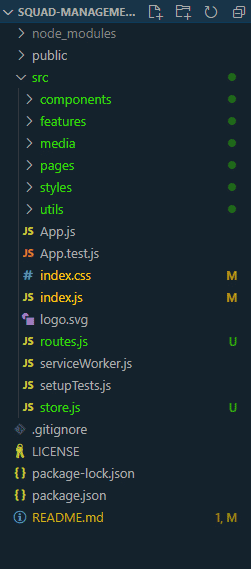
src/components -> Contains every component child from the pages and its childs
src/features -> Redux slices
src/media -> Used media
src/pages -> Parent pages to components (Are called in routes)
src/styles -> Contains all css modules for pages and components
src/utils -> Some reusable functions
### 4.2. Dashboard page 📊
There is 4 components being loaded
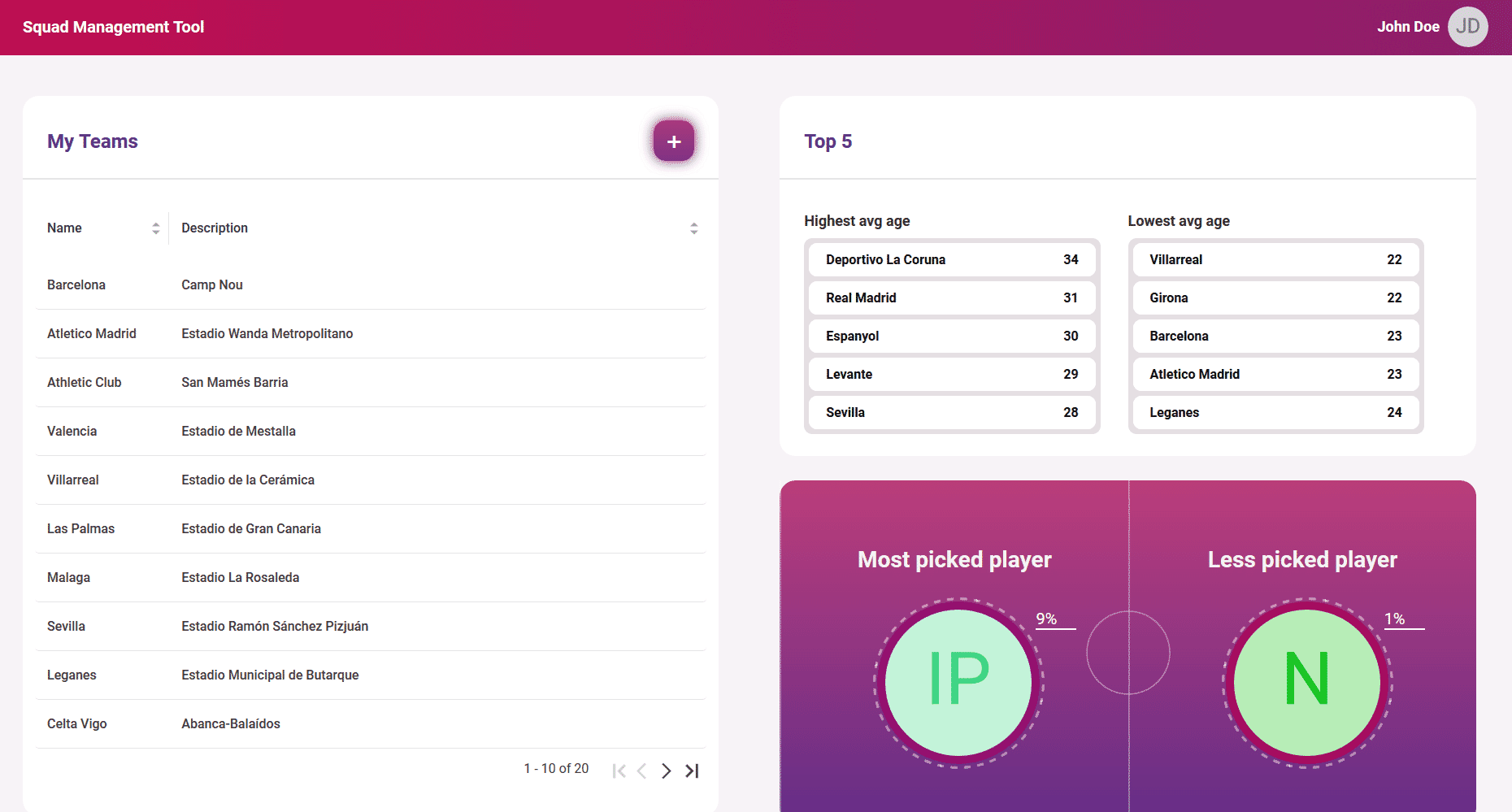
- Topbar - just the topbar
- TeamsBoard (My teams)
- AvgBoard (Top 5)
- PlayersHighlight (Most / Less pickeds player)
#### 4.2.1. TeamsBoard (My teams) 📋
This component is composed by html title row and a table which is a child component named SortingTable.js that gets the dataSource for table mounting (in our case the teams redux store)
Expect to see a fully functional table with pagination (10 to 10 rows) and sorting when clicking on one of the two table headings [Name || Description]
By default it won't sort by anything
```javascript
```
P.S.: TablePagination is built inside utils and has some needed props. I've made it a reusable component in order to access it easily. Props needed:
```javascript
```
#### 4.2.2. AvgBoard ➗
This components loads the playerStore from redux that was accessed by the page Dashboard and passed through props and calculates the averages after the first render, then it renders a list of divs organizing as requested.
```javascript
```
Inside the component we have all the logic that is needed.
#### 4.2.3. PlayersHighlight 🌟
As AvgBoard, it will access the playerStore passed from props and do his math. It uses the utils/ImageFromText.js to generate the image from given player name. If user access the teams and save players to new positions it will recalculate once going back to dashboard.
```javascript
```
### 4.3. TeamEditor Page ✏️
There are two ways of accessing the TeamEditor page component. First if we access directly throug '/team' route or '/team/:id' route. In either way the components are the same, only changing it's content and save action.
Eg.: If you enter through '/team' route you'll see the following title in rendered card

Now if you enter through route that passes id as a URL param you'll see
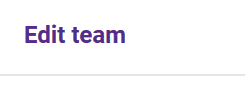
That's one of the many content that are loaded dynamically. Most of them accessing the teamStore and retrieving the correct value for the specified field.
#### 4.3.1. TeamInfoForm
Receives the two sections of inputs and perform some data gathering.
#### 4.3.2. Team Information Section (TeamInformationSection.js) ✍️
This section of the page holds many fields that could be filled with team information or empty in case you're trying to add a new team. VALIDATION OF THE FIELDS ARE ASYNCHRONOUS AND ON THE FLY, except Team type
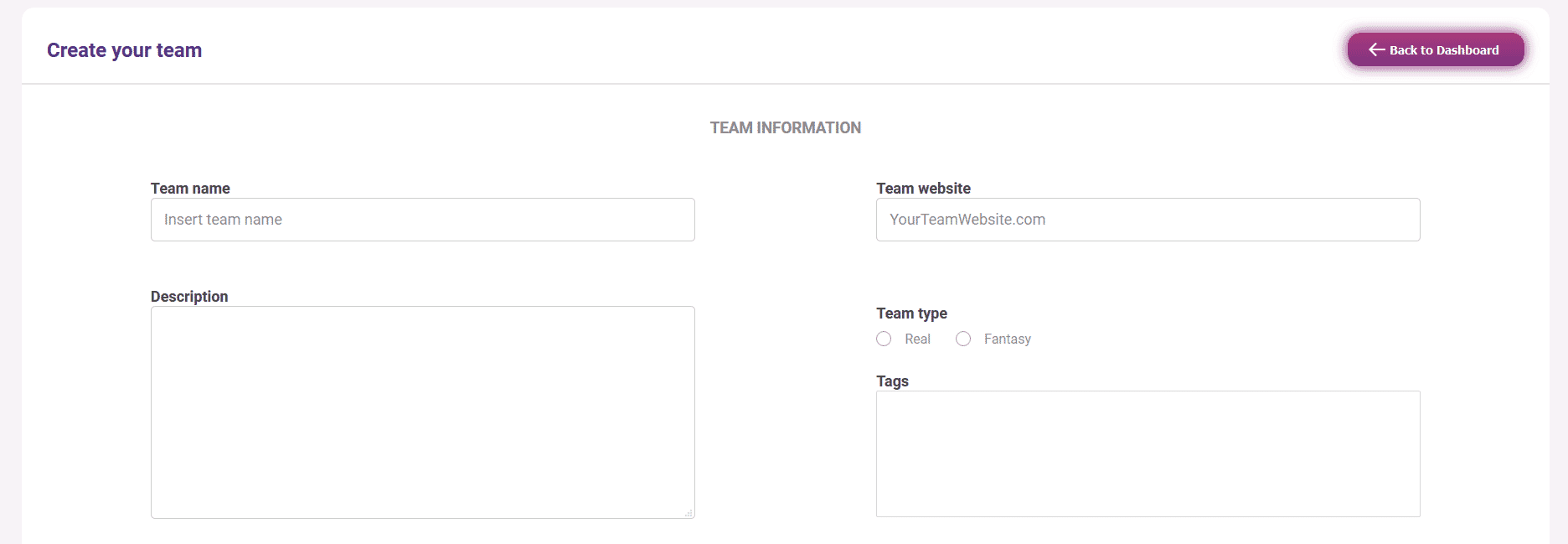
On the left side we have a col holding two form inputs. Plain and simple. Just the Team name will be validated.
On the right side there is two normal inputs, one text and one radio and a tag with a textarea. Team website is validated through The expected behaviour is to add a new tag when the user press 'ENTER', ';' or try to click out of the field with text inside the input. In this particular field there is a simple validation of tags, if you try to put a tag that is already present it would not accept it.
#### 4.3.3. Configure Squad Section(ConfigureSquadSection.js) ⚙️
In this section there is two cols, one with the formation select and the field (with the dropzone) and other with a serch input and the rendered cards of the players.
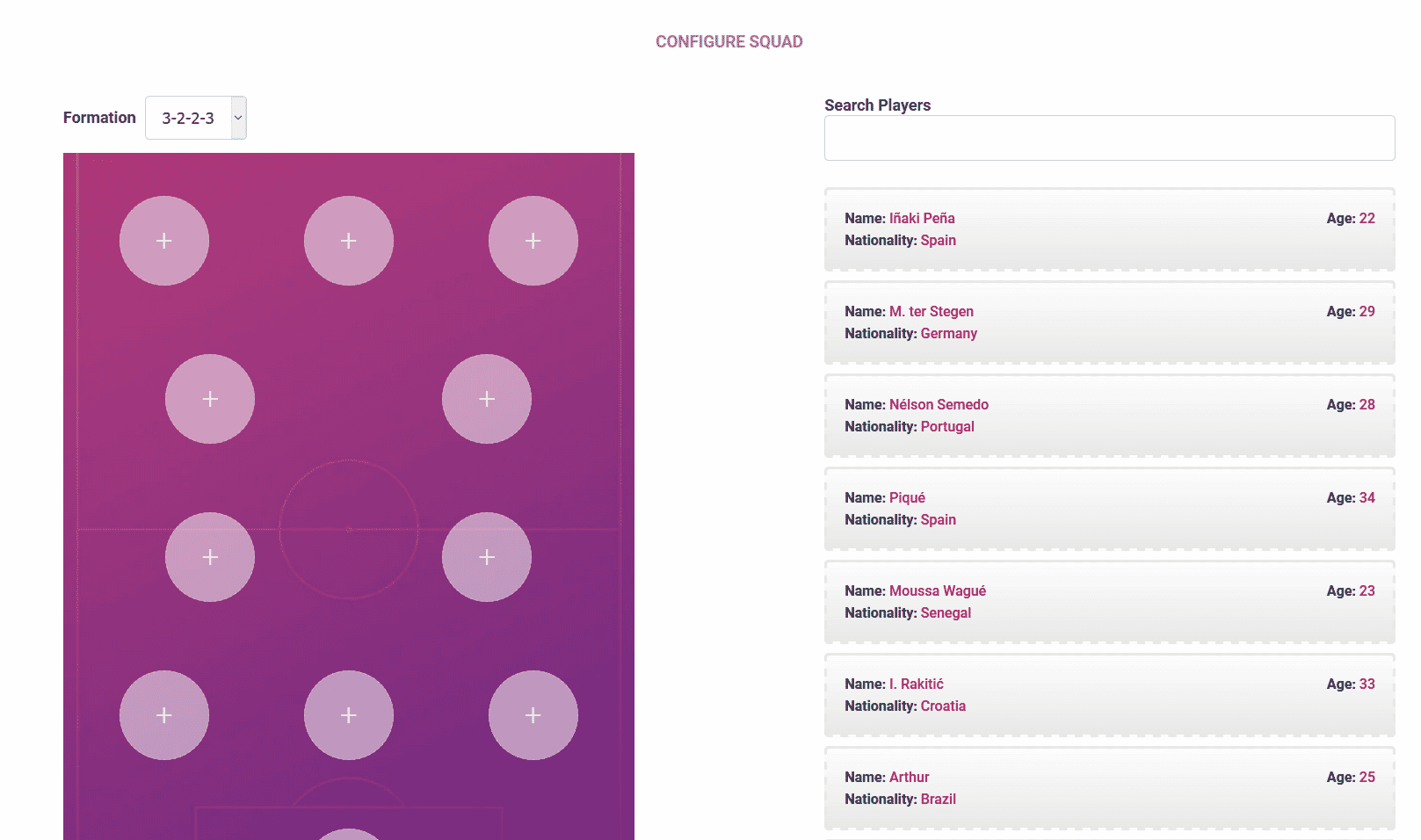
If you change the formation, the field would arrange the drop zones accordingly.
To assign a player, just drag its card and drop at spot that you want it to be. When doing this, it will generate an image with the First Name and Last Name letters. If you hover the player in field it will show a popover with further information of the player. As seen below. If you want to remove the player, you could just replace it for another player or click on it in the field.
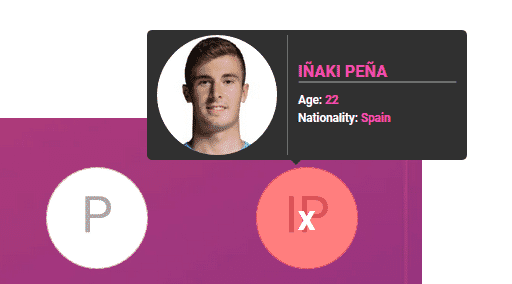
You will notice that uppon dragging the player and putting it into the field will remove it from the player list. And uppon entering some text in the search input you'll see the list being filtered by the name and everything working as they should.
#### 4.3.4. Save Button 💾
The save button will only be enabled if you change any information on the page. However, it will only save if you have filled the minimun required fields such as Team Name, Team Website and Team type fields.
#### 4.3.5. Unsaved validation ⚠️
If you try to exit the page without saving and having made some change, it will trigger a modal showing you what you are about to do.
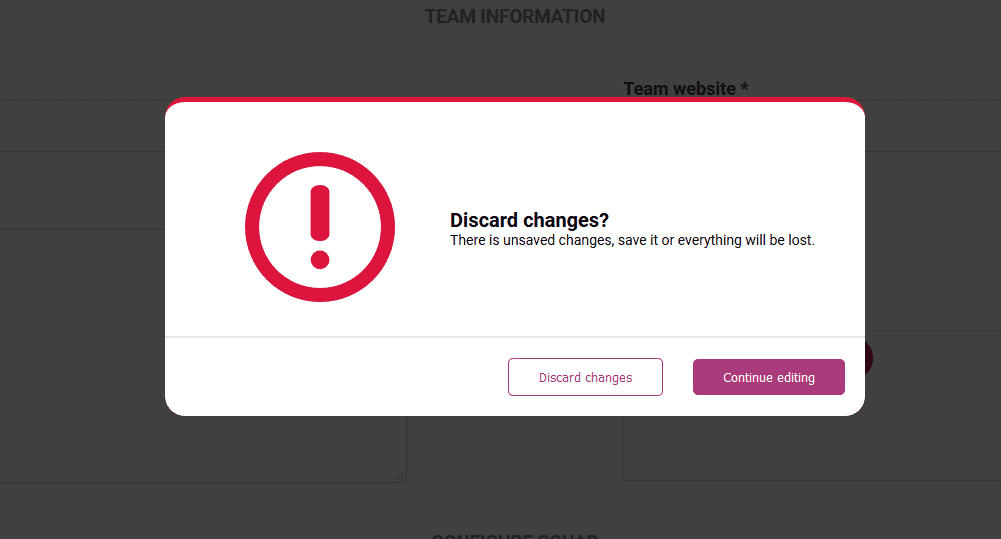
----
## Testing Scope
Coding...