https://github.com/oklas/redmine-color-tasks
Make your favorite redmine theme with colors tasks
https://github.com/oklas/redmine-color-tasks
css redmine-theme
Last synced: about 1 year ago
JSON representation
Make your favorite redmine theme with colors tasks
- Host: GitHub
- URL: https://github.com/oklas/redmine-color-tasks
- Owner: oklas
- Created: 2016-07-26T10:29:23.000Z (almost 10 years ago)
- Default Branch: master
- Last Pushed: 2017-02-03T19:59:37.000Z (over 9 years ago)
- Last Synced: 2025-05-07T23:08:12.175Z (about 1 year ago)
- Topics: css, redmine-theme
- Language: CSS
- Homepage:
- Size: 88.9 KB
- Stars: 9
- Watchers: 4
- Forks: 1
- Open Issues: 0
-
Metadata Files:
- Readme: README.md
Awesome Lists containing this project
README
# redmine-color-tasks
This is Redmine theme with tasks colours like Mantis tasks colors.
# Install
To install theme change dir to your redmine folder:
``` sh
# do it from redmine folder
cd public/themes
git clone https://github.com/oklas/redmine-color-tasks.git
```
Or download zip file from github site and unpack to dir
`${redmine}/public/themes/redmine-color-tasks`
# Configure
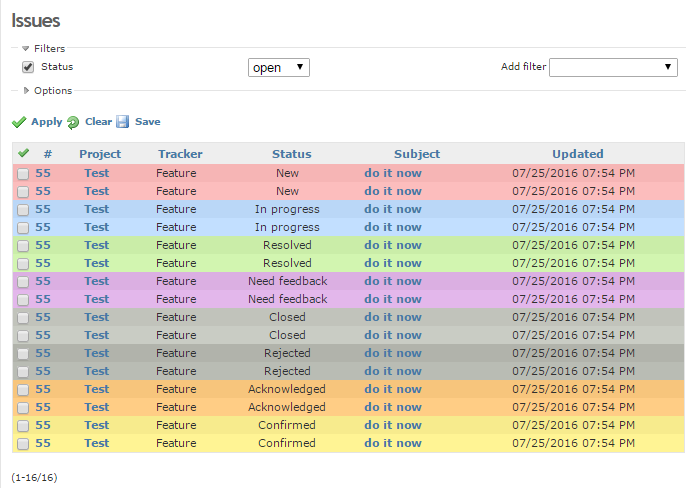
This theme suggest colors for existing Redmine task types
and two additional tasks **Acknowledged** (7) and **Confirmed** (8).
Additional tasks may be added in "Adminstration" > "Issue statuses".
This simple theme conceived as overloading of existing theme.
By default it overload the standart **classic** Redmine theme.
To enable theme go to "Administration" > "Settings" > "Display"
and select theme "Redmine-color-tasks"
It's look like this:
# Overloading
It is possible to overload any other theme by edition
application.css file of that theme. Simple add inclusion of
color_tasks.css to application.css file of your favorite theme.
For example to extends *NYSenate*
[Gitlab-looking](https://github.com/nysenate/nyss-gitlab-redmine-theme)
theme with colored tasks. The result will be like so:

To overload any theme add to its application.css next line,
at the begin of file (for preload) or at the end (for overlapping):
``` css
@import url(../../redmine-color-tasks/stylesheets/color-tasks.css);
```
And go to "Administration" > "Settings" > "Display" and
select just overloaded theme with modified application.css
License MIT
Serguei Okladnikov