https://github.com/olvr/nanofont
An extremely small pixel font file format and JavaScript renderer
https://github.com/olvr/nanofont
fonts javascript js13kgames
Last synced: 3 months ago
JSON representation
An extremely small pixel font file format and JavaScript renderer
- Host: GitHub
- URL: https://github.com/olvr/nanofont
- Owner: olvr
- Created: 2023-12-03T19:09:11.000Z (over 2 years ago)
- Default Branch: master
- Last Pushed: 2023-12-08T17:37:06.000Z (over 2 years ago)
- Last Synced: 2025-03-16T14:49:10.512Z (over 1 year ago)
- Topics: fonts, javascript, js13kgames
- Homepage: https://thort.net/articles/nanofont
- Size: 10.7 KB
- Stars: 0
- Watchers: 1
- Forks: 0
- Open Issues: 0
-
Metadata Files:
- Readme: README.md
Awesome Lists containing this project
README
# nanoFont
An extremely small pixel font file format and JavaScript renderer that doesn't sacrifice on style, 762 bytes combined, using the default font. For use anywhere that might be helpful. Suitable for [js13kGames](https://js13kgames.com/).
Original inspiration from [https://github.com/darkwebdev/tinyfont.js](https://github.com/darkwebdev/tinyfont.js)
More background, along with the file format specification, can be found in [this article about nanoFont](https://thort.net/articles/nanofont).
Some example output using nanoFont with various font files:
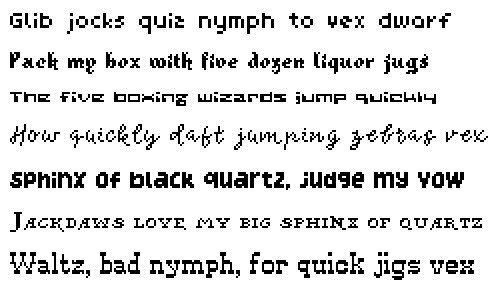
## Font files
The font files are in a binary format and support the full ASCII set of characters.
**There are two types of font file.**
**The first type** allows for characters that each fit into a grid up to 8x8 pixels.
The default nanofont.nf file is of this type.
In addition there are some more fonts of this type included in the fonts folder:
| Filename | Credit |
| -------------------- | ------:|
| bit-nanov-33.nf | [M-Dfonts](https://www.fontget.com/font/bitnanov33/) |
| mousetrap.nf | [Jeti](https://www.fontget.com/font/mousetrap) |
| neutrino.nf | [Jeti](https://www.fontget.com/font/neutrino) |
| planetary-contact.nf | [Jeti](https://www.fontget.com/font/planetary-contact/) |
**The second type** can accommodate characters up to 16x16 pixels but requires the extended version of the renderer.
The following included fonts are of this type:
| Filename | Credit |
| ---------------- | ------:|
bonefish.nf | [Jeti](https://www.fontget.com/font/bonefish/) |
cartridge.nf | [Jeti](https://www.fontget.com/font/cartridge/)
enchanted-sword.nf | [Jeti](https://www.fontget.com/font/enchanted-sword) |
fipps.nf | [Pheist](https://www.fontget.com/font/fipps/) |
lychee-soda.nf | [Jeti](https://www.fontget.com/font/lychee-soda/) |
pixel-cowboy.nf | [Bruno Herfst](https://www.fontget.com/font/pixel-cowboy) |
pixel-pirate.nf | [SparklyDest](https://www.fontget.com/font/pixel-pirate) |
## JavaScript renderer
There is an option between two JavaScript classes to load and render the fonts.
The minimal version (461 bytes) can only render font files with 8x8 characters and allows for setting the text, its position, size and color.
The extended option is slightly larger (604 bytes) but can render fonts of either type (8x8 or 16x16) and adds the option to align either the left, right or center of the text at the specified position. It also returns the width and height of the rendered text, which can be useful.
## Install
Just include the preferred nF class in your code.
## Use
The font class has two methods: load (to load a specified font file) and write (to write text onto the canvas).
With the nF class included, the nanofont.nf file in the same location as the script, and a canvas element in the HTML, the following example will display some text.
```JavaScript
// Canvas configuration
const canvas = document.querySelector('canvas');
const ctx = canvas.getContext("2d");
// Run once on page load
window.addEventListener("load", async () => {
// Create a new nanoFont object
const font = new nF();
// Set which canvas to write to
font.ctx = ctx;
// Load a font file
await font.load('nanofont.nf');
// Write some text using the font
font.write("Hello, world!");
});
```
## Syntax
### Minimal version
`write(text, x, y, size, color, context)`
- text: a string containing the text to be rendered. Default: empty string.
- x: horizontal coordinate from the left in pixels. Default: 0.
- y: horizontal coordinate from the top in pixels. Default: 0.
- size: the size of the font as a multiple of its natural size (1 is a one to one rendering of the pixel data). Can be fractional. Default: 3.
- color: the color of the text, as a string, parsed as a CSS color value. Default: '#000' (black).
- context: the canvas context to render the text to. Default: the object's ctx variable.
Context can also be set via the object variable ctx, which is the way it is mostly expected to be done:
`font.ctx = ctx`
Return value: The return value is undefined.
### Extended version
`write(text, x, y, alignment, size, color, context)`
The parameters are the same as above except for the addition of alignment.
- alignment: the horizontal alignment of the text, valid values are 0, 1 or 2. Default: 0.
- 0: the left edge of the text will be at the given x position.
- 1: the middle of the text will be at the given x position.
- 2: the right edge of the text will be at the given x position.
Return value: An array with two elements is returned [width, maxHeight]:
- width: the width in pixels of the text rendered
- maxHeight: the tallest character of the whole font in pixels. Note that it is the maximum height that could be taken up using the font, not necessarily the height of the specific text rendered.
## Examples
[Minimal example](https://thort.net/projects/nanofont/demo/8/)
[Extended example](https://thort.net/projects/nanofont/demo/16/)