https://github.com/omenapps/django-range-merge
Enables the range_merge Aggregate for Django on Postgres. range_merge "Computes the smallest range that includes ... the given ranges".
https://github.com/omenapps/django-range-merge
aggregates django function postgres postgresql range
Last synced: over 1 year ago
JSON representation
Enables the range_merge Aggregate for Django on Postgres. range_merge "Computes the smallest range that includes ... the given ranges".
- Host: GitHub
- URL: https://github.com/omenapps/django-range-merge
- Owner: OmenApps
- License: mit
- Created: 2022-10-09T04:23:33.000Z (almost 4 years ago)
- Default Branch: main
- Last Pushed: 2025-03-25T13:51:24.000Z (over 1 year ago)
- Last Synced: 2025-04-22T21:03:36.685Z (over 1 year ago)
- Topics: aggregates, django, function, postgres, postgresql, range
- Language: Python
- Homepage:
- Size: 171 KB
- Stars: 8
- Watchers: 1
- Forks: 0
- Open Issues: 0
-
Metadata Files:
- Readme: README.md
- Changelog: CHANGELOG.md
- License: LICENSE.md
Awesome Lists containing this project
README
# django-range-merge
A Django package that enables the PostgreSQL `range_merge` aggregate function for use with Django’s ORM.
`django-range-merge` provides access to PostgreSQL's `range_merge` aggregate function, which computes the smallest range that includes all input ranges. This is particularly useful when working with Django's range fields like `DateTimeRangeField`, `DateRangeField`, or `IntegerRangeField`.
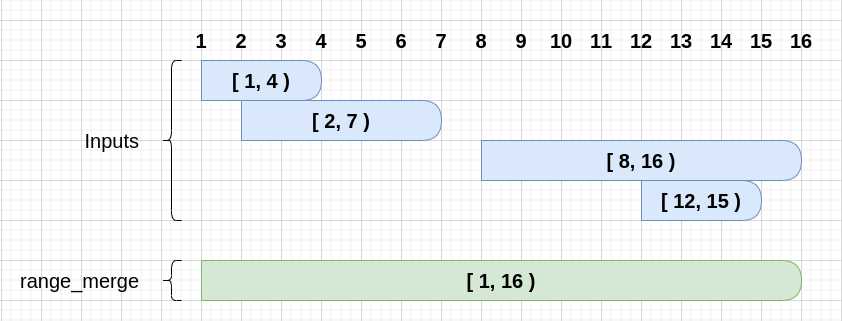
This package should only be used with Django projects using the Postgres database. See [Postgres docs on Range Functions](https://www.postgresql.org/docs/14/functions-range.html#RANGE-FUNCTIONS-TABLE).
Note: This app is still a work-in-progress, but currently works. Tests have not yet been implemented.
## Installation
```bash
pip install django-range-merge
```
Add to `INSTALLED_APPS`:
```python
INSTALLED_APPS = [
...
"django_range_merge",
...
]
```
Migrate to apply the aggregation to your database:
```bash
> python manage.py migrate
```
## Getting Started
Here is a quick example. We have an `Event` model with two different range fields: `period`, which contains the datetime range period during which the Event occurs; and `potential_visitors`, which is an approximation of the minimum and maximum number of people attending the Event.
We want two different views to help Event organizers understand some aggregate details about Events.
- **range_of_visitors_this_month**: Show the overall lowest and greatest number of people we expect for all events this month
- **overall_dates_of_funded_events**: Shows the overall range of dates for Events which are funded (the `is_funded` BooleanField is set to True)
models.py
```python
class Event(models.Model):
name = models.TextField()
period = models.DateTimeRangeField()
potential_visitors = models.IntegerRangeField()
is_funded = BooleanField(default=False)
class Meta:
verbose_name = "Event"
verbose_name_plural = "Events"
def __str__(self):
return self.name
```
date_utils.py (get a range covering the entire current month)
```python
from django.utils import timezone
from dateutil.relativedelta import relativedelta
from psycopg2.extras import DateTimeTZRange
def get_month_range():
"""Return a DateTimeRange range covering this entire month"""
today = timezone.now().date()
if today.day > 25:
today += timezone.timedelta(7)
this_month_start = today.replace(day=1)
next_month_start = this_month_start + relativedelta(months=1)
return DateTimeTZRange(this_month_start, next_month_start)
```
views.py
```python
from django.db.models import F, Aggregate
from django.template.response import TemplateResponse
from .date_utils import get_month_range
def range_of_visitors_this_month(request):
"""
e.g., given the following instances:
{"id" : 1, "name" : "Birthday", "potential_visitors" : "[2, 3)", ...}
{"id" : 2, "name" : "Bake Sale", "potential_visitors" : "[30, 50)", ...}
{"id" : 3, "name" : "Band Camp", "potential_visitors" : "[22, 28)", ...}
{"id" : 4, "name" : "Cooking Show", "potential_visitors" : "[7, 20)", ...}
{"id" : 5, "name" : "Pajama Day", "potential_visitors" : "[15, 30)", ...}
The result would be:
{'output': NumericRange(2, 50, '[)')}
"""
template = "base.html"
context = Event.objects.filter(period__overlap=get_month_range()).aggregate(
output=Aggregate(F("potential_visitors"), function="range_merge")
)
return TemplateResponse(request, template, context)
def overall_dates_of_funded_events(request):
template = "base.html"
context = Event.objects.filter(is_funded=True).aggregate(
output=Aggregate(F("period"), function="range_merge")
)
# Example result: {'output': DateTimeRange("2022-10-01 02:00:00", "2022-12-07 12:00:00", '[)')}
return TemplateResponse(request, template, context)
```
base.html
```html
{{ output }}
```
## Performance Considerations
- The `range_merge` aggregate operates efficiently on server side
- Indexes on range fields can improve query performance
- Consider using `values()` to limit data transfer when only ranges are needed
## Development and Testing Setup
This project uses Docker Compose for development and testing. Follow these steps to get started:
### Prerequisites
1. Make sure you have Docker and Docker Compose installed
2. Install `uv` tool: `pip install uv`
### Setting Up the Development Environment
1. Clone the repository:
```bash
git clone https://github.com/OmenApps/django-range-merge.git
cd django-range-merge
```
2. Create a virtual environment and install dependencies:
```bash
uv venv
source .venv/bin/activate # On Windows: .venv\Scripts\activate
uv sync --prerelease=allow --extra=dev
```
3. Build and start the Docker containers:
```bash
docker-compose up -d --build postgres
```
4. Run migrations:
```bash
python manage.py migrate
```
### Running Tests
Using `nox`:
```bash
nox -s tests
```
This will run tests across multiple Django versions.
### Development Database Setup
The project uses PostgreSQL for testing. The Docker Compose setup includes a PostgreSQL instance with the following configuration:
- Host: localhost
- Port: 5436 # To avoid conflicts with local PostgreSQL installations
- Database: postgres
- Username: postgres
- Password: postgres
The database is automatically configured when running tests through Docker Compose.
## License
The code in this repository is licensed under The MIT License. See LICENSE.md in the repository for more details.
## Contributing
Contributions are very welcome.
This project is currently accepting all types of contributions, bug fixes,
security fixes, maintenance work, or new features. However, please make sure
to have a discussion about your new feature idea with the maintainers prior to
beginning development to maximize the chances of your change being accepted.
You can start a conversation by creating a new issue on this repo summarizing
your idea.