https://github.com/omochice/deepl-translate-cli
Unofficial deepl client on CLI
https://github.com/omochice/deepl-translate-cli
cli deepl golang golang-application translation
Last synced: 11 months ago
JSON representation
Unofficial deepl client on CLI
- Host: GitHub
- URL: https://github.com/omochice/deepl-translate-cli
- Owner: Omochice
- License: mit
- Created: 2021-06-01T16:16:03.000Z (about 5 years ago)
- Default Branch: main
- Last Pushed: 2025-06-13T02:45:51.000Z (about 1 year ago)
- Last Synced: 2025-06-13T03:42:08.683Z (about 1 year ago)
- Topics: cli, deepl, golang, golang-application, translation
- Language: Go
- Homepage:
- Size: 64.5 KB
- Stars: 17
- Watchers: 2
- Forks: 3
- Open Issues: 7
-
Metadata Files:
- Readme: README.md
- License: LICENSE
Awesome Lists containing this project
README
[](https://github.com/Omochice/deepl-translate-cli/actions/workflows/ci.yml)
[](https://github.com/Omochice/deepl-translate-cli/actions/workflows/autorelease.yml)
# ✍️ [DeepL](https://www.deepl.com) Translate CLI (Unofficial)
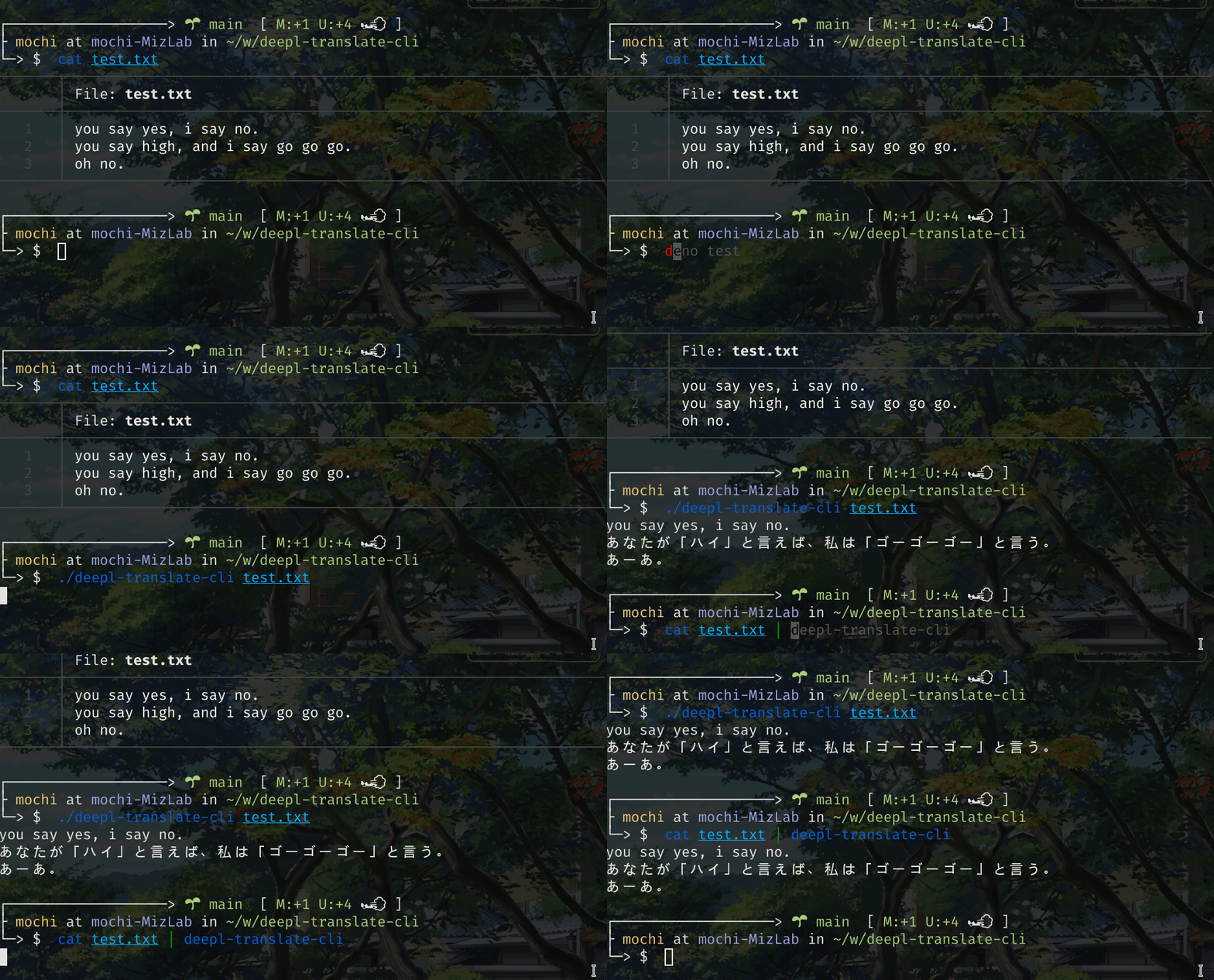
## Installation
### Via the [GitHub release page](https://github.com/Omochice/deepl-translate-cli/releases)
1. Download zipped file from [Releases](https://github.com/Omochice/deepl-translate-cli/releases).
2. Unzip downloaded file.
3. Move the executable file into a directory in your `PATH` (e.g., `$HOME/.local/bin/`).
### By `go install`
```console
go install github.com/Omochice/deepl-translate-cli@latest
```
## Basic usage
1. First, [get a DeepL access token](https://www.deepl.com/docs-api). It looks like a [UUID](https://en.wikipedia.org/wiki/Universally_unique_identifier) with the characters `:fx` appended to it.
2. Assign the access token to the `DEEPL_TOKEN` environment variable.
e.g., in `bash`:
```console
export DEEPL_TOKEN=
```
3. On the first run, if `$HOME/.config/deepl-translate-cli/setting.json` does not exist, it gets automatically created.
The format of the settings file is as shown below:
```json
{
"source_lang": "FILLIN",
"target_lang": "FILLIN"
}
```
For all existing languages that can be translated, as well as their identifying tags, see [this page](https://www.deepl.com/docs-api/translating-text/request/). You can also query the server directly:
```console
deepl-translate-cli languages
```
4. If the filename path is not specified, text is read from `STDIN`.
Currently, only one file path can be specified as an argument.
- If you want to select `source_lang`/`target_lang` _without_ using the settings file, you can use the command-line parameters `--source_lang (-s)` and `target_lang (-t)` instead.
```console
cat | deepl-translate-cli --source_lang ES --target_lang DE
```
- If you are a Pro plan user, switch to the correct endpoint URL with the `--pro` flag.
_**Note**: This feature has not been tested, because the developers only have a free plan._
```console
cat | deepl-translate-cli --pro
```
- Note that it's also possible to run `deepl-translate-cli` in interactive mode, when the input comes from a TTY and not a pipe. In this case, only the first sentence typed (terminated by pressing **ENTER**) will be sent via the API for translation. The before-mentioned flags will also be available in this mode.
## More advanced usage
`deepl-translate-cli` now includes more commands, namely,
- `deepl-translate-cli usage` which will query DeepL to return the number of characters still available for translations.
- `deepl-translate-cli languages` will show the languages currently supported by DeepL. By default, only the _source_ languages are listed; with the `--type target` flag, it will also show those languages (and variants) that are available as translation targets.
- `deepl-translate-cli glossary-language-pairs` retrieves the list of language pairs supported by the glossary feature. Right now, it only does that — you cannot use glossaries yet.
DeepL is also able to translate structured text, i.e. text inside HTML or XML tags. This requires using a few more parameters; see `./deepl-translate-cli translate --help` for a list of all the options. While all are supported and sent to DeepL for processing, there are many possible combinations (some of which make no sense) which haven't been thoroughly tested.
## Shell autocompletion (⚠️ experimental)
Under the `autocomplete` folder are three scripts to enable auto-completion (for `bash`, `zsh`, and PowerShell). To use these, do the following (the example is for `bash`):
```console
PROG=deepl-translate-cli source autocomplete/bash_autocomplete
```
## ⚠️ Warning! ⚠️
If you run the tests, these may actually use your API Token, and consume some of your monthly credits!
Make sure you call `deepl-translate-cli usage` every now and then, to be sure you're well within your limits (half a million characters per month for free accounts; however, unlike other services, Unicode characters just count as one character each!).
## TODO
- Support uploading documents for translation (the API allows that as well)
- Better configuration/settings support (the system, as it is now, offers too few choices)
- Make calls purely in JSON (as opposed to using `application/x-www-form-urlencoded` to post data, while retrieving the results in JSON)
- Write tests!
- Add more glossary-related options
## Known bugs 🪳
- When trying to run help _without_ a valid authentication token (which will be the case), the error message is confusing
- Help formatting is quite a bit off on many of the (larger) entries
- Wrong orders of parameters/commands give unexpected errors
- You can only give _one_ filename as input (to do more, you'll have to use shell scripting to browse through all files and feed them to `deepl-translate-cli`)
- The interactive command has some annoing quirks and just translates one single (non-structured) sentence; additionally, it has a _huge_ overhead (but it sort of works)
## Building
If you wish to embed the build's author in the executable binary (to distinguish _your_ build from someone else's), you can build this with
```console
go build -ldflags "-X main.TheBuilder="
```
## Disclaimer
None of the developers are affiliated with [DeepL](https://www.deepl.com/) and this code should not be considered to represent an endorsement by DeepL or any of its affiliates, partners or subsidiaries. It is released in the hope that it might be helpful to the Go programming community (which lacks official support by DeepL at the time of writing), without any warranty whatsoever (see [LICENSE](./LICENSE) for more information).