https://github.com/oncodash/ontoweaver
Easy integration of heterogeneous iterable data within Semantic Knowledge Graphs databases.
https://github.com/oncodash/ontoweaver
biocypher csv graph-database knowledge-graph ontologies pandas-dataframe python semantic-knowledge-graphs skg tables yaml
Last synced: 5 months ago
JSON representation
Easy integration of heterogeneous iterable data within Semantic Knowledge Graphs databases.
- Host: GitHub
- URL: https://github.com/oncodash/ontoweaver
- Owner: oncodash
- License: mit
- Created: 2024-02-09T12:41:53.000Z (over 2 years ago)
- Default Branch: main
- Last Pushed: 2026-01-06T14:29:37.000Z (5 months ago)
- Last Synced: 2026-01-08T08:07:35.138Z (5 months ago)
- Topics: biocypher, csv, graph-database, knowledge-graph, ontologies, pandas-dataframe, python, semantic-knowledge-graphs, skg, tables, yaml
- Language: Python
- Homepage: https://ontoweaver.readthedocs.io/en/latest/
- Size: 1.76 MB
- Stars: 15
- Watchers: 3
- Forks: 10
- Open Issues: 6
-
Metadata Files:
- Readme: README.md
- License: LICENSE
Awesome Lists containing this project
README
# OntoWeaver
OntoWeaver is a tool for transforming iterable data (like tables)
in Semantic Knowledge Graphs (SKG) databases.
OntoWeaver allows writing a simple declarative mapping to express how columns from
a table should be converted as typed nodes, edges or properties in an SKG.
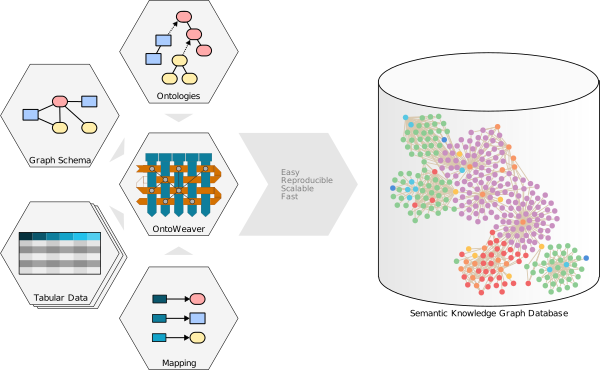
SKG databases allows for an easy integration of very heterogeneous data, and
OntoWeaver brings a reproducible approach to building them.
With OntoWeaver, you can very easily implement a script that will allow you
to automatically reconfigure a new SKG from the input data, each time you need it.
OntoWeaver has been tested on large scale biomedical use cases
(think: millions of nodes), and we can guarantee that it is simple to operate
by anyone having a basic knowledge of programming.
## Basics
### Mapping data
OntoWeaver provides a simple layer of abstraction on top of [BioCypher](https://biocypher.org),
which remains responsible for doing the ontology alignment,
supporting several graph database backends,
and allowing reproducible & configurable builds.
With a pure Biocypher approach, you would have to write a whole adapter by hand,
with OntoWeaver, you just have to express a mapping in YAML, looking like:
```yaml
row: # The meaning of an entry in the input table.
map:
column:
to_subject:
transformers: # How to map cells to nodes and edges.
- map: # Map a column to a node.
column:
to_object:
via_relation:
- map: # Map a column to a property.
column:
to_property:
for_object:
metadata: # Optional properties added to every node and edge.
- source: "My OntoWeaver adapter"
- version: "v1.2.3"
```
OntoWeaver can read anything that [Pandas](https://pandas.pydata.org/) can load,
which means a lot of tabular formats. It can also parse graphs from OWL files.
### Usage
To configure your SKG, you need input data, a mapping (see above), but also
a BioCyhper configuration: a [schema.yaml](https://biocypher.org/BioCypher/learn/tutorials/tutorial001_basics/#schema-configuration) and a [ibiocypher_config.yaml](https://biocypher.org/BioCypher/reference/biocypher-config/).
In most cases, you will just need to call the `ontoweave` command to build-up
the SKG you prepared:
```sh
ontoweave my_data.csv:my_mapping.yaml --import-script-run
```
If you're using OntoWeaver from its Git repository, you will have to indicate
the path to the command:
```sh
./bin/ontoweave data_A.csv:map_A.yaml data_B.tsv:map_B.yaml
```
The `ontoweave` command is very configurable, see `ontoweave --help` for more
details.
Detailed documentation with tutorials and a more detailed installation guide is available
[on the OntoWeaver website](https://ontoweaver.readthedocs.io/en/latest/).
### Installation
The project is written in Python and is tested with the
[UV](https://docs.astral.sh/uv/) environment manager.
You can install the necessary dependencies in a virtual environment like this:
```
git clone https://github.com/oncodash/ontoweaver.git
cd ontoweaver
uv venv
uv pip install .
```
UV will create a virtual environment according to your configuration (either
centrally or in the project folder).
You can then run any script by calling it directly (.e.g. `uv run ontoweave`),
and it should just work. If you want to call scripts from anywhere in your
system, you will have to add the `…/ontoweaver/src/ontoweaver` directory to your PATH:
```sh
# Put this in your ~/.bashrc or ~/.zshrc
export PATH="$PATH:$HOME//ontoweaver/src/ontoweaver/
```
The package can also be used in a [Poetry](https://python-poetry.org/) environment. Just run:
```poetry install
```
Poetry will create a virtual environment according to your configuration, and you can call the CLI with:
```poetry run ontoweave
```
Theoretically, OntoWeaver can export a knowledge graph in any of the formats
supported by BioCypher (Neo4j, ArangoDB, CSV, RDF, PostgreSQL, SQLite, NetworkX, …
see [BioCypher's documentation](https://biocypher.org/output/index.html)).
## Development
### Tests
Tests are located in the `tests/` subdirectory and may be a good starting point
to see OntoWeaver in practice. You may start with `tests/test_simplest.py` which
shows the simplest example of mapping tabular data through BioCypher.
To run tests, use `pytest`:
```
uv run pytest
```
### Contributing
In case of any questions or improvements feel free to open an issue or a pull request!