https://github.com/oneall/android-sdk
This SDK provides the tools to use OneAll on the Android platform. It allows users to login with their social network accounts and to share messages with their friends. The library is integrated with a few lines of code and uses native Android integration with Facebook and Twitter where possible.
https://github.com/oneall/android-sdk
Last synced: over 1 year ago
JSON representation
This SDK provides the tools to use OneAll on the Android platform. It allows users to login with their social network accounts and to share messages with their friends. The library is integrated with a few lines of code and uses native Android integration with Facebook and Twitter where possible.
- Host: GitHub
- URL: https://github.com/oneall/android-sdk
- Owner: oneall
- Created: 2015-03-31T11:59:54.000Z (over 11 years ago)
- Default Branch: master
- Last Pushed: 2023-07-27T10:23:54.000Z (almost 3 years ago)
- Last Synced: 2025-04-17T10:23:51.747Z (over 1 year ago)
- Language: Java
- Homepage: http://docs.oneall.com/services/implementation-guide/
- Size: 752 KB
- Stars: 10
- Watchers: 6
- Forks: 18
- Open Issues: 3
-
Metadata Files:
- Readme: README.md
Awesome Lists containing this project
README
# Developing Android application with OneAll SDK
OneAll SDK provides tools to use OneAll Social Login features on Android Platform. It allows logging in users and posting messages on social networks using existing OneAll connectors. The library is integrated in a few lines of code and uses native Android integration with Facebook and Twitter where possible.
## Integrating SDK
### Running Sample Application
In order to run sample application, number of specific settings have to be updated in the code. Open `app/src/main/res/values/strings.xml` file and update the following values:
- `oneall_subdomain`- OneAll application subdomain from your [application dashboard](https://app.oneall.com/applications/).
- `facebook_app_id`- Facebook application ID used for authentication.
- `fb_login_protocol_scheme`- Facebook login protol scheme. generally should be in format "fb", i.e. "fb1234567890"
- `twitter_consumer_key`- Twitter application consumer key from [Twitter Application Settings](http://apps.twitter.com/).
- `twitter_consumer_secret`- Twitter application consumer secrect from [Twitter Application Settings](http://apps.twitter.com/).
Twitter consumer key and twitter consumer secret are optional and may be omitted if you don't want to use native Android Twitter authentication.
### Including Libraries
SDK added to the project with a few lines of code using Gradle.
After opening the project, edit `build.gradle` file. Add this to Module-level `/app/build.gradle` before `dependencies`:
```groovy
repositories {
mavenCentral()
maven { 'https://maven.fabric.io/public' }
}
```
Add the compile dependency with the latest version of the OneAll SDK in the `build.gradle` file:
```groovy
dependencies {
compile 'com.oneall:oneall-sdk:1.0'
}
```
Sync Gradle and build your project. Now you will be able to use `com.oneall.OAManager` in your code:
```java
OAManager
.getInstance()
.setup(this, "demo", TWITTER_KEY_OR_NULL, TWITTER_SECRET_OR_NULL);
```
Of course, replace "demo" with the subdomain of your OneAll application.
### Setting Up Facebook Integration
This part is required in order for Facebook login to work correct. The instructions here are similar to [Facebook Android Getting Started Guide](https://developers.facebook.com/docs/android/getting-started) .
Add your Facebook App ID to your project's strings file and update your Android manifest:
1. Open `res/values/strings.xml`
2. Add a new string with the name `facebook_app_id` and value as your Facebook App ID
3. Open `AndroidManifest.xml`
4. Add a uses-permission element to the manifest: ``
5. Add a meta-data element to the application element:
```xml
...
...
```
Next, setup your Facebook application by creating and setting up development hash as described in **"Create a Development Key Hash**" and **"Setting a Release Key Hash**" sections of [Getting Started Guide](https://developers.facebook.com/docs/android/getting-started)
### Code Integration
Open the activity class that will use OneAll integration. Add the following into `onCreate`
```java
import com.oneall.oneallsdk.OAManager;
import com.oneall.oneallsdk.rest.models.User;
import com.oneall.oneallsdk.OAError;
@Override
protected void onCreate(Bundle savedInstanceState) {
super.onCreate(savedInstanceState);
// Your initialization code
OAManager
.getInstance()
.setup(this, "demo", TWITTER_KEY_OR_NULL, TWITTER_SECRET_OR_NULL);
OAManager.getInstance().onCreate(this, savedInstanceState);
}
```
This will initialize OneAll module and set it up with your subdomain settings.
Now, pass all activity creation events to the manager:
```java
@Override
protected void onResume() {
super.onResume();
OAManager.getInstance().onResume();
}
@Override
protected void onPostResume() {
super.onPostResume();
OAManager.getInstance().onPostResume(this);
}
@Override
protected void onPause() {
super.onPause();
OAManager.getInstance().onPause();
}
@Override
protected void onDestroy() {
super.onDestroy();
OAManager.getInstance().onDestroy();
}
@Override
protected void onSaveInstanceState(Bundle outState) {
super.onSaveInstanceState(outState);
OAManager.getInstance().onSaveInstanceState(outState);
}
protected void onActivityResult(int requestCode, int resultCode, Intent data) {
super.onActivityResult(requestCode, resultCode, data);
OAManager.getInstance().onActivityResult(requestCode, resultCode, data);
}
```
Next, use the manager to login into OneAll:
```java
OAManager.getInstance().login(this, new OAManager.LoginHandler() {
@Override
public void loginSuccess(User user, Boolean newUser) {
Log.v("tag", String.format("OA user %s", user.identity.name.formatted));
}
@Override
public void loginFailure(OAError error) {
Log.v("tag", String.format("Failed to login into OA: %s", error.getMessage()));
}
});
```
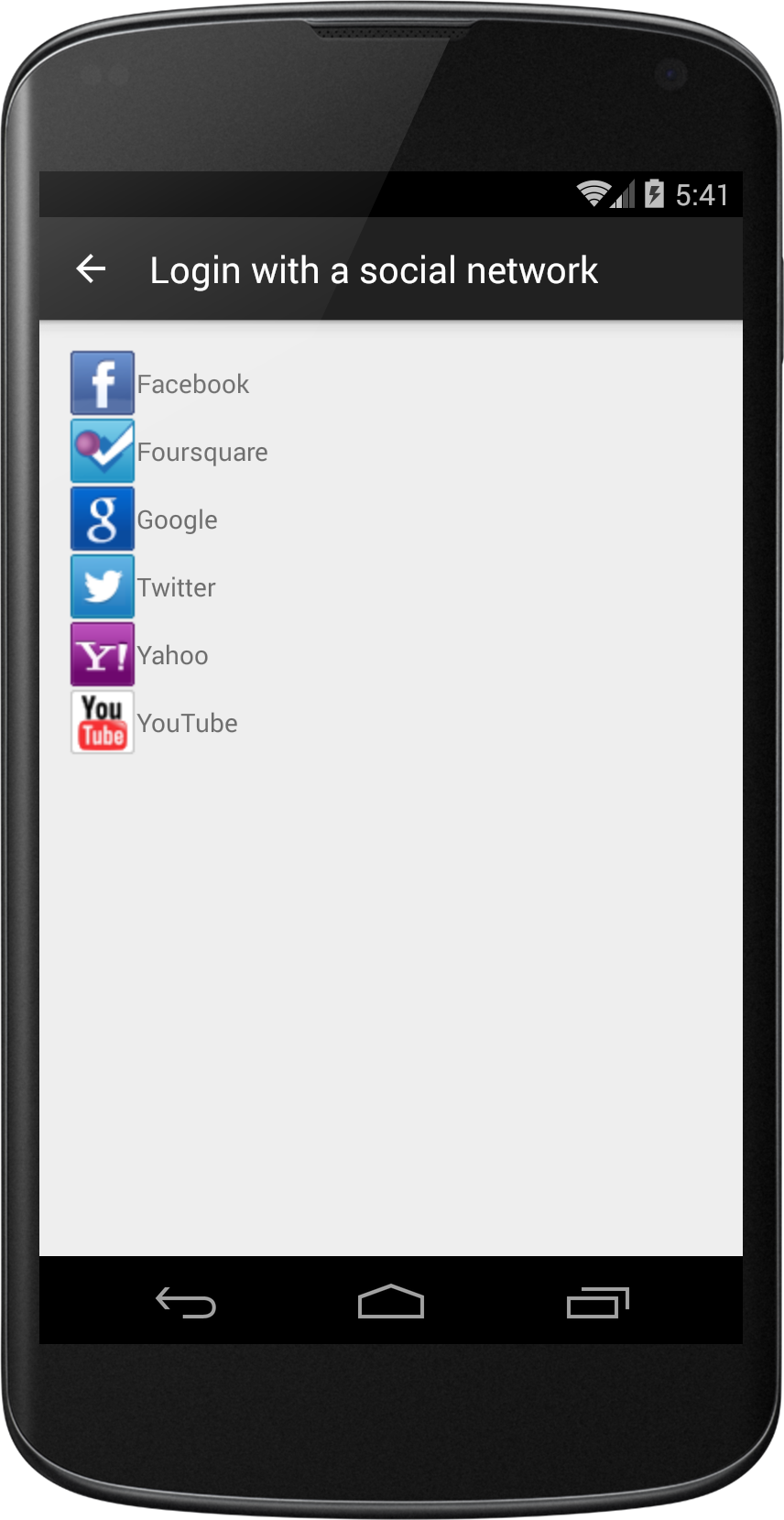
The SDK will show selector of platforms configured for specified OneAll subdomain:
You can use your own native design and login without activating the selector:
OAManager.getInstance().login(this, "facebook", loginHandler);
### Posting Messages onto Wall
In order to post message `OAManager` provides `postMessage` method:
```java
public void postMessage(
String text,
String pictureUrl,
String videoUrl,
String linkUrl,
String linkName,
String linkCaption,
String linkDescription,
Boolean enableTracking,
String userToken,
String publishToken,
final Collection providers,
final OAManagerPostHandler handler)
```
Example usage:
```java
OAManager.getInstance().postMessage(
"Me and the elephant",
"[](https://drscdn.500px.org/photo/57410272/m%3D2048/9e1b37755cc09022b7eb0993379cc6f6)https://drscdn.500px.org/photo/57410272/m%3D2048/9e1b37755cc09022b7eb0993379cc6f6",
null,
null,
null,
null,
null,
true,
user.userToken,
user.publishToken.key,
new string[] { "facebook" },
new OAManager.OAManagerPostHandler() {
@Override
public void postComplete(Boolean success, PostMessageResponse response) {
if (success) {
Log.v("posted message to user wall");
} else {
Log.v("failed to post message to user wall");
}
}
}
);
```
Where `user` object is the same user object that was received via callback on user authentication earlier in the process. This object implements `Serializable` interface and can be serialized and cached between session to avoid repeated logins on every application run.