https://github.com/oneted11/scrimba-react-project1
free react tutorial on scrimba static project 1
https://github.com/oneted11/scrimba-react-project1
css3 reactjs static-site tutorial
Last synced: 2 months ago
JSON representation
free react tutorial on scrimba static project 1
- Host: GitHub
- URL: https://github.com/oneted11/scrimba-react-project1
- Owner: Oneted11
- Created: 2022-06-08T06:36:18.000Z (about 4 years ago)
- Default Branch: master
- Last Pushed: 2022-06-08T07:06:52.000Z (about 4 years ago)
- Last Synced: 2025-01-03T23:16:46.171Z (over 1 year ago)
- Topics: css3, reactjs, static-site, tutorial
- Language: HTML
- Homepage:
- Size: 159 KB
- Stars: 0
- Watchers: 1
- Forks: 0
- Open Issues: 0
-
Metadata Files:
- Readme: README.md
Awesome Lists containing this project
README
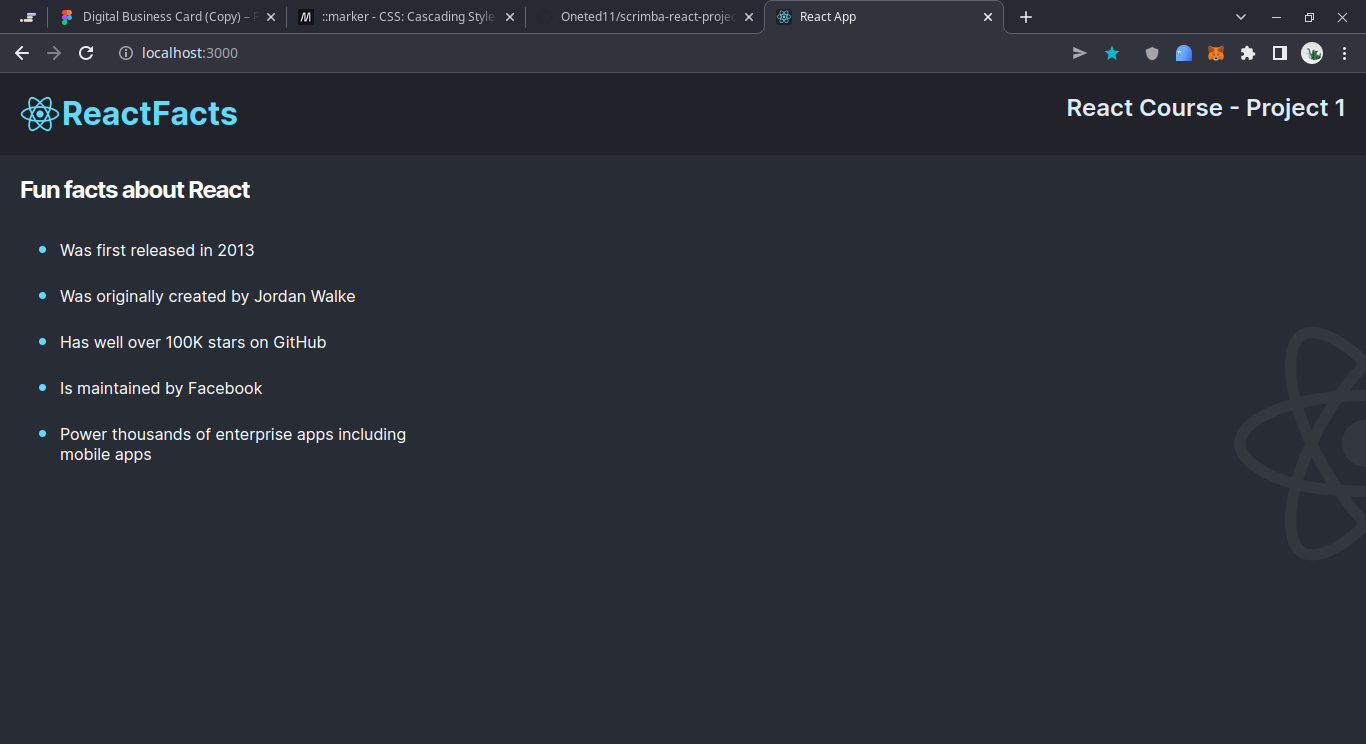
# Finished project screenshot
# How to start
- [x] Ensure you have nodejs installed and either npm or yarn
- [x] pwd into folder
- [x] run `npm install` or `yarn`
- [x] run `npm start` or `yarn start` or `npm run start`
- [ ] have fun with it
# Learnings
## ::marker
A css pseudo-element very useful for adding styling to your lists. In this project it has been used to make the dots big and blue
```css
.main-content > ul > li::marker {
color: #61dafb; /* Change the color */
font-size: 1.4em; /* make bigger*/
}
```
## new render function in react 18
`ReactDOM.render(,document.getElementById("root"))` is now out of vogue this is the new method called [createRoot](https://reactjs.org/docs/react-dom-client.html)
I've used it as such:
```js
import React from "react";
import { createRoot } from "react-dom/client";
import App from "./App";
import "./index.css";
createRoot(document.getElementById("root")).render();
// ReactDOM.render(, document.getElementById("root"));
```
## Background image
How to add and postion the [background image](https://developer.mozilla.org/en-US/docs/Web/CSS/background-image), in this case the half react-logo
```css
.main-content {
background-image: url(./images/reactr-half-background.svg);
background-repeat: no-repeat;
background-position: 100% 50%; /* x,y coordinates*/
}
```
# Default React info starts here
## Learn More
You can learn more in the [Create React App documentation](https://facebook.github.io/create-react-app/docs/getting-started).
To learn React, check out the [React documentation](https://reactjs.org/).
### Code Splitting
This section has moved here: [https://facebook.github.io/create-react-app/docs/code-splitting](https://facebook.github.io/create-react-app/docs/code-splitting)
### Analyzing the Bundle Size
This section has moved here: [https://facebook.github.io/create-react-app/docs/analyzing-the-bundle-size](https://facebook.github.io/create-react-app/docs/analyzing-the-bundle-size)
### Making a Progressive Web App
This section has moved here: [https://facebook.github.io/create-react-app/docs/making-a-progressive-web-app](https://facebook.github.io/create-react-app/docs/making-a-progressive-web-app)
### Advanced Configuration
This section has moved here: [https://facebook.github.io/create-react-app/docs/advanced-configuration](https://facebook.github.io/create-react-app/docs/advanced-configuration)
### Deployment
This section has moved here: [https://facebook.github.io/create-react-app/docs/deployment](https://facebook.github.io/create-react-app/docs/deployment)
### `npm run build` fails to minify
This section has moved here: [https://facebook.github.io/create-react-app/docs/troubleshooting#npm-run-build-fails-to-minify](https://facebook.github.io/create-react-app/docs/troubleshooting#npm-run-build-fails-to-minify)