https://github.com/onlyutkarsh/mermaid-viewer
Lens into your Mermaid diagrams with independent theming, exports, and focused previews.
https://github.com/onlyutkarsh/mermaid-viewer
vscode-extension vsmarketplace
Last synced: 5 months ago
JSON representation
Lens into your Mermaid diagrams with independent theming, exports, and focused previews.
- Host: GitHub
- URL: https://github.com/onlyutkarsh/mermaid-viewer
- Owner: onlyutkarsh
- License: other
- Created: 2025-12-12T16:46:22.000Z (7 months ago)
- Default Branch: main
- Last Pushed: 2026-03-01T16:23:22.000Z (5 months ago)
- Last Synced: 2026-03-01T18:42:03.354Z (5 months ago)
- Topics: vscode-extension, vsmarketplace
- Language: TypeScript
- Homepage: https://marketplace.visualstudio.com/items?itemName=onlyutkarsh.mermaid-diagram-lens
- Size: 4.99 MB
- Stars: 1
- Watchers: 0
- Forks: 0
- Open Issues: 0
-
Metadata Files:
- Readme: README.md
- Changelog: CHANGELOG.md
- License: LICENSE.md
Awesome Lists containing this project
README
# Mermaid Viewer
A VSCode extension that gives you a powerful viewer for Mermaid diagrams with independent theme selection, appearance overrides, and export controls. Everything stays local-no accounts, Copilot prompts, or external services-while the dedicated preview surface (plus CodeLens buttons and gutter highlights) keeps multi- and single-diagram workflows fast.
## Features
- **Syntax Highlighting**: Full syntax highlighting for Mermaid diagrams in markdown code blocks and standalone .mmd/.mermaid files
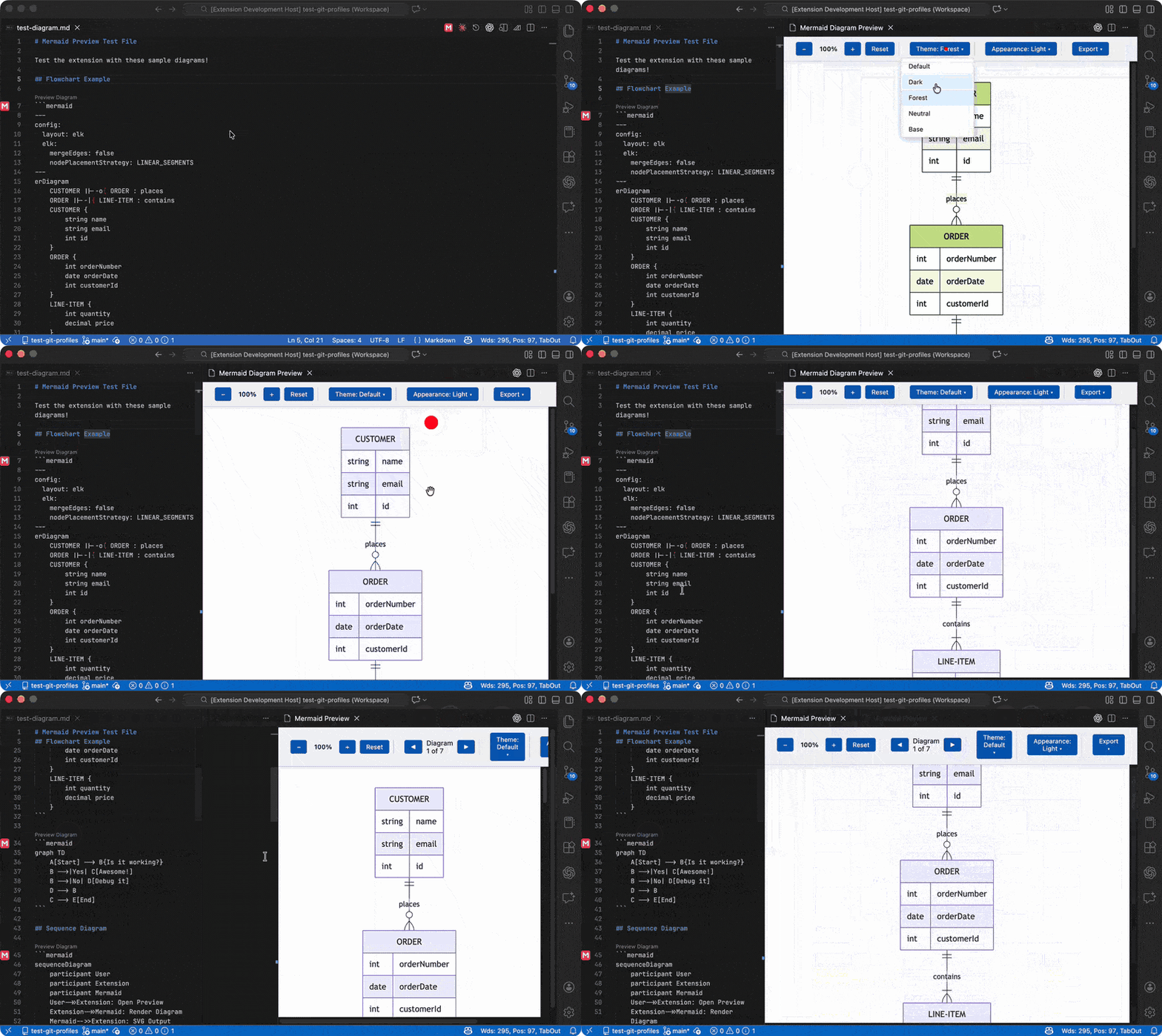
- **Independent Theme Selection**: Choose from multiple Mermaid themes (default, dark, forest, neutral, base) directly in the preview panel
- **Optional VSCode Theme Sync**: Toggle option to automatically sync Mermaid theme with your VSCode theme (dark/light)
- **Live Preview**: Automatic preview updates as you edit your Mermaid diagrams
- **Rich Preview Toolbar**: Zoom, pan, reset, navigate between diagrams, and change the preview chrome (match VS Code, light, or dark) without leaving the panel
- **Keyboard Shortcuts**: Use `+`/`-` to zoom, `R` to reset, and arrow keys to pan around diagrams
- **Export Options**: Save any diagram as SVG, PNG (1x-4x), or JPG (1x-4x) right from the preview toolbar. Dimensions are displayed in the menu, so you know exactly what you're exporting
- **Copy to Clipboard**: Copy diagrams directly to your clipboard as SVG, PNG, or JPG for quick pasting into other apps
- **On-Document Shortcuts**: Click the CodeLens button or gutter icon on each Mermaid block (fenced `mermaid` blocks or `::: mermaid` containers) to open the preview (to the side) without leaving the editor
- **Side-by-Side View**: Open preview beside your editor for convenient editing
- **Theme Persistence**: Save your preferred theme as default
- **Multi-Diagram Support**: Preview every Mermaid block in a document and jump between them with the toolbar navigation controls
- **Offline Friendly**: Bundles Mermaid 11.12.2 locally, so previews work without a network connection or account
## Demo
## Usage
### Opening the Preview
1. Open a Markdown file containing Mermaid diagrams
2. Use one of these methods:
- Click the preview icon in the editor title bar
- Right-click in the editor and select "Mermaid Viewer: Open Preview"
- Use Command Palette (`Cmd+Shift+P` / `Ctrl+Shift+P`) and search for "Mermaid Viewer: Open Preview"
- For side-by-side view: "Mermaid Viewer: Open Preview to the Side"
### Changing Themes
In the preview panel toolbar:
- Use the **Theme** dropdown to select different themes
- Check **"Sync with VSCode theme"** to automatically match VSCode's theme
- Click **"Save as Default"** to persist your theme choice
### Previewing Individual Diagrams
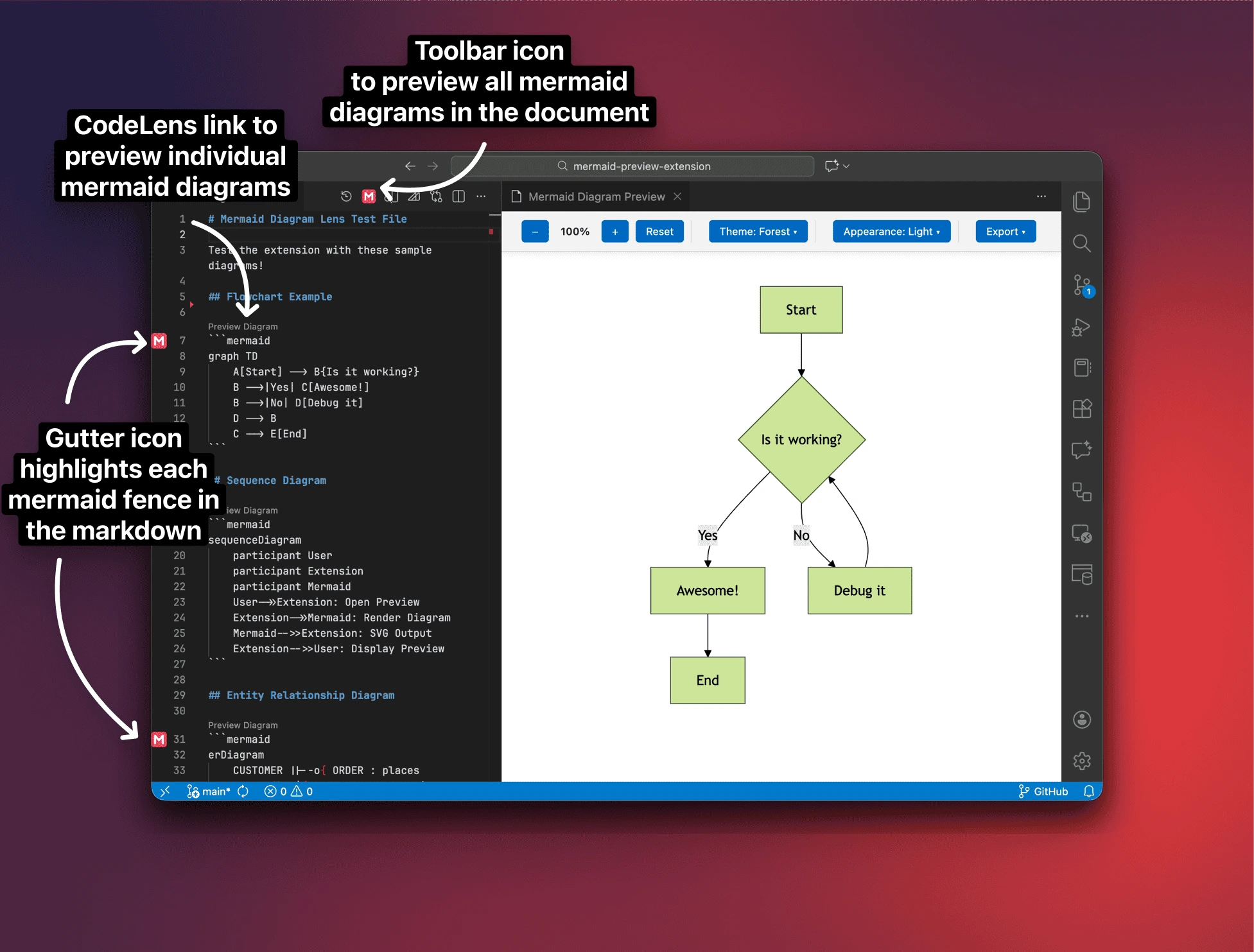
- A **CodeLens button** labeled *Preview Diagram* appears above every Mermaid block in Markdown (fenced `mermaid` blocks and `::: mermaid` containers); clicking it opens a panel focused on that diagram.
- In standalone `.mmd`/`.mermaid` files, the CodeLens appears at the top so you can preview or copy quickly.
- A subtle **gutter icon** highlights Mermaid block starts in Markdown, so you can spot diagrams quickly (it's a visual cue only; use CodeLens to open preview).
- The editor toolbar/title icon still opens the multi-diagram preview, so you can see every Mermaid block at once.
### Supported Themes
- **Default**: Classic Mermaid theme with clean, neutral colors
- **Dark**: Dark background with light elements
- **Forest**: Green-themed palette
- **Neutral**: Minimalist grayscale theme
- **Base**: Simple base theme
## Configuration
Configure the extension through VSCode settings:
```json
{
// Default theme for Mermaid diagrams
"mermaidLivePreview.theme": "default",
// Automatically sync Mermaid theme with VSCode theme
"mermaidLivePreview.useVSCodeTheme": false,
// Automatically refresh preview on document changes
"mermaidLivePreview.autoRefresh": true,
// Delay in milliseconds before refreshing preview after changes
"mermaidLivePreview.refreshDelay": 500
}
```
## Example Mermaid Diagram
````
```mermaid
graph TD
A[Start] --> B{Is it working?}
B -->|Yes| C[Awesome!]
B -->|No| D[Debug it]
D --> B
C --> E[End]
```
````
## Commands
- `Mermaid Viewer: Open Preview` - Shows Mermaid diagrams from the active Markdown or Mermaid file in the current editor column.
- `Mermaid Viewer: Open Preview to the Side` - Same preview behavior, but always opens in the column beside the editor for live editing.
- `Mermaid Viewer: Preview Diagram Here` - Focuses only the Mermaid block at the current cursor (or the CodeLens target) and keeps that single-diagram panel in sync while you type.
## Requirements
- VSCode 1.85.0 or higher
- Markdown files with Mermaid code blocks (fenced `mermaid`) or ADO-style Mermaid containers (`::: mermaid ... :::`)
- Mermaid files (`.mmd`, `.mermaid`)
## Known Limitations
- Markdown preview supports Mermaid fenced blocks and ADO-style `::: mermaid` containers.
- ADO containers must be properly closed with `:::` to be extracted as a diagram.
## Extension Settings
This extension contributes the following settings:
* `mermaidLivePreview.theme`: Choose the default Mermaid theme
* `mermaidLivePreview.useVSCodeTheme`: Sync theme with VSCode
* `mermaidLivePreview.autoRefresh`: Enable/disable auto-refresh
* `mermaidLivePreview.refreshDelay`: Set refresh delay in milliseconds
## Contributing
Found a bug or have a feature request? Please open an issue!
## License
MIT - if you build on Mermaid Viewer, please keep the copyright notice intact and include attribution to Utkarsh Shigihalli in your distribution or documentation.