https://github.com/onmotion/yii2-telegram
Support chat for site based on Telegram bot
https://github.com/onmotion/yii2-telegram
hacktoberfest support-chat telegram-bot yii2 yii2-extension yii2-modules yii2-telegram
Last synced: about 1 year ago
JSON representation
Support chat for site based on Telegram bot
- Host: GitHub
- URL: https://github.com/onmotion/yii2-telegram
- Owner: onmotion
- License: gpl-3.0
- Created: 2016-08-08T10:28:54.000Z (almost 10 years ago)
- Default Branch: master
- Last Pushed: 2019-03-25T18:49:23.000Z (about 7 years ago)
- Last Synced: 2025-04-28T15:23:30.877Z (about 1 year ago)
- Topics: hacktoberfest, support-chat, telegram-bot, yii2, yii2-extension, yii2-modules, yii2-telegram
- Language: PHP
- Homepage:
- Size: 278 KB
- Stars: 51
- Watchers: 10
- Forks: 24
- Open Issues: 1
-
Metadata Files:
- Readme: README.md
- License: LICENSE
Awesome Lists containing this project
README
# **Telegram support Bot for Yii2**
[](https://packagist.org/packages/onmotion/yii2-telegram) [](https://packagist.org/packages/onmotion/yii2-telegram) [](https://packagist.org/packages/onmotion/yii2-telegram) [](https://packagist.org/packages/onmotion/yii2-telegram) [](https://packagist.org/packages/onmotion/yii2-telegram)
**Support chat for site based on Telegram bot**
The Bot logic based on [akalongman/php-telegram-bot](https://github.com/akalongman/php-telegram-bot), so you can read Instructions by longman how to register Telegram Bot and etc.
***Now only telegram webhook api support. You need SSL cert! Doesn't work on http!***
**Installation**
------------
The preferred way to install this extension is through [composer](http://getcomposer.org/download/).
Run
composer require onmotion/yii2-telegram
add to your web config:
'modules' => [
//...
'telegram' => [
'class' => 'onmotion\telegram\Module',
'API_KEY' => 'forexample241875489:AdfgdfFuVJdsKa1cycuxra36g4dfgt66',
'BOT_NAME' => 'YourBotName_bot',
'hook_url' => 'https://yourhost.com/telegram/default/hook', // must be https! (if not prettyUrl https://yourhost.com/index.php?r=telegram/default/hook)
'PASSPHRASE' => 'passphrase for login',
// 'db' => 'db2', //db file name from config dir
// 'userCommandsPath' => '@app/modules/telegram/UserCommands',
// 'timeBeforeResetChatHandler' => 60
]
//more...
]
and to console config:
'bootstrap' => [
//other bootstrap components...
'telegram'],
'modules' => [
//...
'telegram' => [
'class' => 'onmotion\telegram\Module',
'API_KEY' => 'forexample241875489:AdfgdfFuVJdsKa1cycuxra36g4dfgt66',
'BOT_NAME' => 'YourBotName_bot',
'hook_url' => 'https://yourhost.com/telegram/default/hook', // must be https! (if not prettyUrl https://yourhost.com/index.php?r=telegram/default/hook)
'PASSPHRASE' => 'passphrase for login',
]
],
run migrations:
php yii migrate --migrationPath=@vendor/onmotion/yii2-telegram/migrations #that add 4 tables in your DB
or add to your config file
```
'controllerMap' => [
...
'migrate' => [
'class' => 'yii\console\controllers\MigrateController',
'migrationNamespaces' => [
'onmotion\telegram\migrations',
],
],
...
],
```
and run
```
php yii migrate/up
```
go to https://yourhost.com/telegram/default/set-webhook (if not prettyUrl https://yourhost.com/index.php?r=telegram/default/set-webhook)
Now you can place where you want
echo \onmotion\telegram\Telegram::widget(); //that add chat button in the page
in bottom right corner you can see:

if you click it:
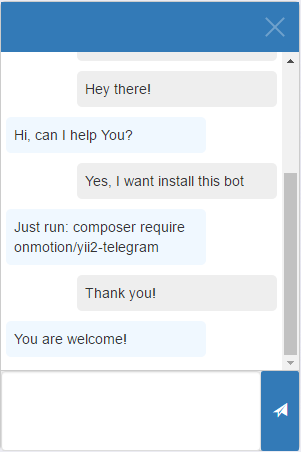
and server side:
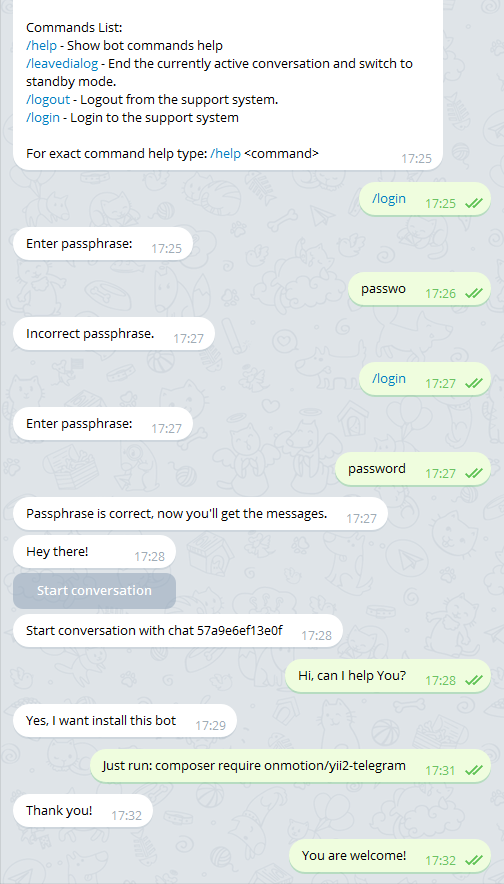
If you want to limit the storage period of messages history, add to you crontab:
#leave 5 days (if empty - default = 7)
php yii telegram/messages/clean 5
Also you can use custom commands. To do this, you can copy UserCommands dir from /vendor/onmotion/yii2-telegram/Commands and add path to this in config, for example:
'userCommandsPath' => '@app/modules/telegram/UserCommands'
**timeBeforeResetChatHandler** - the number of minutes before chat handler will be killed (if he forgot do /leavedialog). Never kill if 0 or not setted.