https://github.com/open-gsd/gsd-pi
A powerful meta-prompting, context engineering and spec-driven development system that enables agents to work for long periods of time autonomously without losing track of the big picture
https://github.com/open-gsd/gsd-pi
context-engineering meta-prompting spec-driven-development
Last synced: about 1 month ago
JSON representation
A powerful meta-prompting, context engineering and spec-driven development system that enables agents to work for long periods of time autonomously without losing track of the big picture
- Host: GitHub
- URL: https://github.com/open-gsd/gsd-pi
- Owner: open-gsd
- License: mit
- Created: 2026-05-22T11:03:33.000Z (2 months ago)
- Default Branch: main
- Last Pushed: 2026-06-12T20:48:10.000Z (about 1 month ago)
- Last Synced: 2026-06-12T21:21:29.884Z (about 1 month ago)
- Topics: context-engineering, meta-prompting, spec-driven-development
- Language: TypeScript
- Homepage: https://www.opengsd.net
- Size: 70.2 MB
- Stars: 609
- Watchers: 5
- Forks: 56
- Open Issues: 46
-
Metadata Files:
- Readme: README.md
- Changelog: CHANGELOG.md
- Contributing: CONTRIBUTING.md
- Funding: .github/FUNDING.yml
- License: LICENSE
- Codeowners: .github/CODEOWNERS
Awesome Lists containing this project
README
# GSD Pi
[](https://www.npmjs.com/package/@opengsd/gsd-pi)
[](https://www.npmjs.com/package/@opengsd/gsd-pi)
[](https://github.com/open-gsd/gsd-pi/actions/workflows/ci.yml)
[](https://discord.gg/8NnkKuepmQ)
[](https://github.com/open-gsd/gsd-pi/stargazers)
[](https://github.com/open-gsd/gsd-pi/blob/main/LICENSE)
GSD Pi is a local-first coding agent for planning, implementing, verifying, and tracking project work from the command line.
It combines a terminal agent, project workflow tools, worktree-aware Git automation, and optional UI integrations so a project can move from idea to reviewed implementation with less manual coordination.
## Feature Roll-Up
- **Guided terminal agent** — Start with `gsd`, configure providers, and run planned or quick coding sessions from your shell.
- **Autonomous project workflow** — Break work into milestones, slices, and tasks, then let auto mode plan, implement, verify, and advance.
- **Worktree-aware Git automation** — Keep implementation work isolated while preserving a reviewable main checkout.
- **Local project memory** — Store project requirements, decisions, runtime notes, generated plans, summaries, and validation evidence under `.gsd/`.
- **Multi-provider model routing** — Use the provider your team already has, with configurable defaults and per-phase model preferences.
- **Extension surface** — Add project-specific commands, tools, skills, and UI integrations through bundled or community extensions.
- **Terminal and web surfaces** — Use the TUI by default, or launch `gsd --web` when a visual control plane fits the work better than a terminal.
See [CHANGELOG.md](./CHANGELOG.md) for release-by-release fixes and [Legacy Release History](./docs/archive/legacy-release-history.md) for archived history before the `open-gsd/gsd-pi` baseline.
## Latest Release Highlights
- **Claude Opus 4.8 support** — Add the latest Claude model option to the generated model catalog.
- **Better `/gsd` observability** — Add `/gsd usage` and `/gsd context` commands for inspecting session usage and context state.
- **Sharper skill scoping** — Scope the skill catalog per unit, trim duplicate prompt surfaces, and apply unit-context manifest policy during auto-mode dispatch.
- **Improved guided installs** — Redesign the `npx @opengsd/gsd-pi@latest` flow so first-time and scripted installs are clearer and more reliable.
- **Smoother auto-mode progress** — Improve requirements backlog handling, completion summaries, quick branch inference, cleanup logic, and milestone closeout behavior.
- **Cloud MCP gateway runtime** — Add the local cloud MCP gateway runtime with persisted auth state.
- **More reliable installs** — Resolve native engine packages to the matching release version across npm installs and Docker images.
## Status
This repository is starting a new development baseline at version `1.0.0` under the `open-gsd/gsd-pi` project.
Older release history has been archived outside the active changelog so new work can be reviewed from a clean project surface.
## Install
Recommended — guided installer:
```bash
npx @opengsd/gsd-pi@latest
```
For CI or scripted installs:
```bash
npx @opengsd/gsd-pi@latest --yes
```
Alternative — direct npm global install:
```bash
npm install -g @opengsd/gsd-pi@latest
```
If you want pnpm to own the global install, use pnpm's runner:
```bash
pnpm setup
exec $SHELL -l
pnpm dlx @opengsd/gsd-pi@latest
```
Source: [`open-gsd/gsd-pi`](https://github.com/open-gsd/gsd-pi).
## Migrate From Older Installs
GSD Pi now installs from the scoped package `@opengsd/gsd-pi`. If you previously installed the older unscoped `gsd-pi` package, remove it first so the old global binary does not shadow the new package.
Recommended migration with the guided `npx` installer:
```bash
npm uninstall -g gsd-pi @opengsd/gsd-pi
rm -f ~/.gsd/.update-check ~/.gsd/agent/managed-resources.json
npx @opengsd/gsd-pi@latest
command -v gsd
gsd --version
```
If the old package was installed with `sudo npm install -g`, use `sudo npm uninstall -g gsd-pi` for the old package removal.
To migrate from old npm globals to a pnpm-owned global install:
```bash
npm uninstall -g gsd-pi @opengsd/gsd-pi
rm -f ~/.gsd/.update-check ~/.gsd/agent/managed-resources.json
pnpm setup
exec $SHELL -l
pnpm dlx @opengsd/gsd-pi@latest
command -v gsd
gsd --version
```
Windows PowerShell with the guided `npx` installer:
```powershell
npm uninstall -g gsd-pi @opengsd/gsd-pi
Remove-Item "$env:USERPROFILE\.gsd\.update-check" -Force -ErrorAction SilentlyContinue
Remove-Item "$env:USERPROFILE\.gsd\agent\managed-resources.json" -Force -ErrorAction SilentlyContinue
npx @opengsd/gsd-pi@latest
where.exe gsd
gsd --version
```
After migration, routine upgrades use:
```bash
gsd upgrade
```
You can also run `npx @opengsd/gsd-pi@latest` to launch the guided installer (recommended for new installs). For deeper recovery steps, see [Upgrade GSD Pi](./docs/user-docs/getting-started.md#upgrade-gsd-pi) and [Upgrade from older gsd-pi installs](./docs/user-docs/troubleshooting.md#upgrade-from-older-gsd-pi-installs).
## Uninstall
Remove the global package and optional local GSD state files.
macOS / Linux:
```bash
npm uninstall -g @opengsd/gsd-pi gsd-pi
rm -rf ~/.gsd
```
If you installed GSD with pnpm, use pnpm for the pnpm-owned package. If pnpm reports that its global bin directory is not on `PATH`, run `pnpm setup`, restart your shell, then retry.
```bash
pnpm remove -g @opengsd/gsd-pi
npm uninstall -g gsd-pi
rm -rf ~/.gsd
```
Windows PowerShell:
```powershell
npm uninstall -g @opengsd/gsd-pi gsd-pi
Remove-Item "$env:USERPROFILE\.gsd" -Recurse -Force -ErrorAction SilentlyContinue
```
## Quick Start
Need help choosing settings? Use the [GSD Pi web configurator](https://pi.opengsd.net/) to build a configuration in your browser.
```bash
gsd
```
Run the setup flow, choose your preferred model provider, and open a project directory. GSD stores project planning and runtime state in `.gsd/`.
For a full first-run walkthrough, see [Getting Started With gsd-pi](./docs/user-docs/getting-started.md).
## Common Session Commands
Start GSD from your shell:
```bash
gsd
```
Then use slash commands inside the GSD session:
```text
/gsd config
/gsd auto
/gsd quick "Describe the task"
/gsd status
```
## What GSD Pi Does
- Plans work into milestones, slices, and tasks.
- Runs coding sessions with project context and verification steps.
- Uses Git worktrees to isolate implementation work.
- Tracks project state in a local database with markdown projections for review.
- Supports extension-based tools and provider integrations.
- Produces artifacts such as plans, summaries, validation notes, and reports.
## Repository Layout
| Path | Purpose |
| --- | --- |
| `src/` | Core runtime resources and bundled extensions |
| `packages/` | Workspace packages used by the CLI, agent, TUI, RPC, and native bridge |
| `native/` | Native engine packaging and platform binaries |
| `studio/` | Desktop studio app |
| `web/` | Web UI and API surface |
| `docs/` | User and developer documentation |
| `scripts/` | Build, release, migration, and maintenance scripts |
## Development
```bash
pnpm install --frozen-lockfile
pnpm run build
pnpm test
```
Before opening a pull request, run:
```bash
pnpm run verify:fast # CI fast-gates locally (scans + policy)
pnpm run verify:pr # Fast loop: build + typecheck + unit tests
pnpm run verify:merge # Before PR review: full CI blocking parity
```
## Versioning
The active public baseline starts at `1.0.0`.
Historical tags and archived refs may exist for traceability, but active release notes should be written from this baseline forward.
## Community
Join the [GSD Discord community](https://discord.gg/8NnkKuepmQ).
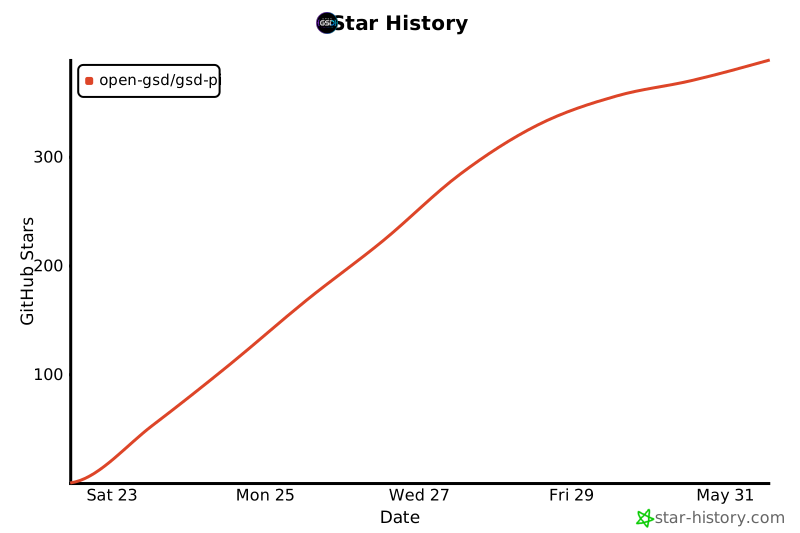
## Star History
## License
MIT