https://github.com/openadaptai/openadapt-evals
Evaluation infrastructure for GUI agent benchmarks
https://github.com/openadaptai/openadapt-evals
benchmarks evaluation gui-automation openadapt python
Last synced: 3 months ago
JSON representation
Evaluation infrastructure for GUI agent benchmarks
- Host: GitHub
- URL: https://github.com/openadaptai/openadapt-evals
- Owner: OpenAdaptAI
- License: mit
- Created: 2026-01-16T22:35:21.000Z (6 months ago)
- Default Branch: main
- Last Pushed: 2026-03-03T03:45:00.000Z (4 months ago)
- Last Synced: 2026-03-03T03:51:39.527Z (4 months ago)
- Topics: benchmarks, evaluation, gui-automation, openadapt, python
- Language: Python
- Homepage: https://pypi.org/project/openadapt-evals/
- Size: 49.3 MB
- Stars: 1
- Watchers: 0
- Forks: 0
- Open Issues: 5
-
Metadata Files:
- Readme: README.md
- Changelog: CHANGELOG.md
- License: LICENSE
Awesome Lists containing this project
README
# OpenAdapt Evals
[](https://github.com/OpenAdaptAI/openadapt-evals/actions/workflows/test.yml)
[](https://github.com/OpenAdaptAI/openadapt-evals/actions/workflows/release.yml)
[](https://pypi.org/project/openadapt-evals/)
[](https://www.python.org/downloads/)
[](https://opensource.org/licenses/MIT)
Evaluation infrastructure for GUI agent benchmarks, built for [OpenAdapt](https://github.com/OpenAdaptAI/OpenAdapt).
## What is OpenAdapt Evals?
OpenAdapt Evals is a unified framework for evaluating GUI automation agents against standardized benchmarks such as [Windows Agent Arena (WAA)](https://microsoft.github.io/WindowsAgentArena/). It provides benchmark adapters, agent interfaces, cloud VM infrastructure (Azure and AWS) for parallel evaluation, and result visualization -- everything needed to go from "I have a GUI agent" to "here are its benchmark scores."
## Benchmark Viewer

More screenshots
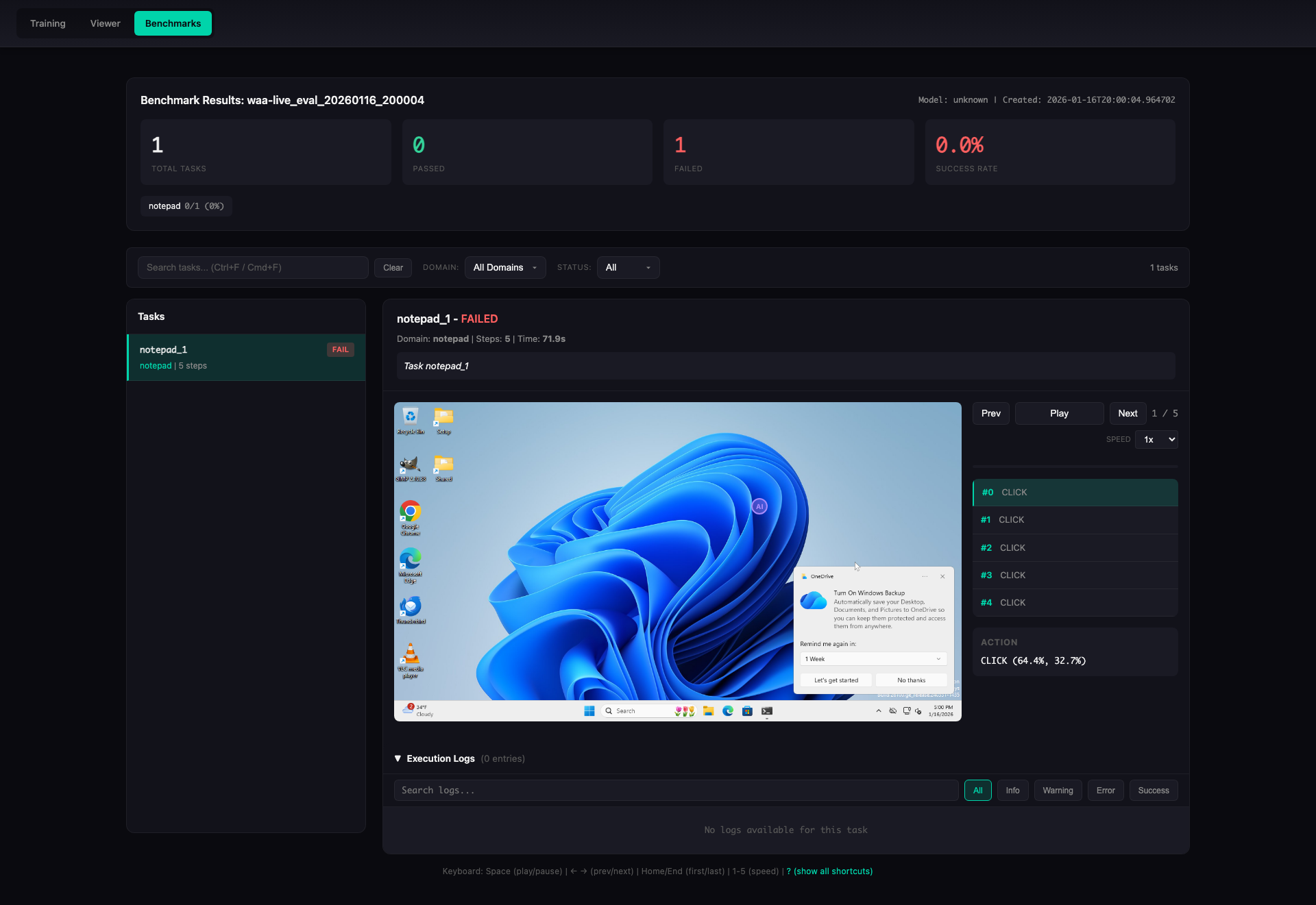
**Task Detail View** -- step-by-step replay with screenshots, actions, and execution logs:
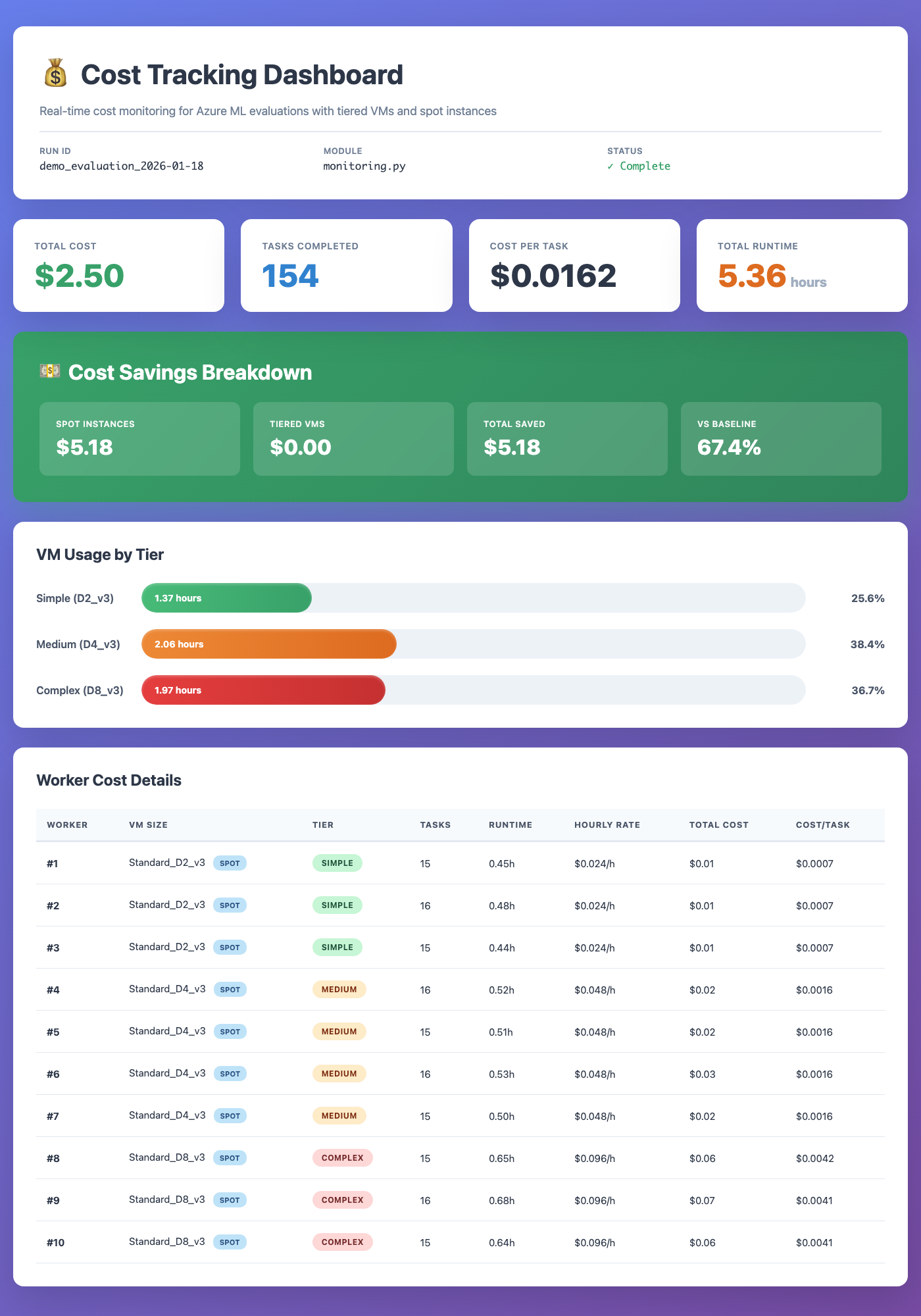
**Cost Tracking Dashboard** -- real-time VM cost monitoring with tiered sizing and spot instances:
## Key Features
- **Benchmark adapters** for WAA (live, mock, and local modes), with an extensible base for OSWorld, WebArena, and others
- **Task setup handlers** -- `verify_apps` and `install_apps` ensure required applications are present on the Windows VM before evaluation begins
- **Agent interfaces** including `ApiAgent` (Claude / GPT), `ClaudeComputerUseAgent` (with coordinate clamping and fail-safe recovery), `RetrievalAugmentedAgent`, `RandomAgent`, and `PolicyAgent`
- **Multi-cloud VM infrastructure** with `AzureVMManager`, `AWSVMManager`, `PoolManager`, `SSHTunnelManager`, and `VMMonitor` for running evaluations at scale on Azure or AWS
- **End-to-end eval pipeline** (`scripts/run_eval_pipeline.py`) -- orchestrates demo generation, VM lifecycle, SSH tunnels, and ZS/DC evaluation in a single command
- **Deterministic desktop parity mode** -- `--clean-desktop` suppresses OneDrive/toast/popover noise, `--force-tray-icons` keeps network/audio tray controls visible, and run metadata records requested/observed environment flags
- **Standalone GRPO trainer** -- self-contained RL training loop with zero external ML dependencies, callback hooks (`on_model_loaded`, `on_before_collect`, `on_rollout_complete`, `on_step_complete`), configurable `vision_loss_mode` (exclude/include/checkpoint), and optional Outlines constrained decoding that forces `Thought: ...\nAction: CLICK/TYPE/WAIT/DONE` format
- **Demo executor** -- tiered demo execution that replays demonstrations with adaptive grounding. Keyboard/type actions execute deterministically (no VLM needed), click actions use a grounder to find elements by description. Validated: **0.00 → 1.00** on notepad-hello
- **Correction flywheel** -- agent fails → human demos correct approach → agent retries with demo → score improves. Full pipeline: `DemoLibrary` stores demos, `DemoExecutor` replays them with adaptation, per-step milestone tracking captures transient states
- **RL training environment** -- `RLEnvironment` wrapper provides a Gymnasium-style `reset`/`step`/`evaluate` interface for online RL (GRPO, PPO) with per-step milestone high-water marks and dense rewards
- **Annotation pipeline** -- VLM-based screenshot annotation (`annotation.py`, `vlm.py`) migrated from openadapt-ml so the full record-annotate-evaluate workflow runs within this repo
- **4-layer WAA probe** -- `probe --detailed` checks screenshot capture, accessibility tree, action pipeline, and scoring independently; supports `--json` and `--layers` filtering
- **Demo recording and review** -- VNC-based demo capture with auto-persistence (incremental `meta.json`, hardlinked PNGs), JPEG thumbnail deduplication, and markdown review artifact generation
- **CLI tools** -- `oa-vm` for VM and pool management (50+ commands), benchmark CLI for running evals
- **Cost optimization** -- tiered VM sizing, spot instance support, and real-time cost tracking
- **Results visualization** -- HTML viewer with step-by-step screenshot replay, execution logs, and domain breakdowns
- **Trace export** for converting evaluation trajectories into training data
- **Configuration via pydantic-settings** with automatic `.env` loading
## Installation
```bash
pip install openadapt-evals
```
With optional dependencies:
```bash
pip install openadapt-evals[training] # GRPO trainer + Outlines constrained decoding
pip install openadapt-evals[azure] # Azure VM management
pip install openadapt-evals[aws] # AWS EC2 management
pip install openadapt-evals[retrieval] # Demo retrieval agent
pip install openadapt-evals[viewer] # Live results viewer
pip install openadapt-evals[all] # Everything
```
## Quick Start
### Run a mock evaluation (no VM required)
```bash
openadapt-evals mock --tasks 10
```
### Run a live evaluation against a WAA server
```bash
# Start with a single VM (Azure by default)
oa-vm pool-create --workers 1
oa-vm pool-wait
# Or use AWS
oa-vm pool-create --cloud aws --workers 1
oa-vm pool-wait --cloud aws
# Run evaluation
openadapt-evals run --agent api-claude --task notepad_1
# View results
openadapt-evals view --run-name live_eval
# Clean up (stop billing)
oa-vm pool-cleanup -y
```
### Python API
```python
from openadapt_evals import (
ApiAgent,
WAALiveAdapter,
WAALiveConfig,
evaluate_agent_on_benchmark,
compute_metrics,
)
adapter = WAALiveAdapter(WAALiveConfig(server_url="http://localhost:5001"))
agent = ApiAgent(provider="anthropic")
results = evaluate_agent_on_benchmark(agent, adapter, task_ids=["notepad_1"])
metrics = compute_metrics(results)
print(f"Success rate: {metrics['success_rate']:.1%}")
```
### Demo-conditioned evaluation
Record demos on a remote VM via VNC, annotate with a VLM, then run demo-conditioned eval:
```bash
# 1. Pre-flight check: verify all required apps are installed
python scripts/record_waa_demos.py record-waa \
--tasks 04d9aeaf,0a0faba3 \
--server http://localhost:5001 \
--verify
# 2. Record demos interactively (perform actions on VNC, press Enter after each step)
python scripts/record_waa_demos.py record-waa \
--tasks 04d9aeaf,0a0faba3 \
--server http://localhost:5001 \
--output waa_recordings/
# 3. Annotate recordings with VLM
python scripts/record_waa_demos.py annotate \
--recordings waa_recordings/ \
--output annotated_demos/ \
--provider openai
# 4. Run demo-conditioned eval
python scripts/record_waa_demos.py eval \
--demo_dir annotated_demos/ \
--tasks 04d9aeaf,0a0faba3
```
### End-to-end eval pipeline
For a fully automated flow (demo generation, VM lifecycle, SSH tunnels, ZS and DC evaluation):
```bash
# Run for all recordings that have demos
python scripts/run_eval_pipeline.py
# Specific task(s)
python scripts/run_eval_pipeline.py --tasks 04d9aeaf
# Dry run
python scripts/run_eval_pipeline.py --tasks 04d9aeaf --dry-run
# AWS instead of Azure
python scripts/run_eval_pipeline.py --cloud aws --vm-name waa-pool-00
# Deterministic desktop parity + pinned image version metadata
python scripts/run_eval_pipeline.py \
--tasks 04d9aeaf \
--clean-desktop \
--force-tray-icons \
--waa-image-version win11-24h2-2026-03-04
```
### Dedicated grounder endpoint (UI-Venus)
For higher click accuracy, serve [UI-Venus-1.5-8B](https://huggingface.co/inclusionAI/UI-Venus-1.5-8B) on a GPU and point the DemoExecutor or PlannerGrounderAgent at it. This replaces general VLM grounding (GPT-4.1-mini) with a purpose-built GUI grounding model.
```bash
# 1. On a GPU machine (A10G 24GB, RTX 4090, etc.):
bash scripts/serve_ui_venus.sh
# Serves at http://0.0.0.0:8000 by default
# 2. Verify it's running:
curl http://gpu-host:8000/v1/models
# Should list "UI-Venus-1.5-8B"
# 3. Run the correction flywheel with the dedicated grounder:
python scripts/run_correction_flywheel.py \
--task-config example_tasks/clear-browsing-data-chrome.yaml \
--demo-dir ./demos \
--grounder-endpoint http://gpu-host:8000
# 4. Or run the full evaluation with the grounder:
python scripts/run_full_eval.py \
--server-url http://localhost:5001 \
--grounder-endpoint http://gpu-host:8000
```
The endpoint uses the UI-Venus native bounding-box prompt format (`[x1,y1,x2,y2]`) and is compatible with vLLM, Ollama, or any OpenAI-compatible server. Both `DemoExecutor` and `PlannerGrounderAgent` use the same prompt format for consistency.
### GRPO training with TRL (recommended)
The recommended path for RL training of VLM desktop agents uses TRL's `GRPOTrainer` with dense milestone rewards from WAA environments. This replaces the standalone GRPO trainer with a battle-tested implementation that supports Unsloth, vLLM, constrained decoding, and automatic telemetry.
```bash
# Basic training against a live WAA VM
python scripts/train_trl_grpo.py \
--task-dir ./example_tasks \
--server-url http://localhost:5001 \
--model Qwen/Qwen2.5-VL-7B-Instruct \
--output ./grpo_output
# With Unsloth (2x VRAM efficiency) + constrained decoding
python scripts/train_trl_grpo.py \
--task-dir ./example_tasks \
--server-url http://localhost:5001 \
--model Qwen/Qwen2.5-VL-7B-Instruct \
--use-unsloth \
--constrained-decoding \
--output ./grpo_output
# Mock mode (validates full pipeline without VM or GPU)
python scripts/train_trl_grpo.py \
--task-dir ./example_tasks \
--mock \
--output ./grpo_output_mock
# With Weave tracing for experiment tracking
python scripts/train_trl_grpo.py \
--task-dir ./example_tasks \
--server-url http://localhost:5001 \
--model Qwen/Qwen2.5-VL-7B-Instruct \
--weave-project openadapt-grpo \
--output ./grpo_output
```
Key flags: `--constrained-decoding` (Outlines regex, eliminates unparseable output), `--vision-loss-mode` (exclude/include/checkpoint), `--weave-project` (Weave tracing), `--use-vllm` (faster generation), `--loss-type` (grpo/dapo/dr_grpo).
### Parallel evaluation
```bash
# Create a pool of VMs and distribute tasks (Azure)
oa-vm pool-create --workers 5
oa-vm pool-wait
oa-vm pool-run --tasks 50
# Same workflow on AWS
oa-vm pool-create --cloud aws --workers 5
oa-vm pool-wait --cloud aws
oa-vm pool-run --cloud aws --tasks 50
# Or use Azure ML orchestration
openadapt-evals azure --workers 10 --waa-path /path/to/WindowsAgentArena
```
## Architecture
```
openadapt_evals/
├── agents/ # Agent implementations
│ ├── base.py # BenchmarkAgent ABC
│ ├── api_agent.py # ApiAgent (Claude, GPT)
│ ├── claude_computer_use_agent.py # ClaudeComputerUseAgent (coord clamping, fail-safe)
│ ├── retrieval_agent.py# RetrievalAugmentedAgent
│ └── policy_agent.py # PolicyAgent (trained models)
├── adapters/ # Benchmark adapters
│ ├── base.py # BenchmarkAdapter ABC + data classes
│ ├── rl_env.py # RLEnvironment (Gymnasium-style wrapper for GRPO/PPO)
│ └── waa/ # WAA live, mock, and local adapters
├── infrastructure/ # Cloud VM and pool management
│ ├── azure_vm.py # AzureVMManager
│ ├── aws_vm.py # AWSVMManager
│ ├── vm_provider.py # VMProvider protocol (multi-cloud abstraction)
│ ├── pool.py # PoolManager
│ ├── probe.py # 4-layer WAA probe (screenshot, a11y, action, score)
│ ├── ssh_tunnel.py # SSHTunnelManager
│ └── vm_monitor.py # VMMonitor dashboard
├── evaluation/ # Shared evaluation utilities
│ └── metrics.py # fuzzy_match and scoring functions
├── benchmarks/ # Evaluation runner, CLI, viewers
│ ├── runner.py # evaluate_agent_on_benchmark()
│ ├── cli.py # Benchmark CLI (run, mock, live, view, probe)
│ ├── vm_cli.py # VM/Pool CLI (oa-vm, 50+ commands)
│ ├── viewer.py # HTML results viewer
│ ├── pool_viewer.py # Pool results viewer
│ └── trace_export.py # Training data export
├── waa_deploy/ # WAA Docker image & task setup
│ ├── evaluate_server.py# Flask server (port 5050): /setup, /evaluate, /task
│ ├── Dockerfile # QEMU + Windows 11 + pre-downloaded apps
│ └── tools_config.json # App installer URLs and configs
├── annotation.py # VLM-based demo annotation pipeline
├── vlm.py # VLM provider abstraction (OpenAI, Anthropic)
├── server/ # WAA server extensions
├── config.py # Settings (pydantic-settings, .env)
└── __init__.py
scripts/
├── run_eval_pipeline.py # End-to-end eval: demo gen + VM + ZS/DC eval
├── record_waa_demos.py # Record demos via VNC
├── generate_demo_review.py # Markdown review artifacts with thumbnails
├── run_grpo_rollout.py # Example: collect RL rollouts from WAA
├── refine_demo.py # Two-pass LLM demo refinement
└── run_dc_eval.py # Demo-conditioned evaluation
```
### How it fits together
```
LOCAL MACHINE CLOUD VM (Azure or AWS, Ubuntu)
┌─────────────────────┐ ┌──────────────────────────────┐
│ oa-vm CLI │ SSH Tunnel │ Docker │
│ (pool management) │ ─────────────> │ ├─ evaluate_server (:5050) │
│ │ :5001 → :5000 │ │ └─ /setup, /evaluate │
│ openadapt-evals │ :5051 → :5050 │ ├─ Samba share (/tmp/smb/) │
│ (benchmark runner) │ :8006 → :8006 │ └─ QEMU (Win 11) │
│ │ │ ├─ WAA Flask API (:5000) │
│ │ │ ├─ \\host.lan\Data\ │
│ │ │ └─ Agent │
└─────────────────────┘ └──────────────────────────────┘
```
Both backends use the same `VMProvider` protocol. Pass `--cloud azure` (default) or `--cloud aws` to any pool command. AWS now supports nested virtualization on C8i/M8i/R8i instances (from ~$0.19/hr, Feb 2026), though GPU families (g5, g6) still require metal instances. Azure uses `Standard_D8ds_v5` ($0.38/hr).
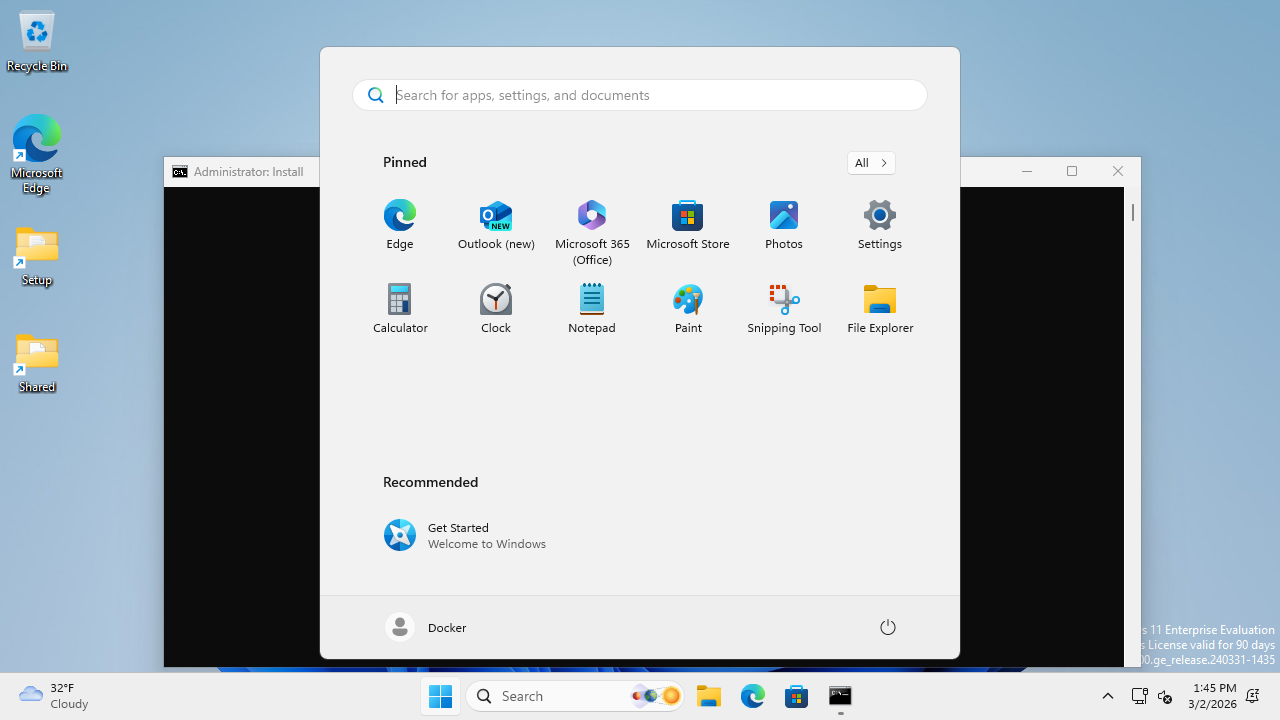
### UNIX Socket Bridge (Docker Port 5050 Workaround)
The WAA Docker container runs QEMU with `--cap-add NET_ADMIN` for TAP networking, which breaks Docker's standard port forwarding for port 5050 (`evaluate_server.py`). The workaround is a two-stage socat proxy using a UNIX socket:
```bash
# Stage 1: Bridge container network namespace to a UNIX socket
CONTAINER_PID=$(docker inspect --format '{{.State.Pid}}' )
nsenter -t $CONTAINER_PID -n socat UNIX-LISTEN:/tmp/waa-bridge.sock,fork TCP:localhost:5050
# Stage 2: Expose the UNIX socket as a TCP port on the VM host
socat TCP-LISTEN:5051,fork,reuseaddr UNIX-CONNECT:/tmp/waa-bridge.sock
```
This makes `VM_HOST:5051` forward to container port 5050. Port 5000 (WAA Flask API) uses standard Docker port forwarding and works normally.
**After a container restart**, remove the stale socket (`rm -f /tmp/waa-bridge.sock`) and re-run both stages with the new container PID.
For the full networking architecture, SSH tunnel setup, and data flow diagrams, see [docs/gpu_e2e_validation/architecture.md](docs/gpu_e2e_validation/architecture.md).
## WAA Task Setup & App Management
The evaluate server (`waa_deploy/evaluate_server.py`) runs on the Docker Linux side (port 5050) and orchestrates task setup on the Windows VM. The `/setup` endpoint accepts a list of setup handlers:
```bash
# Check if required apps are installed on the Windows VM
curl -X POST http://localhost:5051/setup \
-H "Content-Type: application/json" \
-d '{"config": [{"type": "verify_apps", "parameters": {"apps": ["libreoffice-calc"]}}]}'
# → 200 if all present, 422 if any missing
# Install missing apps via two-phase pipeline
curl -X POST http://localhost:5051/setup \
-H "Content-Type: application/json" \
-d '{"config": [{"type": "install_apps", "parameters": {"apps": ["libreoffice-calc"]}}]}'
```
### Two-phase install pipeline
Large installers (e.g. LibreOffice 350MB MSI) can't be downloaded within the WAA server's 120s command timeout. The `install_apps` handler solves this with a two-phase approach:
1. **Download on Linux** -- the evaluate server downloads the installer to the Samba share (`/tmp/smb/` = `\\host.lan\Data\` on Windows), with no timeout constraint
2. **Install on Windows** -- a small PowerShell script is written to the Samba share and executed via the WAA server, running only `msiexec` (fast, no download)
The Dockerfile also pre-downloads LibreOffice at build time with dynamic version discovery, so first-boot installs work without depending on mirror availability.
### Automatic app verification
When a task config includes `related_apps`, the live adapter automatically prepends a `verify_apps` step before the task's setup config. The `--verify` flag on `record_waa_demos.py` provides a pre-flight check across all tasks before starting a recording session.

## CLI Reference
### Benchmark CLI (`openadapt-evals`)
| Command | Description |
|------------|-----------------------------------------------|
| `run` | Run live evaluation (localhost:5001 default) |
| `mock` | Run with mock adapter (no VM required) |
| `live` | Run against a WAA server (full control) |
| `eval-suite` | Automated full-cycle evaluation (ZS + DC) |
| `azure` | Run parallel evaluation on Azure ML |
| `probe` | Check WAA readiness (`--detailed` for 4-layer diagnostics, `--json`, `--layers`) |
| `view` | Generate HTML viewer for results |
| `estimate` | Estimate Azure costs |
### VM/Pool CLI (`oa-vm`)
| Command | Description |
|-----------------|------------------------------------------|
| `pool-create` | Create N VMs with Docker and WAA |
| `pool-wait` | Wait until WAA is ready on all workers |
| `pool-run` | Distribute tasks across pool workers |
| `pool-status` | Show status of all pool VMs |
| `pool-pause` | Deallocate pool VMs (stop billing) |
| `pool-resume` | Restart deallocated pool VMs |
| `pool-cleanup` | Delete all pool VMs and resources |
| `image-create` | Create golden image from a pool VM |
| `image-list` | List available golden images |
| `vm monitor` | Dashboard with SSH tunnels |
| `vm setup-waa` | Deploy WAA container on a VM |
| `smoke-test-aws`| Verify AWS credentials, AMI, VPC, lifecycle |
All pool commands accept `--cloud azure` (default) or `--cloud aws`.
Run `oa-vm --help` for the full list of 50+ commands.
## Configuration
Settings are loaded automatically from environment variables or a `.env` file in the project root via [pydantic-settings](https://docs.pydantic.dev/latest/concepts/pydantic_settings/).
```bash
# .env
ANTHROPIC_API_KEY=sk-ant-...
OPENAI_API_KEY=sk-...
# Azure (for --cloud azure VM management)
AZURE_SUBSCRIPTION_ID=...
AZURE_ML_RESOURCE_GROUP=...
AZURE_ML_WORKSPACE_NAME=...
```
### AWS authentication
AWS credentials are resolved via [boto3's default credential chain](https://boto3.amazonaws.com/v1/documentation/api/latest/guide/credentials.html). **SSO (IAM Identity Center) is recommended** for interactive use:
```bash
# One-time setup — opens a guided wizard
aws configure sso
# Prompts for: SSO start URL, region, account, role name, profile name
# Login (opens browser, caches short-lived token)
aws sso login
# Verify it works
oa-vm smoke-test-aws
# All oa-vm --cloud aws commands now work automatically
oa-vm pool-create --cloud aws --workers 1
```
Example ~/.aws/config for SSO
```ini
[default]
sso_session = my-org
sso_account_id = 111122223333
sso_role_name = PowerUserAccess
region = us-east-1
[sso-session my-org]
sso_start_url = https://my-org.awsapps.com/start
sso_region = us-east-1
sso_registration_scopes = sso:account:access
```
Static keys (`AWS_ACCESS_KEY_ID` / `AWS_SECRET_ACCESS_KEY` in `.env`) also work but are not recommended for interactive use -- they don't expire and are a security risk if leaked.
See [`openadapt_evals/config.py`](openadapt_evals/config.py) for all available settings.
## Custom Agents
Implement the `BenchmarkAgent` interface to evaluate your own agent:
```python
from openadapt_evals import BenchmarkAgent, BenchmarkAction, BenchmarkObservation, BenchmarkTask
class MyAgent(BenchmarkAgent):
def act(
self,
observation: BenchmarkObservation,
task: BenchmarkTask,
history: list[tuple[BenchmarkObservation, BenchmarkAction]] | None = None,
) -> BenchmarkAction:
# Your agent logic here
return BenchmarkAction(type="click", x=0.5, y=0.5)
def reset(self) -> None:
pass
```
## Contributing
We welcome contributions. To get started:
```bash
git clone https://github.com/OpenAdaptAI/openadapt-evals.git
cd openadapt-evals
uv sync --extra dev
uv run pytest tests/ -v
```
See [CLAUDE.md](https://github.com/OpenAdaptAI/openadapt-evals/blob/main/CLAUDE.md) for development conventions and architecture details.
## Related Projects
| Project | Description |
|---------|-------------|
| [OpenAdapt](https://github.com/OpenAdaptAI/OpenAdapt) | Desktop automation with demo-conditioned AI agents |
| [openadapt-ml](https://github.com/OpenAdaptAI/openadapt-ml) | Training and policy runtime |
| [openadapt-capture](https://github.com/OpenAdaptAI/openadapt-capture) | Screen recording and demo sharing |
| [openadapt-consilium](https://github.com/OpenAdaptAI/openadapt-consilium) | Multi-model consensus library |
| [openadapt-grounding](https://github.com/OpenAdaptAI/openadapt-grounding) | UI element localization |
## License
[MIT](https://opensource.org/licenses/MIT)