https://github.com/opencsgs/codesouler
CodeSouler is your personal AI-native code-pair mate
https://github.com/opencsgs/codesouler
Last synced: 6 months ago
JSON representation
CodeSouler is your personal AI-native code-pair mate
- Host: GitHub
- URL: https://github.com/opencsgs/codesouler
- Owner: OpenCSGs
- Created: 2024-11-20T05:56:05.000Z (over 1 year ago)
- Default Branch: main
- Last Pushed: 2024-11-29T05:21:10.000Z (over 1 year ago)
- Last Synced: 2025-03-21T08:13:38.247Z (over 1 year ago)
- Size: 9.77 KB
- Stars: 3
- Watchers: 1
- Forks: 0
- Open Issues: 0
-
Metadata Files:
- Readme: README.md
Awesome Lists containing this project
README
# CodeSouler
CodeSouler is your personal AI-native code-pair mate
___
User Guide: https://opencsg.com/docs/StarShip/CodeSouler/CodeSouler_intro
**StarShip CodeSouler** is a IDE plugin powered by the latest advancements in large model technology, developed by OpenCSG. Whether you’re generating tests, writing code, or conducting reviews, CodeSouler provides a comprehensive suite of tools designed to boost efficiency, enhance code quality, and streamline your development process. Ultimately optimizing your entire software development lifecycle.
## Getting started
CodeSouler offers various methods to assist you. Let's start with following methods:
### **Installation**
- [VS Code](https://marketplace.visualstudio.com/items?itemName=OpenCSG.codesouler)
- [JetBrains](https://plugins.jetbrains.com/plugin/24737-codesouler?noRedirect=true)
### **Issue & FAQ**
- [Github Issues](https://github.com/OpenCSGs/CodeSouler/issues)
### 1. **Right-Click on Highlight Code Block:**
Highlight the target code block, right-click, and select CodeSouler. Then you can adding comments, refactoring etc.
### 2. CodeSouler Command Window:
Use `Ctrl + L` (Windows/Linux) or `Command + L` (MacOS) to open the command window. Also the highlight code block will be automaticaly added to command window.
### **3. Command Operators**
CodeSouler provides a comprehensive set of commands. Once the command window is open, you can easily send requests by commands.
Two operators are frequently used: The `/` operator defines the action to be performed, while the `@` operator indicates the object that the action targets.
## Capabilities
### **1.Code Comments**

CodeSouler intelligently analyzes the logic of your code and adds precise, detailed comments. Whether it’s variable naming, function purposes, or complex logical conditions, the plugin accurately captures these elements and generates clear, understandable comments.

### 2.Code Optimization
CodeSouler automatically identifies opportunities for optimization within your code, such as removing redundancies, improving variable naming, and simplifying loops. It also provides instant fixes and refactoring recommendations for common coding errors.


### **3.UnitTests Generation**
CodeSouler generates comprehensive unit test suites specifically for your codebase.
### **4. Code Q&A**
You can ask any questions about project and files. CodeSouler will deliver accurate answers and recommendations based on the context.

### **5. Code Review**
CodeSouler also supports code review opinions for changes to the entire project (Git diff), which can be quickly achieved by combining @Git diff and/codereview.
### **6. Code SecScan**
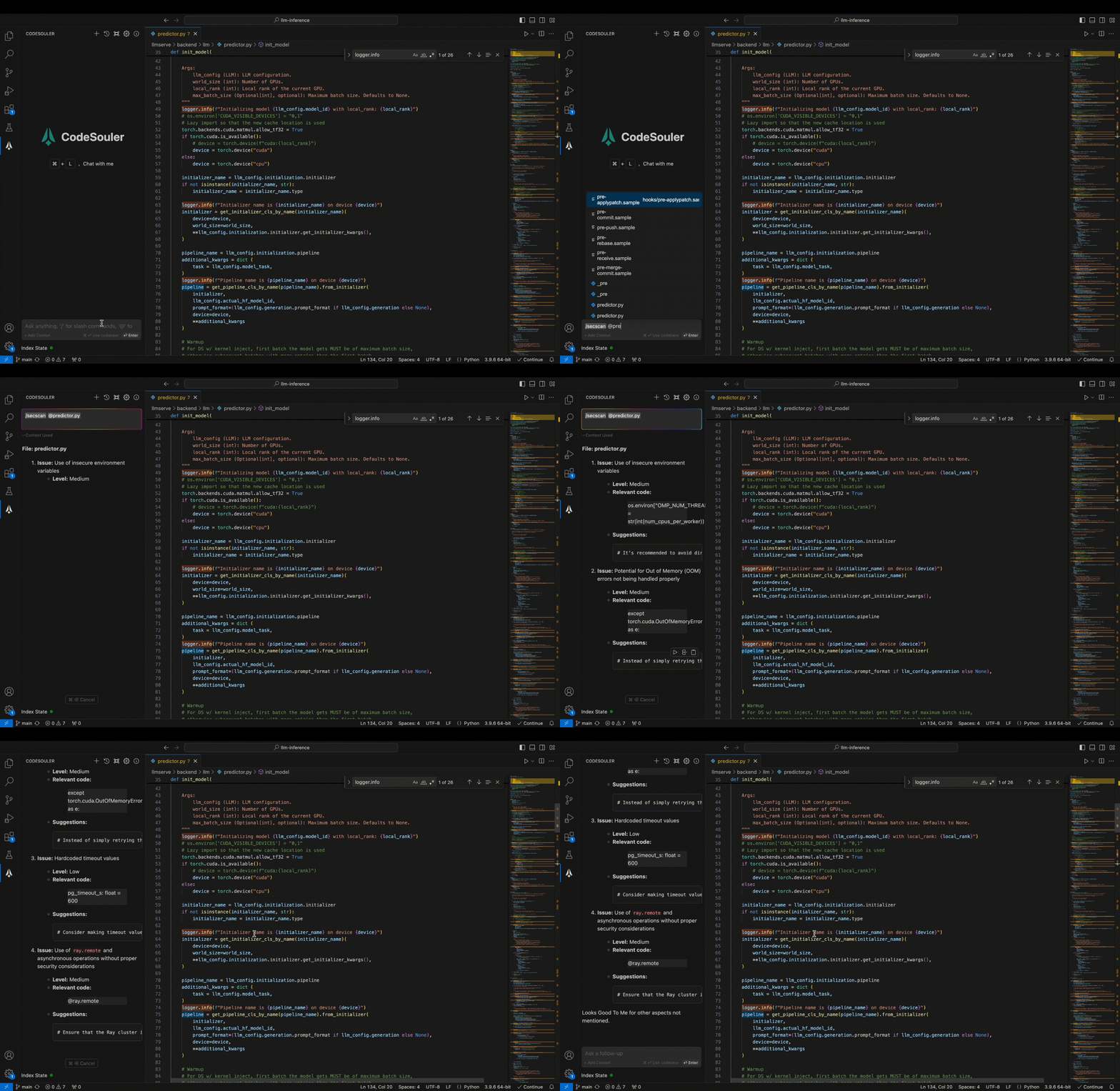
In the CodeSouler session box, use @file to specify a file for/secscan, and CodeSouler will review the entire file and make changes. Users can accept or reject changes for each change.
## Acknowledgments
This project was developed with reference to [Continue](https://github.com/continuedev/continue). We extend our sincerest gratitude to the authors of Continue for their significant contributions.