https://github.com/opengeekslab/react-native-google-places-autocomplete
https://github.com/opengeekslab/react-native-google-places-autocomplete
Last synced: 12 months ago
JSON representation
- Host: GitHub
- URL: https://github.com/opengeekslab/react-native-google-places-autocomplete
- Owner: openGeeksLab
- License: mit
- Created: 2017-08-21T14:57:08.000Z (almost 9 years ago)
- Default Branch: master
- Last Pushed: 2017-08-22T08:17:41.000Z (almost 9 years ago)
- Last Synced: 2025-02-26T22:28:16.936Z (over 1 year ago)
- Language: JavaScript
- Size: 21.5 KB
- Stars: 0
- Watchers: 2
- Forks: 0
- Open Issues: 0
-
Metadata Files:
- Readme: README.md
- License: LICENSE
Awesome Lists containing this project
README
# react-native-google-places-autocomplete
Customizable Google Places autocomplete component for iOS and Android React-Native apps
### Changelog
- 1.2.12 : Fixed render description + docs.
- 1.2.11 : Fixed current location result `onPress` event.
- 1.2.10 : Set default `debounce` to `0`. Fixed debounce typing lag.
- 1.2.9 : Added `isRowScrollable` prop.
- 1.2.8 : Added `underlineColorAndroid`, `listUnderlayColor`, `renderLeftButton`, `renderRightButton` props. Added `nearbyPlacesAPI` option `None`.
- 1.2.7 : Use `children` prop to pass children elements directly into `GooglePlacesAutocomplete`.
- 1.2.6 : Added `renderRow` prop.
- 1.2.5 : Added `renderDescription` prop for rendering dropdown item text
- 1.2.4 : Added `listViewDisplayed` prop for controlling dropdown
- 1.2.3 : Removed ProgressBarAndroid to remove warnings
- 1.2.2 : Added prop to change placeholder text color
- 1.2.1 : Fixed special request characters issue + ensure react-native@0.28 peer dependency.
### Example
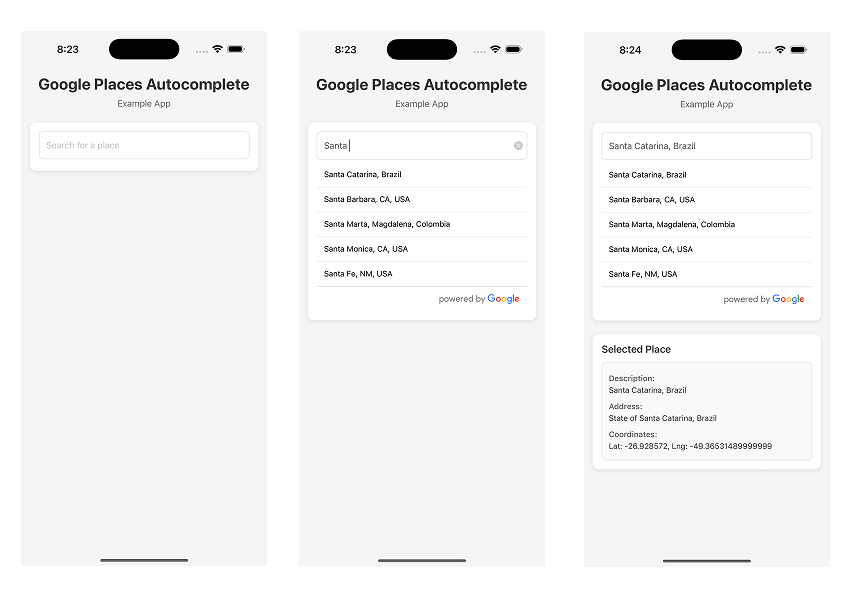
```js
var {GooglePlacesAutocomplete} = require('react-native-google-places-autocomplete');
const homePlace = {description: 'Home', geometry: { location: { lat: 48.8152937, lng: 2.4597668 } }};
const workPlace = {description: 'Work', geometry: { location: { lat: 48.8496818, lng: 2.2940881 } }};
var Example = React.createClass({
render() {
return (
row.description} // custom description render
onPress={(data, details = null) => { // 'details' is provided when fetchDetails = true
console.log(data);
console.log(details);
}}
getDefaultValue={() => {
return ''; // text input default value
}}
query={{
// available options: https://developers.google.com/places/web-service/autocomplete
key: 'YOUR API KEY',
language: 'en', // language of the results
types: '(cities)', // default: 'geocode'
}}
styles={{
description: {
fontWeight: 'bold',
},
predefinedPlacesDescription: {
color: '#1faadb',
},
}}
currentLocation={true} // Will add a 'Current location' button at the top of the predefined places list
currentLocationLabel="Current location"
nearbyPlacesAPI='GooglePlacesSearch' // Which API to use: GoogleReverseGeocoding or GooglePlacesSearch
GoogleReverseGeocodingQuery={{
// available options for GoogleReverseGeocoding API : https://developers.google.com/maps/documentation/geocoding/intro
}}
GooglePlacesSearchQuery={{
// available options for GooglePlacesSearch API : https://developers.google.com/places/web-service/search
rankby: 'distance',
types: 'food',
}}
filterReverseGeocodingByTypes={['locality', 'administrative_area_level_3']} // filter the reverse geocoding results by types - ['locality', 'administrative_area_level_3'] if you want to display only cities
predefinedPlaces={[homePlace, workPlace]}
debounce={200} // debounce the requests in ms. Set to 0 to remove debounce. By default 0ms.
renderLeftButton={() => }
renderRightButton={() => Custom text after the inputg}
/>
);
}
});
```
### Installation
1. ```npm install react-native-google-places-autocomplete --save```
2. Get your [Google Places API keys](https://developers.google.com/places/) and enable "Google Places API Web Service" (NOT Android or iOS) in the console.
3. Enable "Google Maps Geocoding API" if you want to use GoogleReverseGeocoding for Current Location
### Styling
```GooglePlacesAutocomplete``` can be easily customized to meet styles of your app. Pass styles props to ```GooglePlacesAutocomplete``` with style object for different elements (keys for style object are listed below)
| key | type |
| ---- | ---- |
| container | object (View) |
| description | object (Text style) |
| textInputContainer | object (View style) |
| textInput | object (style) |
| loader | object (View style) |
| listView | object (ListView style) |
| predefinedPlacesDescription | object (Text style) |
| poweredContainer | object (View style) |
| powered | object (Image style) |
#### Example
```
```
### Features
- [x] Places autocompletion
- [x] iOS and Android compatibility
- [x] Places details fetching + ActivityIndicatorIOS/ProgressBarAndroid loaders
- [x] Customizable using the ```styles``` parameter
- [x] XHR cancellations when typing fast
- [x] Google Places terms compliant
- [x] Current location
- [x] Predefined places
### License
[MIT](LICENSE)
### Authors
- [Farid Safi](https://www.twitter.com/FaridSafi)
- [Maxim Yaskevich](https://www.twitter.com/mayaskme)