https://github.com/opengeospatial/ets-omxml20
Executable Test Suite for Observations and Measurements - XML Implementation (OMXML)
https://github.com/opengeospatial/ets-omxml20
Last synced: 6 months ago
JSON representation
Executable Test Suite for Observations and Measurements - XML Implementation (OMXML)
- Host: GitHub
- URL: https://github.com/opengeospatial/ets-omxml20
- Owner: opengeospatial
- License: other
- Created: 2014-11-12T14:30:21.000Z (over 11 years ago)
- Default Branch: master
- Last Pushed: 2025-03-13T22:10:42.000Z (over 1 year ago)
- Last Synced: 2025-07-25T16:50:23.243Z (11 months ago)
- Language: Java
- Homepage:
- Size: 2.9 MB
- Stars: 0
- Watchers: 13
- Forks: 0
- Open Issues: 2
-
Metadata Files:
- Readme: README.md
- License: LICENSE.txt
Awesome Lists containing this project
README
## ets-omxml20
### Scope
This test suite validates the XML instances of version 2.0 of the OGC Observations and Measurements - XML Implementation (OMXML) conceptual model.
Visit the [project documentation website](http://opengeospatial.github.io/ets-omxml20/)
### How to run the test
#### 1. via IDE (Eclipse, Netbeans, etc.)
Clone this project into the IDE.
Set the instance location in the config file which located at the user home folder by default:
`${user.home}/test-run-props.xml`
You can modify the value of the "entry" element with the key "iut" to locate the testing instance, like:
```xml
Test run arguments
https://raw.githubusercontent.com/opengeospatial/ets-omxml20/master/src/test/resources/CountObservation.xml
1
```
After the configuring, set the starting class to run as java application:
`org.opengis.cite.om20.TestNGController`
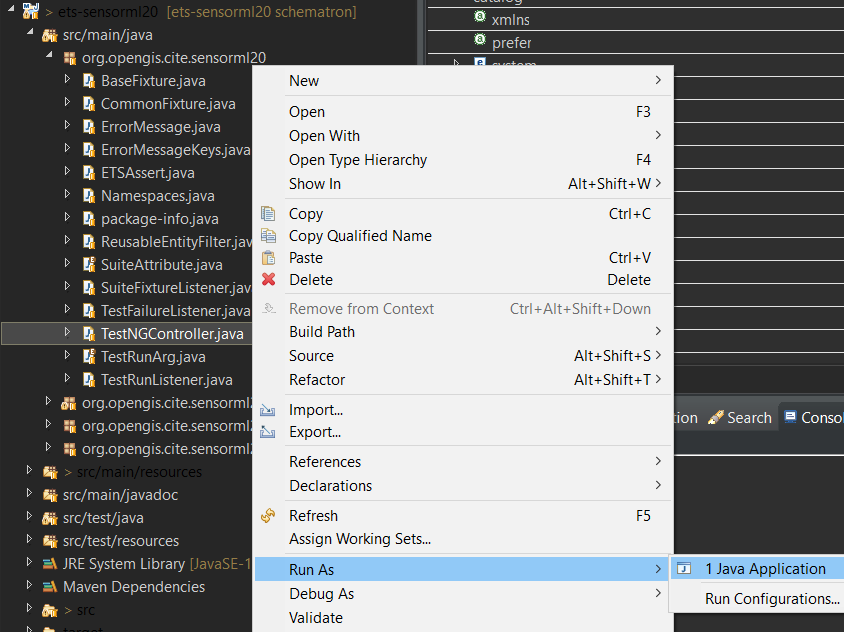
The TestNG results file (`testng-results.xml`) will be written to a subdirectory
in `${user.home}/testng/` having a UUID value as its name.
#### 2. via console
Build the source code with Maven in the shell:
`mvn package`
Execute the build artifact under the target folder:
`java -jar ets-omxml20-1.0-SNAPSHOT-aio.jar [-o|--outputDir $TMPDIR] [test-run-props.xml]`
#### 3. Docker
This test suite comes with a Dockerfile which can be used to easily setup the OGC test harness with
the test suite. Details can be found on [Create Docker Image and create and start Docker Container](https://github.com/opengeospatial/cite/wiki/How-to-create-Docker-Images-of-test-suites#create-docker-image-and-create-and-start-docker-container).
#### 4. OGC test harness
Use [TEAM Engine](https://github.com/opengeospatial/teamengine), the official OGC test harness.
### Files Tested
* [Samples](https://github.com/opengeospatial/ets-omxml20/tree/master/src/test/resources)
### How to contribute
If you would like to get involved, you can:
* [Report an issue](https://github.com/opengeospatial/ets-omxml20/issues) such as a defect or
an enhancement request
* Help to resolve an [open issue](https://github.com/opengeospatial/ets-omxml20/issues?q=is%3Aopen)
* Fix a bug: Fork the repository, apply the fix, and create a pull request
* Add new tests: Fork the repository, implement (and verify) the tests on a new topic branch, and create a pull request