https://github.com/openml/services
Overview of all OpenML components including a docker-compose to run OpenML services locally
https://github.com/openml/services
Last synced: 12 months ago
JSON representation
Overview of all OpenML components including a docker-compose to run OpenML services locally
- Host: GitHub
- URL: https://github.com/openml/services
- Owner: openml
- Created: 2024-01-10T13:08:27.000Z (over 2 years ago)
- Default Branch: main
- Last Pushed: 2025-02-15T11:36:45.000Z (over 1 year ago)
- Last Synced: 2025-06-07T11:07:56.218Z (about 1 year ago)
- Language: Shell
- Size: 3.69 MB
- Stars: 1
- Watchers: 7
- Forks: 0
- Open Issues: 4
-
Metadata Files:
- Readme: README.md
Awesome Lists containing this project
README
# services
Overview of all OpenML components including a docker-compose to run OpenML services locally
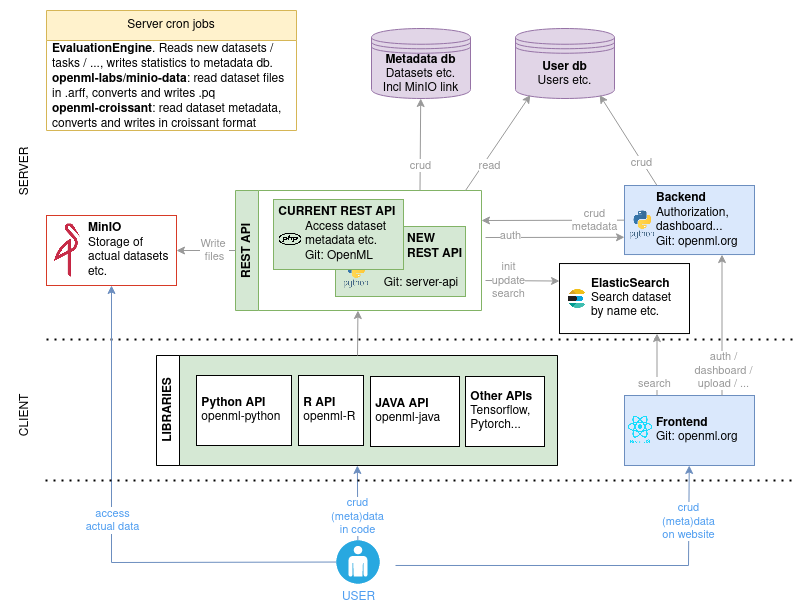
## Overview
## Prerequisites
- Linux/MacOS with Intell processor (because of our old ES version, this project currently does not support `arm` architectures)
- [Docker](https://docs.docker.com/get-docker/)
- [Docker Compose](https://docs.docker.com/compose/install/) version 2.21.0 or higher
## Usage
When using this project for the first time, run:
```bash
chown -R www-data:www-data data/php
# Or, if previous fails, for instance because `www-data` does not exist:
chmod -R 777 data/php
```
This is necessary to make sure that you can upload datasets, tasks and runs. Note that the dataset data is meant to be public anyway, so a 777 should not be problematic. This step won't be necessary anymore once the backend stores its files on MinIO.
You run all OpenML services locally using
```bash
docker compose --profile all up -d
```
Stop it again using
```bash
docker compose --profile all down
```
### Profiles
You can use different profiles:
- `[no profile]`: databases
- `"elasticsearch"`: databases + nginx + elasticsearch
- `"rest-api"`: databases + nginx + elasticsearch + REST API
- `"frontend"`: databases + nginx + elasticsearch + REST API + frontend + email-server
- `"minio"`: databases + nginx + elasticsearch + REST APP + MinIO + parquet and croissant conversion
- `"evaluation-engine"`: databases + nginx + elastichsearc + REST API + MinIO + evaluation engine
- `"all"`: everything
Usage examples:
```bash
docker compose --profile all up -d # all services
docker compose up -d # only the database
docker compose --profile frontend up -d # Frontend, rest-api, elasticsearch and database
```
Use the same profile for your `down` command.
## Known issues
See the Github Issue list for the known issues.
## Debugging
Some usefull commands:
```bash
docker logs openml-php-rest-api -f # tail the logs of the php rest api
docker exec -it openml-php-rest-api /bin/bash # go into the php rest api container
./scripts/connect_db.sql # access the database
```
## Endpoints
> [!TIP]
> If you change any port, make sure to change it for all services!
When you spin up the docker-compose, you'll get these endpoints:
- *Frontend*: localhost:8000
- *Database*: localhost:3306, filled with test data.
- *ElasticSearch*: localhost:9200 or localhost:8000/es, filled with test data.
- *Rest API*: localhost:8080
- *Minio*: console at localhost:9001, filled with test data.
## Credentials
The credentials for the database can be found in `config/database/.env`, for minio in `config/minio/.env`, etc.
## Emails
The email-server is used for emails from the frontend. For example, if you create a new user, an
email is send to the user. All outgoing emails are rerouted to catchall@example.com. You can see
the messages in `config/email-server/messages`. Note that some of the urls in the emails need to
be slightly altered to use them in the test setup: change https to http.
## Development
### PHP, Parquet and Croissant converter
If you want to do local development on containers that are part of the docker-compose, you want those containers to change based on your code. You should have the relevant code somewhere on your system, you only need to tell the docker-compose where to find it. You can do so by setting environment variables.
Create a `.env` file inside this directory, and set:
#### PHP
```bash
PHP_CODE_DIR=/path/to/OpenML # Root of https://github.com/openml/OpenML on your computer
PHP_CODE_VAR_WWW_OPENML=/var/www/openml # Always set this to /var/www/openml. Leave empty if you leave PHP_CODE_DIR empty
```
Make sure to create `openml_OS/config/BASE_CONFIG.php` in your local `$PHP_CODE_DIR`. The correct configuration can be found in `config/php.env`. Run docker compose with profile `rest-api`.
#### Parquet
```bash
ARFF_TO_PQ_CODE_DIR=/path/to/minio-data # Root of https://github.com/openml-labs/minio-data on your computer
ARFF_TO_PQ_APP=/app # Always set this to /app. Leave empty if you leave ARFF_TO_PQ_CODE_DIR empty
```
#### Croissant
```bash
CROISSANT_CODE_DIR=/path/to/openml-croissant/python # Python directory of https://github.com/openml/openml-croissant on your computer
CROISSANT_APP=/app # Always set this to /app. Leave empty if you leave CROISSANT_CODE_DIR empty
```
### Frontend
```bash
FRONTEND_CODE_DIR=/path/to/openml.org # Python directory of https://github.com/openml/openml.org on your computer
FRONTEND_APP=/app # Always set this to /app. Leave empty if you leave FRONTEND_CODE_DIR empty
```
### Python
You can run the openml-python code on your own local server now!
```bash
docker run --rm -it -v ./config/python/config:/root/.config/openml/config:ro --network openml-services openml/openml-python
```
For an example of manual tests, you can run:
```python
import openml
from openml.tasks import TaskType
from openml.datasets.functions import create_dataset
import pandas as pd
import numpy as np
df = pd.DataFrame(np.random.randint(0,100,size=(100, 4)), columns=list('ABCD'))
df["class"] = ["test" if np.random.randint(0, 1) == 0 else "test2" for _ in range(100)]
df["class"] = df["class"].astype("category")
dataset = create_dataset(
name="test_dataset",
description="test",
creator="I",
contributor=None,
collection_date="now",
language="en",
attributes="auto",
ignore_attribute=None,
citation="citation",
licence="BSD (from scikit-learn)",
default_target_attribute="class",
data=df,
version_label="test",
original_data_url="https://www4.stat.ncsu.edu/~boos/var.select/diabetes.html",
paper_url="url",
)
dataset.publish()
# Meanwhile you can admire your newly created dataset at http://localhost:8000/search?type=data&id=[dataset.id]
# Wait a minute until dataset is active
my_task = openml.tasks.create_task(
task_type=TaskType.SUPERVISED_CLASSIFICATION,
dataset_id=dataset.id,
target_name="class",
evaluation_measure="predictive_accuracy",
estimation_procedure_id=1,
)
my_task.publish()
# wait a minute, so that the dataset and tasks are both processed by the evaluation engine.
# the evaluation engine runs every minute.
# Meanwhile you can check out the newly created task at localhost:8000/search?type=task&id=[my_task.id]
my_task = openml.tasks.get_task(my_task.task_id)
from sklearn import compose, ensemble, impute, neighbors, preprocessing, pipeline, tree
clf = tree.DecisionTreeClassifier()
run = openml.runs.run_model_on_task(clf, my_task)
run.publish()
# wait a minute, so the the run is processed by the evaluation engine
run = openml.runs.get_run(run.id, ignore_cache=True)
run.evaluations
# Expected: {'average_cost': 0.0, 'f_measure': 1.0, 'kappa': 1.0, 'mean_absolute_error': 0.0, 'mean_prior_absolute_error': 0.0, 'number_of_instances': 100.0, 'precision': 1.0, 'predictive_accuracy': 1.0, 'prior_entropy': 0.0, 'recall': 1.0, 'root_mean_prior_squared_error': 0.0, 'root_mean_squared_error': 0.0, 'total_cost': 0.0}
```
### Other services
If you want to develop a service that depends on any of the services in this docker-compose, just bring up this docker-compose and point your service to the correct endpoints.