https://github.com/opensourceame/slim-vscode-extension
A Visual Studio Code extension that adds formatting, outline view and syntax highlighting for the Slim / Trim languages.
https://github.com/opensourceame/slim-vscode-extension
html-css-javascript slim templates trim visual-studio-code visual-studio-code-extension visual-studio-extension
Last synced: 5 months ago
JSON representation
A Visual Studio Code extension that adds formatting, outline view and syntax highlighting for the Slim / Trim languages.
- Host: GitHub
- URL: https://github.com/opensourceame/slim-vscode-extension
- Owner: opensourceame
- License: mit
- Created: 2025-07-30T14:40:30.000Z (12 months ago)
- Default Branch: master
- Last Pushed: 2025-12-20T14:44:30.000Z (7 months ago)
- Last Synced: 2025-12-22T06:27:10.606Z (7 months ago)
- Topics: html-css-javascript, slim, templates, trim, visual-studio-code, visual-studio-code-extension, visual-studio-extension
- Language: TypeScript
- Homepage:
- Size: 2.57 MB
- Stars: 3
- Watchers: 0
- Forks: 0
- Open Issues: 4
-
Metadata Files:
- Readme: README.md
- Changelog: CHANGELOG.md
- License: LICENSE
Awesome Lists containing this project
README
# Slim/Trim Language Support for VS Code
A comprehensive VS Code extension that provides syntax highlighting, formatting and code folding for Slim and Trim templates.
## Features
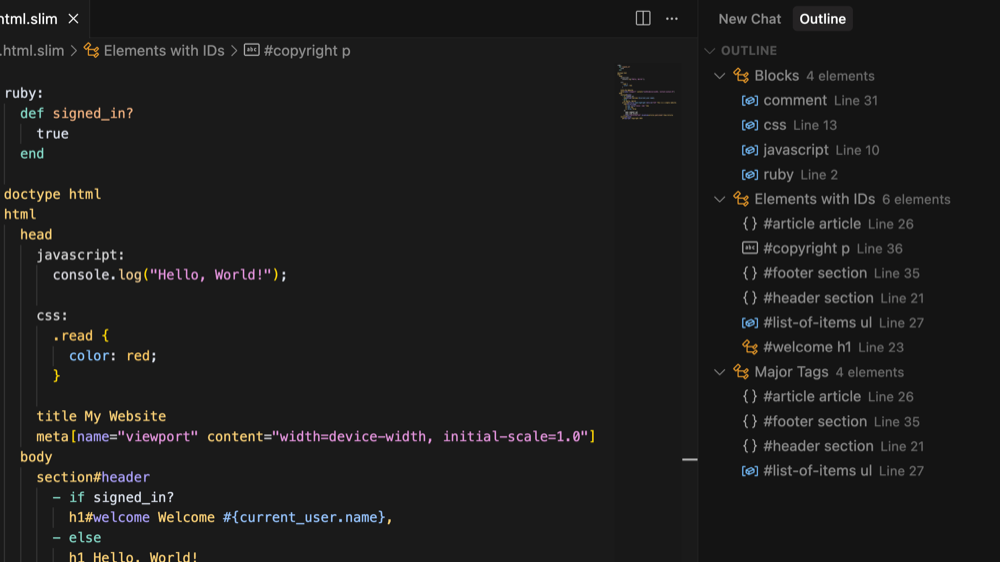
### Syntax Highlighting
- **HTML Elements**: Proper highlighting for all HTML tags
- **Attributes**: Support for ID (#) and class (.) selectors
- **Ruby Code**: Embedded Ruby code with proper syntax highlighting
- **Comments**: Support for both single line and block comments
- **Text Content**: Proper highlighting for text content with pipe (|) syntax
- **Doctype**: Special highlighting for doctype declarations
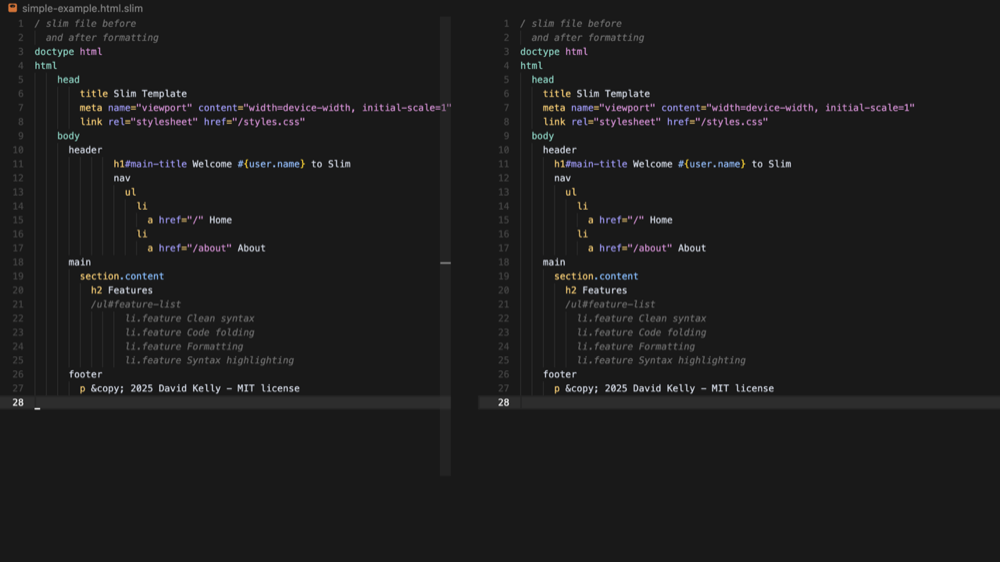
### Formatting
- **Auto-indentation**: Automatic indentation based on Slim structure
- **Configurable indentation**: Support for both spaces and tabs
- **Format on Save**: Option to automatically format files when saving
- **Range Formatting**: Format specific sections of code
- **On-type Formatting**: Auto-indent when pressing Enter
### Code Folding
- **Intelligent Folding**: Automatic folding ranges based on content structure
- **Block-based Folding**: Folds blocks with more than 5 lines by default
- **Configurable Threshold**: Adjustable minimum line count for folding via settings
- **Nested Folding**: Supports nested folding ranges for complex templates
- **Visual Indicators**: Clear fold markers for easy navigation
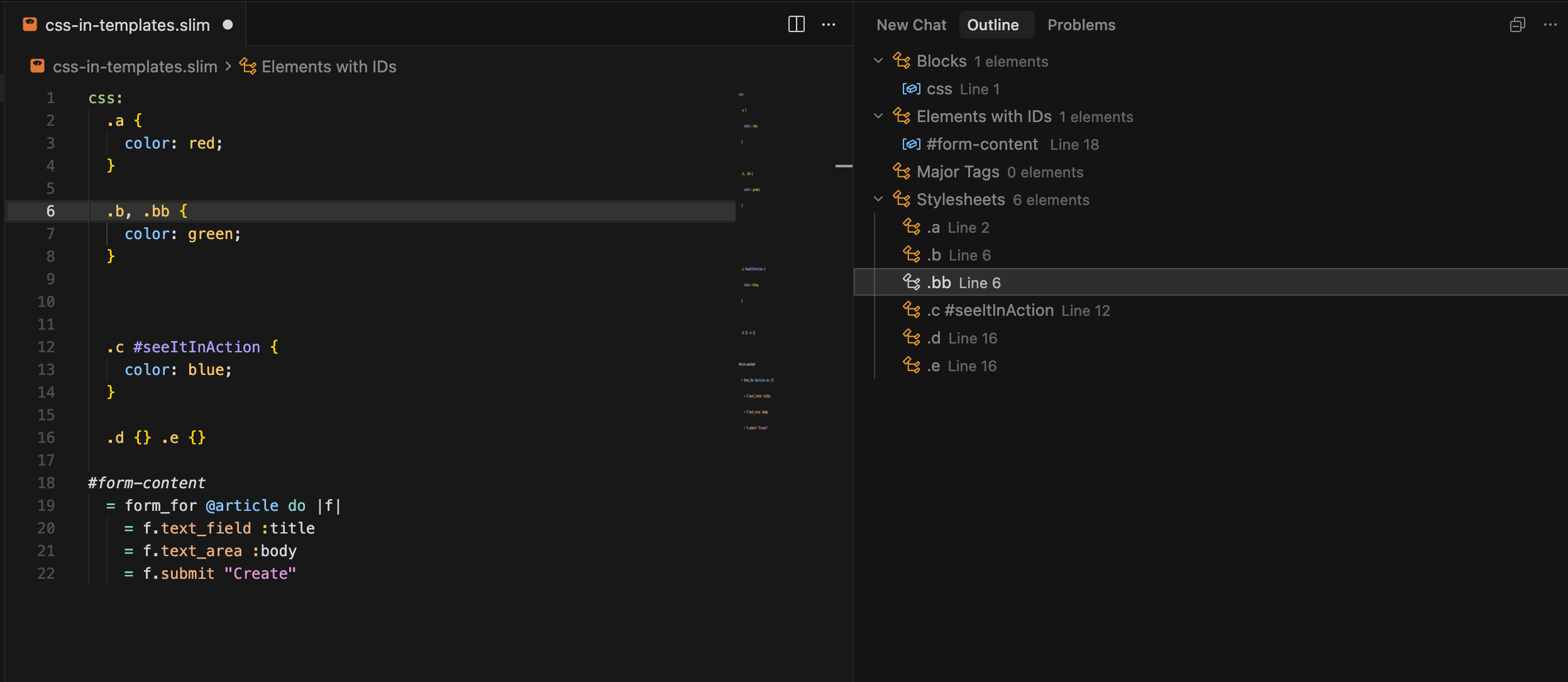
### Document Outline
- **Elements with IDs**: quickly jump to any element with an ID from an alphabetical list
- **Blocks**: jump to declarations of non-Slim blocks (CSS, Javascript, etc.)
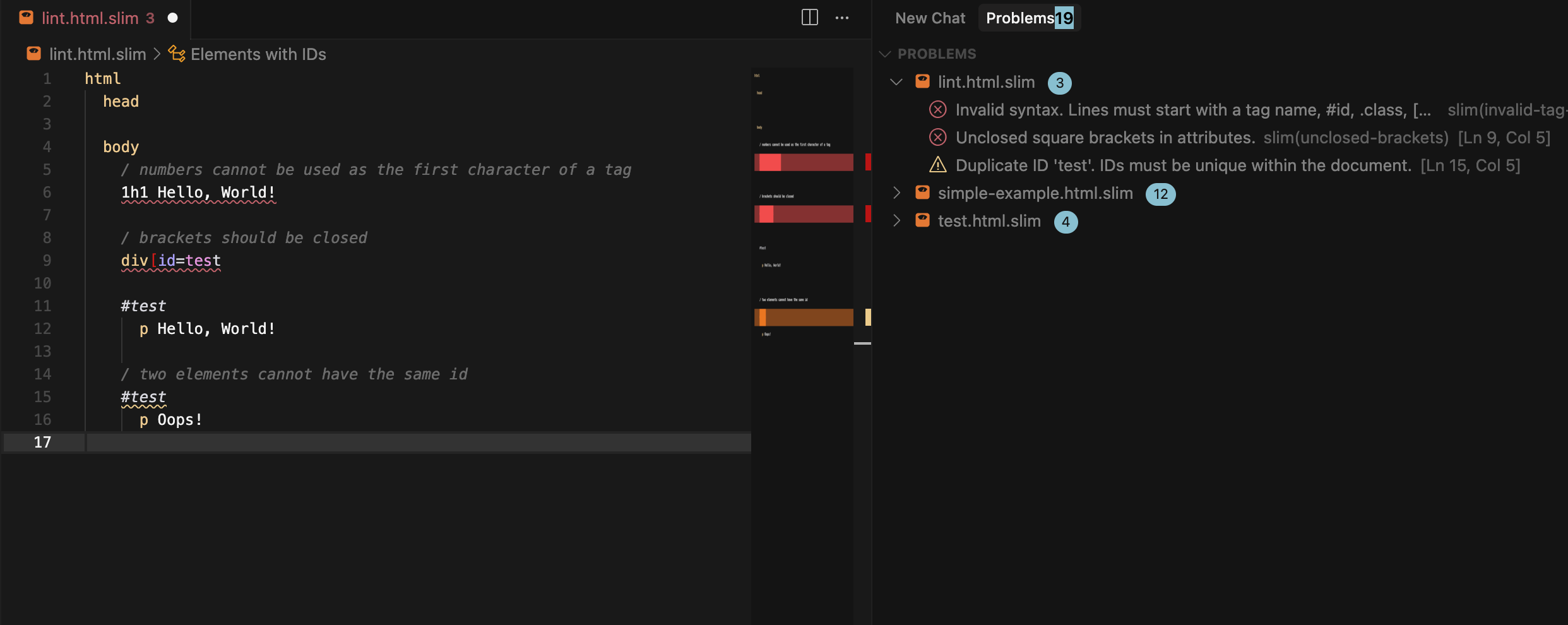
### Syntax Linting
- **Real-time Error Detection**: Shows syntax errors and warnings as you type
- **Configurable Rules**: Enable/disable specific linting rules via settings
- **Syntax Validation**: Validates tag names, attributes, brackets, and Ruby code
- **Indentation Checking**: Ensures consistent indentation throughout your templates
- **Duplicate ID Detection**: Warns about duplicate IDs within the same document
- **Ruby Syntax Validation**: Basic validation of embedded Ruby code syntax
- **Smart Block Detection**: Automatically skips linting for non-Slim blocks (CSS, JavaScript, SCSS, Ruby, comments)
## Installation
### From Source
1. Clone this repository
2. Run `npm install` to install dependencies
3. Run `npm run compile` to build the extension
4. Press `F5` in VS Code to launch the extension in a new window
### From VSIX
1. Build the extension: `npm run compile`
2. Package the extension: `vsce package`
3. Install the generated `.vsix` file in VS Code
## Configuration
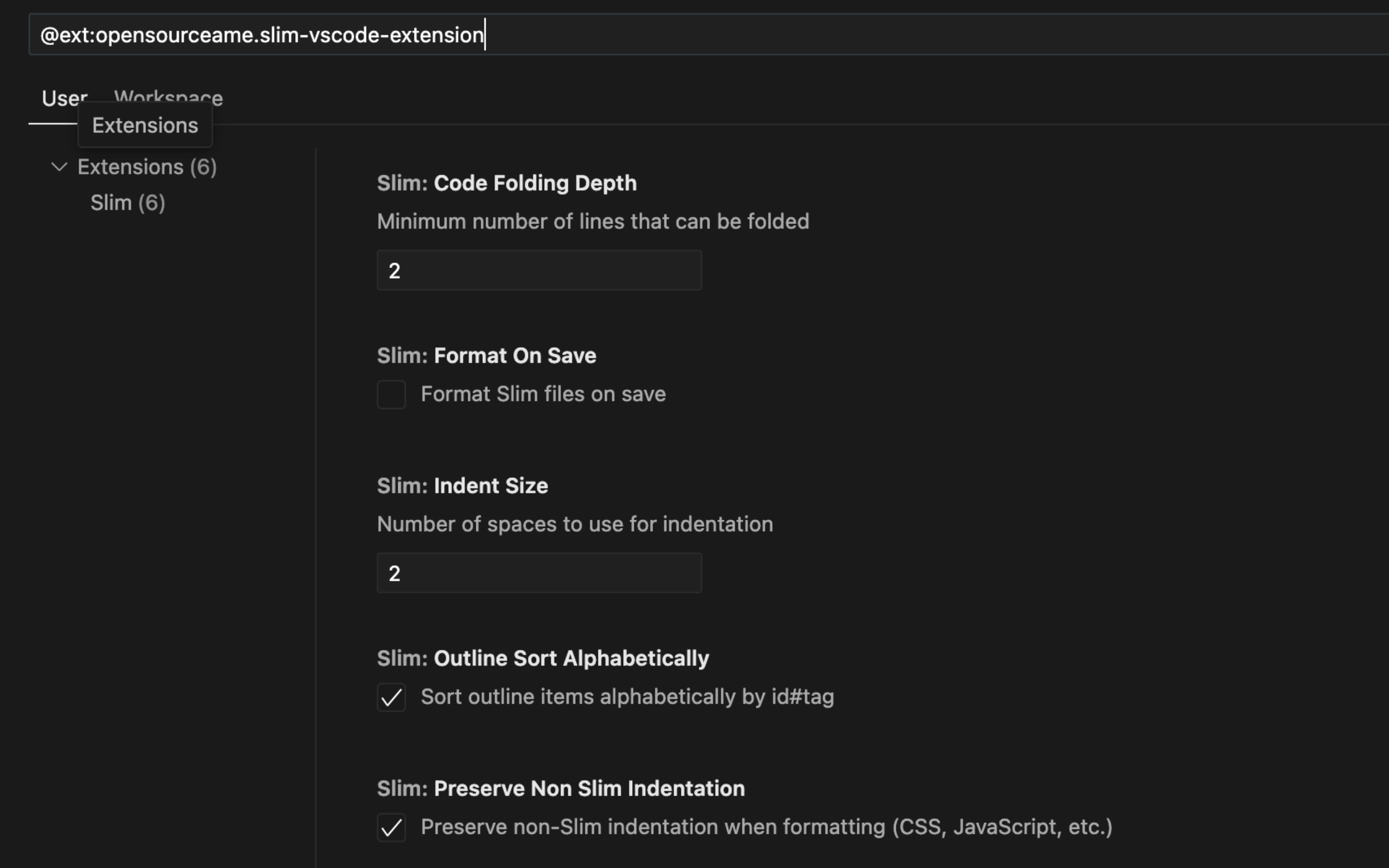
The extension has multiple settings that can be changed:
### Basic Settings
- `slim.indentSize`: Number of spaces for indentation (default: 2)
- `slim.useTab`: Use tabs instead of spaces (default: false)
- `slim.formatOnSave`: Format files automatically on save (default: false)
- `slim.codeFoldingDepth`: Minimum number of lines that can be folded (default: 2)
- `slim.preserveNonSlimIndentation`: Preserve non-Slim indentation when formatting (default: true)
- `slim.outlineSortAlphabetically`: Sort outline items alphabetically by id#tag (default: true)
### Linting Configuration
- `slim.linting.enabled`: Enable/disable Slim template linting (default: true)
- `slim.linting.validateSyntax`: Validate basic Slim syntax (tags, attributes, brackets) (default: true)
- `slim.linting.validateIndentation`: Validate indentation consistency (default: true)
- `slim.linting.validateRuby`: Validate embedded Ruby code syntax (default: true)
- `slim.linting.validateIds`: Check for duplicate IDs in the document (default: true)
- `slim.linting.warnEmptyTags`: Show warnings for empty tags with only selectors (default: false)
## Usage
### Syntax Highlighting
### Formatting
- `Format Document` (Shift+Alt+F): Format the entire document
- `Format Selection` (Ctrl+K Ctrl+F): Format selected text
- Auto-format on save (if enabled)
### Outline
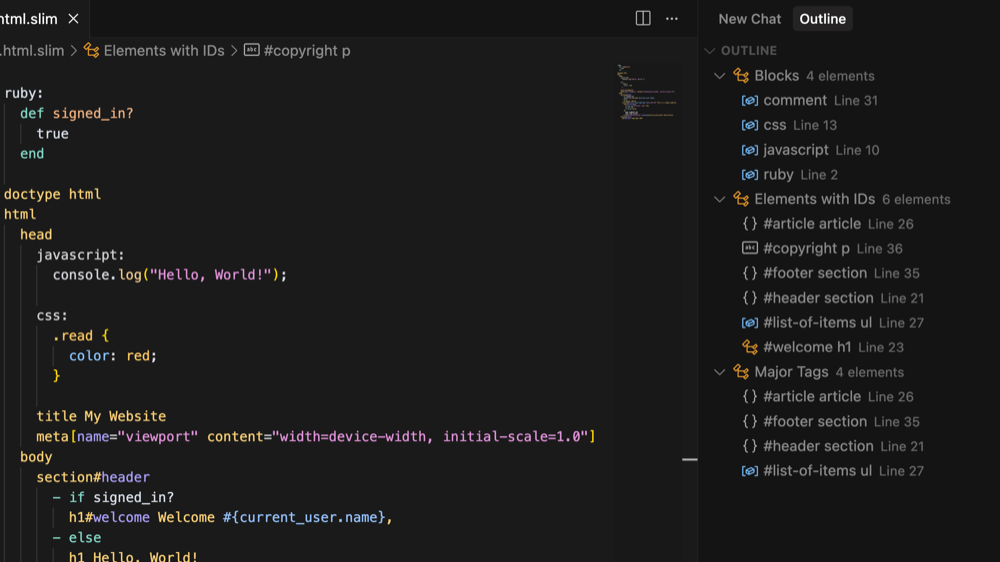
Outlines also show CSS/SCSS elements within a template
### Code folding
**Folding Behavior:**
- Adjust the threshold via `slim.codeFoldingDepth` setting
### Linting
## Supported File Types
- `.slim` files
- `.trim` files
## Requirements
- VS Code 1.60.0 or higher
## Contributing
1. Fork the repository
2. Create a feature branch
3. Make your changes
4. Add tests if applicable
5. Submit a pull request
## License
(c) David Kelly 2025
MIT License - see LICENSE file for details.