https://github.com/opszero/terraform-aws-iam
https://github.com/opszero/terraform-aws-iam
Last synced: 8 months ago
JSON representation
- Host: GitHub
- URL: https://github.com/opszero/terraform-aws-iam
- Owner: opszero
- License: other
- Created: 2021-09-24T05:19:16.000Z (over 4 years ago)
- Default Branch: main
- Last Pushed: 2025-09-16T08:05:40.000Z (9 months ago)
- Last Synced: 2025-09-16T09:32:36.293Z (9 months ago)
- Language: HCL
- Homepage: https://opszero.com
- Size: 167 KB
- Stars: 0
- Watchers: 3
- Forks: 1
- Open Issues: 0
-
Metadata Files:
- Readme: README.md
- Funding: .github/FUNDING.yml
- License: LICENSE
- Support: SUPPORT
Awesome Lists containing this project
README
# MrMgr (AWS IAM)
Configures AWS IAM users, groups, OIDC.
## Usage
This belongs within the [infrastructure as code](https://github.com/opszero/template-infra).
```
# iam/main.tf
provider "aws" {
profile = "opszero"
region = "us-east-1"
}
terraform {
backend "s3" {
bucket = "opszero-opszero-terraform-tfstate"
region = "us-east-1"
profile = "opszero"
encrypt = "true"
key = "iam"
}
}
resource "aws_iam_policy" "deployer" {
name = "github-deployer-policy"
description = "Github Deployer"
policy = </main.tf
module "opszero-eks" {
source = "github.com/opszero/terraform-aws-kubespot"
...
sso_roles = {
admin_roles = [
"arn:${local.partition}:iam::1234567789101:role/github-deployer"
]
readonly_roles = []
dev_roles = []
monitoring_roles = []
}
...
}
```
## Users
Users will be created _without_ a login profile. This means the user will exist
but will not have a password to login with. Login profiles and credentials will
be managed via console manually (to prevent automated disruption of everyone).
When removing a user, first disable console access.
Users without MFA will have no privilege within the system. In order to have
access to AWS users will need to attach a MFA device to their account.
- Log in via console
- Select "My Security Credentials"
- Choose "Assign MFA device"
- Use a virtual MFA device
- Enter two consecutive MFA codes from your 2FA app
- Sign out
- Sign in with MFA
### List Existing Users
```bash
aws --profile iam list-attached-user-policies --user-name | jq '.AttachedPolicies[].PolicyArn'
```
## Groups
# OIDC
OIDC Deployer allows us to access resources within another piece of
infrastructure through the use of OpenID. Check below for examples oh how dto do
deployments.
### Github
Example configuration for deploying to an EKS cluster without the need for AWS
Access Keys.
```terraform
resource "aws_iam_policy" "deployer" {
name = "github-deployer-policy"
description = "Github Deployer"
policy = <
STS=($(aws sts assume-role-with-web-identity
--role-arn ${ROLE_ARN}
--role-session-name "GitLabRunner-${CI_PROJECT_ID}-${CI_PIPELINE_ID}"
--web-identity-token $CI_JOB_JWT_V2
--duration-seconds 3600
--query 'Credentials.[AccessKeyId,SecretAccessKey,SessionToken]'
--output text))
- export AWS_ACCESS_KEY_ID="${STS[0]}"
- export AWS_SECRET_ACCESS_KEY="${STS[1]}"
- export AWS_SESSION_TOKEN="${STS[2]}"
- export AWS_REGION="$REGION"
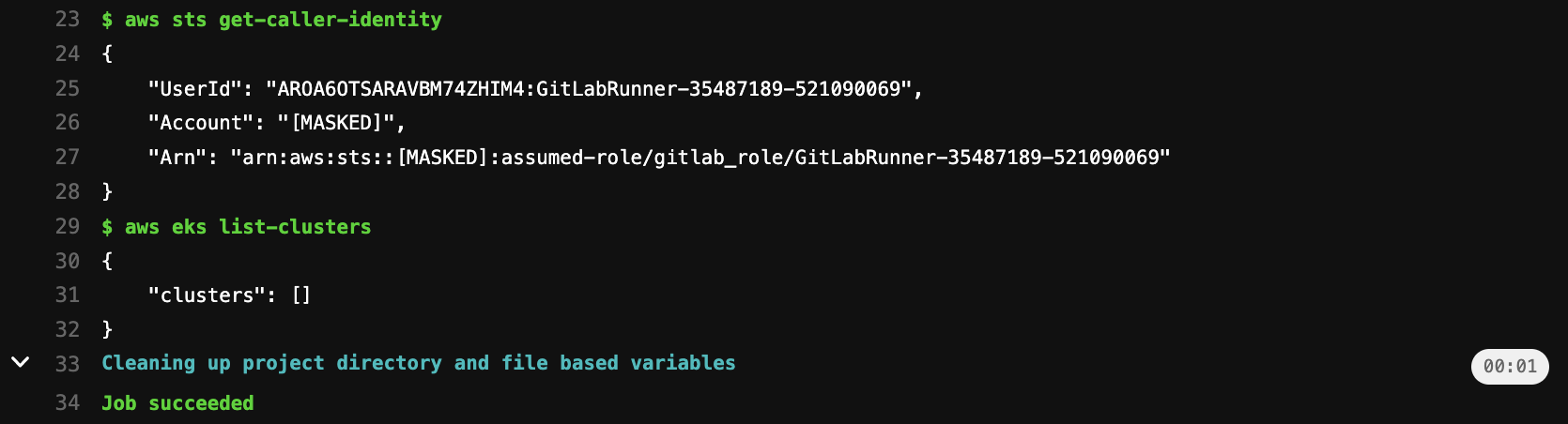
- aws sts get-caller-identity
- aws eks list-clusters
```
#### GitLab CI Outputs
## BitBucket
```bash
module "mrmgr" {
source = "github.com/opszero/terraform-aws-mrmgr"
bitbucket = {
"deployer" = {
subjects = [
"{REPOSITORY_UUID}[:{ENVIRONMENT_UUID}]:{STEP_UUID}"
]
policy_json = [
aws_iam_policy.deployer.json
]
}
}
```
## Providers
| Name | Version |
|------|---------|
| [aws](#provider\_aws) | n/a |
| [tls](#provider\_tls) | n/a |
## Inputs
| Name | Description | Type | Default | Required |
|------|-------------|------|---------|:--------:|
| [bitbucket](#input\_bitbucket) | Terraform object to create IAM OIDC identity provider in AWS to integrate with Bitbucket | `map` | `{}` | no |
| [github](#input\_github) | Terraform object to create IAM OIDC identity provider in AWS to integrate with github actions | `map` | `{}` | no |
| [gitlab](#input\_gitlab) | Terraform object to create IAM OIDC identity provider in AWS to integrate with gitlab CI | `map` | `{}` | no |
| [groups](#input\_groups) | Terraform object to create AWS IAM groups with custom IAM policies | `map` | `{}` | no |
| [management\_account](#input\_management\_account) | Is this an AWS management account that has child accounts? | `bool` | `false` | no |
| [opszero\_enabled](#input\_opszero\_enabled) | Deploy opsZero omyac cloudformation stack | `bool` | `false` | no |
| [users](#input\_users) | Terraform object to create AWS IAM users | `map` | `{}` | no |
| [vanta\_account\_id](#input\_vanta\_account\_id) | Vanta account id | `string` | `""` | no |
| [vanta\_enabled](#input\_vanta\_enabled) | n/a | `bool` | `false` | no |
| [vanta\_external\_id](#input\_vanta\_external\_id) | Vanta external id | `string` | `""` | no |
## Resources
| Name | Type |
|------|------|
| [aws_cloudformation_stack.opszero](https://registry.terraform.io/providers/hashicorp/aws/latest/docs/resources/cloudformation_stack) | resource |
| [aws_iam_policy.mfa](https://registry.terraform.io/providers/hashicorp/aws/latest/docs/resources/iam_policy) | resource |
| [aws_iam_policy.ssh](https://registry.terraform.io/providers/hashicorp/aws/latest/docs/resources/iam_policy) | resource |
| [aws_iam_policy.vanta_child](https://registry.terraform.io/providers/hashicorp/aws/latest/docs/resources/iam_policy) | resource |
| [aws_iam_policy.vanta_management](https://registry.terraform.io/providers/hashicorp/aws/latest/docs/resources/iam_policy) | resource |
| [aws_iam_policy_attachment.ssh](https://registry.terraform.io/providers/hashicorp/aws/latest/docs/resources/iam_policy_attachment) | resource |
| [aws_iam_role.vanta_auditor](https://registry.terraform.io/providers/hashicorp/aws/latest/docs/resources/iam_role) | resource |
| [aws_iam_role_policy_attachment.vanta_child](https://registry.terraform.io/providers/hashicorp/aws/latest/docs/resources/iam_role_policy_attachment) | resource |
| [aws_iam_role_policy_attachment.vanta_management](https://registry.terraform.io/providers/hashicorp/aws/latest/docs/resources/iam_role_policy_attachment) | resource |
| [aws_iam_role_policy_attachment.vanta_security_audit](https://registry.terraform.io/providers/hashicorp/aws/latest/docs/resources/iam_role_policy_attachment) | resource |
| [aws_caller_identity.current](https://registry.terraform.io/providers/hashicorp/aws/latest/docs/data-sources/caller_identity) | data source |
| [aws_iam_policy.SecurityAudit](https://registry.terraform.io/providers/hashicorp/aws/latest/docs/data-sources/iam_policy) | data source |
| [aws_iam_policy_document.ssh](https://registry.terraform.io/providers/hashicorp/aws/latest/docs/data-sources/iam_policy_document) | data source |
| [aws_iam_policy_document.vanta_child](https://registry.terraform.io/providers/hashicorp/aws/latest/docs/data-sources/iam_policy_document) | data source |
| [aws_iam_policy_document.vanta_management](https://registry.terraform.io/providers/hashicorp/aws/latest/docs/data-sources/iam_policy_document) | data source |
| [aws_partition.current](https://registry.terraform.io/providers/hashicorp/aws/latest/docs/data-sources/partition) | data source |
| [tls_certificate.github](https://registry.terraform.io/providers/hashicorp/tls/latest/docs/data-sources/certificate) | data source |
## Outputs
No outputs.
# 🚀 Built by opsZero!

Since 2016 [opsZero](https://opszero.com) has been providing Kubernetes
expertise to companies of all sizes on any Cloud. With a focus on AI and
Compliance we can say we seen it all whether SOC2, HIPAA, PCI-DSS, ITAR,
FedRAMP, CMMC we have you and your customers covered.
We provide support to organizations in the following ways:
- [Modernize or Migrate to Kubernetes](https://opszero.com/solutions/modernization/)
- [Cloud Infrastructure with Kubernetes on AWS, Azure, Google Cloud, or Bare Metal](https://opszero.com/solutions/cloud-infrastructure/)
- [Building AI and Data Pipelines on Kubernetes](https://opszero.com/solutions/ai/)
- [Optimizing Existing Kubernetes Workloads](https://opszero.com/solutions/optimized-workloads/)
We do this with a high-touch support model where you:
- Get access to us on Slack, Microsoft Teams or Email
- Get 24/7 coverage of your infrastructure
- Get an accelerated migration to Kubernetes
Please [schedule a call](https://calendly.com/opszero-llc/discovery) if you need support.


