https://github.com/opszero/terraform-aws-oidc-gitlab
https://github.com/opszero/terraform-aws-oidc-gitlab
Last synced: 4 months ago
JSON representation
- Host: GitHub
- URL: https://github.com/opszero/terraform-aws-oidc-gitlab
- Owner: opszero
- License: other
- Created: 2025-09-16T05:58:52.000Z (9 months ago)
- Default Branch: main
- Last Pushed: 2025-11-24T19:26:08.000Z (7 months ago)
- Last Synced: 2025-11-28T07:31:05.807Z (7 months ago)
- Language: HCL
- Size: 43 KB
- Stars: 0
- Watchers: 0
- Forks: 0
- Open Issues: 0
-
Metadata Files:
- Readme: README.md
- Funding: .github/FUNDING.yml
- License: LICENSE
- Support: SUPPORT
Awesome Lists containing this project
README
          ## AWS federation for GitLab Using OIDC

This is a Terraform module to configure GitLab as an IAM OIDC identity provider in AWS. It enables GitLab to access resources within an AWS account without requiring AWS credentials.

## Requirements

| Name | Version |

|------|---------|

| terraform | ~> 1.0 |

| aws | ~> 4.0 |

| tls |    3.3.0 |

## Installation and usage

The following snippet shows the minimum required configuration to create a working OIDC connection between GitLab and AWS.

```bash

provider "aws" {

  region = var.aws_region

}

module "aws_oidc_gitlab" {

  for_each = var.gitlab

  source   = "../../"

  iam_role_name        = "gitlab_action_oidc_aws"

  attach_admin_policy  = true

  create_oidc_provider = true

  iam_policy_arns      = []

  gitlab_url           = "https://gitlab.com"

  audience             = "https://gitlab.com"

  match_field          = each.value.match_field

  match_value          = each.value.match_value

}

```

## Input Variables
-
attach_admin_policyis the flag to enable or disable the attachment of the AdministratorAccess policy to the IAM role. -
aws_managed_policy_arnsis a list of AWS Managed IAM policy ARNs to attach to the IAM role such as S3FullAccess -
gitlab_urlis the address of your GitLab instance, such as https://gitlab.com or http://gitlab.example.com. -
audienceis the same asgitlab_url -
match_valueIt should be your Gitlab Instance URl such as https://gitlab.example.com or a filter to a specific gitlab group, branch or tag such as project_path:mygroup/myproject:ref_type:branch:ref:main. -
match_fieldIf you use a filter to specific GitLab group, branch or tag asmatch_value, usesub. Useaudif you use GitLab instance url such as https://gitlab.com asmatch_value
## Explanation For match_value And match-field
By default, any GitLab user would be able to assume the role if he knows this IAM role's ARN. So, we need to lock it down by adding a condition in the assume-role policy document. Go to the tab Trust relationships and replace the existing condition with:
Here is how I declare the conditions in the module configuration.
```bash
condition {
test = "StringEquals"
values = var.match_value
variable = "${aws_iam_openid_connect_provider.gitlab[0].url}:${var.match_field}"
}
```
Below condition allows any GitLab project to retrieve temporary credentials from AWS Security Token Service (STS). Use aud if you use GitLab instance url such as https://gitlab.com as match_value . aud means the URL of the GitLab instance. This is defined when the identity provider is first configured in your cloud provider.
```bash
condition {
test = "StringEquals"
values = var.match_value # https//gitlab.com
variable = "${aws_iam_openid_connect_provider.gitlab[0].url}:${var.match_field}" # gitlab.com:aud
}
```
Trusted Entities look liks
```bash
{
"Version": "2012-10-17",
"Statement": [
{
"Effect": "Allow",
"Principal": {
"Federated": "arn:aws:iam::585584209241:oidc-provider/gitlab.com"
},
"Action": "sts:AssumeRoleWithWebIdentity",
"Condition": {
"StringEquals": {
"gitlab.com:aud": "https://gitlab.com"
}
}
}
]
}
```
sub is a concatenation of metadata describing the GitLab CI/CD workflow including the group, project, branch, and tag. The sub field is in the following format:
project_path:{gitlab_group_id}/{project_name}:ref_type:{type}:ref:{branch_name}
| Filter | Example |
|--------|---------|
| Filter to main branch | project_path:mygroup/myproject:ref_type:branch:ref:main |
| Filter to any branch | Wildcard supported. project_path:mygroup/myproject:ref_type:branch:ref:* |
| Filter to specific project | project_path:mygroup/myproject:ref_type:branch:ref:main |
| Filter to all projects under a group | Wildcard supported. project_path:mygroup/*:ref_type:branch:ref:main |
| Filter to a Git tag | Wildcard supported. project_path:mygroup/*:ref_type:tag:ref:1.0 |
Trusted Entities look like
```bash
"Condition": {
"StringEquals": {
"gitlab.com:sub": "project_path:{group_id}/{project_name}:ref_type:branch:ref:main
}
}
```
## Inputs
| Name | Description | Type | Default | Required |
|------|-------------|------|---------|:--------:|
| gitlab_url | The address of your GitLab instance, such as https://gitlab.com or http://gitlab.example.com. | `string` | `"https://gitlab.com"` | yes |
| audience | The address of your GitLab instance, such as https://gitlab.com or http://gitlab.example.com. | `string` | `"https://gitlab.com"` | yes |
| iam\_role\_policy\_arns | List of IAM policy ARNs to attach to the IAM role. | `list(string)` | `[]` | optional |
| create\_oidc\_provider | Flag to enable/disable the creation of the GitHub OIDC provider. | `bool` | `true` | yes |
| match\_field | Issuer, the domain of your GitLab instance. Change to sub if you want to use the filter to any project | `string` | aud | yes |
| match\_value | It should be your Gitab Instance URl by default. But if you want to use filer to a specific group, branch or tag, use this format project_path:mygroup/myproject:ref_type:branch:ref:main | `list` | GitLab Instance URL | yes |
## Optional Inputs
| Name | Description | Type | Default | Required |
|------|-------------|------|---------|:--------:|
| attach\_admin\_policy | Flag to enable/disable the attachment of the AdministratorAccess policy. | `bool` | `false` | no |
| iam\_role\_name | Name of the IAM role to be created. This will be assumable by GitLab. | `string` | `"gitlab_action_role"` | no |
| iam\_role\_path | Path under which to create IAM role. | `string` | `"/"` | no |
| max\_session\_duration | Maximum session duration in seconds. | `number` | `3600` | no |
## Outputs
| Name | Description |
|------|-------------|
| iam\_role\_arn | ARN of the IAM role. |
## .gitlab-ci.yml
```bash
variables:
REGION: us-east-1
ROLE_ARN: arn:aws:iam::${AWS_ACCOUNT_ID}:role/gitlab_action_role
image:
name: amazon/aws-cli:latest
entrypoint:
- '/usr/bin/env'
assume role:
script:
- >
STS=($(aws sts assume-role-with-web-identity
--role-arn ${ROLE_ARN}
--role-session-name "GitLabRunner-${CI_PROJECT_ID}-${CI_PIPELINE_ID}"
--web-identity-token $CI_JOB_JWT_V2
--duration-seconds 3600
--query 'Credentials.[AccessKeyId,SecretAccessKey,SessionToken]'
--output text))
- export AWS_ACCESS_KEY_ID="${STS[0]}"
- export AWS_SECRET_ACCESS_KEY="${STS[1]}"
- export AWS_SESSION_TOKEN="${STS[2]}"
- export AWS_REGION="$REGION"
- aws sts get-caller-identity
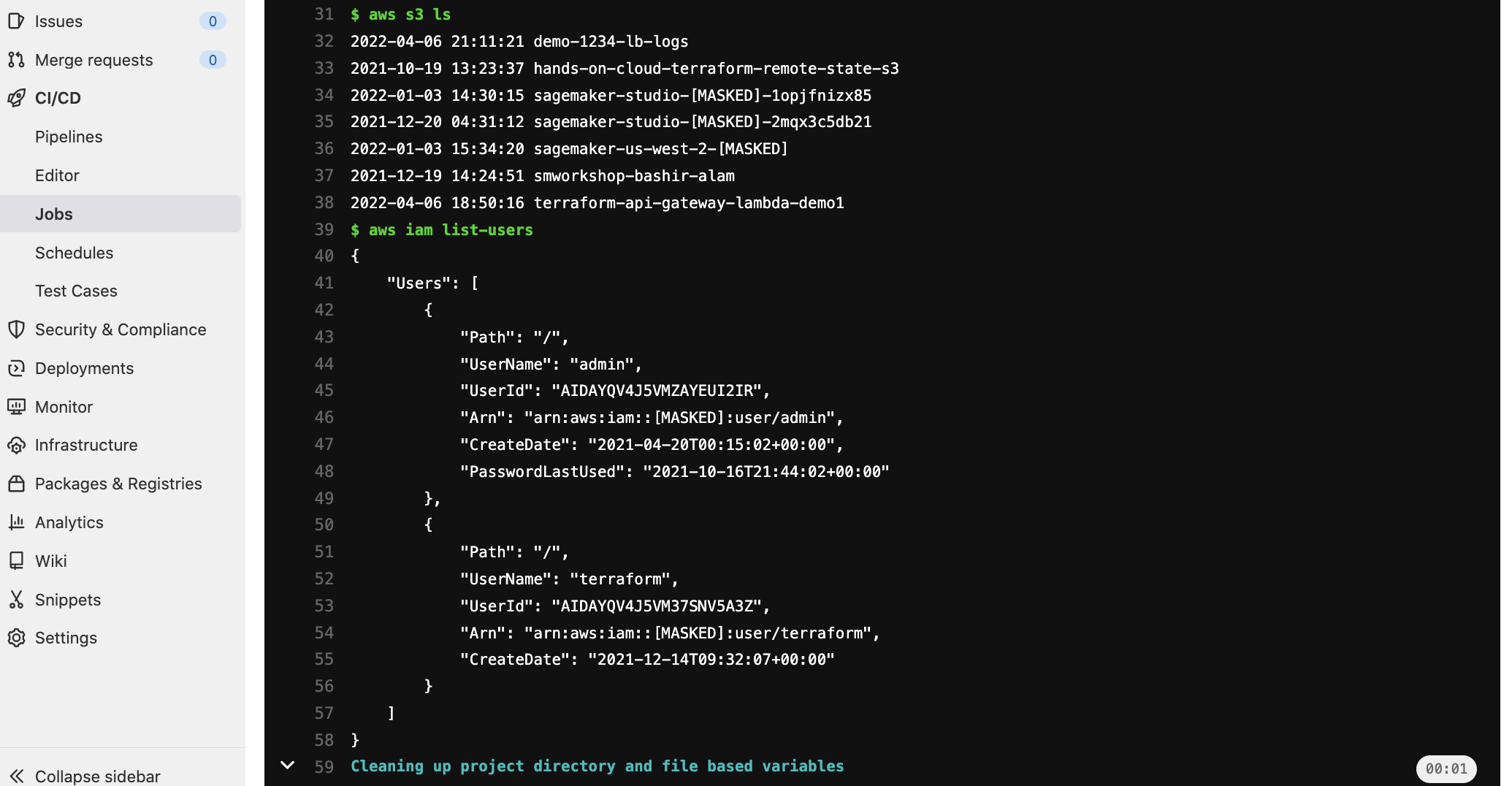
- aws s3 ls
- aws iam list-users
```
## Outputs
## References
- [Configure OpenID Connect in AWS to retrieve temporary credentials
](https://docs.gitlab.com/ee/ci/cloud_services/aws/)
- [Connect to cloud services
](https://docs.gitlab.com/ee/ci/cloud_services/index.html#configure-a-conditional-role-with-oidc-claims)
## License
© 2021 [Daniel Morris](https://unfun.co)
Made available under the terms of the [Apache License 2.0].
[Apache License 2.0]: LICENSE.md
[Complete example]: examples/complete
[Configuring OpenID Connect in Amazon Web Services]: https://docs.github.com/en/actions/deployment/security-hardening-your-deployments/configuring-openid-connect-in-amazon-web-services
[Creating OpenID Connect (OIDC) identity providers]: https://docs.aws.amazon.com/IAM/latest/UserGuide/id_roles_providers_create_oidc.html
[Make]: https://www.gnu.org/software/make/
[Obtaining the thumbprint for an OpenID Connect Identity Provider]: https://docs.aws.amazon.com/IAM/latest/UserGuide/id_roles_providers_create_oidc_verify-thumbprint.html
[Terraform]: https://www.terraform.io