https://github.com/orneryd/nornicdb
NornicDB is a high-performance graph + vector database built for AI agents and knowledge systems. It speaks Neo4j's (Bolt + Cypher) and qdrant's (gRPC) languages so you can use Nornic with zero code changes, while adding intelligent features including a graphql endpoint, air-gapped embeddings, GPU accelerated search, and other intelligent features.
https://github.com/orneryd/nornicdb
bolt cypher cypher-query-language database embedded-systems enterprise-solutions golang graph-rag graphql hnsw local-llm mcp-server memoryos neo4j openai-api qdrant-vector-database tlp vector-database vector-search
Last synced: 4 months ago
JSON representation
NornicDB is a high-performance graph + vector database built for AI agents and knowledge systems. It speaks Neo4j's (Bolt + Cypher) and qdrant's (gRPC) languages so you can use Nornic with zero code changes, while adding intelligent features including a graphql endpoint, air-gapped embeddings, GPU accelerated search, and other intelligent features.
- Host: GitHub
- URL: https://github.com/orneryd/nornicdb
- Owner: orneryd
- License: other
- Created: 2025-12-06T15:46:33.000Z (8 months ago)
- Default Branch: main
- Last Pushed: 2026-02-28T17:23:12.000Z (5 months ago)
- Last Synced: 2026-02-28T18:55:46.703Z (5 months ago)
- Topics: bolt, cypher, cypher-query-language, database, embedded-systems, enterprise-solutions, golang, graph-rag, graphql, hnsw, local-llm, mcp-server, memoryos, neo4j, openai-api, qdrant-vector-database, tlp, vector-database, vector-search
- Language: Go
- Homepage:
- Size: 38.4 MB
- Stars: 177
- Watchers: 1
- Forks: 10
- Open Issues: 1
-
Metadata Files:
- Readme: README.md
- Changelog: CHANGELOG.md
- Contributing: CONTRIBUTING.md
- License: LICENSE
- Security: docs/security/README.md
- Support: docs/support/reply-user-config-gpu-embeddings-ui.md
- Agents: AGENTS.md
Awesome Lists containing this project
README
NornicDB
The Graph Database That Learns
Neo4j-compatible • GPU-accelerated • Memory that evolves









Quick Start •
What It Is •
Why NornicDB •
Benchmarks •
Features •
Docs •
Comparison •
Contributors
## Try It With One Command
```bash
# arm64 / Apple Silicon
docker run -d --name nornicdb -p 7474:7474 -p 7687:7687 -v nornicdb-data:/data timothyswt/nornicdb-arm64-metal-bge:latest
# amd64 / CPU only
docker run -d --name nornicdb -p 7474:7474 -p 7687:7687 -v nornicdb-data:/data timothyswt/nornicdb-amd64-cpu-bge:latest
```
Open [http://localhost:7474](http://localhost:7474) for the admin UI. For NVIDIA CUDA hosts, use `timothyswt/nornicdb-amd64-cuda-bge:latest`. For Vulkan hosts, use `timothyswt/nornicdb-amd64-vulkan-bge:latest`.
---
## What NornicDB Is
NornicDB is a graph database for workloads that need graph traversal, vector retrieval, and historical truth in the same system. It speaks Neo4j's language through Bolt and Cypher, exposes REST, GraphQL, and gRPC interfaces, and can preserve Qdrant-style client workflows where that helps migration.
It is built for knowledge systems, agent memory, Graph-RAG, and canonical truth stores where semantic search is only part of the query. The design goal is not to bolt a vector store onto a graph database. The design goal is one execution path for graph, vector, temporal, and audit-oriented workloads.
## Why NornicDB Is Different
- **Neo4j-compatible by default**: Bolt + Cypher support for existing drivers and applications.
- **Built for AI-native workloads**: vector search, memory decay, and auto-relationships are first-class features.
- **Graph, vector, and ledger semantics in one engine**: hybrid retrieval, graph traversal, canonical graph ledger modeling, tritemporal facts, as-of reads, txlog queries, and receipts do not require a second database.
- **Protocol flexibility without splitting the system**: REST, GraphQL, Bolt/Cypher, Qdrant-compatible gRPC, and additive Nornic gRPC live on the same platform.
- **Hardware-accelerated execution**: Metal/CUDA/Vulkan pathways for high-throughput graph + semantic workloads.
- **Operational flexibility**: full images (models included), BYOM images, and headless API-only deployments.
## Production Deployment Patterns
NornicDB is currently in production at a Fortune 100 company (awaiting legal approval to say who). The current deployment patterns are not theoretical migration slides; they are active stack consolidation projects.
- **Parallel workload systems**: replacing a Neo4j + Qdrant + OpenAI stack with a single Docker deployment to manage and track tasks and dependencies of LLM swarms and automated graph-rag retreival pipleines and the pipelines themselves. Performance timing varies on application structure and load. However, distribution is broad enough that I am actively and reliably hitting edge cases in production to cover those cases and hit a broad bradth of queries-in-production.
- **LLM translation quality systems**: replacing a Mongo Atlas plus Azure embeddings pipeline stack with a single Docker deployment to improve the quality and speed of LLM-generated translations. (Mongo Atlas aggregation queries replaced with node labels + edges dropping vector search + aggregation query time from ~1s to ~1.6ms)
## Transactional Guarantees & Isolation
NornicDB implements Snapshot Isolation at the storage layer. Each transaction is anchored to a specific MVCC version, so point reads, label scans, and snapshot-visible graph traversals resolve against the same committed view of the graph.
- **Repeatable reads within a transaction**: transactions see their own buffered writes, but not commits that land after their read snapshot.
- **Conflict detection at commit**: concurrent graph mutations against the same logical state fail with a normalized `ErrConflict` instead of silently overwriting newer data.
- **Explicit historical reads**: MVCC pruning preserves the current head and a retained floor per logical key; requests below that retained floor fail safely with `ErrNotFound`.
- **Search remains current-state focused**: current search paths are intentionally separate from historical MVCC state.
See [transaction implementation details](docs/user-guides/transactions.md), [historical reads and MVCC retention](docs/user-guides/historical-reads-mvcc-retention.md), and the [canonical graph ledger guide](docs/user-guides/canonical-graph-ledger.md).
### What Recent Deep-Dives Show
- **Hybrid execution model (streaming fast paths + general engine)**: NornicDB uses shape-specialized streaming executors for common traversal/aggregation patterns while retaining a general Cypher path for coverage and correctness.
- **Runtime parser mode switching**: the default `nornic` parser is optimized for low-overhead hot-path routing, while `antlr` mode prioritizes strict parsing and diagnostics when debugging and validation matter more than throughput.
- **Measured parser-path deltas on benchmark suites**: internal Northwind comparisons show large overhead differences on certain query shapes when full parse-tree paths are used, which is why the production default remains the custom parser path.
- **HNSW build acceleration from insertion-order optimization**: BM25-seeded insertion order reduced a 1M embedding build from ~27 minutes to ~10 minutes (~2.7x) in published tests by reducing traversal waste during construction, without changing core quality knobs.
- **Shared seed strategy across indexing stages**: the same lexical seed extraction supports HNSW insertion ordering and improves k-means centroid initialization spread for vector pipeline efficiency.
Read more:
- [Cypher parser modes and execution trade-offs](docs/architecture/cypher-parser-modes.md)
- [How we sped up HNSW construction 2.7x](https://dev.to/orneryd/how-i-sped-up-hnsw-construction-27x-2jhn)
## Performance Snapshot
**LDBC Social Network Benchmark** (M3 Max, 64GB):
| Query Type | NornicDB | Neo4j | Speedup |
| ----------------------------- | ------------- | ----------- | ------- |
| **Message content lookup** | 6,389 ops/sec | 518 ops/sec | **12x** |
| **Recent messages (friends)** | 2,769 ops/sec | 108 ops/sec | **25x** |
| **Avg friends per city** | 4,713 ops/sec | 91 ops/sec | **52x** |
| **Tag co-occurrence** | 2,076 ops/sec | 65 ops/sec | **32x** |
> See [full benchmark results](docs/performance/benchmarks-vs-neo4j.md) for complete methodology and additional workloads.
### Hybrid Retrieval Benchmarks
Hybrid retrieval is where NornicDB is materially different from vector-only stacks: the query shape is vector search followed by graph expansion in the same engine.
**Local benchmark** (67,280 nodes, 40,921 edges, 67,298 embeddings, HNSW CPU-only index):
| Workload | Transport | Throughput | Mean | P50 | P95 | P99 | Max |
| -------------- | --------- | -----------: | ------: | ------: | ------: | ------: | ------: |
| Vector only | HTTP | 19,342 req/s | 511 us | 470 us | 750 us | 869 us | 1.02 ms |
| Vector only | Bolt | 22,309 req/s | 444 us | 428 us | 629 us | 814 us | 968 us |
| Vector + 1 hop | HTTP | 11,523 req/s | 859 us | 699 us | 1.54 ms | 3.46 ms | 4.71 ms |
| Vector + 1 hop | Bolt | 7,977 req/s | 1.24 ms | 1.10 ms | 1.97 ms | 4.91 ms | 6.14 ms |
Bolt is now ahead on both throughput and tail latency for this vector-only path.
**Remote benchmark** (GCP, 8 vCPU, 32 GB RAM):
- Vector only: ~110.7 ms P50
- Vector + 1 hop: ~112.9 ms P50
- The delta between local and remote matched network RTT closely enough that end-to-end latency was network-bound rather than compute-bound.
This is the practical point: once vector search plus one-hop traversal stays in low single-digit milliseconds locally, the bottleneck shifts from retrieval logic to deployment topology.
See the [hybrid retrieval benchmark write-up](docs/performance/hybrid-query-benchmarks.md) for methodology, caveats, and reproduction queries, and see [Graph-RAG: NornicDB vs Typical](docs/architecture/graph-rag-nornicdb-comparison.md) for the architectural implications.
## Quick Start
### Docker (Recommended)
```bash
# Apple Silicon (includes bge-m3 embedding model)
docker run -d --name nornicdb \
-p 7474:7474 -p 7687:7687 \
-v nornicdb-data:/data \
timothyswt/nornicdb-arm64-metal-bge:latest # Apple Silicon
# timothyswt/nornicdb-amd64-cuda-bge:latest # NVIDIA GPU
```
Open [http://localhost:7474](http://localhost:7474) for the admin UI.
Need a different image/profile (Heimdall, BYOM, CPU-only, Vulkan, headless)?
- [Docker image quick reference](docs/getting-started/image-quick-reference.md)
- [Docker images section](#docker-images)
- [Quick start guide](docs/getting-started/quick-start.md)
### From Source
```bash
git clone https://github.com/orneryd/NornicDB.git
cd NornicDB
go build -o nornicdb ./cmd/nornicdb
./nornicdb serve
```
### Connect
Use any Neo4j driver — Python, JavaScript, Go, Java, .NET:
```python
from neo4j import GraphDatabase
driver = GraphDatabase.driver("bolt://localhost:7687")
with driver.session() as session:
session.run("CREATE (n:Memory {content: 'Hello NornicDB'})")
```
## Why Switch from Neo4j?
- **12x-52x faster** on published LDBC workloads (same hardware comparisons).
- **Native graph + vector** in one engine (no separate vector sidecar required).
- **GPU acceleration paths** (Metal/CUDA/Vulkan) for semantic + graph workloads.
- **Drop-in compatibility** via Bolt + Cypher for existing applications.
- **Canonical graph ledger model** for temporal validity, tritemporal fact modeling, as-of reads, and audit-oriented mutation tracking.
## Why Switch from Qdrant?
- **Graph + vector in one engine**: combine semantic retrieval with native graph traversal and Cypher queries.
- **Qdrant gRPC compatibility preserved**: keep Qdrant-style gRPC workflows while adding graph-native capabilities.
- **Hybrid retrieval built in**: vector + BM25 fusion and optional reranking in the same query pipeline.
- **Canonical truth modeling**: versioned facts, temporal validity windows, tritemporal facts, and as-of reads for governance-heavy use cases.
- **Protocol flexibility**: use REST, GraphQL, Bolt/Cypher, Qdrant-compatible gRPC, and additive Nornic gRPC on one platform.
## Features
### 🔌 Neo4j Compatible
Drop-in replacement for Neo4j. Your existing code works unchanged.
- **Bolt Protocol** — Use official Neo4j drivers
- **Cypher Queries** — Full query language support
- **Schema Management** — Constraints, indexes, vector indexes
- **Qdrant gRPC API Compatible** — Works with Qdrant-style gRPC vector workflows
### 🧠 Intelligent Memory
Memory that behaves like human cognition.
| Memory Tier | Half-Life | Use Case |
| -------------- | --------- | ---------------------- |
| **Episodic** | 7 days | Chat context, sessions |
| **Semantic** | 69 days | Facts, decisions |
| **Procedural** | 693 days | Skills, patterns |
```cypher
// Find memories that are still strong
MATCH (m:Memory) WHERE m.decayScore > 0.5
RETURN m.title ORDER BY m.decayScore DESC
```
### 🔗 Auto-Relationships
NornicDB weaves connections automatically:
- **Embedding Similarity** — Related concepts link together
- **Co-access Patterns** — Frequently queried pairs connect
- **Temporal Proximity** — Same-session nodes associate
- **Transitive Inference** — A→B + B→C suggests A→C
### 🎯 Vector Search
Native semantic search with GPU acceleration and hybrid retrieval support.
> 📖 Deep dive: [Vector Search Guide](docs/user-guides/vector-search.md) and [Qdrant gRPC Endpoint](docs/user-guides/qdrant-grpc.md).
**Cypher (Neo4j-compatible):**
```cypher
CALL db.index.vector.queryNodes('embeddings', 10, 'machine learning guide')
YIELD node, score
RETURN node.content, score
```
**Hybrid search (REST):**
```bash
curl -X POST http://localhost:7474/nornicdb/search \
-H "Content-Type: application/json" \
-d '{"query": "machine learning", "limit": 10}'
```
More API entry points:
- **GraphQL** hybrid search: `POST /graphql` with `search(query, options)`
- **gRPC** (Qdrant-compatible): `Points.Search` / `Points.Query(Document.text)`
- **Nornic native gRPC**: `NornicSearch/SearchText` (additive client)
- See `docs/user-guides/nornic-search-grpc.md` for additive proto setup without forking Qdrant drivers.
### 🤖 Heimdall AI Assistant
Built-in AI that understands your database.
```bash
# Enable Heimdall
NORNICDB_HEIMDALL_ENABLED=true ./nornicdb serve
```
**Natural Language Queries:**
- "Get the database status"
- "Show me system metrics"
- "Run health check"
**Plugin System:**
- Create custom actions the AI can execute
- Lifecycle hooks (PrePrompt, PreExecute, PostExecute)
- Database event monitoring for autonomous actions
- Inline notifications with proper ordering
See [Heimdall AI Assistant Guide](docs/user-guides/heimdall-ai-assistant.md) and [Plugin Development](docs/user-guides/heimdall-plugins.md).
### 🧩 APOC Functions
950+ built-in functions for text, math, collections, and more. Plus a plugin system for custom extensions.
```cypher
// Text processing
RETURN apoc.text.camelCase('hello world') // "helloWorld"
RETURN apoc.text.slugify('Hello World!') // "hello-world"
// Machine learning
RETURN apoc.ml.sigmoid(0) // 0.5
RETURN apoc.ml.cosineSimilarity([1,0], [0,1]) // 0.0
// Collections
RETURN apoc.coll.sum([1, 2, 3, 4, 5]) // 15
```
Drop custom `.so` plugins into `/app/plugins/` for automatic loading. See the [APOC Plugin Guide](docs/features/plugin-system.md).
## Docker Images
All images available at [Docker Hub](https://hub.docker.com/u/timothyswt).
### ARM64 (Apple Silicon)
| Image | Size | Description |
| ---------------------------------------------- | ------ | ------------------------------------- |
| `timothyswt/nornicdb-arm64-metal-bge-heimdall` | 1.1 GB | **Full** - Embeddings + AI Assistant |
| `timothyswt/nornicdb-arm64-metal-bge` | 586 MB | **Standard** - With BGE-M3 embeddings |
| `timothyswt/nornicdb-arm64-metal` | 148 MB | **Minimal** - Core database, BYOM |
| `timothyswt/nornicdb-arm64-metal-headless` | 148 MB | **Headless** - API only, no UI |
### AMD64 (Linux/Intel)
| Image | Size | Description |
| ----------------------------------------- | ------- | ------------------------------------ |
| `timothyswt/nornicdb-amd64-cuda-bge` | ~4.5 GB | **GPU + Embeddings** - CUDA + BGE-M3 |
| `timothyswt/nornicdb-amd64-cuda` | ~3 GB | **GPU** - CUDA acceleration, BYOM |
| `timothyswt/nornicdb-amd64-cuda-headless` | ~2.9 GB | **GPU Headless** - API only |
| `timothyswt/nornicdb-amd64-cpu` | ~500 MB | **CPU** - No GPU required |
| `timothyswt/nornicdb-amd64-cpu-headless` | ~500 MB | **CPU Headless** - API only |
**BYOM** = Bring Your Own Model (mount at `/app/models`)
```bash
# With your own model
docker run -d -p 7474:7474 -p 7687:7687 \
-v /path/to/models:/app/models \
timothyswt/nornicdb-arm64-metal:latest
# Headless mode (API only, no web UI)
docker run -d -p 7474:7474 -p 7687:7687 \
-v nornicdb-data:/data \
timothyswt/nornicdb-arm64-metal-headless:latest
```
### Headless Mode
For embedded deployments, microservices, or API-only use cases, NornicDB supports headless mode which disables the web UI for a smaller binary and reduced attack surface.
**Runtime flag:**
```bash
nornicdb serve --headless
```
**Environment variable:**
```bash
NORNICDB_HEADLESS=true nornicdb serve
```
**Build without UI (smaller binary):**
```bash
# Native build
make build-headless
# Docker build
docker build --build-arg HEADLESS=true -f docker/Dockerfile.arm64-metal .
```
## Configuration
```yaml
# nornicdb.yaml
server:
bolt_port: 7687
http_port: 7474
host: localhost
database:
data_dir: ./data
async_writes_enabled: true
async_flush_interval: 50ms
async_max_node_cache_size: 50000
async_max_edge_cache_size: 100000
embedding:
enabled: true
provider: local # or ollama, openai
model: bge-m3.gguf
url: ""
dimensions: 1024
embedding_worker:
chunk_size: 8192
chunk_overlap: 50
memory:
decay_enabled: true
decay_interval: 1h
auto_links_enabled: true
auto_links_similarity_threshold: 0.82
```
## Use Cases
- **AI Agent Memory** — Persistent, queryable memory for LLM agents
- **Knowledge Graphs** — Auto-organizing knowledge bases
- **RAG Systems** — Vector + graph retrieval in one database
- **Graph-RAG for LLM Inference** — Simplify retrieval pipelines by combining graph traversal, hybrid search, and provenance in one engine
- **Session Context** — Decaying conversation history
- **Research Tools** — Connect papers, notes, and insights
- **Canonical Truth Stores** — Versioned facts, temporal validity, and append-only mutation history in a graph model
- **Financial Systems** — Loan/risk state reconstruction with as-of reads and audit receipts
- **Compliance & RegTech** — KYC/AML state changes, policy/rule versioning, and non-overlapping validity enforcement
- **Audit Platforms** — Correlate graph mutations to WAL sequence ranges and receipt hashes
- **AI Governance & Lineage** — Track model assertions, overrides, and fact provenance over time
## Documentation
Start with the docs hub for role/task navigation, then use the issue index for symptom-first troubleshooting:
- Public documentation site: [https://orneryd.github.io/NornicDB/](https://orneryd.github.io/NornicDB/)
- [Documentation Hub](docs/README.md)
- [Issue Index](docs/ISSUES-INDEX.md)
| Guide | Description |
| ----------------------------------------------------------------------------- | ------------------------------ |
| [Getting Started](docs/getting-started/README.md) | Installation & quick start |
| [Docker Image Quick Reference](docs/getting-started/image-quick-reference.md) | Full runtime image matrix |
| [API Reference](docs/api-reference/README.md) | Cypher functions & procedures |
| [User Guides](docs/user-guides/README.md) | Complete examples & patterns |
| [Performance](docs/performance/README.md) | Benchmarks vs Neo4j |
| [Neo4j Migration](docs/neo4j-migration/README.md) | Compatibility & feature parity |
| [Architecture](docs/architecture/README.md) | System design & internals |
| [Docker Guide](docker/README.md) | Build & deployment |
| [Development](docs/development/README.md) | Contributing & development |
Additional deep dives referenced above:
- [Hybrid query benchmarks](docs/performance/hybrid-query-benchmarks.md)
- [Canonical graph ledger](docs/user-guides/canonical-graph-ledger.md)
- [Historical reads and MVCC retention](docs/user-guides/historical-reads-mvcc-retention.md)
- [Cypher parser modes](docs/architecture/cypher-parser-modes.md)
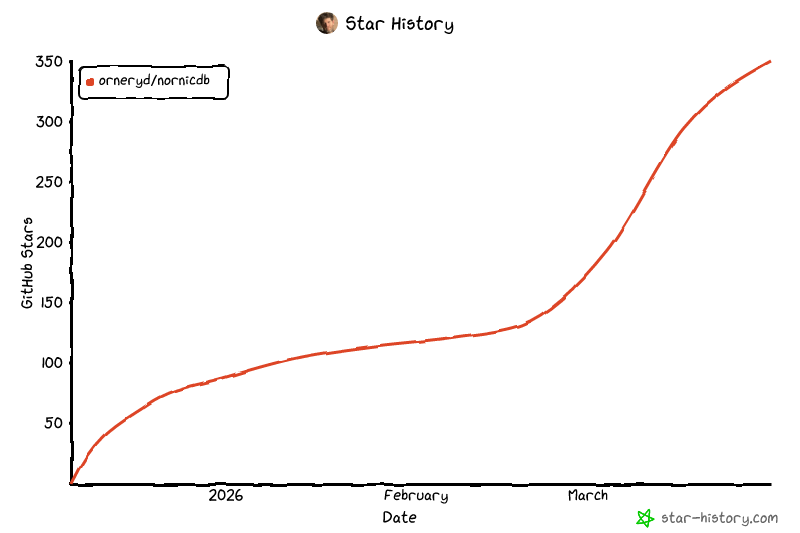
## Star History
## Comparison
| Platform | Category | Query Language Support (and protocol) | Native Vector Search | Canonical Graph + Temporal Ledger Pattern | Queryable Mutation Log + Receipts | Embedded/Self-Hosted Focus |
| ------------ | --------------------------------- | ---------------------------------------------------------------------------------- | ------------------------ | ------------------------------------------------------------- | ---------------------------------------------------- | -------------------------- |
| **NornicDB** | Graph + Vector + Canonical Ledger | **Cypher via Bolt**; also HTTP/GraphQL and gRPC (Qdrant-compatible + NornicSearch) | **Yes** | **Yes** | **Yes** | **Yes** |
| Neo4j | Graph DB | Cypher via Bolt/HTTP | Yes | Partial (manual modeling) | Partial (logs exist, not first-class receipts model) | Server-first |
| Memgraph | Graph DB | openCypher via Bolt/HTTP | Partial/varies by setup | Partial (manual) | Partial (manual/integration) | Server-first |
| TigerGraph | Graph analytics DB | GSQL via REST++/native endpoints | Partial/extension-driven | Partial (manual) | Partial (manual/integration) | Server-first |
| Qdrant | Vector DB | Qdrant query/filter API via gRPC/REST | Yes | No (not graph-native) | No | Server-first |
| Weaviate | Vector DB | GraphQL + REST APIs | Yes | Partial (knowledge graph features, not Cypher property graph) | No | Server-first |
| Amazon QLDB | Ledger DB | PartiQL via AWS API/SDK | No | Partial (ledger + temporal history, not graph-native) | Yes (ledger-native) | Managed service |
> Snapshot is capability-oriented and high-level; exact behavior depends on edition/configuration and workload design.
## Building
### Native Binary
```bash
# Basic build
make build
# Headless (no UI)
make build-headless
# With local LLM support
make build-localllm
```
### Docker Images
```bash
# Download models for Heimdall builds (automatic if missing)
make download-models # BGE-M3 + qwen3-0.6b (~750MB)
make check-models # Verify models present
# ARM64 (Apple Silicon)
make build-arm64-metal # Base (BYOM)
make build-arm64-metal-bge # With BGE embeddings
make build-arm64-metal-bge-heimdall # With BGE + Heimdall AI
make build-arm64-metal-headless # Headless (no UI)
# AMD64 CUDA (NVIDIA GPU)
make build-amd64-cuda # Base (BYOM)
make build-amd64-cuda-bge # With BGE embeddings
make build-amd64-cuda-bge-heimdall # With BGE + Heimdall AI
make build-amd64-cuda-headless # Headless (no UI)
# AMD64 CPU-only
make build-amd64-cpu # Minimal
make build-amd64-cpu-headless # Minimal headless
# Build all variants for your architecture
make build-all
# Deploy to registry
make deploy-all # Build + push all variants
```
### Cross-Compilation
```bash
# Build for other platforms from macOS
make cross-linux-amd64 # Linux x86_64
make cross-linux-arm64 # Linux ARM64
make cross-rpi # Raspberry Pi 4/5
make cross-windows # Windows (CPU-only)
make cross-all # All platforms
```
## Roadmap
### Completed
- [x] Neo4j Bolt protocol
- [x] Cypher query engine (52 functions)
- [x] Memory decay system
- [x] GPU acceleration (Metal, CUDA)
- [x] Vector & full-text search
- [x] Auto-relationship engine
- [x] HNSW vector index
- [x] Metadata/Property Indexing
- [x] SIMD Implementation
- [x] Clustering support
- [x] Sharding (Composite DB + Remote Constituents)
- [x] Data Explorer UI (Browser query editor, semantic search, node details)
### Planned (from `docs/plans`)
- [ ] GPU-assisted HNSW construction with CPU-serving persistence parity (`docs/plans/gpu-hnsw-construction-plan.md`)
- [ ] Neo4j-compatible end-to-end streaming execution + wrapper driver/ORM (`docs/plans/neo4j-compatible-streaming-driver-and-server-plan.md`)
- [ ] GDPR compliance hardening: user-data detection, relationship export/delete/anonymization, and audit-log coverage (`docs/plans/gdpr-compliance-fixes.md`)
- [ ] UI enhancement backlog (search/config/admin UX improvements) (`docs/plans/ui-enhancements.md`)
## Contributors
Special thanks to everyone who helps make NornicDB better. See [CONTRIBUTORS.md](CONTRIBUTORS.md) for a list of community contributors.
## License
MIT License — Originally part of the [Mimir](https://github.com/orneryd/mimir) project, now maintained as a standalone repository.
Patent rights are handled via a defensive non-assertion grant in [PATENTS.md](PATENTS.md). This keeps the project open for broad use (including commercial use) while adding patent retaliation protection.
See [NOTICES.md](NOTICES.md) for third-party license information, including bundled AI models (BGE-M3, Qwen2.5) and dependencies.
---
Weaving your data's destiny