https://github.com/oslabs-beta/osiris
An Electron based desktop application for generating components, building pages, and storing them in a UI library.
https://github.com/oslabs-beta/osiris
electron js libary react ui ui-components ux ux-design vue
Last synced: about 1 year ago
JSON representation
An Electron based desktop application for generating components, building pages, and storing them in a UI library.
- Host: GitHub
- URL: https://github.com/oslabs-beta/osiris
- Owner: oslabs-beta
- License: mit
- Created: 2020-07-11T14:47:56.000Z (about 6 years ago)
- Default Branch: master
- Last Pushed: 2020-10-31T21:48:31.000Z (over 5 years ago)
- Last Synced: 2025-04-30T19:09:07.652Z (about 1 year ago)
- Topics: electron, js, libary, react, ui, ui-components, ux, ux-design, vue
- Language: JavaScript
- Homepage:
- Size: 1.61 MB
- Stars: 177
- Watchers: 6
- Forks: 7
- Open Issues: 0
-
Metadata Files:
- Readme: README.md
- License: LICENSE
- Code of conduct: code-of-conduct.md
Awesome Lists containing this project
README

## Osiris
An Electron based desktop application for generating components and storing them in a UI library.
__________
## Table of Contents
* [About the Project](#about-the-project)
* [Built With](#built-with)
* [Usage](#usage)
* [Getting Started](#getting-started)
* [Prerequisites](#prerequisites)
* [Installation](#installation)
* [Contributing](#contributing)
* [Contact](#contact)
* [Authors](#authors)
* [License](#license)
## About The Project
Osiris is an all-in-one UI Component Library + Generator + Page Builder for developers and designers. Create and store custom, reusable components in React or Vue. Then, dynamically inject the components and manipulate their hierarchy. Finally, download the code for further development.
### Built With
* [Electron](https://www.electronjs.org/)
* [React](https://reactjs.org/)
* [PostgreSQL](https://www.postgresql.org/)
* [Node](https://nodejs.org/en/)
* [Webpack](https://webpack.js.org/)
* [AWS](https://aws.amazon.com/)
## Usage
_______
**UI Generator and Library Features**: Create custom components in React or Vue. Store your custom components securely in our UI Library powered by AWS S3

_______
**Build Page: Style and Add to Build**: Easily build a React or Vue page by controlling the hierarchy of your custom components stored in your library. Customize your components by adding CSS and text

________
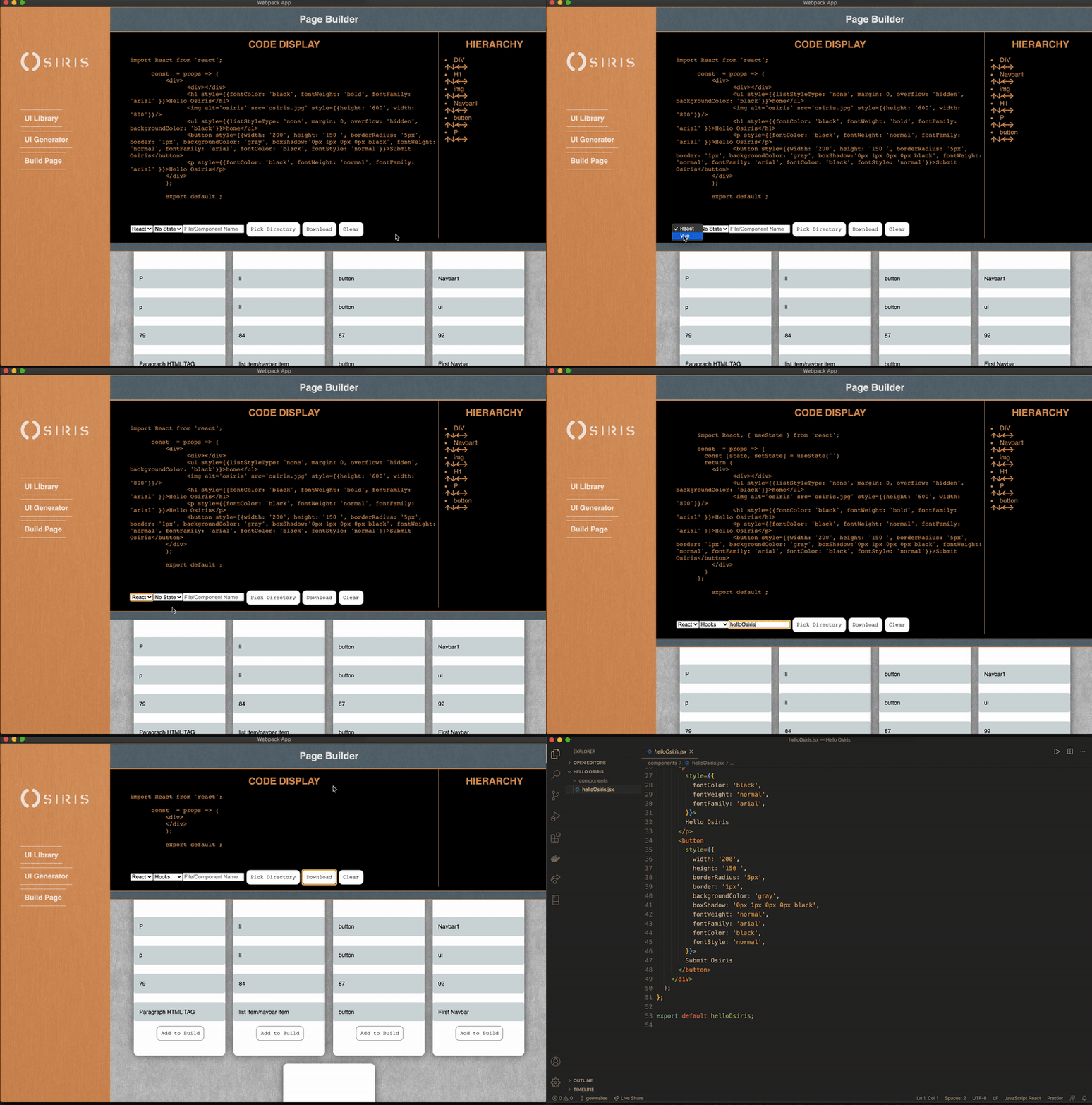
**Build Page: Hierarchy & Download Code to Vue or React**: Edit the hierarchy with simple arrow buttons. Choose to build your React page with/without State or Hooks. You can also build a Vue page with or without State. Lastly, download your custom page directly to your computer!
_______
## Getting Started
To get a local copy up and running follow these steps.
### Prerequisite Accounts
* ElephantSQL:
https://www.elephantsql.com/
* AWS S3 Bucket with Amplify:
https://docs.amplify.aws/lib/storage/getting-started/q/platform/js
### Installation
1. Clone the repo
```sh
git clone https://github.com/oslabs-beta/Osiris.git
```
2. Install NPM packages
```sh
npm install
```
### Connect Osiris Electron App to SQL Database with ElephantSQL
1. SQL Script
```sh
CREATE TABLE individual_ui (id SERIAL PRIMARY KEY, organization_id VARCHAR, image VARCHAR, tags VARCHAR, react_code VARCHAR, file_name VARCHAR, type VARCHAR, description VARCHAR);
```
2. Add pgkeys.js to /src and include the following:
```sh
export const PG_URI = ''
```
### Initialize AWS-Amplify to your project
1. Navigate to Osiris Root folder
2. Install Amplify folder following these steps:
https://docs.amplify.aws/start/getting-started/installation/q/integration/react
https://docs.amplify.aws/lib/storage/getting-started/q/platform/android#initialize-amplify-storage
### Run
1. Run the electron app
```sh
npm start
```
### Contributing
Contributions are what make the open source community such an amazing place to be, learn, inspire, and create. Any contributions you make are **greatly appreciated**.
1. Fork the Project
2. Create your Feature Branch (`git checkout -b feature/AmazingFeature`)
3. Commit your Changes (`git commit -m 'Add some AmazingFeature'`)
4. Push to the Branch (`git push origin feature/AmazingFeature`)
5. Open a Pull Request
## Contact
Website: [https://osirisdev.io](https://osirisdev.io/)
Github Link: [https://github.com/oslabs-beta/Osiris/](https://github.com/oslabs-beta/Osiris/)
Twitter: [@osiris_io](https://twitter.com/osiris_io)
## Authors
* [@Wayne Wilcox](https://github.com/LovelaceDink)
* [@Eelan Tung](https://github.com/cupofjoy)
* [@Cameron Fitz](https://github.com/cameronleefitz)
* [@Jehovany Cruz](https://github.com/howaboutjeho)
* [@Garrett Lee](https://github.com/geewailee)
## License
Distributed under the MIT License. See `LICENSE` for more information.