https://github.com/ospoon/spa-build-version
在SPA模式网页版本检测方案
https://github.com/ospoon/spa-build-version
Last synced: 9 months ago
JSON representation
在SPA模式网页版本检测方案
- Host: GitHub
- URL: https://github.com/ospoon/spa-build-version
- Owner: OSpoon
- Created: 2021-07-25T03:20:09.000Z (about 5 years ago)
- Default Branch: master
- Last Pushed: 2021-07-25T03:22:22.000Z (about 5 years ago)
- Last Synced: 2024-12-28T06:09:37.498Z (over 1 year ago)
- Language: JavaScript
- Homepage: https://juejin.cn/post/6988527907404513288
- Size: 116 KB
- Stars: 0
- Watchers: 2
- Forks: 0
- Open Issues: 0
-
Metadata Files:
- Readme: README.md
Awesome Lists containing this project
README
### 
> 方案来源于团队分享后的总结实现,文中代码并未在实际产品中是使用,仅供参考。
### 背景
> 由于在spa模式的应用中页面的内容变化不再引起整个页面的重新加载,故需要解决在spa模式的应用中网页在使用的过程中服务器已更新的资源不能被及时的获取的问题。
### 解决思路
1. 标记版本:
1. 在`vue.config.js`中每次编译生成一个版本号
1. 使用`html-webpack-plugin`插件将版本号插入到`index.html`的`mate`标签
1. 在`webpack`编译结束生成附带版本号的`version.json`文件放置到服务器
2. 检测版本
1. 通过`document.getElementsByTagName("meta").buildVersion.content`获取浏览器已打开网页的版本号
1. 通过不带缓存的`get`请求获取服务器存放的新版本号的`version.json`
3. 刷新页面: 通过检测版本来提示或自动刷新页面获取最新的服务器资源
### 标记版本
1. 配置`html-webpack-plugin`为`index.html`插入编译版本号
```javascript
const BuildVersionWebpackPlugin = require("./build-version.js");
const HtmlWebpackPlugin = require("html-webpack-plugin");
const buildVersion = Date.now();
console.log("当前编译版本: >>", buildVersion);
module.exports = {
configureWebpack: (config) => {
config.plugins.forEach((plugin) => {
if (plugin instanceof HtmlWebpackPlugin) {
plugin.options.version = buildVersion;
}
});
},
};
```
2. 在`index.html`插入`mate`标签
```html
```
3. 创建用于生成`version.json`的`webpack`插件`build-version.js`
```javascript
const pluginName = "BuildVersionWebpackPlugin";
const fs = require("fs");
const path = require("path");
/**
* 编译后生成版本文件
*/
class BuildVersionWebpackPlugin {
constructor({ output = "./", version = Date.now() }) {
this.output = output;
this.version = version;
}
apply(compiler) {
compiler.hooks.done.tap(pluginName, () => {
console.log("webpack 编译完成,正在生成版本文件!");
const outputPath = path.resolve(this.output, "./version.json");
const versionJson = JSON.stringify({
version: this.version,
});
fs.writeFileSync(outputPath, versionJson, {
encoding: "utf-8",
});
});
}
}
module.exports = BuildVersionWebpackPlugin;
```
4. 配置新建的webpack插件
```javascript
const BuildVersionWebpackPlugin = require("./build-version.js");
const buildVersion = Date.now();
console.log("当前编译版本: >>", buildVersion);
module.exports = {
configureWebpack: (config) => {
...
config.plugins.push(
new BuildVersionWebpackPlugin({
output: "./dist",
version: buildVersion,
})
);
},
};
```
### 检测版本
1. 获取服务器存放的版本号
```javascript
async function _serverVersion() {
return await new Promise((resolve) => {
fetch("/version.json", {
headers: {
"cache-control": "no-cache",
},
})
.then((response) => {
try {
response.json().then((json) => {
resolve(json.version);
});
} catch (error) {
resolve(0);
}
})
.catch(() => {
resolve(0);
});
});
}
```
2. 获取浏览器本地页面的版本号
```javascript
function _currentVersion() {
return Number(document.getElementsByTagName("meta").buildVersion.content);
}
```
3. 版本号比较
```javascript
async function _inspector() {
let isConsistent = true;
const sv = await _serverVersion();
const cv = _currentVersion();
console.log(`检测到本地版本${cv}和服务器版本${sv}`);
console.log("本地&服务器版本是否一致:>>", (isConsistent = sv === cv));
return isConsistent;
}
export default async function() {
return await _inspector();
}
```
### 刷新页面
1. 检测更新时机: 推荐在路由切换之后检测,或主要模块进入时检测
1. 检测函数,具体的刷新逻辑按实际场景考虑
```javascript
versionCheck() {
inspector().then((isConsistent) => {
if (!isConsistent) {
const isReload = window.confirm(
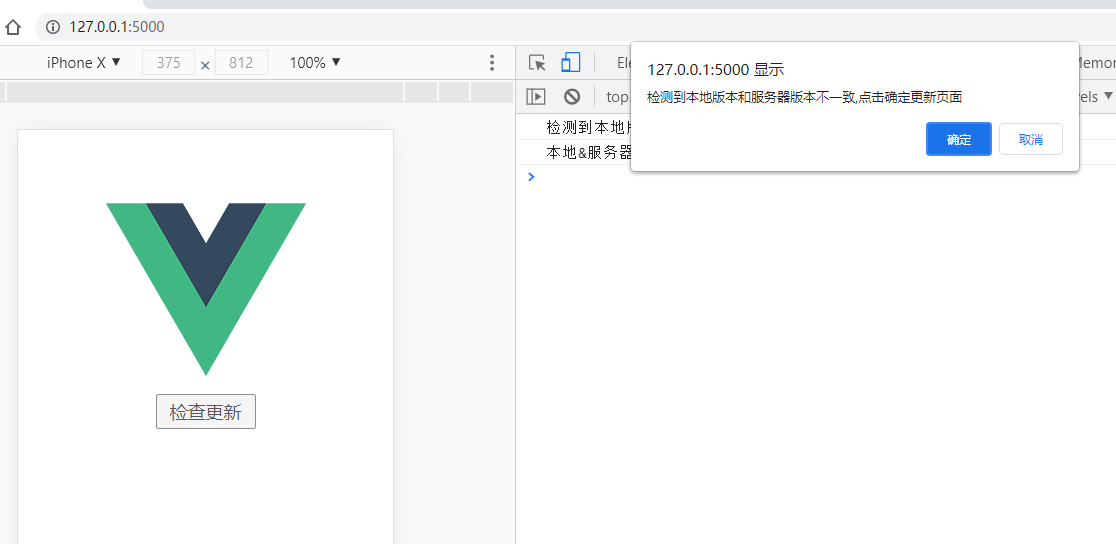
"检测到本地版本和服务器版本不一致,点击确定更新页面 "
);
if (isReload) {
window.location.reload();
}
}
});
}
```
### 效果图