https://github.com/ostinelli/scar_e2tb
A mod for Arma 3 that allows you to export data to Terrain Builder, from EDEN and in game.
https://github.com/ostinelli/scar_e2tb
Last synced: 7 months ago
JSON representation
A mod for Arma 3 that allows you to export data to Terrain Builder, from EDEN and in game.
- Host: GitHub
- URL: https://github.com/ostinelli/scar_e2tb
- Owner: ostinelli
- License: other
- Created: 2017-10-19T13:56:06.000Z (almost 9 years ago)
- Default Branch: master
- Last Pushed: 2018-01-03T20:56:45.000Z (over 8 years ago)
- Last Synced: 2025-04-04T09:44:58.555Z (over 1 year ago)
- Language: SQF
- Homepage:
- Size: 38.1 KB
- Stars: 3
- Watchers: 2
- Forks: 2
- Open Issues: 3
-
Metadata Files:
- Readme: README.md
- License: LICENSE.md
Awesome Lists containing this project
README

# [E2TB] Export to Terrain Builder
**E2TB** is a small module for Arma 3 that allows you to export data to Terrain Builder.
## Why
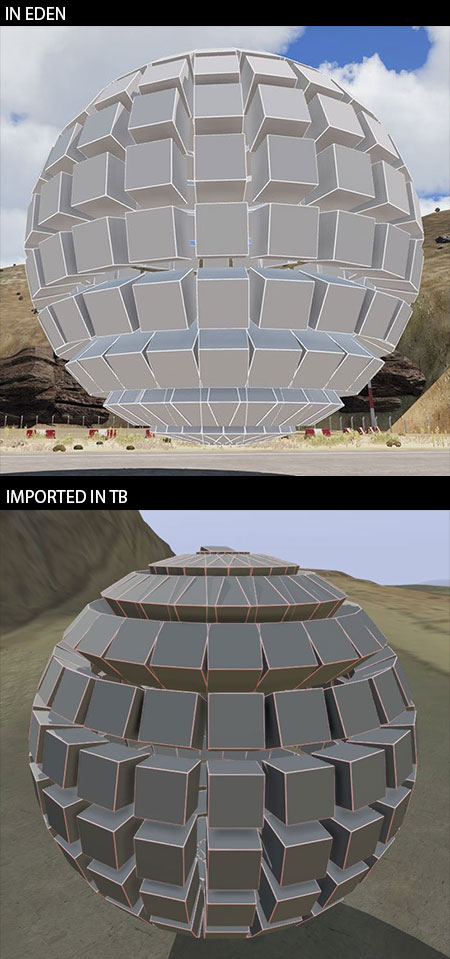
If you have tried to import from EDEN or from any other custom tools that generate objects while in mission to Terrain Builder, you may have seen the hassle of objects' rotations being often incorrect. This fixes most of those issues. You can check out results in this comparison image:
## How does it work
* Copy the objects to the clipboard:
* From EDEN: click on the menu `Export > Export to Terrain Builder (E2TB)` or the `absolute position` alternative
* From within a mission (SP): run the action `Copy the map objects to the clipboard` or the `absolute position` alternative. To do this you'll first need to drop the `SCAR_E2TB_Module` in your mission.
* Copy the contents of the clipboard in a file and save it with the extension `.txt`
* From within your map in Terrain Builder: `File > Import > Objects`. If you exported with `absolute position`, ensure that you import the objects in Terrain Builder by checking `advanced options > absolute` in the import dialog.
> According to our experience, absolute position works better with large objects such as Big Rocks. Your mileage may vary.
## Scale
E2TB will use the size has reported by the following tools:
* XCam
* Surface Painter
* Map Builder
## Options
You can set up E2TB to ignore certain models and not export them. To do so, just define into the `init.sqf` of your mission the variable `SCAR_E2TB_ignoreModels`. For instance:
```sqf
SCAR_E2TB_ignoreModels = [
"reservoirtank_01_military_f",
"busstop_01_sign_f"
];
```
You can also set E2TB to force the slope export for some models:
```sqf
SCAR_E2TB_slopeModels = [
"my_custom_fence"
];
```
## Download
You can get the module from [Steam](http://steamcommunity.com/sharedfiles/filedetails/?id=1174073713).
## Note
There are certain objects that behave very differently in EDEN and Terrain Builder. These are the objects that have the named property `placement=slopelandcontact` into the geometry LOD.
The intended behaviour for these objects is to stay flat on the ground and adapt to the terrain. Though, in EDEN you are able to easily position them horizontally, but once imported in Terrain Builder they will follow the ground. As an example, if you were to put a barbed wire on top of a bunker that is on a slope, once imported in Terrain Builder the barbed wire will follow the underneath terrain slope and hence be in an incorrect position.
As a compromise, E2TB assumes that all of those objects are used as normally intended to be: on the ground, following the terrain. This should cover 95% of usage. If you use those objects differently, you will have to manually fix them in Terrain Builder.
We are working on alternative options to see if we can come up with some other solutions, as in the end it boils down to the fact that EDEN and Terrain Builder do not treat these objects in the same way.
## Thank you
Thanks to the Arma3 discord channel, in particular:
* ianbanks (for the absolute code positioning and TB matrices)
* Lappihuan
* zgmrvn
* mikero
* W4lly63
* Ice
* cring0
* Adanteh
* HorribleGoat
* T_D
...and all the other folks involved in the discussions in Discord's Arma3 `#terrain_makers` channel in those memorable days of October 18th and 19th 2017.
## Contribute
So you want to contribute? That's great! Please follow the guidelines below. It will make it easier to get merged in.
Before implementing a new feature, please submit a ticket to discuss what you intend to do. Your feature might already be in the works, or an alternative implementation might have already been discussed.
Do not commit to master in your fork. Provide a clean branch without merge commits. Every pull request should have its own topic branch. In this way, every additional adjustments to the original pull request might be done easily, and squashed with `git rebase -i`. The updated branch will be visible in the same pull request, so there will be no need to open new pull requests when there are changes to be applied.`