https://github.com/otherjohn/google-location-autofill
A Statamic v.3 Google Location Autofill Fieldtype
https://github.com/otherjohn/google-location-autofill
statamic statamic-v3 vue-components
Last synced: 5 months ago
JSON representation
A Statamic v.3 Google Location Autofill Fieldtype
- Host: GitHub
- URL: https://github.com/otherjohn/google-location-autofill
- Owner: otherjohn
- License: mit
- Created: 2020-01-22T16:13:11.000Z (over 6 years ago)
- Default Branch: master
- Last Pushed: 2020-01-23T16:34:36.000Z (over 6 years ago)
- Last Synced: 2025-10-04T05:32:12.599Z (8 months ago)
- Topics: statamic, statamic-v3, vue-components
- Language: Vue
- Size: 1.44 MB
- Stars: 0
- Watchers: 1
- Forks: 0
- Open Issues: 0
-
Metadata Files:
- Readme: README.md
- License: LICENSE
Awesome Lists containing this project
README
# Google Location Autofill

[](https://packagist.org/packages/otherjohn/google-location-autofill) [](https://packagist.org/otherjohn/google-location-autofill) [](https://paypal.me/otherjohn)
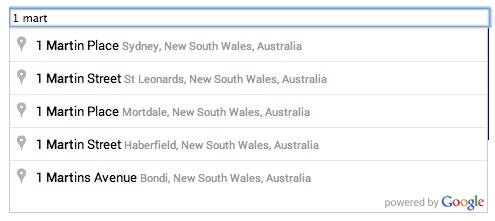
Google Location Autofill is a [Statamic 3](https://statamic.com/) addon that allows you to pull Google places locations
via autotype field and save the location information.
- [Installation](#installation)
- [Data](#data)
- [Reporting issues](#reporting-issues)
- [Recognition](#recognition)
## Installation
This Fieldtype works with **Statamic 3** only!
#### Step 1.
1. Run the following command in your v3 project root:
```
composer require otherjohn/google-location-autofill
```
#### Step 2.
Publish addon assets from vendor package
```
php artisan vendor:publish --provider=otherjohn\google-location-autofill\ServiceProvider --force
```
You should now have the field show up in your field list.
Does the Fieldtype does not show up? Rebuild your addon package manifest and clear your cache
```
php please addons:discover
php please cache:clear
```
## Data
Since Google has additional charges for data that is pulled by *default*, the ability to select and choose what you want
pulled from Google has been added to the addon.
The following data is saved with this fieldtype by default. You can change this in the fieldtype settings when you add
the field to your blueprint. A list of all fields available is in the [PlaceResults docs](https://developers.google.com/maps/documentation/javascript/reference/places-service#PlaceResult).
```
address_components
formatted_address
adr_address
vicinity
place_id
latitude
longitude
google_url
```
> ```address_components``` will output the following: ``` street_number,route,locality,administrative_area_level_2,administrative_area_level_1,country,postal_code```. If you remove ```address_components``` you will loose these fields.
> ```geometry``` outputs ```latitude,longitude```. If you remove ```geometry``` you will loose these fields.
## Reporting issues
This is my first ever community code share. I will try to fix issues, but I can't promise anything.
So if you have an issue and I don't get to it just remember...

## Recognition
Initial code taken from [olefirenko/vue-google-autocomplete](https://github.com/olefirenko/vue-google-autocomplete) and modified to return more data and work with Statamic.
& ["Added the option to specify which fields to fetch in the PlaceResult object" Pull Request](https://github.com/olefirenko/vue-google-autocomplete/pull/103)