https://github.com/overlu/laravel-reget
nacos laravel
https://github.com/overlu/laravel-reget
laravel laravel-nacos nocas php
Last synced: 6 months ago
JSON representation
nacos laravel
- Host: GitHub
- URL: https://github.com/overlu/laravel-reget
- Owner: overlu
- License: mit
- Created: 2020-04-17T07:42:34.000Z (about 6 years ago)
- Default Branch: master
- Last Pushed: 2020-06-22T08:06:05.000Z (about 6 years ago)
- Last Synced: 2025-09-06T20:01:56.746Z (10 months ago)
- Topics: laravel, laravel-nacos, nocas, php
- Language: PHP
- Size: 57.6 KB
- Stars: 8
- Watchers: 2
- Forks: 5
- Open Issues: 0
-
Metadata Files:
- Readme: README.md
- License: LICENSE.txt
Awesome Lists containing this project
README
### 前言
#### 项目介绍
`overlu/laravel-reget` 是一款基于laravel的nacos扩展
#### 安装
1. 引入扩展库
```
php composer.phar require overlu/laravel-reget
```
2. 配置
```php
# publish config
php artisan vendor:publish --provider="Overlu\Reget\RegetServiceProvider"
```
3. 注册服务提供者(laravel5.5之前需要操作)
```php
# 打开 config/app.php,注册如下服务提供者到 $providers 数组
Overlu\Reget\RegetServiceProvider::class
```
4. 注册Facade
```php
# 然后添加如下门面到 $aliaes 数组
'Reget' => \Overlu\Reget\Facades\Reget::class
```
#### 配置
修改配置文件`reget.php`,根据参数说明修改相关参数,或者__`在.env文件中加入相关参数配置(建议)`__
```php
[
'driver' => 'nacos',
'nacos' => [
'register_host' => env('NACOS_REGISTER_HOST', 'http://127.0.0.1:8848'),
'ip' => env('NACOS_SERVICE_HOST', ''), // 服务实例IP
'port' => env('NACOS_SERVICE_PORT', ''), // 服务实例port
'namespaceId' => env('NACOS_SERVICE_NAMESPACE_ID', ''), // 命名空间ID
'weight' => env('NACOS_SERVICE_WEIGHT', '0.8'), // 权重
'enabled' => env('NACOS_SERVICE_ENABLE', 'true'), // 是否上线
'healthy' => env('NACOS_SERVICE_HEALTHY', 'true'), // 是否健康
'metadata' => env('NACOS_SERVICE_METADATA', '{}'), // 扩展信息 json
'clusterName' => env('NACOS_SERVICE_CLUSTER_NAME', 'DEFAULT'), // 集群名
'serviceName' => env('NACOS_SERVICE_NAME', 'server_name'), // 服务名
'groupName' => env('NACOS_SERVICE_GROUP_NAME', 'DEFAULT_GROUP'), // 分组名
'ephemeral' => env('NACOS_SERVICE_EPHEMERAL', 'true'), // 是否临时实例
'scheduled' => env('NACOS_SERVICE_SCHEDULED', 'true')
]
];
```
#### Usage
##### 常用命令
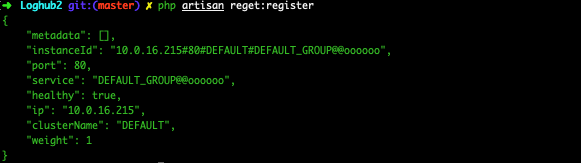
* 注册服务
```shell
php artisan reget:register // 根据配置文件注册
```
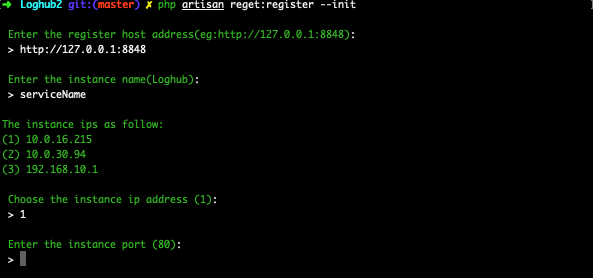
```shell
php artisan reget:register --init // 初始化配置并注册
```
* 发送心跳
```shell
php artisan reget:heartbeat // 发送一次
```

```shell
php artisan reget:heartbeat --cron // 定时发送
```

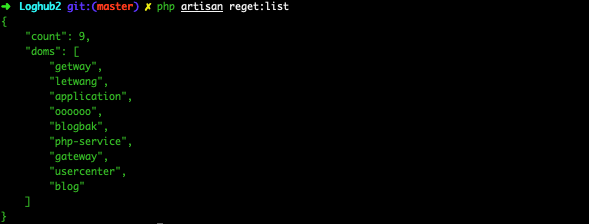
* 查看服务列表
```shell
php artisan reget:list
```
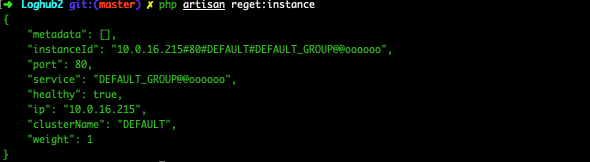
* 查看当前实例详情
```shell
php artisan reget:instance
```
* 移除当前实例
```shell
php artisan reget:remove
```

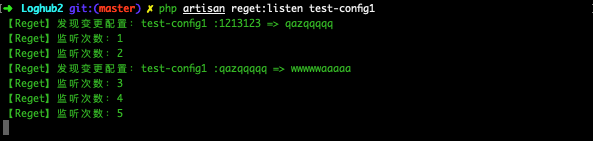
* 监听配置
```shell
php artisan reget:listen key
# 加入观察者
php artisan reget:listen key --handle="Namespace\ClassName"
```
##### ~~定时发送心跳(不建议)~~
```shell
# 1. 下面的 Cron 添加到你的服务器中
* * * * * cd /path-to-your-project && php artisan schedule:run >>/dev/null 2>&1
```
```php
# 2. 在 App\Console\Kernel 类的 schedule 方法中定义所有的调度任务
protected function schedule(Schedule $schedule)
{
$schedule->command('reget:heartbeat')->everyMinute();
}
```
##### 定时发送心跳
```shell
php artisan reget:heartbeat --cron # 联调测试用
# or
php artisan reget:heartbeat --cron>>/dev/null 2>&1 &
```
#### API
##### 获取服务
```php
$service = \Overlu\Reget\Reget::getInstance()->service('service_name');
# or
$service = Reget::service('service_name');
return $service;
```
##### 获取服务列表
```php
$services_list = \Overlu\Reget\Reget::getInstance()->services();
# or
$services_list = Reget::services();
```
##### 获取配置
```php
$config = \Overlu\Reget\Reget::getInstance()->config('key'); // 走缓存处理
$config = \Overlu\Reget\Reget::getInstance()->config('key', false); // 直接获取远程配置数据
# or
$config = Reget::config('key'); // 走缓存处理
$config = Reget::config('key', false); // 直接获取远程配置数据
```
##### 发布配置
```php
$response = \Overlu\Reget\Reget::getInstance()->publish('key', 'string value');
# or
$response = Reget::publish('key', 'string value'); // return true
```
##### 删除配置
```php
$response = \Overlu\Reget\Reget::getInstance()->remove('key'); # return true
# or
$response = Reget::remove('key');
```
##### 监听配置
```php
Reget::listen('key'); # 可以curl请求路由
```
or
```shell
php artisan reget:listen key
```
or 加入观察者
```php
php artisan reget:listen key --handle="Namespace\ClassName"
getCode());
}
}
```

##### 配置缓存
```php
# 读取配置缓存
\Overlu\Reget\Utils\ConfigCache::get('key', 'group_name');
# 写入配置缓存
\Overlu\Reget\Utils\ConfigCache::set('key', 'group_name', 'content');
```
##### Env文件操作
```php
$env = new \Overlu\Reget\Utils\Env();
# 读取env
$value = env('key', 'default_value');
# or
$value = $env->getEnv('key', 'default_value');
# 写入env
$result = $env->setEnv('key', 'value');
# 批量写入env数据,会自动插入空行分组
$env->setEnvs([
'key1' => 'value1',
'key2' => 'value2'
]);
```