https://github.com/oxdev03/remnote-focus-timer
A countdown timer for RemNote flashcards that uses your past response times to help you stay focused during review sessions and stop procrastinating by gamifying faster recalls.
https://github.com/oxdev03/remnote-focus-timer
remnote remnote-plugin
Last synced: 11 days ago
JSON representation
A countdown timer for RemNote flashcards that uses your past response times to help you stay focused during review sessions and stop procrastinating by gamifying faster recalls.
- Host: GitHub
- URL: https://github.com/oxdev03/remnote-focus-timer
- Owner: oxdev03
- License: mit
- Created: 2025-08-06T15:04:09.000Z (12 months ago)
- Default Branch: main
- Last Pushed: 2025-08-06T19:15:32.000Z (12 months ago)
- Last Synced: 2025-08-06T21:10:48.152Z (12 months ago)
- Topics: remnote, remnote-plugin
- Language: TypeScript
- Homepage:
- Size: 995 KB
- Stars: 0
- Watchers: 0
- Forks: 0
- Open Issues: 0
-
Metadata Files:
- Readme: README.md
- License: LICENSE
Awesome Lists containing this project
README
# RemNote Focus Timer
A countdown timer for RemNote flashcards that uses your past response times to help you stay focused during review sessions and stop procrastinating by gamifying faster recalls.
## Features
- 🎯 **Card-specific timer**: Uses your historical response times from RemNote's repetition data to calculate personalized target times for each card
- ⏱️ **Smart countdown**: Shows time remaining based on your past performance with that specific card
- 🎨 **Visual feedback**: Green → Orange → Red as time runs out, with your actual response time displayed
- 🎮 **Gamification**: Challenge yourself to beat your own previous response times
## How it works
1. Start reviewing flashcards in RemNote
2. Timer automatically starts when a card loads, using your past response times for that specific card
3. Countdown shows your target time (1.2x your weighted average response time for that card)
4. Timer stops when you reveal the answer
5. Builds better time awareness over multiple sessions
### Demo
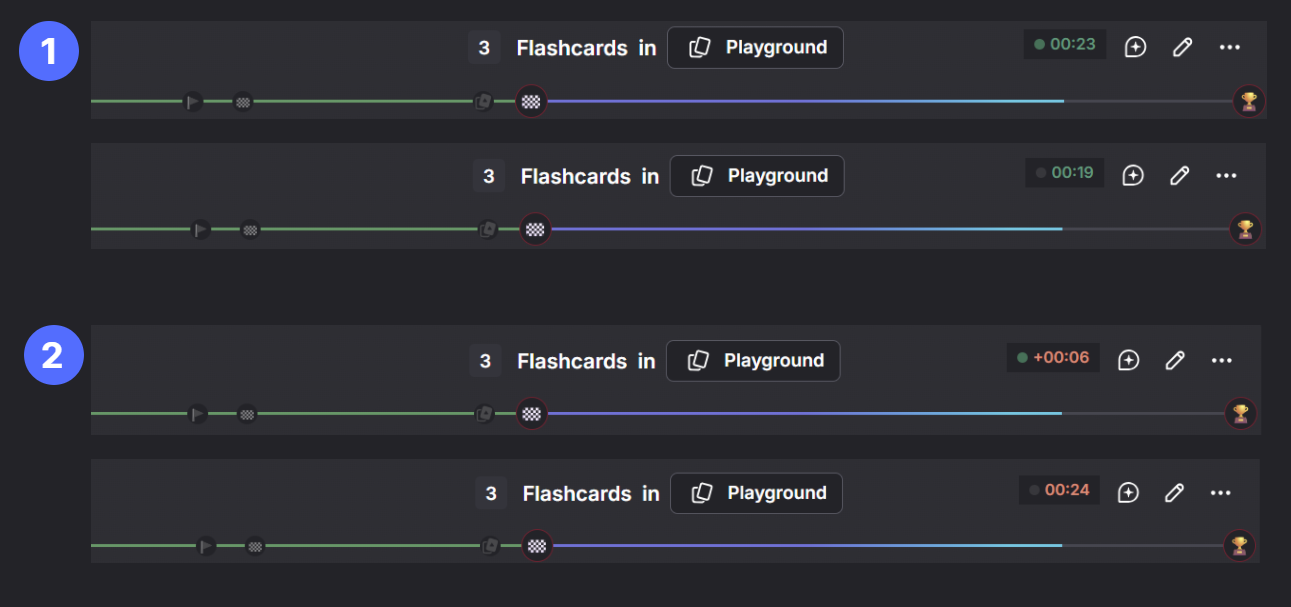
The demo shows two cases:
- **1** Card with a avg time of 23 seconds and was answered in 19 seconds. The timer stops once the answer is revealed and is displayed in green.
- **2** Card with a avg time of 23 seconds and was answered in 24 seconds. The timer is already above the avg time, so it is displayed in red. The timer will continue to run until the answer is revealed, at which point it will be displayed in red.
## Display
- **Green**: You're doing well compared to your past times for this card
- **Orange**: Getting close to your historical average time
- **Red**: Taking longer than your usual response time - try to wrap up
## Settings
- **Target Multiplier**: How much longer than your historical average response time to allow (default: 1.2x)