https://github.com/oxgeneral/orch
One CLI to orchestrate them all. Manage a team of AI agents executing tasks in parallel from your terminal.
https://github.com/oxgeneral/orch
agent-framework ai-agents automation claude cli codex cursor developer-tools devops llm multi-agent nodejs orchestrator task-queue terminal tui typescript workflow-automation
Last synced: 4 months ago
JSON representation
One CLI to orchestrate them all. Manage a team of AI agents executing tasks in parallel from your terminal.
- Host: GitHub
- URL: https://github.com/oxgeneral/orch
- Owner: oxgeneral
- License: mit
- Created: 2026-03-10T20:37:40.000Z (4 months ago)
- Default Branch: main
- Last Pushed: 2026-03-13T22:46:13.000Z (4 months ago)
- Last Synced: 2026-03-14T07:06:12.999Z (4 months ago)
- Topics: agent-framework, ai-agents, automation, claude, cli, codex, cursor, developer-tools, devops, llm, multi-agent, nodejs, orchestrator, task-queue, terminal, tui, typescript, workflow-automation
- Language: TypeScript
- Homepage: https://www.orch.one/
- Size: 2.22 MB
- Stars: 3
- Watchers: 0
- Forks: 0
- Open Issues: 0
-
Metadata Files:
- Readme: readme.md
- Contributing: CONTRIBUTING.md
- License: LICENSE
Awesome Lists containing this project
README

Stop babysitting AI agents. Start orchestrating them.
One CLI to run Claude, Codex, Cursor, and shell scripts as a team — in parallel, with retries, from your terminal.







---
Real-time TUI dashboard: tasks running, agents working, activity streaming — all from one terminal.
---
## You know the pain
You have 3 AI assistants open. Claude is implementing auth in one terminal. Codex is writing tests in another. A shell script runs migrations somewhere else.
You're the human router — switching tabs, copy-pasting context, manually tracking who's doing what, restarting crashed agents.
**That's not engineering. That's babysitting.**
## What if your AI agents worked like a real team?
```
$ orch run --all
orch · watching · 3 running · 0 queued
14:32 ▶ Backend A → "Implement OAuth2 flow"
14:32 ▶ Backend B → "Write API integration tests"
14:32 ▶ QA → "Verify auth edge cases"
14:35 ✓ Backend B DONE (3m 12s · 4,200 tokens)
14:38 ✓ Backend A DONE (6m 44s · 8,100 tokens)
14:39 ↻ QA RETRY attempt 2 · found regression
14:41 ✓ QA DONE (2m 15s · 2,800 tokens)
```
One command. Three agents. Zero tab-switching.
## Get started in 30 seconds
```bash
npm install -g @oxgeneral/orch
```
Then go to your project and run:
```bash
cd ~/your-project
orch
```
That's it. ORCH auto-initializes on first run, then opens the TUI dashboard — you add agents and tasks right from there.
**Requirements:** Node.js >= 20
## Why teams choose ORCH
### Parallel execution that actually works
Run up to N agents simultaneously. ORCH handles dispatching, slot management, and prevents double-assignments. You set `max_concurrent_agents: 5` and forget about it.
### Agents that don't give up
Failed? ORCH retries with exponential backoff. Stalled? Automatic detection kills the zombie and re-queues. Crashed? The next tick picks it up. Your tasks finish even when individual runs fail.
### A real state machine, not a TODO list
```
todo → in_progress → review → done
↘ retrying → in_progress
↘ failed
```
Every transition is validated. No task gets lost. No agent runs something that's already done.
### Real-time dashboard in your terminal
```bash
orch # launches TUI
```
Full-screen Ink/React dashboard with:
- Live task & agent status with three tabs: **Tasks**, **Agents**, **Goals**
- Activity feed with token counts
- Keyboard-driven: create tasks, assign agents, approve reviews — without leaving the terminal
- Command bar with `/task add`, `/agent add`, tab completion
### Goals — strategic direction for your agents
Define high-level goals and let ORCH autonomously generate tasks to achieve them. Goals have statuses (`active`, `paused`, `achieved`, `abandoned`), can be assigned to specific agents, and appear in a dedicated TUI tab for tracking.
### Teams — organize agents into squads
Group agents into teams with a lead, shared task pools, and auto-claiming. Each team member has a role and badge. The lead coordinates work distribution, and the team pool keeps related tasks together.
### Inter-agent messaging
Agents communicate through direct messages and broadcasts. Send context between agents, coordinate across teams, and keep everyone in sync — all via CLI or programmatically during runs.
### Reactive dispatch
No more waiting for the next 30-second poll cycle. When a task is created, ORCH dispatches it immediately (500ms debounce). Your agents start working in under a second.
### Autonomous mode
Set a goal, and ORCH generates work for idle agents automatically. Goal-directed task creation means your team stays productive without manual task assignment.
### Shared context store
A key-value store for inter-agent data exchange. Agents save results, share findings, and build on each other's work — with optional TTL for ephemeral data.
### Global config & settings wizard
Configure activity filters, display preferences, and agent defaults through the TUI settings wizard or `orch config edit`. No manual YAML editing required.
### Zero infrastructure
All state lives in `.orchestry/` — YAML configs, JSON state, JSONL event logs. No database. No cloud. No Docker. `git clone` and you're running.
### Works with any AI tool
| Adapter | What it runs |
|---------|-------------|
| `claude` | Claude Code CLI (`claude --print`) |
| `codex` | OpenAI Codex CLI (`codex exec --json`) |
| `cursor` | Cursor Agent CLI (headless mode) |
| `shell` | Any command: `npm test`, `python bot.py`, custom scripts |
## Full CLI reference
```bash
# Setup
orch init # Initialize project
orch doctor # System diagnostics
# Tasks
orch task add "Title" -p 1 # Create task (priority 1-4)
orch task list # List all tasks
orch task list --status todo # Filter by status
orch task assign # Manual assignment
orch task cancel # Cancel running task
# Agents
orch agent add --adapter claude --role "Role description"
orch agent list # Status of all agents
orch agent disable/enable # Toggle availability
# Teams
orch team create --lead # Create a team
orch team list # List all teams
orch team join # Add agent to team
orch team leave # Remove agent from team
orch team set-lead # Transfer lead role
orch team add-task # Add task to team pool
orch team disband # Disband a team
# Messaging
orch msg send "message" -s "subject" # Direct message
orch msg broadcast "message" -s "subject" # Broadcast to all
orch msg broadcast "message" --team # Broadcast to team
orch msg inbox # View inbox
# Goals
orch goal add "Title" --description "desc" # Create a goal
orch goal list # List all goals
orch goal list --status active # Filter by status
orch goal show # Goal details
orch goal status achieved # Change status
orch goal update --title "New title" # Update fields
orch goal delete # Delete a goal
# Shared Context
orch context set # Store shared data
orch context get # Retrieve shared data
orch context list # List all entries
# Execution
orch run # Run single task
orch run --all # Run everything
orch run --watch # Daemon mode
# Monitoring
orch status # Quick overview
orch logs # View run logs
orch tui # Interactive dashboard
# Config
orch config edit # Open in $EDITOR
# Updates
orch update # Check for and install latest version
```
**Aliases:** `orchestry`, `orch`, `ao`
## Architecture
Clean DDD with dependency injection — no frameworks, no decorators, pure TypeScript:
```
src/
├── domain/ # Models & state machine
│ ├── task.ts # Task entity, priorities, statuses
│ ├── agent.ts # Agent entity, stats, badges
│ ├── run.ts # Run entity, event types
│ ├── goal.ts # Goal entity, statuses
│ ├── team.ts # Team entity, members, pools
│ ├── message.ts # Message entity, channels
│ ├── config.ts # Project config schema
│ ├── global-config.ts # Global user settings
│ ├── default-agents.ts # Default agent definitions
│ ├── transitions.ts # State machine transitions
│ ├── scope.ts # File scope matching
│ ├── state.ts # Orchestrator state
│ ├── events.ts # Event type definitions
│ └── errors.ts # Domain error types
├── application/ # Orchestrator engine, services, event bus
├── infrastructure/
│ ├── adapters/ # Claude, Codex, Cursor, Shell (pluggable)
│ ├── storage/ # File-based (YAML/JSON/JSONL)
│ ├── process/ # PID management, graceful kill
│ ├── template/ # LiquidJS template engine
│ └── workspace/ # Isolation modes (shared/worktree/isolated)
├── cli/ # Commander.js commands
└── tui/ # Ink + React dashboard
```
## Development
```bash
npm run dev # Run via tsx
npm run build # Build ESM + DTS
npm test # 1001 tests via Vitest
npm run typecheck # Strict TypeScript
```
**Performance:** CLI startup is ~40% faster thanks to lazy command imports — heavy dependencies (orchestrator, adapters, LiquidJS) are loaded only when the relevant subcommand is invoked. `--help` and lightweight commands like `task list` skip the full container entirely.
## Community
We just hit **10 stars** — small number, real users. Every star so far came from someone who actually runs multi-agent workflows and needed something better than tab-switching.
**Next milestone: 25 stars** — when we get there, we'll add a public "Used by" showcase. If you're already running ORCH in your workflow, [open an issue](https://github.com/oxgeneral/ORCH/issues) and tell us — you'll be first on the list.
**If ORCH saves you time → [⭐ Star it on GitHub](https://github.com/oxgeneral/ORCH)** — it helps other developers find the project.
[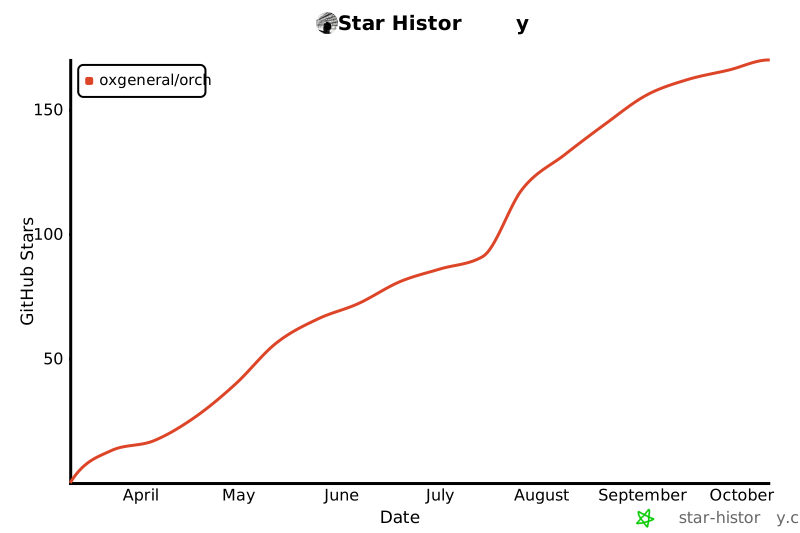](https://star-history.com/#oxgeneral/ORCH&Date)
- **Open an issue** if something breaks or could be better
- **Submit a PR** — see [CONTRIBUTING.md](CONTRIBUTING.md)
## Used by / Early Adopters
> This section will be filled as the community grows. Using ORCH in your project? [Let us know](https://github.com/oxgeneral/ORCH/issues/new?title=Using+ORCH+in+production&body=Tell+us+about+your+setup) — we'd love to feature you here.
*Be the first to add your project here — open an issue with "Using ORCH in production".*
## License
[MIT](LICENSE) — use it however you want.