https://github.com/oxylabs/regex-web-scraping
Web Scraping with RegEx
https://github.com/oxylabs/regex-web-scraping
github-python python regex regex-scraping using-regex-in-python web-scraping
Last synced: 2 months ago
JSON representation
Web Scraping with RegEx
- Host: GitHub
- URL: https://github.com/oxylabs/regex-web-scraping
- Owner: oxylabs
- Created: 2022-08-18T08:45:36.000Z (almost 4 years ago)
- Default Branch: main
- Last Pushed: 2025-09-24T13:00:46.000Z (9 months ago)
- Last Synced: 2025-10-27T21:23:14.827Z (8 months ago)
- Topics: github-python, python, regex, regex-scraping, using-regex-in-python, web-scraping
- Language: Python
- Homepage:
- Size: 17.6 KB
- Stars: 1
- Watchers: 1
- Forks: 0
- Open Issues: 0
-
Metadata Files:
- Readme: README.md
Awesome Lists containing this project
README
# Web Scraping With RegEx
[](https://oxylabs.io/pages/gitoxy?utm_source=877&utm_medium=affiliate&groupid=877&utm_content=regex-web-scraping-github&transaction_id=102f49063ab94276ae8f116d224b67)
[](https://discord.gg/Pds3gBmKMH) [](https://www.youtube.com/@oxylabs)
# Creating virutal environment
```bash
python3 -m venv scrapingdemo
```
```bash
source ./scrapingdemo/bin/activate
```
# Installing requirements
```bash
pip install requests
```
```bash
pip install beautifulsoup4
```
# Importing the required libraries
```python
import requests
from bs4 import BeautifulSoup
import re
```
## Sending the GET request
Use the Requests library to send a request to a web page from which you want to scrape the data. In this case, https://books.toscrape.com/. To commence, enter the following:
```python
page = requests.get('https://books.toscrape.com/')
```
## Selecting data
First, create a Beautiful Soup object and pass the page content received from your request during the initialization, including the parser type. As you’re working with an HTML code, select `HTML.parser` as the parser type.

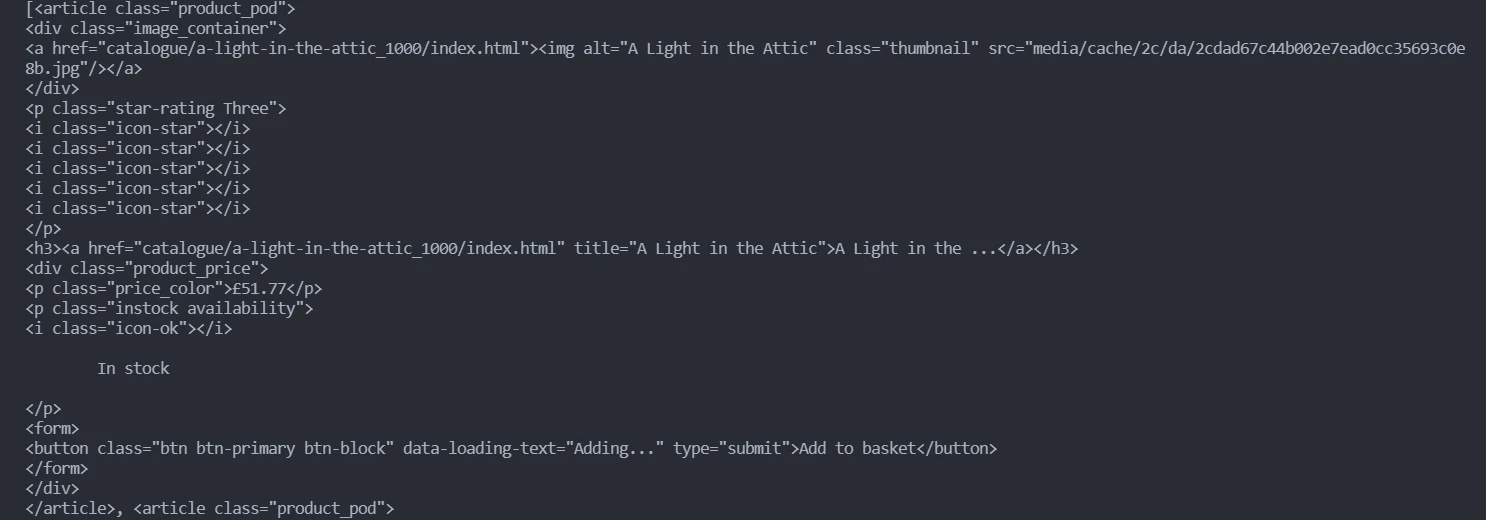
By inspecting the elements (right-click and select inspect element) in a browser, you can see that each book title and price are presented inside an `article` element with the class called `product_pod`. Use Beautiful Soup to get all the data inside these elements, and then convert it to a string:
```python
soup = BeautifulSoup(page.content, 'html.parser')
content = soup.find_all(class_='product_pod')
content = str(content)
```
## Processing the data using RegEx
Since the acquired content has a lot of unnecessary data, create two regular expressions to get only the desired data.
### Expression # 1
### Finding the pattern
First, inspect the title of the book to find the pattern. You can see above that every title is present after the text `title=` in the format `title=“Titlename”`.
### Generating the expression
Then, create an expression that returns the data inside quotations after the `title=` by specifying `"(.*?)"`.
The first expression is as follows:
```python
re_titles = r'title="(.*?)">'
```
### Expression # 2
### Finding the pattern
First, inspect the price of the book. Every price is present after the text `£` in the format `£=price` before the paragraph tag ``.
### Generating the expression
Then, create an expression that returns the data inside quotations after the `£=` and before the `` by specifying `£(.*?)`.
The second expression is as follows:
```python
re_prices = '£(.*?)'
```
To conclude, use the expressions with `re.findall` to find the substrings matching the patterns. Lastly, save them in the variables `title_list` and `price_list`.
```python
titles_list = re.findall(re_titles, content)
price_list = re.findall(re_prices, content)
```
## Saving the output
To save the output, loop over the pairs for the titles and prices and write them to the `output.txt` file.
```python
with open("output.txt", "w") as f:
for title, price in zip(titles_list, price_list):
f.write(title + "\t" + price + "\n")
```
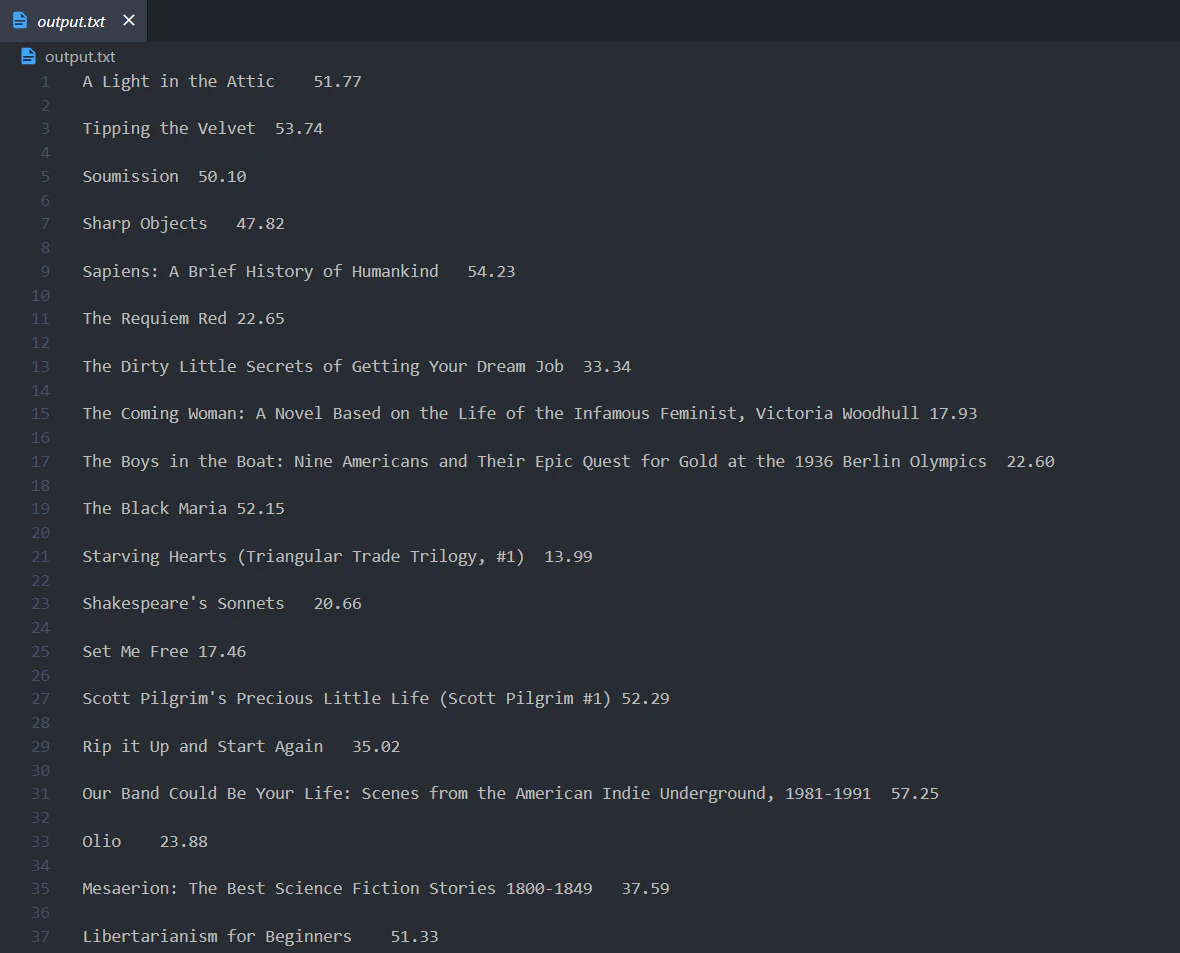
Putting everything together, this is the complete code that can be run by calling `python demo.py`:
```python
# Importing the required libraries.
import requests
from bs4 import BeautifulSoup
import re
# Requesting the HTML from the web page.
page = requests.get("https://books.toscrape.com/")
# Selecting the data.
soup = BeautifulSoup(page.content, "html.parser")
content = soup.find_all(class_="product_pod")
content = str(content)
# Processing the data using Regular Expressions.
re_titles = r'title="(.*?)">'
titles_list = re.findall(re_titles, content)
re_prices = "£(.*?)"
price_list = re.findall(re_prices, content)
# Saving the output.
with open("output.txt", "w") as f:
for title, price in zip(titles_list, price_list):
f.write(title + "\t" + price + "\n")
```