https://github.com/oyvinrog/sqlshell
A powerful SQL shell with GUI interface for data analysis
https://github.com/oyvinrog/sqlshell
analysis delta-lake duckdb excel-import sql sqlite
Last synced: 6 months ago
JSON representation
A powerful SQL shell with GUI interface for data analysis
- Host: GitHub
- URL: https://github.com/oyvinrog/sqlshell
- Owner: oyvinrog
- Created: 2025-03-15T22:39:03.000Z (over 1 year ago)
- Default Branch: main
- Last Pushed: 2025-08-17T07:13:13.000Z (11 months ago)
- Last Synced: 2025-08-17T09:08:00.365Z (11 months ago)
- Topics: analysis, delta-lake, duckdb, excel-import, sql, sqlite
- Language: Python
- Homepage:
- Size: 9.61 MB
- Stars: 1
- Watchers: 1
- Forks: 0
- Open Issues: 0
-
Metadata Files:
- Readme: README.md
Awesome Lists containing this project
README
# SQLShell
**A fast SQL interface for analyzing data files ✨**
*Query CSV, Parquet, Excel files with SQL • DuckDB powered • No database setup required*
[](https://github.com/oyvinrog/SQLShell/releases/latest)
[](https://badge.fury.io/py/sqlshell)
[](https://www.python.org/downloads/)
[](https://opensource.org/licenses/MIT)
[](https://pepy.tech/project/sqlshell)
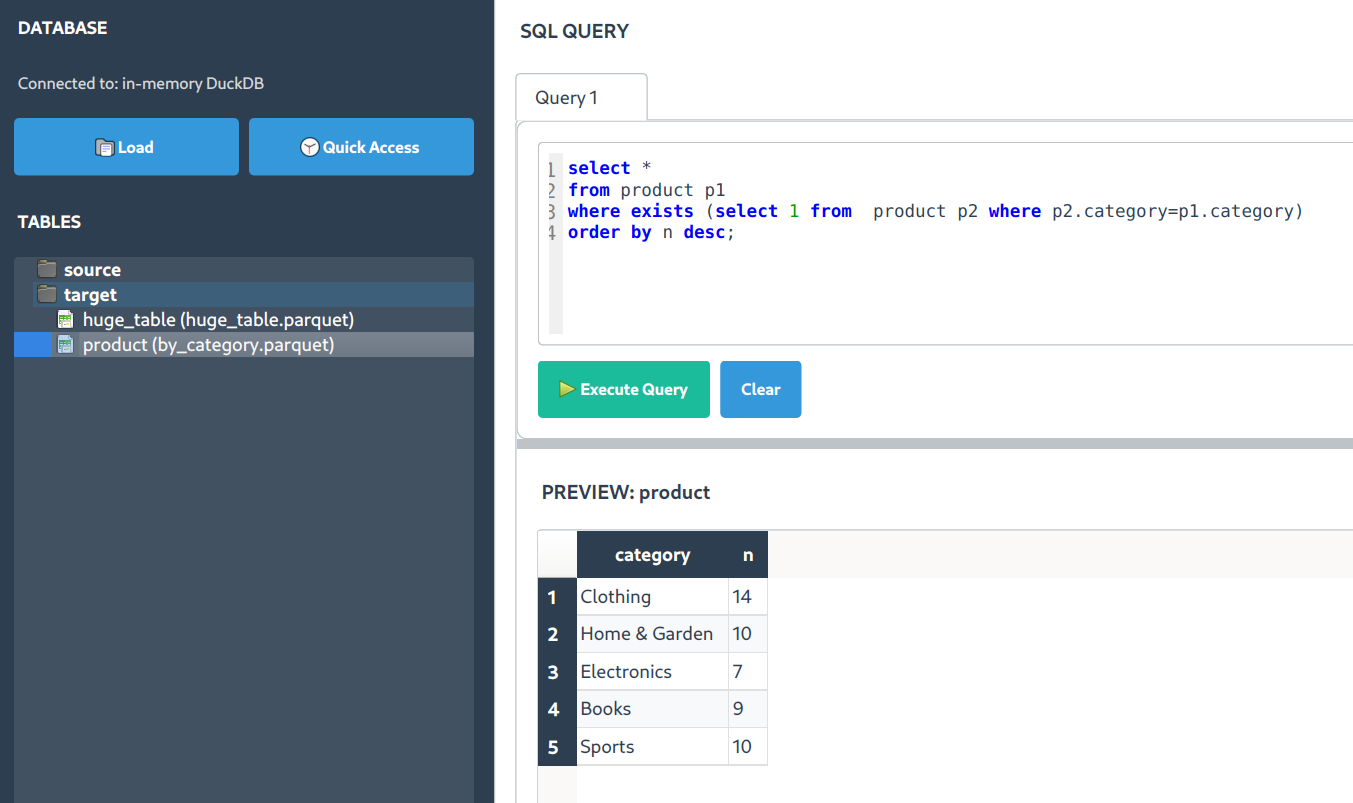
[📥 Download](https://github.com/oyvinrog/SQLShell/releases/latest) • [🚀 Install](#-quick-install) • [📖 Examples](https://github.com/oyvinrog/SQLShell/wiki/Guides) • [🤝 Contribute](#-contributing)
---
## What SQLShell Does
**SQLShell is a desktop SQL interface specifically designed for analyzing data files.** It's not a database client - instead, it lets you load CSV, Parquet, Excel, and other data files and query them with SQL using DuckDB's fast analytical engine.
### 🔥 Key Features
**⚡ Fast File Analysis**
Load data files and search through millions of rows quickly. Built on DuckDB for analytical performance.
**🎯 Smart Execution**
`F5` runs all queries, `F9` runs current statement. Simple keyboard shortcuts for iterative analysis.
**🧠 SQL Autocompletion**
Context-aware suggestions that understand your loaded tables and column names.
### 📁 **File-Based Data Analysis**
**Important**: SQLShell works with data files, not live databases. It's designed for:
- **📊 Data Files** - CSV, Parquet, Excel, TSV, JSON files
- **🗃️ Local Analysis** - Load files from your computer for SQL analysis
- **⚡ Fast Queries** - DuckDB engine optimized for analytical workloads
- **🔍 Data Exploration** - Search and filter capabilities across your datasets
**Not supported**: Live database connections (MySQL, PostgreSQL, etc.). Use dedicated database clients for those.
### 💫 What Makes SQLShell Useful
- **🏎️ DuckDB Powered** - Fast analytical queries on data files
- **📊 Multiple File Formats** - CSV, Parquet, Excel, Delta, TSV, JSON support
- **🎨 Clean Interface** - Simple SQL editor with result display
- **🔍 Search Functionality** - Find data across result sets quickly
- **🚀 Zero Database Setup** - No server installation or configuration needed
---
## 🚀 Quick Install
### 📥 Download (Recommended)
Pre-built executables — **no Python installation required**:
| Platform | Download | Install |
|----------|----------|---------|
| 🪟 **Windows** | [SQLShell Installer (.exe)](https://github.com/oyvinrog/SQLShell/releases/latest) | Run the installer |
| 🐧 **Linux (Debian/Ubuntu)** | [SQLShell (.deb)](https://github.com/oyvinrog/SQLShell/releases/latest) | `sudo dpkg -i sqlshell_*.deb` |
👉 [**View all releases**](https://github.com/oyvinrog/SQLShell/releases)
---
### 🐍 Install via pip
Alternatively, install with pip if you have Python:
```bash
pip install sqlshell
sqls
```
**That's it!** 🎉 SQLShell opens and you can start loading data files.
🐧 Linux Users - One-Time Setup for Better Experience
```bash
# Create dedicated environment (recommended)
python3 -m venv ~/.venv/sqlshell
source ~/.venv/sqlshell/bin/activate
pip install sqlshell
# Add convenient alias
echo 'alias sqls="~/.venv/sqlshell/bin/sqls"' >> ~/.bashrc
source ~/.bashrc
```
💻 Alternative Launch Methods
If `sqls` doesn't work immediately:
```bash
python -c "import sqlshell; sqlshell.start()"
```
---
## ⚡ Getting Started
1. **Launch**: `sqls`
2. **Load Data**: Click "Load Files" to import your CSV, Parquet, or Excel files
3. **Query**: Write SQL queries against your loaded data
4. **Execute**: Hit `Ctrl+Enter` or `F5` to run queries
5. **Search**: Press `Ctrl+F` to search through results

---
## 🔍 Search and Filter Features
### ⚡ **Result Search with Ctrl+F**
Once you have query results, use `Ctrl+F` to search across all columns:
- **Cross-column search** - Finds terms across all visible columns
- **Case-insensitive** - Flexible text matching
- **Instant feedback** - Filter results as you type
- **Numeric support** - Search numbers and dates
### 💪 **Practical Use Cases**
| Use Case | Search Term | What It Finds |
|----------|-------------|---------------|
| **Error Analysis** | `"error"` | Error messages in log files |
| **Data Quality** | `"null"` | Missing data indicators |
| **ID Tracking** | `"CUST_12345"` | Specific customer records |
| **Pattern Matching** | `"*.com"` | Email domains |
**Workflow**: Load file → Query data → `Ctrl+F` → Search → `ESC` to clear
---
## 🤖 Data Analysis Features
### 🔮 **Text Encoding**
Right-click text columns to create binary indicator columns for analysis:
```sql
-- Original data
SELECT category FROM products;
-- "Electronics", "Books", "Clothing"
-- After encoding
SELECT
category_Electronics,
category_Books,
category_Clothing
FROM products_encoded;
```
### 📊 **Column Analysis**
Right-click columns for quick statistical analysis and correlation insights.
---
## 🚀 Power User Features
### ⚡ F5/F9 Quick Execution
- **`F5`** - Execute all SQL statements in sequence
- **`F9`** - Execute only the current statement (where cursor is positioned)
- **Useful for**: Testing queries step by step
### 🧠 SQL Autocompletion
- Press `Ctrl+Space` for suggestions
- **After SELECT**: Available columns from loaded tables
- **After FROM/JOIN**: Loaded table names
- **After WHERE**: Column names with appropriate operators
### 📊 File Format Support
SQLShell can load and query:
- **CSV/TSV** - Comma and tab-separated files
- **Parquet** - Column-oriented format
- **Excel** - .xlsx and .xls files
- **JSON** - Structured JSON data
- **Delta** - Delta Lake format files
---
## 📝 Query Examples
### Basic File Analysis
```sql
-- Load and explore your CSV data
SELECT * FROM my_data LIMIT 10;
-- Aggregate analysis
SELECT
category,
AVG(price) as avg_price,
COUNT(*) as count
FROM sales_data
GROUP BY category
ORDER BY avg_price DESC;
```
### Multi-File Analysis
```sql
-- Join data from multiple loaded files
SELECT
c.customer_name,
SUM(o.order_total) as total_spent
FROM customers c
JOIN orders o ON c.customer_id = o.customer_id
GROUP BY c.customer_name
ORDER BY total_spent DESC
LIMIT 10;
```
---
## 🎯 Perfect For
**📊 Data Analysts**
- Quick file exploration
- CSV/Excel analysis
- Report generation from files
- Data quality checking
**🔬 Data Scientists**
- Dataset exploration
- Feature analysis
- Data preparation
- Quick prototyping
**💼 Business Analysts**
- Spreadsheet analysis with SQL
- KPI calculations from files
- Trend analysis
- Data validation
**🛠️ Developers**
- Log file analysis
- CSV processing
- Data transformation
- File-based testing
---
## 📋 Requirements
- **Python 3.8+**
- **Auto-installed dependencies**: PyQt6, DuckDB, Pandas, NumPy
**System Requirements**: SQLShell is a desktop application that works on Windows, macOS, and Linux.
---
## 💡 Tips for Better Productivity
### ⌨️ **Keyboard Shortcuts**
- `Ctrl+F` → Search results
- `F5` → Run all statements
- `F9` → Run current statement
- `Ctrl+Enter` → Quick execute
- `ESC` → Clear search
### 🎯 **Efficient File Loading**
- Drag & drop files into the interface
- Use "Load Files" button for selection
- Load multiple related files for joins
- Supported: CSV, Parquet, Excel, JSON, Delta
### 🚀 **Typical Workflow**
1. **Load files** (drag & drop or Load Files button)
2. **Explore structure** (`SELECT * FROM table_name LIMIT 5`)
3. **Build analysis** (use F9 to test statements)
4. **Search results** (Ctrl+F for specific data)
5. **Export findings** (copy results or save queries)
---
## 🔧 Advanced Features
📊 Table Analysis Tools
Right-click loaded tables for:
- **Column profiling** - Data types, null counts, unique values
- **Quick statistics** - Min, max, average for numeric columns
- **Sample data preview** - Quick look at table contents
🔮 Column Operations
Right-click column headers in results:
- **Text encoding** - Create binary columns from categories
- **Statistical summary** - Distribution and correlation info
- **Data type conversion** - Format suggestions
⚡ Performance Tips
- **File format matters** - Parquet files load faster than CSV
- **Use LIMIT** - for initial exploration of large files
- **Column selection** - Select only needed columns for better performance
- **Indexing** - DuckDB automatically optimizes common query patterns
---
## 🤝 Contributing
SQLShell is open source and welcomes contributions!
```bash
git clone https://github.com/oyvinrog/SQLShell.git
cd SQLShell
pip install -e .
```
**Ways to contribute:**
- 🐛 Report bugs and issues
- 💡 Suggest new features
- 📖 Improve documentation
- 🔧 Submit pull requests
- ⭐ Star the repo to show support
---
## 📄 License
MIT License - feel free to use SQLShell in your projects!
---
**Ready to analyze your data files with SQL?**
[📥 **Download for Windows/Linux**](https://github.com/oyvinrog/SQLShell/releases/latest) or install via pip:
```bash
pip install sqlshell && sqls
```
⭐ **Star us on GitHub** if SQLShell helps with your data analysis!
[📥 Download](https://github.com/oyvinrog/SQLShell/releases/latest) • [🚀 Get Started](#-quick-install) • [📖 Documentation](#-getting-started) • [🐛 Report Issues](https://github.com/oyvinrog/SQLShell/issues)
*A simple tool for SQL-based file analysis*