https://github.com/pagerduty/go-pdagent
A new PagerDuty agent.
https://github.com/pagerduty/go-pdagent
agent devops golang pagerduty team-auth-foundations
Last synced: about 1 year ago
JSON representation
A new PagerDuty agent.
- Host: GitHub
- URL: https://github.com/pagerduty/go-pdagent
- Owner: PagerDuty
- License: apache-2.0
- Created: 2020-03-16T16:58:23.000Z (over 6 years ago)
- Default Branch: main
- Last Pushed: 2023-10-21T11:22:11.000Z (over 2 years ago)
- Last Synced: 2024-06-20T17:53:04.380Z (about 2 years ago)
- Topics: agent, devops, golang, pagerduty, team-auth-foundations
- Language: Go
- Homepage:
- Size: 146 KB
- Stars: 11
- Watchers: 12
- Forks: 8
- Open Issues: 10
-
Metadata Files:
- Readme: README.md
- License: LICENSE
Awesome Lists containing this project
README
**Note: This project is currently in beta, for the current Python-based agent see: https://github.com/PagerDuty/pdagent**
# PagerDuty Agent
An agent daemon to aid in creating PagerDuty events.
Goals of this project include providing:
- A command-line interface for creating PagerDuty events.
- A local entry point for PagerDuty's Events API.
- Ensuring that events are properly ordered for each integration.
- Handling back pressure or when PagerDuty is inaccessible.
If you're looking for a more comprehensive PagerDuty API Go client library and CLI, see: https://github.com/PagerDuty/go-pagerduty
## Installation
Binaries for our officially supported platforms can be found on the [releases page](https://github.com/PagerDuty/go-pdagent/releases).
## Usage
On first run we recommend running `pdagent init` to generate a default config file. By default this file will live in `~/.pdagent` along with any other artifacts.
Once the config has been created, to start the daemon:
```
pdagent server
```
There are a number of other commands available that are listed as part of the command's help command:
```
pdagent help
```
Perhaps the most common command, sending events:
```
pdagent enqueue \
-k your_key_goes_here \
-t trigger \
-d "This is only a test" \
-u "http://pagerduty.com" \
-e "error" \
-f some_field=some_value
```
## Architecture
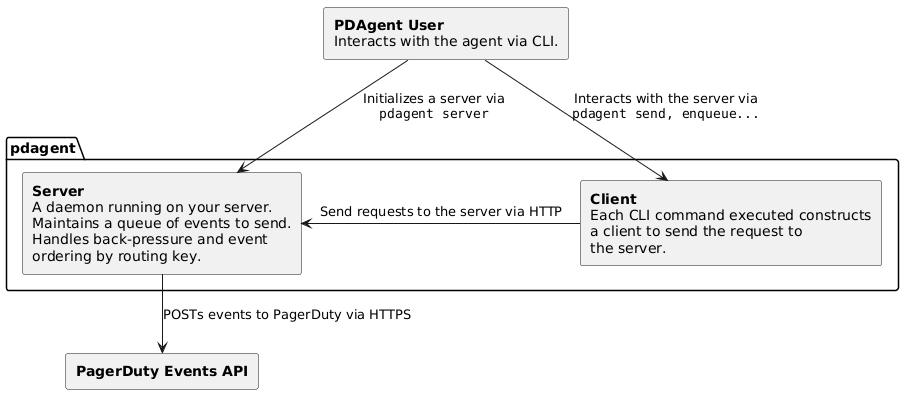
At a high level, the agent has three key components:
- Server: The daemon itself where most of the heavy lifting occurs.
- Client: An HTTP client to simplify making requests against the server.
- CLI: A command line tool for working with both the server and client commands.
## Development
Looking to contribute? See [development](/docs/development.md) for some helpful tips.