https://github.com/pajachiet/pymongo-schema
A schema analyser for MongoDB, written in Python.
https://github.com/pajachiet/pymongo-schema
json mongodb schema
Last synced: 6 months ago
JSON representation
A schema analyser for MongoDB, written in Python.
- Host: GitHub
- URL: https://github.com/pajachiet/pymongo-schema
- Owner: pajachiet
- License: lgpl-3.0
- Created: 2017-04-13T09:17:36.000Z (over 9 years ago)
- Default Branch: master
- Last Pushed: 2022-08-31T09:32:32.000Z (almost 4 years ago)
- Last Synced: 2025-09-20T03:52:33.266Z (10 months ago)
- Topics: json, mongodb, schema
- Language: Python
- Homepage:
- Size: 2.22 MB
- Stars: 78
- Watchers: 5
- Forks: 13
- Open Issues: 1
-
Metadata Files:
- Readme: README.md
- License: LICENSE
Awesome Lists containing this project
README
# pymongo-schema
A schema analyser for MongoDB, written in Python.
This tool allows you to **extract your application's schema, directly from your MongoDB data**. It comes with **powerful schema manipulation and export functionalities**.
It will be particularly useful when you inherit a data dump, and want to quickly learn how the data is structured.
pymongo-schema allows to map your MongoDB data model to a relational (SQL) data model. This greatly helps to configure [mongo-connector-postgresql](https://github.com/Hopwork/mongo-connector-postgresql), a tool to synchronize data from MongoDB to a target PostgreSQL database.
It also helps you to **compare different versions of your data model**.
This tools is inspired by [variety](https://github.com/variety/variety), with the following enhancement
- extract the **hierarchical structure** of the schema
- versatile output options : json, yaml, tsv, markdown or htlm
- **finer grained types**. ex: INTEGER, DOUBLE rather than NUMBER
- **filtering** of the output schema, using a `namespace` as defined by [mongo-connector](https://github.com/mongodb-labs/mongo-connector/wiki/Configuration-Options#configure-namespaces)
- **mapping to a relational schema**
- **comparison** of successive schema
[](https://travis-ci.org/pajachiet/pymongo-schema)
[](https://coveralls.io/github/pajachiet/pymongo-schema?branch=master)
# Install
You can install latest stable version PyPi :
```shell
pip install --upgrade pymongo-schema
```
Or directly from github :
```shell
pip install --upgrade git+https://github.com/pajachiet/pymongo-schema
```
# Usage
## Command line
```shell
python -m pymongo_schema -h
usage: [-h] [--quiet] {extract,transform,tosql,compare} ...
commands:
{extract,transform,tosql,compare}
extract Extract schema from a MongoDB instance
transform Transform a json schema to another format, potentially
filtering or changing columns outputs
tosql Create a mapping from mongo schema to relational
schema (json input and output)
compare Compare two schemas
optional arguments:
-h, --help show this help message and exit
--quiet Remove logging on standard output
Usage:
python -m pymongo_schema extract -h
usage: [-h] [-f [FORMATS [FORMATS ...]]] [-o OUTPUT] [--port PORT] [--host HOST]
[-d [DATABASES [DATABASES ...]]] [-c [COLLECTIONS [COLLECTIONS ...]]]
[--columns COLUMNS [COLUMNS ...]] [--size SIZE] [--without-counts]
python -m pymongo_schema transform -h
usage: [-h] [-f [FORMATS [FORMATS ...]]] [-o OUTPUT] [--category CATEGORY] [-n FILTER]
[--columns COLUMNS [COLUMNS ...]] [--without-counts] [input]
python -m pymongo_schema tosql -h
usage: [-h] [-f [FORMATS [FORMATS ...]]] [--columns COLUMNS [COLUMNS ...]]
[--without-counts] [-o OUTPUT] [input]
python -m pymongo_schema compare -h
usage: [-h] [-f [FORMATS [FORMATS ...]]] [-o OUTPUT] [input]
[--columns COLUMNS [COLUMNS ...]] [--without-counts]
[--detailed_diff] prev_schema [new_schema]
```
To display full usage, with options description, run:
```shell
pymongo-schema -h
```
## Python package
pymongo_schema modules can also be imported to be used directly inside python code :
```python
from pymongo_schema.compare import compare_schemas_bases
from pymongo_schema.export import transform_data_to_file
from pymongo_schema.extract import extract_pymongo_client_schema
from pymongo_schema.filter import filter_mongo_schema_namespaces
from pymongo_schema.tosql import mongo_schema_to_mapping
```
Fore more details, refer to modules and functions docstrings.
# Examples
First, lets populate a collection in test database from mongo shell
db.users.insert({name: "Tom", bio: "A nice guy.", pets: ["monkey", "fish"], someWeirdLegacyKey: "I like Ike!"})
db.users.insert({name: "Dick", bio: "I swordfight.", birthday: new Date("1974/03/14")})
db.users.insert({name: "Harry", pets: "egret", birthday: new Date("1984/03/14"), location:{country:"France", city: "Lyon"}})
db.users.insert({name: "Geneviève", bio: "Ça va?", location:{country:"France", city: "Nantes"}})
db.users.insert({name: "MadJacques", location:{country:"France", city: "Paris"}})
## Bash api examples
### Easy examples
Extract the schema from this database, with a json format on standard output
$ python -m pymongo_schema extract --database test
=== Start MongoDB schema analysis
Extract schema of database test
...collection users
scanned 5 documents out of 5 (100.00 %)
--- MongoDB schema analysis took 0.00 s
=== Write output
{"test": {
"users": {
"object": {"_id": {"prop_in_object": 1.0, "count": 5, "type": "oid", "types_count": {"oid": 5}},
"pets": {"array_types_count": {"string": 2}, "prop_in_object": 0.4, "count": 2, "array_type": "string", "type": "ARRAY", "types_count": {"string": 1, "ARRAY": 1}},
"birthday": {"prop_in_object": 0.4, "count": 2, "type": "date", "types_count": {"date": 2}},
"name": {"prop_in_object": 1.0, "count": 5, "type": "string", "types_count": {"string": 5}},
"bio": {"prop_in_object": 0.6, "count": 3, "type": "string", "types_count": {"string": 3}},
"someWeirdLegacyKey": {"prop_in_object": 0.2, "count": 1, "type": "string", "types_count": {"string": 1}},
"location": {"object": {"country": {"prop_in_object": 1.0, "count": 3, "type": "string", "types_count": {"string": 3}},
"city": {"prop_in_object": 1.0, "count": 3, "type": "string", "types_count": {"string": 3}}},
"types_count": {"OBJECT": 3}, "prop_in_object": 0.6, "type": "OBJECT", "count": 3}},
"count": 5}}}
Extract the same schema in md format.
$ python -m pymongo_schema extract --database test --format md
=== Start MongoDB schema analysis
Extract schema of database test
...collection users
scanned 5 documents out of 5 (100.00 %)
--- MongoDB schema analysis took 0.00 s
=== Write output
### Database: test
#### Collection: users
|Field_compact_name |Field_name |Count |Percentage |Types_count |
|-----------------------|-----------------------|----------|---------------|--------------------------------------|
|_id |_id |5 |100.0 |oid : 5 |
|name |name |5 |100.0 |string : 5 |
|bio |bio |3 |60.0 |string : 3 |
|location |location |3 |60.0 |OBJECT : 3 |
| . city |city |3 |100.0 |string : 3 |
| . country |country |3 |100.0 |string : 3 |
|birthday |birthday |2 |40.0 |date : 2 |
|pets |pets |2 |40.0 |ARRAY(string : 2) : 1, string : 1 |
|someWeirdLegacyKey |someWeirdLegacyKey |1 |20.0 |string : 1 |
Map this schema to a relational mapping
$ python -m pymongo_schema extract --database test | python -m pymongo_schema tosql
=== Start MongoDB schema analysis
Extract schema of database test
...collection users
scanned 5 documents out of 5 (100.00 %)
--- MongoDB schema analysis took 0.00 s
=== Write output
=== Generate mapping from mongo to sql
=== Write output
{"test":
{"users":
{"_id": {"type": "TEXT", "dest": "_id"},
"pets": {"valueField": "pets", "fk": "id_users", "type": "_ARRAY_OF_SCALARS", "dest": "users__pets"},
"location.city": {"type": "TEXT", "dest": "location__city"},
"name": {"type": "TEXT", "dest": "name"},
"someWeirdLegacyKey": {"type": "TEXT", "dest": "someWeirdLegacyKey"},
"pk": "_id",
"bio": {"type": "TEXT", "dest": "bio"},
"birthday": {"type": "TIMESTAMP", "dest": "birthday"},
"location.country": {"type": "TEXT", "dest": "location__country"}},
"users__pets": {"id_users": {"type": "TEXT"},
"pets": {"type": "TEXT", "dest": "pets"},
"pk": "_id_postgres"}}}
### Other examples
**extract:** Extract the schema for collections `test_collection_1` and `test_collection_2` from `test_db` and write it into `mongo_schema.html` and `mongo_schema.json` files
```shell
python -m pymongo_schema extract --databases test_db --collections test_collection_1 test_collection_2 --output mongo_schema --format html json
```
**extract:** Extract the schema for collection `test_collection_1` with only 1000 random rows scanned and write it into `mongo_schema.html` files
```shell
python -m pymongo_schema extract --collections test_collection_1 --size 1000 --output mongo_schema --format html
```
**transform:** Filter extracted schema (`mongo_schema.json`) using `namespace.json` file and write output into `mongo_schema_filtered.html`, `mongo_schema_filtered.csv` and `mongo_schema_filtered.json` files
```shell
python -m pymongo_schema transform mongo_schema.json --filter namespace.json --output mongo_schema_filtered --format html csv json
```
**tosql:** Create mapping file based on `mongo_schema_filtered.json`
```shell
python -m pymongo_schema tosql mongo_schema_filtered.json --output mapping.json
```
## Python api examples
Extract the schemas of all collections and all databases in a MongoDB instance:
```python
import pymongo
from pymongo_schema.extract import extract_pymongo_client_schema
with pymongo.MongoClient() as client:
schema = extract_pymongo_client_schema(client)
```
Arguments can be specified to extract only some databases and some collections. See code documentation for more details.
Filter extract schema with a `namespace`:
```python
import json
from pymongo_schema.filter import filter_mongo_schema_namespaces
# assuming a namespace is defined in a file named namespace.json
with open("namespace.json") as f:
namespace = json.load(f)
schema_filtered = filter_mongo_schema_namespaces(schema, namespace)
```
Save filtered_schema (could be used for schema) to file in json and md formats in a `docs` directory:
```python
from pymongo_schema.export import transform_data_to_file
transform_data_to_file(schema_filtered, ['json', 'md'], output='docs/schema_filtered')
```
Compare filtered_schema (could be used for schema) to another (previous for example) schema:
```python
from pymongo_schema.compare import compare_schemas_bases
# assuming a namespace is defined in a file named namespace.json
with open("old_schema_filtered.json") as f:
old_schema_filtered = json.load(f)
differences = compare_schemas_bases(old_schema_filtered, schema_filtered)
```
Save differences to file in json and md formats in a `docs` directory:
```python
transform_data_to_file(differences, ['json', 'md'], output='docs/diff', category='diff')
```
Transform filtered_schema to a relational mapping:
```python
from pymongo_schema.tosql import mongo_schema_to_mapping
mapping = mongo_schema_to_mapping(schema_filtered)
```
Save mapping to file in json and md formats in a `docs` directory:
```python
transform_data_to_file(mapping, ['json', 'md'], output='docs/mapping', category='mapping')
```
# Schema
We define 'schema' as a dictionary describing the structure of MongoDB component, being either a MongoDB instances, a database, a collection, an objects or a field.
Schema are hierarchically nested, with the following structure :
```python
# mongo_schema : A MongoDB instance contains databases
{
"database_name_1": {}, #database_schema,
"database_name_2": # A database contains collections
{
"collection_name_1": {}, # collection_schema,
"collection_name_2": # A collection maintains a 'count' and contains 1 object
{
"count" : int,
"object": # object_schema : An object contains fields.
{
"field_name_1" : {}, # field_schema,
"field_name_2": # A field maintains 'types_count_information
# An optional 'array_types_count' field maintains 'types_count' information for values encountered in arrays
# An 'OBJECT' or 'ARRAY(OBJECT)' field recursively contains 1 'object'
{
'count': int,
'prop_in_object': float,
'type': 'type_str',
'types_count': { # count for each encountered type
'type_str' : 13,
'Null' : 3
},
'array_type': 'type_str',
'array_types_count': { # (optional) count for each type encountered in arrays
'type_str' : 7,
'Null' : 3
},
'object': {}, # (optional) object_schema
}
}
}
}
}
```
# Contributing - Limitations - TODO
The code base should be easy to read and improve upon. Contributions are welcomed.
## Mixed types handling
pymongo-schema handles mixed types by looking for the lowest common parent type in the following tree.
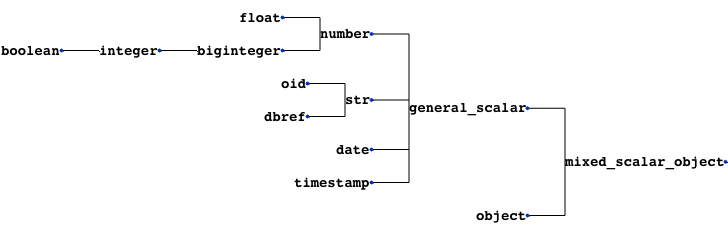
If a field contains both arrays and scalars, it is considered as an array. The 'array_type' is defined as the common parent type of scalars and array_types encountered in this field.
TODO
- Improve mapping from Python type to name (TYPE_TO_STR dict)
- see documentation: [bson-types](https://docs.mongodb.com/manual/reference/bson-types/), [spec](http://bsonspec.org/spec.html)
- Check a mongo scheme for compatibility to an sql mapping
- Handle incompatibilities
## Support Python 3 version
- fix encoding issues when exporting manually added non-ascii characters
## Diff between schemas
A way to compare the schema dictionaries and highlights the differences.
## Test if a mongo schema can be mapped tosql
- test for the presence of mongo types in the mapping
- look for mixes of list and scalar, that are currently not supported by mongo-connector-postgresql
- look for the presence of an '_id'
=> It may be donne directly in mongo-connector-postgresql doc_manager
## Adding fields in json/yaml outputs
- for example to add comments
## Other option to sort text outputs
- It is currently based on counts and then alphabetically.
## Tackle bigger databases
This code has been only used on a relatively small sized Mongo database, on which it was faster than Variety.
To tackle bigger databases, it certainly would be usefull to implement the following variety's features :
- Analyze subsets of documents, most recent documents, or documents to a maximum depth.
## Tests
The codebase is still under development. It should not be trusted blindly.
## Devcontainer
This project contains a devcontainer definition.
Just open the project in VS Code and hit `[CTRL]` + `[SHIFT]` + `[P]` > `Reopen in container` and it will launch the dev container with all dependencies installed.