https://github.com/pakequis/arduino-quake-flicker-lamp
A flicker lamp for Arduino with Quake styles
https://github.com/pakequis/arduino-quake-flicker-lamp
arduino electronics hardware led quake
Last synced: 4 months ago
JSON representation
A flicker lamp for Arduino with Quake styles
- Host: GitHub
- URL: https://github.com/pakequis/arduino-quake-flicker-lamp
- Owner: Pakequis
- Created: 2021-09-15T21:13:06.000Z (over 4 years ago)
- Default Branch: main
- Last Pushed: 2024-12-28T15:56:07.000Z (12 months ago)
- Last Synced: 2025-04-08T17:54:24.929Z (9 months ago)
- Topics: arduino, electronics, hardware, led, quake
- Language: C++
- Homepage:
- Size: 222 KB
- Stars: 16
- Watchers: 1
- Forks: 1
- Open Issues: 0
-
Metadata Files:
- Readme: README.md
Awesome Lists containing this project
README
# arduino-quake-flicker-lamp
A flicker lamp for Arduino with Quake styles.
# Context:
[Somebody in reddit found the same pattern of the flicker lamp in Half Life and Half Life Alyx in June](https://www.reddit.com/r/HalfLife/comments/nwrtol/valve_still_uses_the_same_light_flicker_pattern/)
[And more games use the same patterns, first one is Quake from 1996](https://www.pcgamer.com/half-life-alyxs-lights-flicker-just-like-they-did-in-quake-almost-25-years-later/)
[and more information here.](https://www.alanzucconi.com/2021/06/15/valve-flickering-lights/)
So I made a emergency lamp flicker with the same original Quake styles, with some code adaptations. The hardware:

# The code:
[First I get the original world.qc with the original styles.](https://github.com/id-Software/Quake/blob/bf4ac424ce754894ac8f1dae6a3981954bc9852d/QW/progs/world.qc#L307)
For the Arduino version I get the styles and put in a string array:
```
String lightstyle[] = {
"string1",
"string2",
"strin3",
...,
"stringN" }
````
The Quake flicker use the letters a to z to indicate the brightness of the light. Where "a" is for total darkness and "z" for total brightness.
So for make this work with the Arduino and the LEDs, I get the pin 9 of the board (both for Arduino Uno or Arduino Mini Pro) and use the analogWrite() to control the brightness. This require a conversion from "a" to "z" from the original code to 0-255 for the analogWrite() function. This is made whit this simple code, in the Arduino loop():
```
for (i = 0; i < l; i++)
{
value = (lightstyle[LIGHT_STYLE][i]) - 'a'; //Get the value from a to z from the string array minus 'a' (ASCII 0x61). This returns a value from 0 to 25.
value = map(value, 0, 25, 0, 255); // convert from 0-25 to 0-255
analogWrite(BLED, value); // Put the value in the pin 9 (PWM)
delay(FTIME); // Wait the time for one step
}
```
The FTIME value of 100 ms I get with a video of Quake gameplay and a vídeo editor app (Vegas Pro) and pen and paper.
I tested with the classical "FLUORESCENT FLICKER" (10 - "mmamammmmammamamaaamammma"). For change the style, change the LIGHT_STYLE define value.
For power supply I use a USB cable for the arduino and a power bank.
# Vídeo demo:
[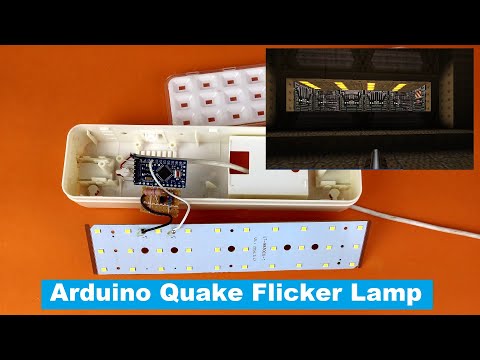](https://www.youtube.com/watch?v=ldI8LOxTwaM)
# Schematics for one LED:

# Schematics for 30 LED:
