https://github.com/pangaea-data-publisher/fuji
FAIRsFAIR Research Data Object Assessment Service
https://github.com/pangaea-data-publisher/fuji
fairdata hacktoberfest
Last synced: 4 months ago
JSON representation
FAIRsFAIR Research Data Object Assessment Service
- Host: GitHub
- URL: https://github.com/pangaea-data-publisher/fuji
- Owner: pangaea-data-publisher
- License: mit
- Created: 2020-04-28T15:33:40.000Z (about 6 years ago)
- Default Branch: master
- Last Pushed: 2026-01-19T12:09:51.000Z (6 months ago)
- Last Synced: 2026-01-29T16:23:10.424Z (6 months ago)
- Topics: fairdata, hacktoberfest
- Language: Python
- Homepage:
- Size: 9.81 MB
- Stars: 64
- Watchers: 8
- Forks: 46
- Open Issues: 27
-
Metadata Files:
- Readme: README.md
- Contributing: CONTRIBUTING.md
- License: LICENSE
- Citation: CITATION.cff
- Authors: AUTHORS
Awesome Lists containing this project
README
# F-UJI (FAIRsFAIR Research Data Object Assessment Service)
Developers: [Robert Huber](mailto:rhuber@marum.de), [Anusuriya Devaraju](mailto:anusuriya.devaraju@googlemail.com)
Thanks to [Heinz-Alexander Fuetterer](https://github.com/afuetterer) for his contributions and his help in cleaning up the code.
| __CI__ | [](https://github.com/pangaea-data-publisher/fuji/actions/workflows/ci.yml) [](https://coveralls.io/github/pangaea-data-publisher/fuji?branch=master) |
| :--- | :--- |
| __CD__ | [](https://github.com/pangaea-data-publisher/fuji/actions/workflows/publish-docker.yml) |
| __Package__ | [](https://www.python.org/) |
| __Meta__ | [](https://doi.org/10.5281/zenodo.11084909) [](https://github.com/pangaea-data-publisher/fuji/blob/master/LICENSE) [](https://github.com/pre-commit/pre-commit) [](https://github.com/astral-sh/ruff) |
## Overview
F-UJI is a web service to programmatically assess FAIRness of research data objects based on [metrics](https://doi.org/10.5281/zenodo.3775793) developed by the [FAIRsFAIR](https://www.fairsfair.eu/) project.
The service will be applied to demonstrate the evaluation of objects in repositories selected for in-depth collaboration with the project.
The '__F__' stands for FAIR (of course) and '__UJI__' means 'Test' in Malay. So __F-UJI__ is a FAIR testing tool.
**Cite as**
Devaraju, A. and Huber, R. (2021). An automated solution for measuring the progress toward FAIR research data. Patterns, vol 2(11), https://doi.org/10.1016/j.patter.2021.100370
### Clients and User Interface
A web demo using F-UJI is available at .
An R client package that was generated from the F-UJI OpenAPI definition is available from .
An open source web client for F-UJI is available at .
### Output Formats
As as REST service the default output of F-UJI is JSON. Since version 3.5.0 F-UJI additionally offers output of results in various RDF formats following the DQV specifications. Content negotiation can be used to retrieve a RDF DQV result output.
Supported RDF serialisations are: application/rdf+xml, application/x-turtle, text/turtle, application/ld+json, text/n3
## Assessment Scope, Constraint and Limitation
The service is **in development** and its assessment depends on several factors.
- In the FAIR ecosystem, FAIR assessment must go beyond the object itself. FAIR enabling services and repositories are vital to ensure that research data objects remain FAIR over time. Importantly, machine-readable services (e.g., registries) and documents (e.g., policies) are required to enable automated tests.
- In addition to repository and services requirements, automated testing depends on clear machine assessable criteria. Some aspects (rich, plurality, accurate, relevant) specified in FAIR principles still require human mediation and interpretation.
- The tests must focus on generally applicable data/metadata characteristics until domain/community-driven criteria have been agreed (e.g., appropriate schemas and required elements for usage/access control, etc.). For example, for some metrics (i.e., on I and R principles), the automated tests we proposed only inspect the ‘surface’ of criteria to be evaluated. Therefore, tests are designed in consideration of generic cross-domain metadata standards such as Dublin Core, DCAT, DataCite, schema.org, etc.
- FAIR assessment is performed based on aggregated metadata; this includes metadata embedded in the data (landing) page, metadata retrieved from a PID provider (e.g., DataCite content negotiation) and other services (e.g., re3data).
## Requirements
[Python](https://www.python.org/downloads/) `3.11`
### Google Dataset Search
Since FsF metric 0.8, The Google Corpus is no longer used, **the following steps are therefore not required anymore**.
* Download the latest Dataset Search corpus file from:
* Open file `fuji_server/helper/create_google_cache_db.py` and set variable 'google_file_location' according to the file location of the corpus file
* Run `create_google_cache_db.py` which creates a SQLite database in the data directory. From root directory run `python3 -m fuji_server.helper.create_google_cache_db`.
The service was generated by the [swagger-codegen](https://github.com/swagger-api/swagger-codegen) project. By using the
[OpenAPI-Spec](https://github.com/swagger-api/swagger-core/wiki) from a remote server, you can easily generate a server stub.
The service uses the [Connexion](https://github.com/spec-first/connexion) library on top of Flask.
## Usage
Before running the service, please set user details in the configuration file, see config/users.py.
To install F-UJI, you may execute the following Python-based or docker-based installation commands from the root directory:
### Python module-based installation
From the fuji source folder run:
```bash
python -m pip install .
```
The F-UJI server can now be started with:
```bash
python -m fuji_server -c fuji_server/config/server.ini
```
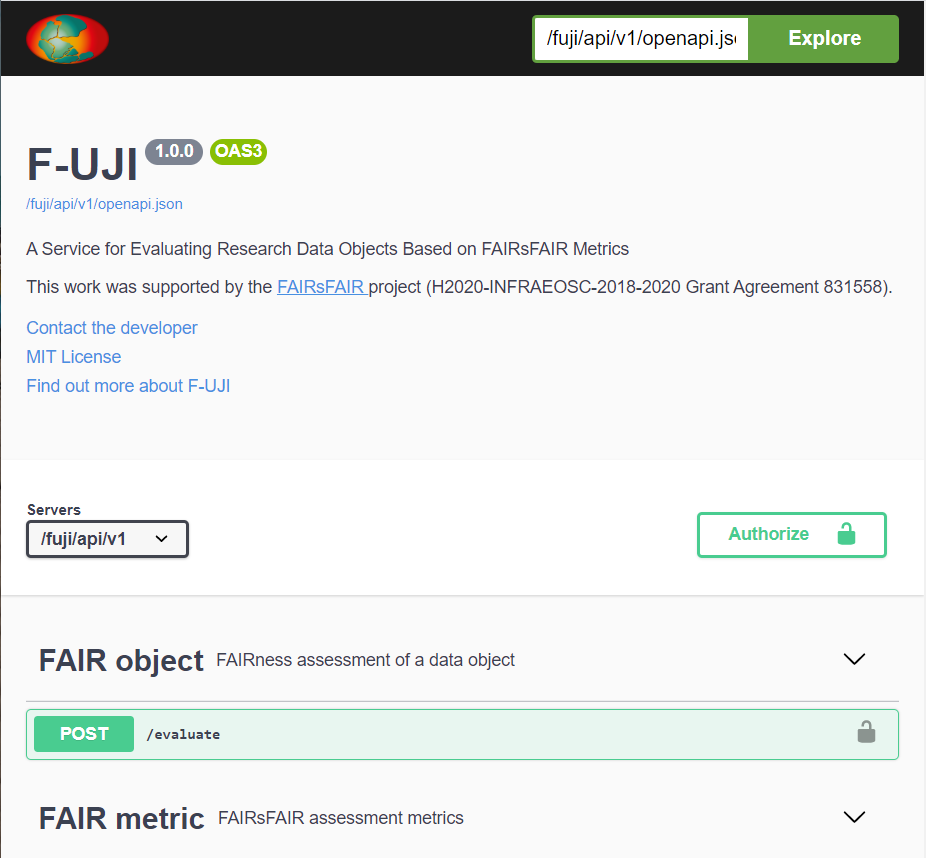
The OpenAPI user interface is then available at .
### Docker-based installation
```bash
docker run -d -p 1071:1071 ghcr.io/pangaea-data-publisher/fuji
```
To access the OpenAPI user interface, open the URL below in the browser:
Your OpenAPI definition lives here:
You can provide a different server config file this way:
```bash
docker run -d -p 1071:1071 -v server.ini:/usr/src/app/fuji_server/config/server.ini ghcr.io/pangaea-data-publisher/fuji
```
You can also build the docker image from the source code:
```bash
docker build -t .
docker run -d -p 1071:1071
```
### Notes
To avoid Tika startup warning message, set environment variable `TIKA_LOG_PATH`. For more information, see [https://github.com/chrismattmann/tika-python](https://github.com/chrismattmann/tika-python)
If you receive the exception `urllib2.URLError: , either by clicking on the link or through Settings -> Developer Settings -> Personal access tokens -> Tokens (classic). Next, click "Generate new token" and select "Generate new token (classic)" from the drop-down menu.
Write the purpose of the token into the "Note" field (for example, *F-UJI deployment*) and set a suitable expiration date. Leave all the checkboxes underneath *unchecked*.
> Note: When the token expires, you will receive an e-mail asking you to renew it if you still need it. The e-mail will provide a link to do so, and you will only need to change the token in the f-uji configuration as described below to continue using it. Setting no expiration date for a token is thus not recommended.
When you click "Generate new token" at the bottom of the page, the new token will be displayed. Make a note of it now.
To use F-UJI with a single access token, open [`fuji_server/config/github.ini`](./fuji_server/config/github.ini) locally and set `token` to the token you just created. When F-UJI receives an evaluation request that uses the GitHub API, it will run this request authenticated as your account.
If you still run into rate limiting issues, you can use multiple GitHub API tokens.
These need to be generated by different GitHub accounts, as the rate limit applies to the user, not the token.
F-UJI will automatically switch to another token if the rate limit is near.
To do so, create a local file in [`fuji_server/data/`](./fuji_server/data/), called e.g. `github_api_tokens.txt`. Put all API tokens in that file, one token on each line. Then, open [`fuji_server/config/github.ini`](./fuji_server/config/github.ini) locally and set `token_file` to the absolute path to your local API token file.
> Note: If you push a change containing a GitHub API token, GitHub will usually recognise this and invalidate the token immediately. You will need to regenerate the token. Please take care not to publish your API tokens anywhere. Even though they have very limited scope if you leave all the checkboxes unchecked during creation, they can allow someone else to run a request in your name.
## Development
First, make sure to read the [contribution guidelines](./CONTRIBUTING.md).
They include instructions on how to set up your environment with `pre-commit` and how to run the tests.
The repository includes a [simple web client](./simpleclient/) suitable for interacting with the API during development.
One way to run it would be with a LEMP stack (Linux, Nginx, MySQL, PHP), which is described in the following.
First, install the necessary packages:
```bash
sudo apt-get update
sudo apt-get install nginx
sudo ufw allow 'Nginx HTTP'
sudo service mysql start # expects that mysql is already installed, if not run sudo apt install mysql-server
sudo service nginx start
sudo apt install php8.1-fpm php-mysql
sudo apt install php8.1-curl
sudo phpenmod curl
```
Next, configure the service by running `sudo vim /etc/nginx/sites-available/fuji-dev` and paste:
```php
server {
listen 9000;
server_name fuji-dev;
root /var/www/fuji-dev;
index index.php;
location / {
try_files $uri $uri/ =404;
}
location ~ \.php$ {
include snippets/fastcgi-php.conf;
fastcgi_pass unix:/var/run/php/php8.1-fpm.sock;
fastcgi_read_timeout 3600s;
}
location ~ /\.ht {
deny all;
}
}
```
Link `simpleclient/index.php` and `simpleclient/icons/` to `/var/www/fuji-dev` by running `sudo ln /fuji/simpleclient/* /var/www/fuji-dev/`. You might need to adjust the file permissions to allow non-root writes.
Next,
```bash
sudo ln -s /etc/nginx/sites-available/fuji-dev /etc/nginx/sites-enabled/
sudo nginx -t
sudo service nginx reload
sudo service php8.1-fpm start
```
The web client should now be available at . Make sure to adjust the username and password in [`simpleclient/index.php`](./simpleclient/index.php).
After a restart, it may be necessary to start the services again:
```bash
sudo service php8.1-fpm start
sudo service nginx start
python -m fuji_server -c fuji_server/config/server.ini
```
### Component interaction (walkthrough)
This walkthrough can guide you through the comprehensive codebase.
A good starting point is [`fair_object_controller/assess_by_id`](fuji_server/controllers/fair_object_controller.py#36).
Here, we create a [`FAIRCheck`](fuji_server/controllers/fair_check.py) object called `ft`.
This reads the metrics YAML file during initialisation and will provide all the `check` methods.
Next, several harvesting methods are called, first [`harvest_all_metadata`](fuji_server/controllers/fair_check.py#329), followed by [`harvest_re3_data`](fuji_server/controllers/fair_check.py#345) (Datacite) and [`harvest_github`](fuji_server/controllers/fair_check.py#366) and finally [`harvest_all_data`](fuji_server/controllers/fair_check.py#359).
The harvesters are implemented separately in [`harvester/`](./fuji_server/harvester/), and each of them collects different kinds of data.
This is regardless of the defined metrics, the harvesters always run.
- The metadata harvester looks through HTML markup following schema.org, Dublincore etc., through signposting/typed links.
Ideally, it can find things like author information or license names that way.
- The data harvester is only run if the metadata harvester finds an `object_content_identifier` pointing at content files.
Then, the data harvester runs over the files and checks things like the file format.
- The Github harvester connects with the GitHub API to retrieve metadata and data from software repositories.
It relies on an access token being defined in [`config/github.cfg`](./fujji_server/config/github.cfg).
After harvesting, all evaluators are called.
Each specific evaluator, e.g. [`FAIREvaluatorLicense`](fuji_server/evaluators/fair_evaluator_license.py), is associated with a specific FsF and/or FAIR4RS metric.
Before the evaluator runs any checks on the harvested data, it asserts that its associated metric is listed in the metrics YAML file.
Only if it is, the evaluator runs through and computes a local score.
In the end, all scores are aggregated into F, A, I, R scores.
### Adding support for new metrics
Start by adding a new metrics YAML file in [`yaml/`](./fuji_server/yaml).
Its name has to match the following regular expression: `(metrics_v)?([0-9]+\.[0-9]+)(_[a-z]+)?(\.yaml)`,
and the content should be structured similarly to the existing metric files.
Metric names are tested for validity using regular expressions throughout the code.
If your metric names do not match those, not all components of the tool will execute as expected, so make sure to adjust the expressions.
Regular expression groups are also used for mapping to F, A, I, R categories for scoring, and debug messages are only displayed if they are associated with a valid metric.
Evaluators are mapped to metrics in their `__init__` methods, so adjust existing evaluators to associate with your metric as well or define new evaluators if needed.
The multiple test methods within an evaluator also check whether their specific test is defined.
[`FAIREvaluatorLicense`](fuji_server/evaluators/fair_evaluator_license.py) is an example of an evaluator corresponding to metrics from different sources.
For each metric, the maturity is determined as the maximum of the maturity associated with each passed test.
This means that if a test indicating maturity 3 is passed and one indicating maturity 2 is not passed, the metric will still be shown to be fulfilled with maturity 3.
### Community specific metrics
Some, not all, metrics can be configured using the following guidelines:
[Metrics configuration guide](https://github.com/pangaea-data-publisher/fuji/blob/master/metrics_configuration.md)
### Updates to the API
Making changes to the API requires re-generating parts of the code using Swagger.
First, edit [`fuji_server/yaml/openapi.yaml`](fuji_server/yaml/openapi.yaml).
Then, use the [Swagger Editor](https://editor.swagger.io/) to generate a python-flask server.
The zipped files should be automatically downloaded.
Unzip it.
Next:
1. Place the files in `swagger_server/models` into `fuji_server/models`, except `swagger_server/models/__init__.py`.
2. Rename all occurrences of `swagger_server` to `fuji_server`.
3. Add the content of `swagger_server/models/__init__.py` into `fuji_server/__init__.py`.
Unfortunately, the Swagger Editor doesn't always produce code that is compliant with PEP standards.
Run `pre-commit run` (or try to commit) and fix any errors that cannot be automatically fixed.
## License
This project is licensed under the MIT License; for more details, see the [LICENSE](https://github.com/pangaea-data-publisher/fuji/blob/master/LICENSE) file.
## Acknowledgements
F-UJI is a result of the [FAIRsFAIR](https://www.fairsfair.eu/) “Fostering FAIR Data Practices In Europe” project which received funding from the European Union’s Horizon 2020 project call H2020-INFRAEOSC-2018-2020 (grant agreement 831558).
The project was also supported through our contributors by the [Helmholtz Metadata Collaboration (HMC)](https://www.helmholtz-metadaten.de/en), an incubator-platform of the Helmholtz Association within the framework of the Information and Data Science strategic initiative.