https://github.com/pansila/auto-test-system
A distributed test automation framework with a centralized management web UI
https://github.com/pansila/auto-test-system
robot-framework
Last synced: 3 months ago
JSON representation
A distributed test automation framework with a centralized management web UI
- Host: GitHub
- URL: https://github.com/pansila/auto-test-system
- Owner: pansila
- License: mit
- Created: 2019-02-18T07:14:41.000Z (over 7 years ago)
- Default Branch: master
- Last Pushed: 2023-10-03T04:53:40.000Z (over 2 years ago)
- Last Synced: 2025-04-06T20:11:18.759Z (about 1 year ago)
- Topics: robot-framework
- Language: Python
- Homepage:
- Size: 1.15 MB
- Stars: 20
- Watchers: 3
- Forks: 5
- Open Issues: 10
-
Metadata Files:
- Readme: README.md
- License: LICENSE
Awesome Lists containing this project
README
- [Introduction](#introduction)
- [Features](#features)
- [System Dashboard](#system-dashboard)
- [Test System Architecture](#test-system-architecture)
- [Design of Robot Test Server](#design-of-robot-test-server)
- [Set Up The Test Environment](#set-up-the-test-environment)
- [Run Tests](#run-tests)
- [Configurations of the Auto Test System](#configurations-of-the-auto-test-system)
- [Support The Robot Test Cases In Markdown](#support-the-robot-test-cases-in-markdown)
- [Hacks To The Robot](#hacks-to-the-robot)
- [RESTful API Document of Web Server](#restful-api-document-of-web-server)
### Introduction
This is a distributed test automation framework with a centralized management UI. We are not intent to invent a new test framework or language here, so we choose [Robot Framework](https://github.com/robotframework/robotframework) and [Robot Framework Remote Server](https://github.com/robotframework/PythonRemoteServer) as the test infrastructure, and then add the upper layer applications to make it easier to use.
### Features
1. Provide a web server to serve all test scripts and test data in a centralized place to facilitate the update.
2. Automatically download test libraries to test endpoints which run the actual tests.
3. Support test cases written in markdown to make it more legible to test users.
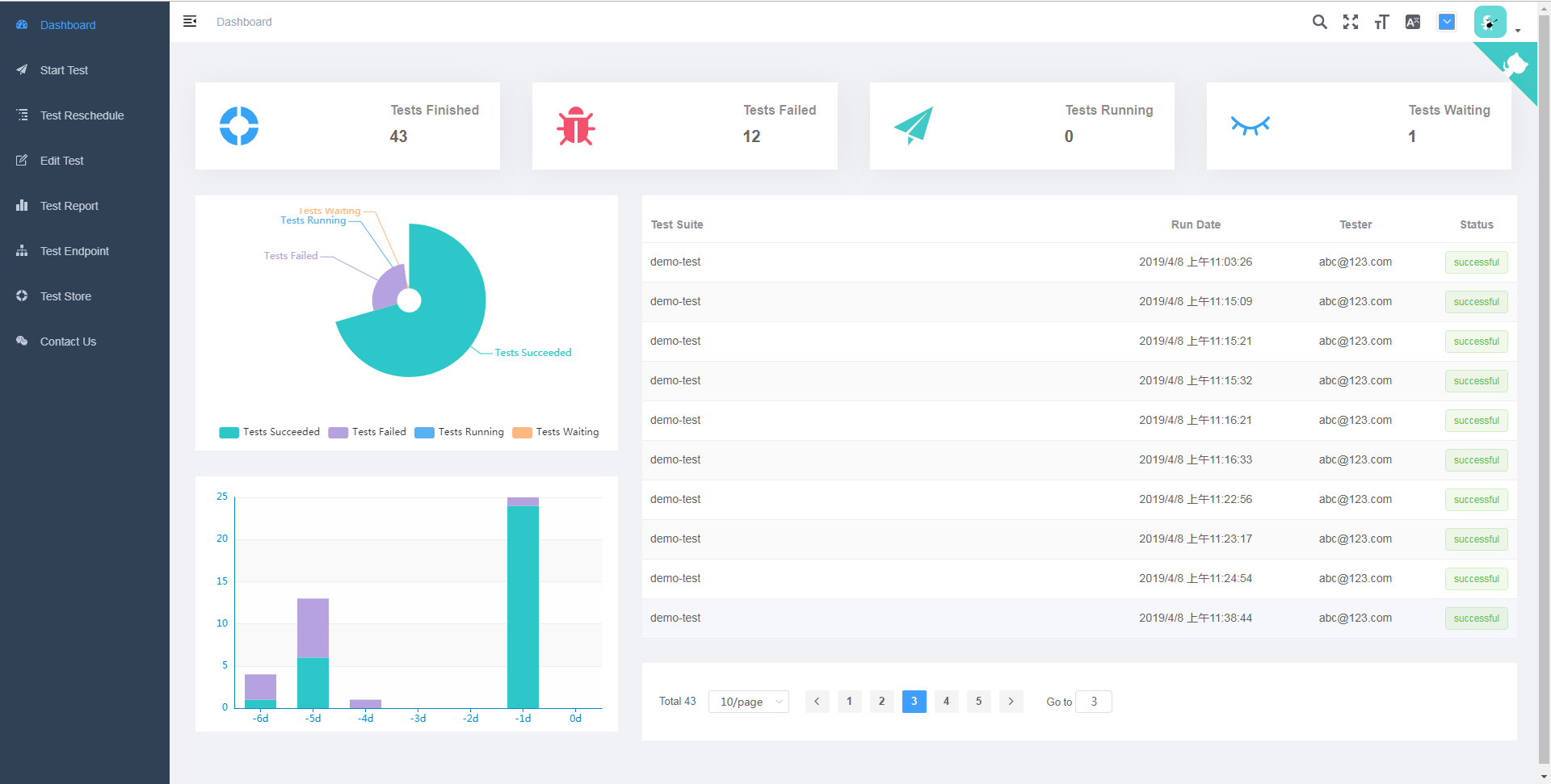
4. Provide a Web UI to help schedule tests in priority and review the test reports in a diverse charts.
### System Dashboard
### Test System Architecture
A typical architecture for a Robot Remote Server is described in the official [website](https://github.com/robotframework/RemoteInterface).
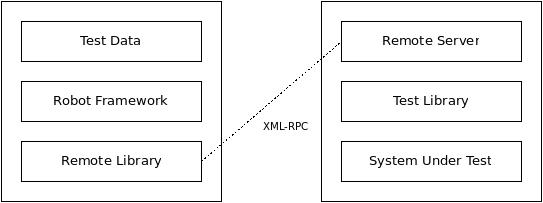
We improves it by adding a daemon process on the Test Endpoint (aka. Robot Remote Server). The daemon, which is a special test library, will listen on the test endpoint so that it can accept any new test request from the Robot Server without needing to run a corresponding test library every time as we usually do in Robot Remote Server tutorial.
When a test request is sent to the Test Endpoint, a corresponding test library will be downloaded by the daemon process from the Robot Server which is also hosted as a web server. The downloaded test library will be served in the same address where a test library did before, namely we always serve the test libraries at a fixed address.

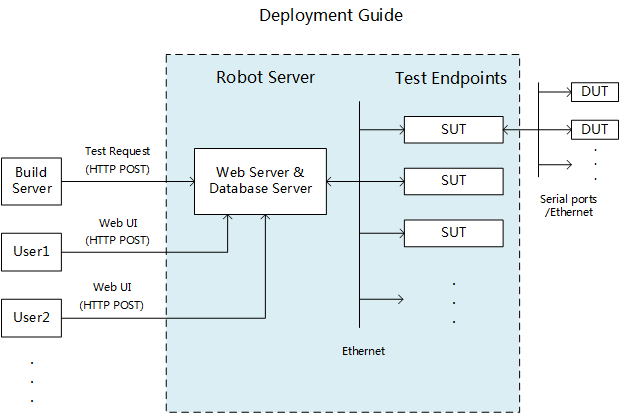
It's recommended to deploy Robot Server and Test Endpoint on the separated machines. For our case, we use Raspberry Pi 3 to reduce the deployment cost, but more performance PC would work as well.
### Design of Robot Test Server
### Set Up The Test Environment
1. Install python 3.7.x and [pip](https://pip.pypa.io/en/stable/installing/).
2. Install poetry
```bash
pip install --user poetry
```
3. Set up test endpoint environment
```bash
cd robot-test-endpoint
poetry install
```
4. Set up Web server and test runner environment
```bash
cd webrobot
poetry install
poetry run task patch
```
The last step is to patch installed robot framework package, details please see sections [Support the robot test cases in markdown](#support-the-robot-test-cases-in-markdown) and [Hacks to the robot](#hacks-to-the-robot).
5. Set up the MongoDB database
Install MongoDB from the [official website](https://www.mongodb.com/), please be noted to choose the community version instead of cloud based version.
### Run Tests
1. Run the web server
```bash
cd webrobot
poetry run task server
```
2. Run the daemon process of a test endpoint
```bash
cd robot-test-endpoint
poetry run task daemon
```
3. (Work in progress) Run a test by using the restful API
```
http POST http://127.0.0.1:5000/task/ test_suite:=\"demo-test\" endpoint_list:=[\"127.0.0.1:8270\"] variables:={\"echo_message\":\"bye\"} tester:=\"abc@123.com\"
```
`http` is a handy http client tool provided by python, `"pip install httpie"`. Alternatively you can use `curl`. For more complicate test arguments, we can put them to a file and load it to `httpie` as follows.
```
http POST http://127.0.0.1:5000/task/ < task.json
```
While contents in `task.json` look like:
```
{
"test_suite": "demo-test",
"endpoint_list": ["127.0.0.1:8270"],
"variables": {
"echo_message": "bye"
},
"testcases": ["hello world"],
"tester": "abc@123.com"
}
```
For more complex operations like uploading files, please refer to [RESTful API of Web Server](#restful-api-of-web-server).
There is a script to help relieve the pain of debugging RESTful APIs, please note that it's not for production environment.
```
cd webrobot
pipenv run start http://127.0.0.1:5000 demo-test -e 127.0.0.1:8270 --file firmware.bin --tester abc@123.com -v echo_message bye -t hello_world
```
Notice:
1. For a test in action, please check out `wifi-basic-test.md`.
2. The robot server and test endpoint run on the same PC by default, if you want to deploy the them on the different PCs respectively, change the IP addresses in the robot server's config script (`config.py`) and test endpoint's config file (`config.yml`). Don't forget to configure the firewall to let through the communication on the TCP port `8270/8271`.
3. The `example-test-scripts` directory is just for demonstration so that you can play around with the demo tests out of box. For production environment, you will probably have your own test assets. Same for `robot-test-endpoint`, implement your own work of test endpoint along with the test scripts in a stand-alone repository as they're coupled to work together. Please remember to modify configuration variables in the `config.py` to point to the right places after setting up your test asset repository.
By this way you can keep tracking the latest code of auto test framework without the pain of messing with the code here by the frequent changes of test scripts.
### Configurations of the Auto Test System
1. Test Endpoint
It's as known as the `Robot Remote Server`. There is a `config.yml` to describe any SUT dependent details, such as serial port interfaces, robot server port, test library serving port, etc.
2. Web server and test runner
All configurations are store in the `config.py` file, such as mongodb URI, robot scripts root directory, etc.
### Support The Robot Test Cases In Markdown
For how to write a robot test case, please check out the official [Quick Start Tutorial](https://github.com/robotframework/QuickStartGuide/blob/master/QuickStart.rst) and [User Manuel](http://robotframework.org/robotframework/latest/RobotFrameworkUserGuide.html).
In an effort to support test cases written in a markdown file, we patched an unofficial work from [here](https://gist.github.com/Tset-Noitamotua/75d15a2beb9ab6f1931d3871172ebbbf) to make robot recognize markdown files and then read all code blocks marked as `robotframework`.
While we go a bit further by [Adding Support of Tables in Markdown](https://gist.github.com/pansila/8d4f2869ccae891326959c947571ea67). Robot will also read all tables that start with any robot keyword in the table header in a markdown file.
After that, we can execute a test suite in the markdown file as usual.
```bash
robot demo-test.md
```
### Hacks To The Robot
1. robot will cache test libraries if they have been imported before, we disabled it in `_import_library` in `importer.py` to support reloading test libraries in order to get the latest test library downloaded by daemon process on the test endpoint. Change details please see `patch/robot.diff`.
### RESTful API Document of Web Server
Please visit automatically generated [swagger doc](http://127.0.0.1:5000/)