https://github.com/pass-with-high-score/universal-installer
A modern Android app for installing and managing APK packages with split APK support, silent install via Shizuku, and VirusTotal malware scanning.
https://github.com/pass-with-high-score/universal-installer
android apk-installer jetpack-compose shizuku
Last synced: 3 months ago
JSON representation
A modern Android app for installing and managing APK packages with split APK support, silent install via Shizuku, and VirusTotal malware scanning.
- Host: GitHub
- URL: https://github.com/pass-with-high-score/universal-installer
- Owner: pass-with-high-score
- License: gpl-3.0
- Created: 2025-07-28T19:14:09.000Z (12 months ago)
- Default Branch: main
- Last Pushed: 2026-04-18T06:42:01.000Z (3 months ago)
- Last Synced: 2026-04-18T08:37:38.953Z (3 months ago)
- Topics: android, apk-installer, jetpack-compose, shizuku
- Language: Kotlin
- Homepage: https://universal-installer.pwhs.app/
- Size: 1.4 MB
- Stars: 10
- Watchers: 0
- Forks: 0
- Open Issues: 0
-
Metadata Files:
- Readme: README.md
- Funding: .github/FUNDING.yml
- License: LICENSE
Awesome Lists containing this project
- stargazer - pass-with-high-score/universal-installer - A modern Android app for installing and managing APK packages with split APK support, silent install via Shizuku, and VirusTotal malware scanning. \[*GNU GPLv3*\] (⭐️1134) (Kotlin)
- awesome-shizuku - universal-installer - Install and manage APK packages with split APK support, silent install via Shizuku, and VirusTotal malware scanning `GPL-3.0` (Apps / Installer & app stores)
- changelog-awesome-shizuku - universal-installer - Install and manage APK packages with split APK support, silent install via Shizuku, and VirusTotal malware scanning `GPL-3.0` (May 06, 2026 / Installer & app stores)
- awesome-android-root - Universal Installer - Install and manage APK packages with split APK support. `FOSS` `[LSP]` (App Management and Control / Package Management and Installation)
README

Universal Installer
Universal Installer is a modern Android package manager that handles what the default installer can't.
Install APK, APKS, XAPK, APKM (with split APKs and OBB files), download packages from URLs, manage installed apps, and silent-install via Shizuku — all in one Material 3 app.


Download




Website
·
Privacy
·
Terms
---
## Screenshots


---
## Features
### Install
* **Multi-format** — `.apk`, `.apks`, `.xapk`, `.apkm` with split APK handling (via [Ackpine](https://ackpine.solrudev.ru/))
* **Package preview** — App name, icon, version, package, size, min/target SDK, supported ABIs, languages, permissions, OBB count, split count — shown in a bottom sheet before you commit
* **Three local pick modes** — Find automatic (scans device storage), Browse packages (APK/XAPK/APKS/APKM only), Browse all files
* **Remote download** — Paste a URL, download package directly. Files land in `/sdcard/Download/UniversalInstaller/` with their Content-Disposition name so they're easy to re-find in any file manager
* **Download history** — Every download is logged; re-install later, copy the source URL, or delete from the dedicated history screen
* **Intent handling** — Open APK/XAPK files from Chrome downloads, Gmail attachments, Telegram, or any file manager — even when the URL has no extension
### OBB support
* **Bundle-embedded OBBs** — XAPK/APKM/APKS archives containing `.obb` files are auto-detected and copied to `Android/obb//` after the APK installs
* **Standalone attach** — Pick a base APK, then attach one or more `.obb` files via the preview sheet; they're installed alongside
* **Runs in a foreground worker** — OBB copy survives app closure, with progress on the notification shade
* **Three write strategies** — Falls back in order based on what the device permits:
1. Direct I/O (pre-Android 11)
2. Shizuku (`shell` UID can write to any app's OBB dir on modern Android)
3. SAF tree grant (user grants access to `Android/obb//` once per package; reused on subsequent installs)
### Security
* **VirusTotal integration** — Auto SHA-256 hash lookup on every picked file; if VirusTotal doesn't know the file yet, optionally upload it for a full multi-engine scan (supports files up to 650 MB via VirusTotal's large-file endpoint)
* **Clear verdict** — See engine counts (malicious / suspicious / harmless / undetected) before you install
### Shizuku & Root power-user features
When Root access or Shizuku is enabled, unlocks:
* **Silent install / uninstall** — No system confirmation prompt
* **Replace existing**, **Allow downgrade**, **Grant all requested permissions**, **Allow test packages**, **Bypass low target SDK block**, **Install for all users**
* **Set install source** — Spoof the installer package name (Google Play, Aurora, F-Droid, Amazon, Samsung, Huawei, Xiaomi presets, or custom) so apps with "installed from Play Store" checks accept your sideload
### Sync & Share (LAN File Server)
* **Built-in HTTP server** — Share and manage your packages across a local Wi-Fi network from any browser
* **Web dashboard** — Download APKs straight to your PC or upload new packages directly to your phone
* **Live tracking** — Real-time progress updates visible inside the app as files transfer
* **PIN security** — Set an optional 4–8 digit PIN code to restrict local access to your shared folder
### Uninstall / app manager
* **Full app list** — Browse user apps (system apps optional)
* **Rich metadata** — App name, package, version, APK size, first install date, last used time
* **Sort** — By Name / Size / Installed date / Last used — each with ascending/descending toggle
* **Batch select** — Long-press to enter selection mode, uninstall many at once
* **Filter sheet** — Tap FAB for sort/filter options; long-press FAB to scroll to top
* **Usage access hint** — "Last used" sort prompts user to grant the Usage Access permission only when needed
* **Uninstall logs** — Separate log screen for every uninstall attempt (success / failure with reason)
### Device utilities
* **Storage card on Install screen** — At-a-glance internal storage usage (free / total, color-coded warning at 75% / 90%)
* **Install history** — Every install attempt logged with app name, package, version, success/failure, and error reason
### Other
* **Material 3** — Dynamic color + Light / Dark / System theme
* **Multi-language** — Arabic, German, English, Spanish, French, Hindi, Indonesian, Italian, Japanese, Korean, Portuguese (BR), Russian, Turkish, Vietnamese, Chinese
* **Progress notifications** — Download, install, and OBB copy all surface their progress in the notification shade
---
## Tech Stack
* **Kotlin** + **Jetpack Compose** — UI
* **[Ackpine](https://ackpine.solrudev.ru/)** — Package install/uninstall with split APK, Shizuku, and libsu plugins
* **[Shizuku](https://shizuku.rikka.app/)** — Privileged operations via ADB/root
* **Ktor** — HTTP client for VirusTotal and remote downloads
* **WorkManager** — Foreground worker for OBB copy (survives app process death)
* **Room** — Local DB for install / uninstall / download history
* **Koin** — Dependency injection
* **DataStore** — Preferences storage
* **Compose Destinations** — Type-safe navigation
* **Coil 3** — App icon loading
---
## Build Instructions
### Requirements
* [Android Studio](https://developer.android.com/studio)
* Java 17+
* Android SDK 36
### Steps
1. Clone the repository:
```bash
git clone https://github.com/pass-with-high-score/universal-installer.git
cd universal-installer
```
2. Open the project in Android Studio
3. Sync Gradle and run on a device (emulator works for most features except Shizuku-backed install)
### Gradle
Universal Installer uses two product flavors: `store` (F-Droid/Play Store compliant, no bundled Root binaries) and `full` (All features, including Root backend).
```bash
# Debug builds
./gradlew assembleStoreDebug
./gradlew assembleFullDebug
# Release builds
./gradlew assembleStoreRelease
./gradlew assembleFullRelease
```
### Fastlane
```bash
# Install dependencies
bundle install
# Build debug APK
bundle exec fastlane build_debug
# Build release APK
bundle exec fastlane build_release
# Deploy beta to Firebase App Distribution
bundle exec fastlane beta
# Deploy to Play Store internal track
bundle exec fastlane deploy_internal
# Bump version code
bundle exec fastlane bump_version
# Bump version code + name
bundle exec fastlane bump_version version_name:"2.0"
```
---
## Configuration
### Shizuku (silent install, install source spoofing, OBB copy)
1. Install [Shizuku](https://shizuku.rikka.app/) on your device
2. Start the Shizuku service via ADB (or via the Shizuku app if rooted)
3. Open Universal Installer → **Settings → Installation → Shizuku Backend** → grant permission when prompted
4. Optional: enable **Set install source** to pick the installer package name apps will see
### VirusTotal
1. Get a free API key at [virustotal.com/gui/my-apikey](https://www.virustotal.com/gui/my-apikey)
2. **Settings → Security → VirusTotal API Key** → paste key
3. Every picked APK is hashed and looked up automatically; unknown files can be uploaded on demand from the preview sheet
### Storage permissions (for OBB copy + device scan)
* **Android 11+**: grant **All files access** when prompted (used for `Find automatic` device scan and for the direct-write OBB path). If you decline, OBB copy falls back to Shizuku or a per-package SAF tree grant
* **Pre-Android 11**: falls back to legacy `READ/WRITE_EXTERNAL_STORAGE`
* **Usage access** (optional, Uninstall screen only): grant when you tap the "Last used" sort option — enables sorting and date metadata per row
---
## Contributing
Pull requests and issue reports are welcome. Help us improve Universal Installer!
* Found a bug? [Open an issue](https://github.com/pass-with-high-score/universal-installer/issues)
* Want a feature? Start a discussion or submit a PR
* Translation fixes / new locales also welcome
---
## Sponsor
If Universal Installer saves you time, consider supporting the project. Sponsorships help cover
maintenance, new features, and keeping the app free.
[](https://github.com/sponsors/pass-with-high-score)
---
## License
[](https://spdx.org/licenses/GPL-3.0-only.html)
This project is licensed under the **GNU General Public License v3.0 only (GPL-3.0-only)**.
You are free to use, modify, and distribute it.
See the full [LICENSE](LICENSE) file for details.
---
## Credits
* Built and maintained by [Nguyen Quang Minh](https://github.com/nqmgaming)
---
## Star History
[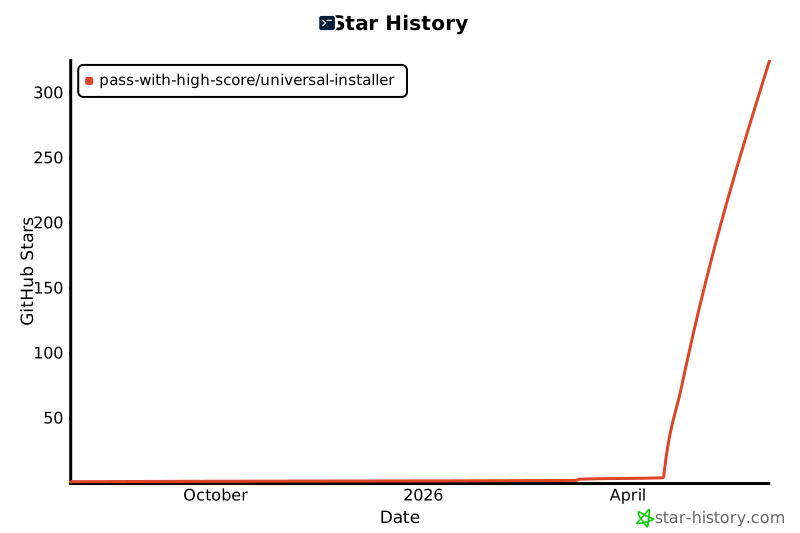](https://www.star-history.com/#pass-with-high-score/universal-installer&Date)