https://github.com/pathak22/hierarchical-imitation
[NeurIPS 2019] Code for Hierarchical Third-Person Imitation Learning
https://github.com/pathak22/hierarchical-imitation
Last synced: about 1 year ago
JSON representation
[NeurIPS 2019] Code for Hierarchical Third-Person Imitation Learning
- Host: GitHub
- URL: https://github.com/pathak22/hierarchical-imitation
- Owner: pathak22
- Created: 2019-10-31T06:19:08.000Z (over 6 years ago)
- Default Branch: master
- Last Pushed: 2020-01-20T04:04:36.000Z (over 6 years ago)
- Last Synced: 2025-03-24T11:21:17.498Z (over 1 year ago)
- Language: Python
- Homepage: https://pathak22.github.io/hierarchical-imitation/
- Size: 2.81 MB
- Stars: 59
- Watchers: 7
- Forks: 10
- Open Issues: 1
-
Metadata Files:
- Readme: README.md
Awesome Lists containing this project
README
## Third-Person Visual Imitation Learning via Decoupled Hierarchical Controller ##
### NeurIPS 2019
#### [[Project Website]](https://pathak22.github.io/hierarchical-imitation/) [[Demo Video]](https://youtu.be/eWBkDuNFEKA)
[Pratyusha Sharma](https://scholar.google.co.in/citations?user=RGiCLUgAAAAJ&hl=en), [Deepak Pathak](https://people.eecs.berkeley.edu/~pathak/), [Abhinav Gupta](http://www.cs.cmu.edu/~abhinavg/)
Carnegie Mellon University
University of California, Berkeley
We study a generalized setup for learning from demonstration to build an agent that can manipulate novel objects in unseen scenarios by looking at only a single video of human demonstration from a third-person perspective. If you find this work useful in your research, please cite:
@inproceedings{sharma19thirdperson,
Author = {Sharma, Pratyusha and Pathak, Deepak
and Gupta, Abhinav},
Title = {Third-Person Visual Imitation Learning via
Decoupled Hierarchical Controller},
Booktitle = {NeurIPS},
Year = {2019}
}
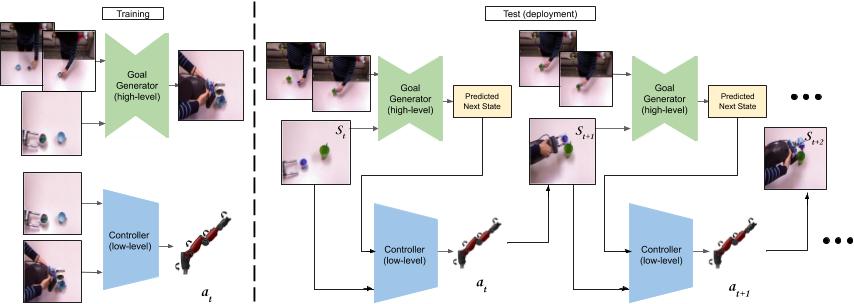
The code for the paper consists of two modules:
1. The Goal Generator: The goal generator takes in consecutive frames of a human video along with the present image of the table to hallucinate a possible next visual state of the robot's trajectory. It is contained inside the directory named 'pix2pix'.
2. Low-level Controller: The low-level controller takes as input the current visual state and the predicted visual state and outputs an action.
The two models are trained independently and are run together in alternation at test time.
The code to run the models in alternation at test time is also in this repository.
## Step 0: Installation and Prerequisites
### Prerequisites
- Python 3
- Pytorch 0.4+
- Linux or macOS
- CPU or NVIDIA GPU + CUDA CuDNN
### Installation
- Clone this repo
```
git clone https://github.com/pathak22/hierarchical-imitation.git
cd hierarchical-imitation
```
## Step 1: Training the Goal Generator
The code for the goal generator is built using code from the wonderful [pix2pix](https://github.com/junyanz/pytorch-CycleGAN-and-pix2pix) repository.
### a. Data pre-processing
Before training the goal generator the steps listed under [creating your own datasets for pix2pix](https://github.com/junyanz/pytorch-CycleGAN-and-pix2pix/blob/master/docs/tips.md) need to be followed.
Since we want to translate intent from human videos to robot videos the folders should be as follows:
Folder A: Human demonstration frames
Folder B: Robot demonstration frames
The code used to subsample the trajectories to equal lengths to roughly align them can be found in utils as subsample.py.
### b. Training
Train the model:
```
cd pix2pix
python train.py --dataroot /location/of/the/dataset --model pix2pix
```
### c. Evaluation
Evaluating the model:
```
python test.py --dataroot /location/of/the/dataset --model pix2pix
```
## Step 2: Training the Low-level Controller / Inverse Model
### a. Data pre-processing
At training time the inputs to the low-level controller are consecutive images from the robot trajectory and the joint angle of the robot at the end of the two frames.
Subsample the robot trajectories using the code for subsample.py.
### b. Training
Train the low-level controller using:
```
python controller_train.py --dataroot /location/of/the/dataset
```
### c. Evaluation
Evaluate the low-level controller using:
```
python controller_test.py --dataroot /location/of/the/dataset
```
## Step 3: Running the models together on the robot
To finally test the controllers together on the robot use:
```
python run_on_robot.py --goal_generator /location/of/checkpoint --inverse_model /location/of/checkpoint --dataroot /location/of/the/humandemo
```
### Finally : Pointers
1. Test how good the models are indivdually before running the joint run to get an estimate of how best can each of the models do in isolation
2. Look at the predictions of the goal generator while running the final experiment on the robot
3. A good place to start could be downloading the [[MIME Dataset]](https://www.dropbox.com/sh/hwgdkzbu488gwy4/AABPjRj_ZpNYn5WjbnkdoDKQa?dl=0). Alternatively, one could also collect their own dataset and follow the training protocol above.
4. In case of a query, feel free to reach out Pratyusha Sharma at pratyuss@csail.mit.edu.